
Cisco Certified Support Technician Networking Exam Questions and Answers
Evaluate the graphic.
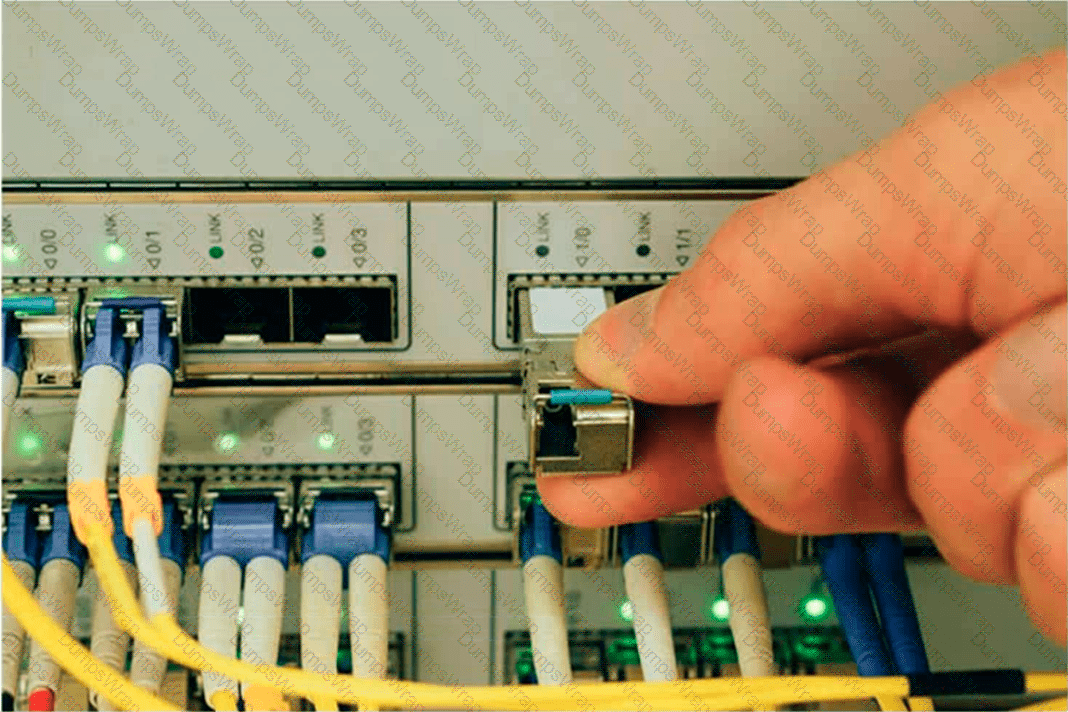
Exhibit: Installation of a removable network transceiver module into a router interface.
What type of interface is the administrator installing in the router?
Options:
PoE
USB
Serial
SFP
Answer:
DExplanation:
Correct Answer: D. SFP
The image illustrates the installation of a Small Form-Factor Pluggable (SFP) transceiver module into a compatible network interface.
SFP technology provides modular network connectivity, enabling administrators to select appropriate transceiver types based on transmission media, supported data rates, and communication distance.
An SFP transceiver is a compact, hot-swappable interface module that connects networking equipment to optical-fiber or copper Ethernet infrastructure.
The photograph shows a removable metallic transceiver being inserted into an SFP-compatible port. The surrounding connections also illustrate fiber-optic network cabling.
SFP modules commonly support Gigabit Ethernet, while enhanced SFP+ modules typically support 10-Gigabit Ethernet connectivity.
Why the other options are incorrect:
A. PoE: Power over Ethernet provides electrical power and data over supported Ethernet cabling. It is not the removable transceiver interface shown.
B. USB: Universal Serial Bus provides peripheral connectivity and uses different connector designs.
C. Serial: Serial interfaces support sequential data transmission and are commonly associated with console management or legacy WAN connections.
D. SFP: Provides modular, replaceable network interfaces for supported fiber-optic and copper connections.
Therefore, Option D correctly identifies the interface technology shown in the exhibit. Cisco ' s SFP installation documentation confirms the modular and hot-swappable characteristics of these transceivers.
What information is contained in the MAC address table of a switch?
Options:
MAC address-to-IP address mappings learned through ARP requests or manually configured by the administrator
Dynamically learned Layer 2 and Layer 3 addresses of devices communicating on active ports on the switch
All active ports on the switch and the host Layer 3 addresses that were dynamically learned on each port
The MAC addresses of devices communicating on active ports and static MAC addresses configured by the administrator
Answer:
DExplanation:
Correct Answer: D. The MAC addresses of devices communicating on active ports and static MAC addresses configured by the administrator.
A MAC address table, commonly implemented as a Content Addressable Memory (CAM) table, is maintained by Ethernet switches to support efficient Layer 2 frame forwarding.
The table contains MAC addresses associated with switch interfaces and VLANs. Entries can be dynamically learned or statically configured.
Dynamic MAC Address Entries:
When a switch receives an Ethernet frame, it examines the source MAC address and associates that address with the receiving interface and VLAN. Dynamically learned entries normally expire after an aging period when no corresponding traffic is observed.
Static MAC Address Entries:
Administrators can manually configure MAC address entries to associate specific MAC addresses with designated interfaces and VLANs. These entries do not follow ordinary dynamic aging procedures.
The Cisco IOS command used to examine the table is:
show mac address-table
Why the other options are incorrect:
A. IP-to-MAC mappings belong to ARP tables for IPv4, not ordinary Layer 2 MAC address tables.
B. Standard MAC address tables store Layer 2 addresses rather than both Layer 2 and Layer 3 addresses.
C. MAC address tables do not dynamically maintain host Layer 3 addresses for every active switch port.
Therefore, Option D correctly identifies both dynamically learned and statically configured MAC address information.
What is the most compressed valid format of the IPv6 address 2001 :0db8:0000:0016:0000:001b: 2000:0056?
Options:
2001:db8: : 16: : 1b:2:56
2001:db8: : 16: : 1b: 2000: 56
2001:db8: 16: :1b:2:56
2001:db8: 0:16: :1b: 2000:56
Answer:
DExplanation:
IPv6 addresses can be compressed by removing leading zeros and replacing consecutive groups of zeros with a double colon (::). Here’s how to compress the address 2001:0db8:0000:0016:0000:001b:2000:0056:
Remove leading zeros from each segment:
2001:db8:0000:0016:0000:001b:2000:0056 becomes 2001:db8:0:16:0:1b:2000:56
Replace the longest sequence of consecutive zeros with a double colon (::). In this case, the two consecutive zeros between the 16 and 1b:
2001:db8:0:16::1b:2000:56
Thus, the most compressed valid format of the IPv6 address is 2001:db8:0:16::1b:2000:56.
References :=
Cisco Learning Network
IPv6 Addressing (Cisco)
A support technician examines the front panel of a Cisco switch and sees 4 Ethernet cables connected in the first four ports. Ports 1, 2, and 3 have a green
LED. Port 4 has a blinking green light.
What is the state of the Port 4?
Options:
Link is up with cable malfunctions.
Link is up and not stable.
Link is up and active.
Link is up and there is no activity.
Answer:
CExplanation:
On a Cisco switch, a port with a blinking green LED typically indicates that the port is up (active) and is currently transmitting or receiving data. This is a normal state indicating active traffic on the port.
• A. Link is up with cable malfunctions: Usually indicated by an amber or blinking amber light.
• B. Link is up and not stable: Not typically indicated by a green blinking light.
• D. Link is up and there is no activity: Would be indicated by a solid green light without blinking.
Thus, the correct answer is C. Link is up and active.
References :=
• Cisco Switch LED Indicators
• Cisco Ethernet Switch LED Patterns
Which standard contains the specifications for Wi-Fi networks?
Options:
GSM
LTE
IEEE 802.11
IEEE 802.3
EIA/TIA 568A
Answer:
CExplanation:
The IEEE 802.11 standard contains the specifications for Wi-Fi networks. It is a set of media access control (MAC) and physical layer (PHY) specifications for implementing wireless local area network (WLAN) computer communication in various frequencies, including but not limited to 2.4 GHz, 5 GHz, and 6 GHz1. This standard is maintained by the Institute of Electrical and Electronics Engineers (IEEE) and is commonly referred to as Wi-Fi. The standard has evolved over time to include several amendments that improve speed, range, and reliability of wireless networks.
References :=
• The Most Common Wi-Fi Standards and Types, Explained
• 802.11 Standards Explained: 802.11ax, 802.11ac, 802.11b/g/n, 802.11a
• Wi-Fi Standards Explained - GeeksforGeeks
=========================
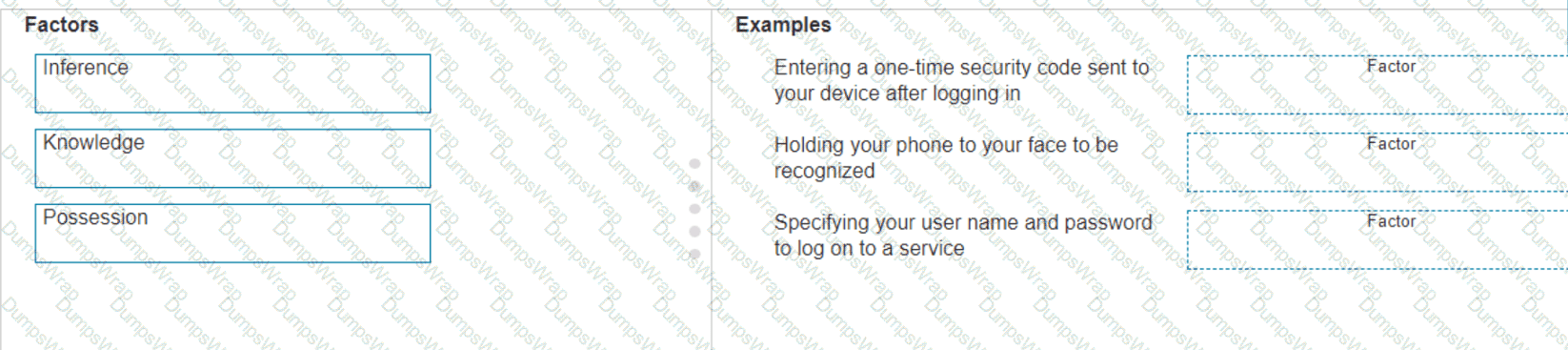
Move the MFA factors from the list on the left to their correct examples on the right. You may use each factor once, more than once, or not at all.
Note: You will receive partial credit for each correct selection.
Options:
Answer:
Explanation:
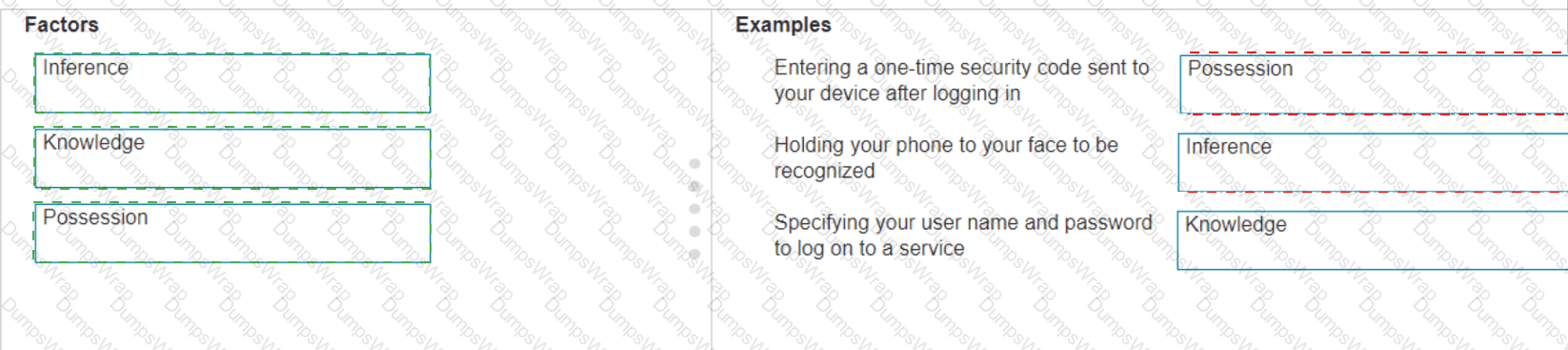
The correct matching of the MFA factors to their examples is as follows:
Entering a one-time security code sent to your device after logging in : Possession
Holding your phone to your face to be recognized : Inherence
Specifying your user name and password to log on to a service : Knowledge
Here’s why each factor matches the example:
Possession : This factor is something the user has, like a mobile device. A one-time security code sent to this device falls under this category.
Inherence : This factor is something the user is, such as a biometric characteristic. Facial recognition using a phone is an example of this factor.
Knowledge : This factor is something the user knows, like a password or PIN.
Multi-Factor Authentication (MFA) enhances security by requiring two or more of these factors to verify a user’s identity before granting access.
Entering a one-time security code sent to your device after logging in .
Factor : Possession
Explanation: This factor relates to something you have, such as a device that receives a security code.
Holding your phone to your face to be recognized .
Factor : Inference (typically referred to as Inherence or Biometric)
Explanation: This factor relates to something you are, such as biometric authentication like facial recognition.
Specifying your username and password to log on to a service .
Factor : Knowledge
Explanation: This factor relates to something you know, such as a username and password.
Possession Factor : This involves something the user has in their possession. Receiving a one-time security code on a device (e.g., phone) is an example of this.
Inference Factor (Inherence/Biometric) : This involves something inherent to the user, such as biometric verification (e.g., facial recognition or fingerprint scanning).
Knowledge Factor : This involves something the user knows, such as login credentials (username and password).
What is the most compressed valid format of the IPv6 address 2001:0db8:0000:0016:0000:001b:2000:0056?
Options:
2001:db8:0:16::1b:2000:56
2001:db8::16::1b:2000:56
2001:db8:16::1b:2:56
2001:db8::16::1b:2:56
Answer:
AExplanation:
Correct Answer: A. 2001:db8:0:16::1b:2000:56
IPv6 addresses consist of eight 16-bit hexadecimal groups separated by colons. IPv6 compression simplifies their representation without changing the underlying 128-bit address.
According to Cisco ' s IPv6 addressing documentation, IPv6 compression follows two fundamental rules:
Rule 1: Remove leading zeros.
Leading zeros within each hexadecimal group may be omitted.
The original address becomes:
2001:db8:0:16:0:1b:2000:56
Rule 2: Apply zero compression.
A double colon (::) can represent one or more consecutive all-zero groups. It can appear only once within an IPv6 address.
Applying this compression produces:
2001:db8:0:16::1b:2000:56
Why the other options are incorrect:
A. Correct: Preserves the original address and uses valid IPv6 zero-compression syntax.
B. Incorrect: Uses :: twice, which is prohibited.
C. Incorrect: Omits a required zero group and changes 2000 to 2, altering the original address.
D. Incorrect: Uses :: twice and incorrectly changes the 2000 group.
Technical distinction: Option A is a valid IPv6 representation under RFC 4291. However, RFC 5952 recommends against using :: to compress only one 16-bit zero group. The preferred canonical representation is 2001:db8:0:16:0:1b:2000:56. Because that representation is absent, A is the correct examination answer.
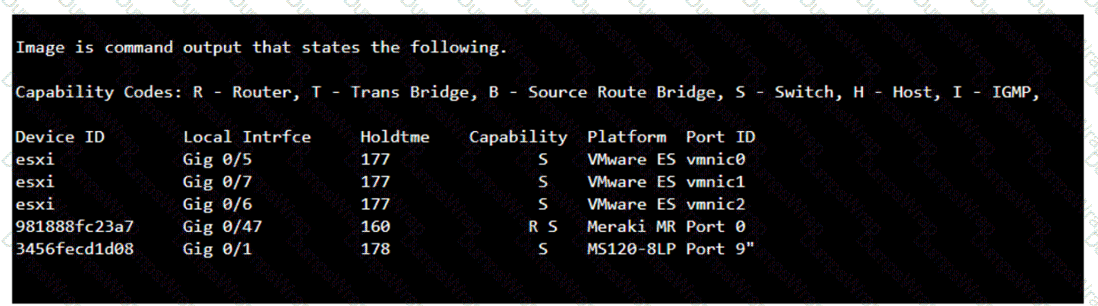
Which command will display the following output?
Options:
show mac-address-table
show cdp neighbor
show inventory
show ip interface
Answer:
BExplanation:
The command that will display the output provided, which includes capability codes, local interface details, device IDs, hold times, and platform port ID capabilities, is the show cdp neighbor command. This command is used in Cisco devices to display current information about neighboring devices detected by Cisco Discovery Protocol (CDP), which includes details such as the interface through which the neighbor is connected, the type of device, and the port ID of the device1.
References :=
• Cisco - show cdp neighbors
The provided output is from the Cisco Discovery Protocol (CDP) neighbor table. The show cdp neighbor command displays information about directly connected Cisco devices, including Device ID, Local Interface, Holdtime, Capability, Platform, and Port ID.
• A. show mac-address-table: Displays the MAC address table on the switch.
• C. show inventory: Displays information about the hardware inventory of the device.
• D. show ip interface: Displays IP interface status and configuration.
Thus, the correct answer is B. show cdp neighbor.
References :=
• Cisco CDP Neighbor Command
• Understanding CDP
You plan to use a network firewall to protect computers at a small office.
For each statement about firewalls, select True or False.
Note: You will receive partial credit for each correct selection.
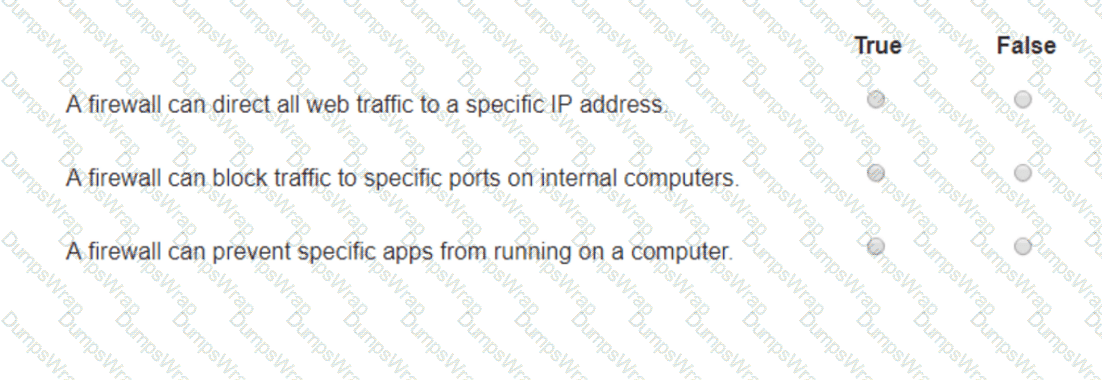
Options:
Answer:
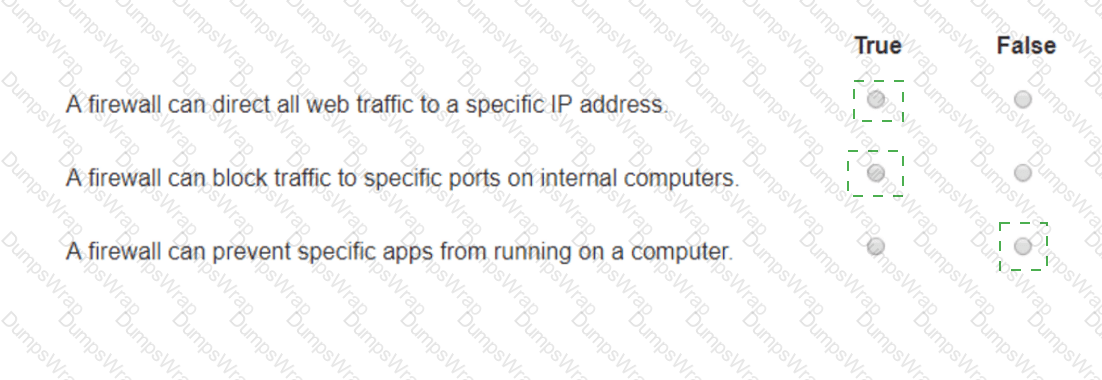
Explanation:
A firewall can direct all web traffic to a specific IP address .
True : Firewalls can be configured to perform Network Address Translation (NAT) and port forwarding, which can direct all web traffic (typically on port 80 and 443) to a specific internal IP address.
A firewall can block traffic to specific ports on internal computers .
True : Firewalls can be configured with access control lists (ACLs) or rules to block traffic to specific ports on internal computers, enhancing security by restricting unwanted or harmful traffic.
A firewall can prevent specific apps from running on a computer .
False : Firewalls typically control traffic flow and do not prevent specific applications from running on a computer. Application control is usually managed by endpoint security software or application control systems.
Directing Web Traffic : Firewalls can manage traffic redirection using NAT and port forwarding rules to route web traffic to designated servers or devices within the network.
Blocking Specific Ports : Firewalls can enforce security policies by blocking or allowing traffic based on port numbers, ensuring that only permitted traffic reaches internal systems.
Application Control : While firewalls manage network traffic, preventing applications from running typically requires software specifically designed for endpoint protection and application management.
Examine the graphic.
router1#
Which action can be run directly from the Cisco router ' s IOS mode shown?
Options:
Show running system information
Select an interface to configure
Enable a routing process
Enter interface IP configuration subcommands
Answer:
AExplanation:
Correct Answer: A. Show running system information
The Cisco IOS command prompt router1# indicates that the router is operating in Privileged EXEC mode.
Privileged EXEC mode provides access to advanced monitoring, diagnostic, and administrative commands. It allows administrators to examine system status, running configurations, interface statistics, routing information, and software details.
Commands available directly from this mode include:
show running-config — Displays the active configuration.
show version — Displays IOS software and hardware information.
show interfaces — Displays interface operational status and statistics.
show ip route — Displays the IPv4 routing table.
Why the other options are incorrect:
B. Select an interface to configure: Requires Global Configuration mode, accessed using configure terminal, followed by an interface command.
C. Enable a routing process: Requires Global Configuration mode, where routing commands such as router ospf 1 can be entered.
D. Enter interface IP configuration subcommands: Requires Interface Configuration mode, identified by the prompt router1(config-if)#.
The Cisco IOS CLI uses distinct command modes to separate operational monitoring from configuration activities.
Therefore, Option A is correct because Privileged EXEC mode supports direct execution of system information and diagnostic commands.
Which protocol allows you to securely upload files to another computer on the internet?
Options:
SFTP
ICMP
NTP
HTTP
Answer:
AExplanation:
SFTP, or Secure File Transfer Protocol, is a protocol that allows for secure file transfer capabilities between networked hosts. It is a secure extension of the File Transfer Protocol (FTP). SFTP encrypts both commands and data, preventing passwords and sensitive information from being transmitted openly over the network. It is typically used for secure file transfers over the internet and is built on the Secure Shell (SSH) protocol1.
References :=
• What Is SFTP? (Secure File Transfer Protocol)
• How to Use SFTP to Safely Transfer Files: A Step-by-Step Guide
• Secure File Transfers: Best Practices, Protocols And Tools
The Secure File Transfer Protocol (SFTP) is a secure version of the File Transfer Protocol (FTP) that uses SSH (Secure Shell) to encrypt all commands and data. This ensures that sensitive information, such as usernames, passwords, and files being transferred, are securely transmitted over the network.
• ICMP (Internet Control Message Protocol) is used for network diagnostics and is not designed for file transfer.
• NTP (Network Time Protocol) is used to synchronize clocks between computer systems and is not related to file transfer.
• HTTP (HyperText Transfer Protocol) is used for transmitting web pages over the internet and does not inherently provide secure file transfer capabilities.
Thus, the correct protocol that allows secure uploading of files to another computer on the internet is SFTP.
References :=
• Cisco Learning Network
• SFTP Overview (Cisco)
Which protocol is used by IPv6-enabled hosts to perform automatic stateless address configuration?
Options:
DHCPv6
DNS
ICMPv6
TFTP
Answer:
CExplanation:
Correct Answer: C. ICMPv6
Internet Control Message Protocol version 6 (ICMPv6) provides the messaging functionality required for IPv6 Stateless Address Autoconfiguration (SLAAC). SLAAC allows IPv6-enabled hosts to automatically generate their own IPv6 addresses without requiring a DHCPv6 server to assign them.
SLAAC operates through the IPv6 Neighbor Discovery Protocol (NDP), which uses ICMPv6 messages.
The process involves the following operations:
Router Solicitation (RS) – ICMPv6 Type 133: An IPv6 host can send an RS message to discover routers on the local network.
Router Advertisement (RA) – ICMPv6 Type 134: The router advertises the network prefix, prefix lifetime, default-router information, and configuration flags.
Address Generation: The host combines the advertised 64-bit network prefix with a 64-bit interface identifier to construct a 128-bit IPv6 address.
Duplicate Address Detection (DAD): The host uses ICMPv6 Neighbor Solicitation messages to verify that its address is not already in use.
Why the other options are incorrect:
A. DHCPv6: Provides stateful address assignment or additional configuration parameters but is not required for SLAAC.
B. DNS: Resolves domain names to IP addresses.
D. TFTP: Transfers files using a lightweight file-transfer protocol.
Cisco confirms that SLAAC uses ICMPv6 Router Solicitation and Router Advertisement messages.
Which address is included in the 192.168.200.0/24 network?
Options:
192.168.199.13
192.168.200.13
192.168.201.13
192.168.1.13
Answer:
BExplanation:
• 192.168.200.0/24 Network: This subnet includes all addresses from 192.168.200.0 to 192.168.200.255. The /24 indicates a subnet mask of 255.255.255.0, which allows for 256 addresses.
• 192.168.199.13: This address is in the 192.168.199.0/24 subnet, not the 192.168.200.0/24 subnet.
• 192.168.200.13: This address is within the 192.168.200.0/24 subnet.
• 192.168.201.13: This address is in the 192.168.201.0/24 subnet, not the 192.168.200.0/24 subnet.
• 192.168.1.13: This address is in the 192.168.1.0/24 subnet, not the 192.168.200.0/24 subnet.
For each statement about network performance, select True or False.
Note: You will receive partial credit for each correct selection.
Answer Area:
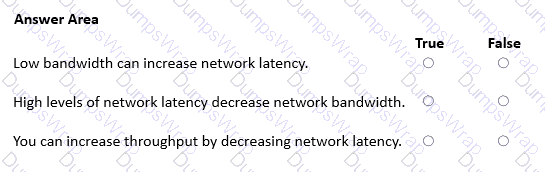
Options:
Answer:
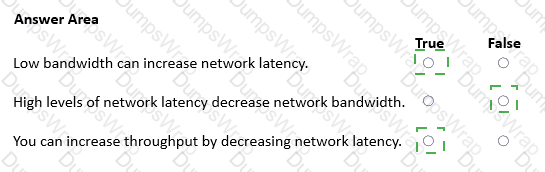
Explanation:
True
False
True
1. Low bandwidth can increase network latency — True
Bandwidth represents the maximum transmission capacity of a network connection, measured in bits per second (bps). When available bandwidth is insufficient for the offered traffic, packets accumulate in network device queues, increasing queuing delay and overall latency. Lower bandwidth also increases the serialization time required to transmit a packet. Therefore, limited bandwidth can increase network latency, particularly during congestion.
2. High levels of network latency decrease network bandwidth — False
Latency measures the time required for data to travel between network endpoints, whereas bandwidth represents the transmission capacity of a connection. Higher latency does not directly reduce the physical bandwidth of the link. However, excessive latency can reduce actual throughput, particularly for TCP applications that depend on acknowledgments and transmission windows. The distinction between bandwidth and throughput is essential.
3. You can increase throughput by decreasing network latency — True
Throughput represents the actual quantity of data successfully transferred per unit of time. Reducing latency can improve TCP throughput because acknowledgments return sooner, allowing additional data to be transmitted more efficiently. This improvement is especially significant for connections constrained by TCP window sizes and round-trip time (RTT). However, reducing latency does not guarantee higher throughput when another bottleneck exists.
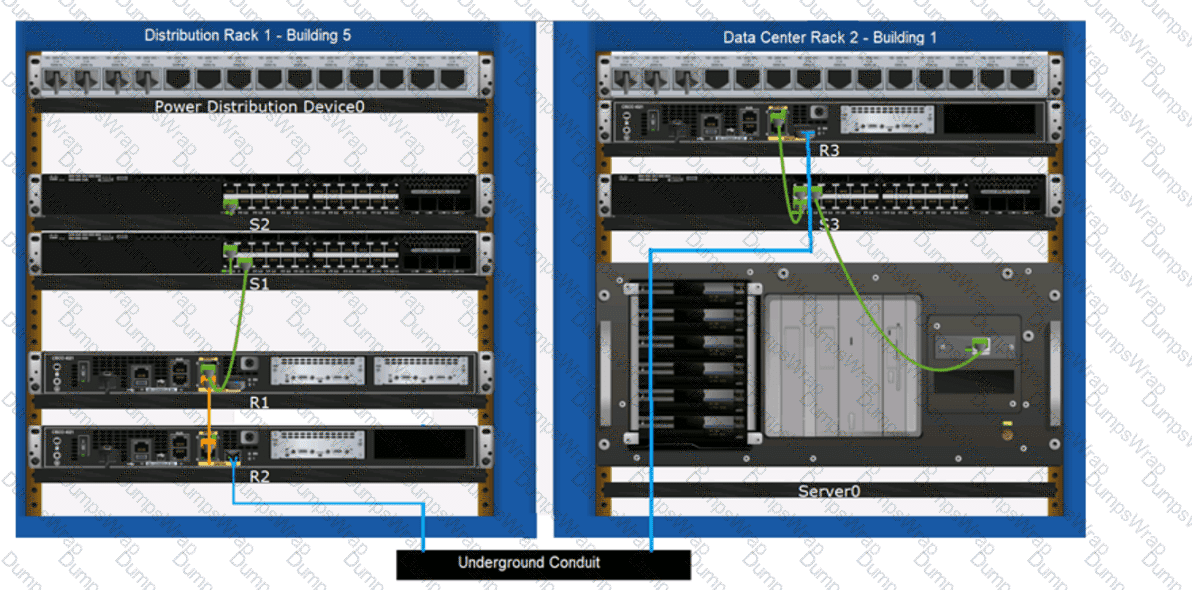
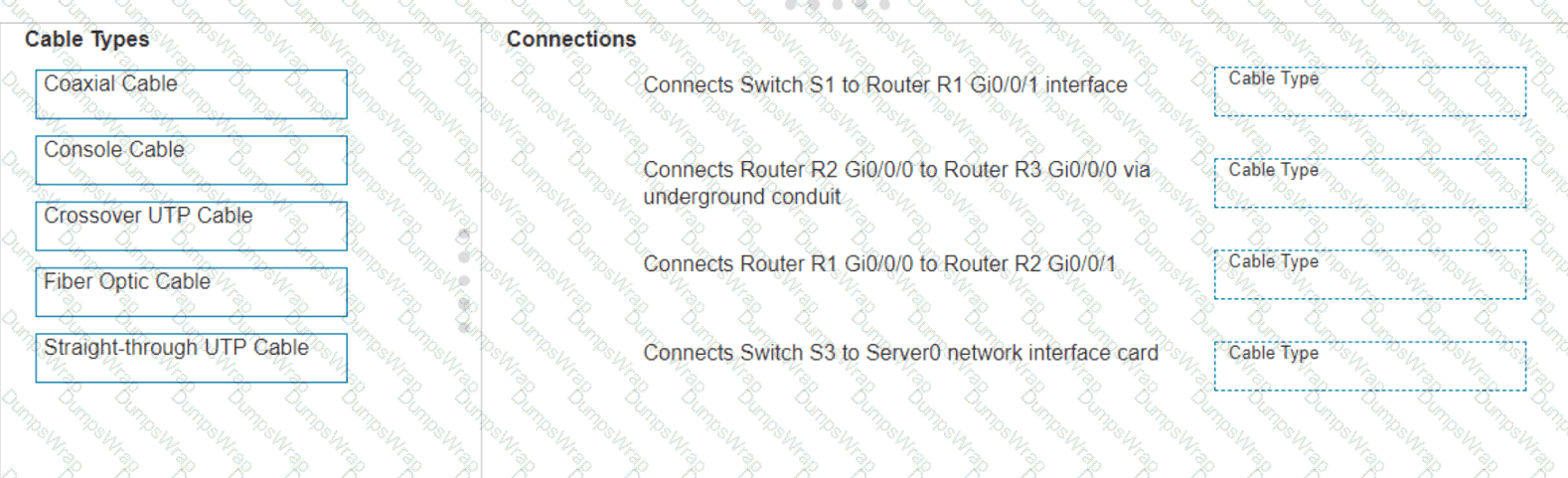
Examine the connections shown in the following image. Move the cable types on the right to the appropriate connection description on the left. You may
use each cable type more than once or not at all.
Options:
Answer:
Explanation:
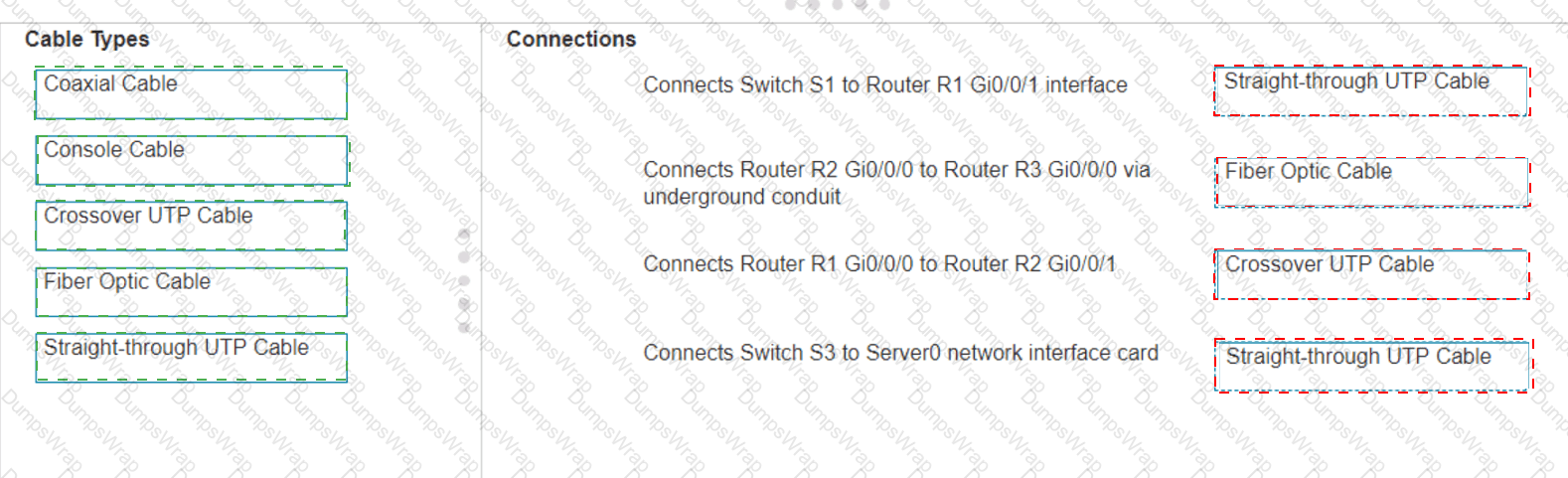
Based on the image description provided, here are the cable types matched with the appropriate connection descriptions:
Connects Switch S1 to Router R1 Gi0/0/1 interface Cable Type : = Straight-through UTP Cable
Connects Router R2 Gi0/0/0 to Router R3 Gi0/0/0 via underground conduit Cable Type : = Fiber Optic Cable
Connects Router R1 Gi0/0/0 to Router R2 Gi0/0/1 Cable Type : = Crossover UTP Cable
Connects Switch S3 to Server0 network interface card Cable Type : = Straight-through UTP Cable
The choices are based on standard networking practices where:
Straight-through UTP cables are typically used to connect a switch to a router or a network interface card.
Fiber optic cables are ideal for long-distance, high-speed data transmission, such as connections through an underground conduit.
Crossover UTP cables are used to connect similar devices, such as router-to-router connections.
These matches are consistent with the color-coded cables in the image: green for switch connections, yellow for router-to-router connections within the same rack, and blue for inter-rack connections. The use of these cables follows the Ethernet cabling standards.
Connects Switch S1 to Router R1 Gi0/0/1 interface :
Cable Type : Straight-through UTP Cable
Explanation: A straight-through UTP cable is typically used to connect different types of devices, such as a switch to a router.
Connects Router R2 Gi0/0/0 to Router R3 Gi0/0/0 via underground conduit :
Cable Type : Fiber Optic Cable
Explanation: Fiber optic cables are used for long-distance connections, such as those through an underground conduit between buildings.
Connects Router R1 Gi0/0/0 to Router R2 Gi0/0/1 :
Cable Type : Crossover UTP Cable
Explanation: A crossover UTP cable is typically used to connect similar devices directly, such as router to router connections.
Connects Switch S3 to Server0 network interface card :
Cable Type : Straight-through UTP Cable
Explanation: A straight-through UTP cable is typically used to connect a switch to an end device, such as a server.
Straight-through UTP Cable : Used to connect different devices (e.g., switch to router, switch to server).
Crossover UTP Cable : Used to connect similar devices directly (e.g., router to router, switch to switch).
Fiber Optic Cable : Used for long-distance and high-speed connections, often between buildings or data centers.
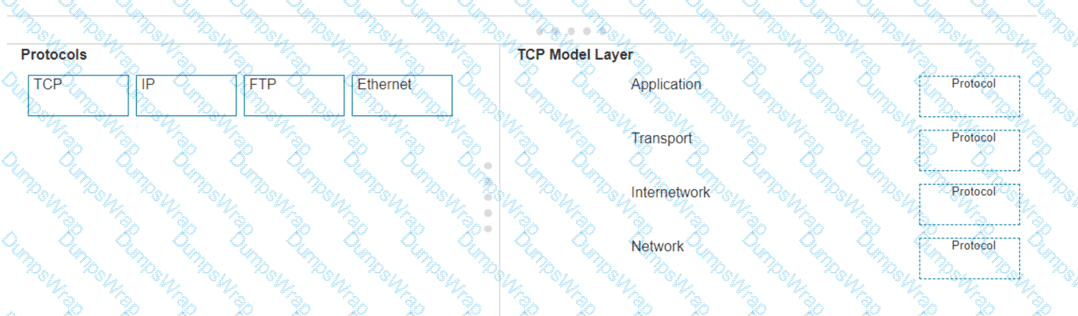
Move each protocol from the list on the left to the correct TCP/IP model layer on the right.
Note: You will receive partial credit for each correct match.
Options:
Answer:
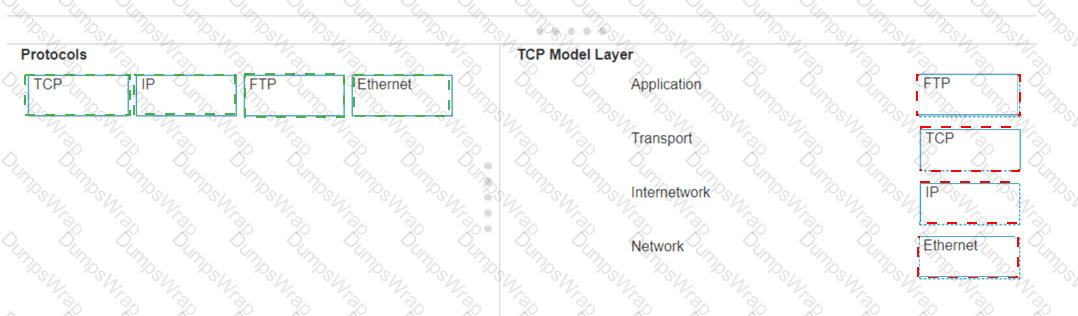
Explanation:
Here’s how each protocol aligns with the correct TCP/IP model layer:
TCP (Transmission Control Protocol) : This protocol belongs to the Transport layer, which is responsible for providing communication between applications on different hosts 1 .
IP (Internet Protocol) : IP is part of the Internetwork layer, which is tasked with routing packets across network boundaries to their destination 1 .
FTP (File Transfer Protocol): FTP operates at the Application layer, which supports application and end-user processes. It is used for transferring files over the network 1 .
Ethernet : While not a protocol within the TCP/IP stack, Ethernet is associated with the Network Interface layer, which corresponds to the link layer of the TCP/IP model and is responsible for the physical transmission of data 1 .
The TCP/IP model layers are designed to work collaboratively to transmit data from one layer to another, with each layer having specific protocols that perform functions necessary for the data transmission process 1 .
TCP :
TCP Model Layer : Transport
Explanation: The Transport layer is responsible for end-to-end communication and error handling. TCP (Transmission Control Protocol) operates at this layer to provide reliable, ordered, and error-checked delivery of data.
IP :
TCP Model Layer : Internetwork
Explanation: The Internetwork layer, also known as the Internet layer, is responsible for logical addressing and routing. IP (Internet Protocol) operates at this layer to route packets across networks.
FTP :
TCP Model Layer : Application
Explanation: The Application layer provides network services to applications. FTP (File Transfer Protocol) operates at this layer to transfer files between computers over a network.
Ethernet :
TCP Model Layer : Network
Explanation: The Network layer, also known as the Link layer in the TCP/IP model, is responsible for physical addressing and access to the physical medium. Ethernet operates at this layer to provide the physical and data link functions.
Transport Layer : This layer is responsible for providing communication services directly to the application processes running on different hosts. TCP is a core protocol in this layer.
Internetwork Layer : This layer is responsible for logical addressing, routing, and packet forwarding. IP is the primary protocol for this layer.
Application Layer : This layer interfaces directly with application processes and provides common network services. FTP is an example of a protocol operating in this layer.
Network Layer : In the TCP/IP model, this layer includes both the data link and physical layers of the OSI model. Ethernet is a protocol used in this layer to define network standards and communication protocols at the data link and physical levels.
Examine the graphic.
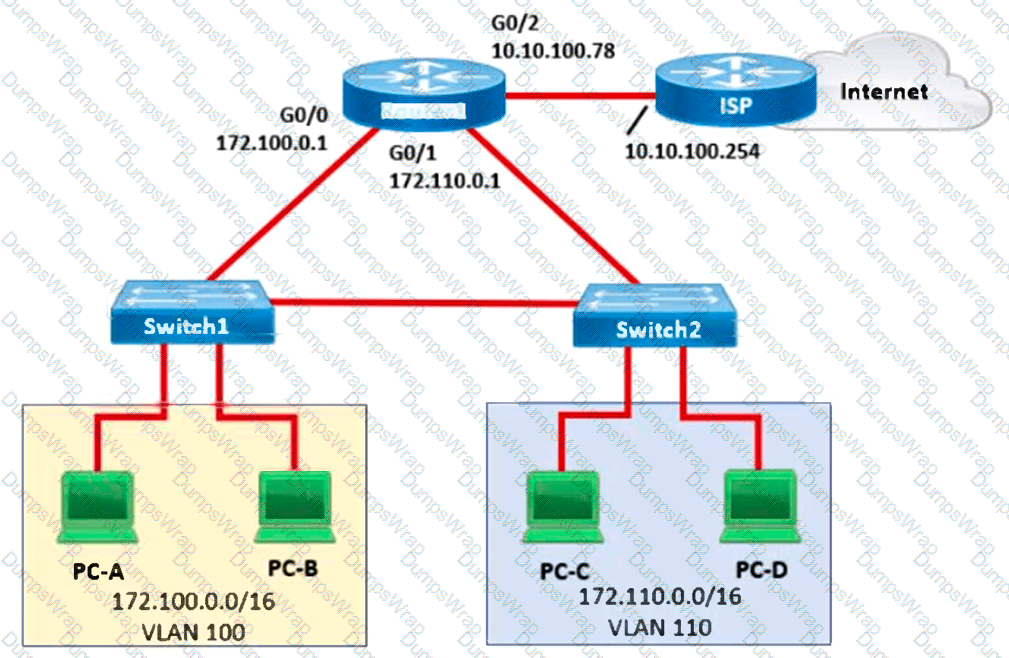
Which address should be assigned as the default gateway to the hosts in VLAN 100 and VLAN 110 so that they can reach the internet?
Options:
Hosts in both VLANs should be assigned 10.10.100.1 as the default gateway.
Hosts in both VLANs should be assigned 172.0.0.1 as the default gateway.
Hosts in VLAN 100 should be assigned 172.100.0.1 and hosts in VLAN 110 should be assigned 172.110.0.1 as the default gateway.
Hosts in both VLANs should be assigned 10.10.100.78 as the default gateway.
Answer:
CExplanation:
Correct Answer: C. Hosts in VLAN 100 should use 172.100.0.1, and hosts in VLAN 110 should use 172.110.0.1.
A default gateway is a Layer 3 device that forwards packets from a local subnet toward destinations outside that subnet.
In the supplied topology, Router1 provides routing connectivity for two distinct VLANs and connects to the ISP for internet access.
VLAN 100:
Network: 172.100.0.0/16
Router interface: GigabitEthernet0/0
Default gateway: 172.100.0.1
VLAN 110:
Network: 172.110.0.0/16
Router interface: GigabitEthernet0/1
Default gateway: 172.110.0.1
Each host must use an appropriate router interface address within its own subnet as its default gateway.
Why the other options are incorrect:
A. The address 10.10.100.1 is not identified as a gateway in the topology.
B. The address 172.0.0.1 does not correspond to either VLAN ' s router interface.
D. The address 10.10.100.78 belongs to Router1 ' s ISP-facing interface, not either internal VLAN.
Correct default gateway configuration enables inter-VLAN communication and forwarding toward the internet. Additional upstream routing and, where applicable, NAT configuration are required for successful internet access.
A user initiates a trouble ticket stating that an external web page is not loading. You determine that other resources both internal and external are still reachable.
Which command can you use to help locate where the issue is in the network path to the external web page?
Options:
ping -t
tracert
ipconfig/all
nslookup
Answer:
BExplanation:
The tracert command is used to determine the route taken by packets across an IP network. When a user reports that an external web page is not loading, while other resources are accessible, it suggests there might be an issue at a certain point in the network path to the specific web page. The tracert command helps to diagnose where the breakdown occurs by displaying a list of routers that the packets pass through on their way to the destination. It can identify the network segment where the packets stop progressing, which is valuable for pinpointing where the connectivity issue lies. References := Cisco CCST Networking Certification FAQs – CISCONET Training Solutions, Command Prompt (CMD): 10 network-related commands you should know, Network Troubleshooting Commands Guide: Windows, Mac & Linux - Comparitech, How to Use the Traceroute and Ping Commands to Troubleshoot Network, Network Troubleshooting Techniques: Ping, Traceroute, PathPing.
• tracert Command: This command is used to determine the path packets take to reach a destination. It lists all the hops (routers) along the way and can help identify where the delay or failure occurs.
• ping -t: This command sends continuous ping requests and is useful for determining if a host is reachable but does not provide path information.
• ipconfig /all: This command displays all current TCP/IP network configuration values and can be used to verify network settings but not to trace a network path.
• nslookup: This command queries the DNS to obtain domain name or IP address mapping, useful for DNS issues but not for tracing network paths.
A help desk technician receives a report that a user is experiencing network connectivity issues. The help desk supervisor advises the technician to use a bottom-up troubleshooting method to determine the cause of the problem.
Which two potential issues would the technician check first using the bottom-up method? (Choose two.)
Options:
Incorrect network password
Wrong IP address configuration
Network interface card failure
Incorrect or damaged cables
Wrong DNS server address
Answer:
C, DExplanation:
Correct Answers: C. Network interface card failure and D. Incorrect or damaged cables.
The bottom-up troubleshooting methodology follows the Open Systems Interconnection (OSI) reference model, beginning at Layer 1 (Physical Layer) and progressively moving toward higher layers.
The primary objective is to identify physical connectivity problems before investigating network configuration, transport protocols, or application services.
C. Network interface card failure — Correct
A faulty Network Interface Card (NIC) can prevent a computer from establishing a physical network connection. Technicians should examine NIC status indicators, verify link detection, inspect physical connections, and test the adapter using appropriate diagnostic tools.
D. Incorrect or damaged cables — Correct
Damaged Ethernet cables, defective connectors, improper cable termination, or disconnected cables can prevent reliable signal transmission. Technicians should inspect cable connections, examine link indicators, and replace questionable cables with known-good alternatives.
Why the other options are incorrect:
A. An incorrect network password involves authentication, which is investigated after physical connectivity.
B. An incorrect IP address configuration relates to Layer 3 networking.
E. An incorrect DNS server address affects name resolution, which is investigated at higher layers.
Therefore, C and D are the correct answers because both concern fundamental physical-layer connectivity. Cisco Press explicitly identifies the Physical layer as the starting point for bottom-up troubleshooting.
Cisco Press+1
You want to list the IPv4 addresses associated with the host name
Complete the command by selecting the correct option from each drop-down list.
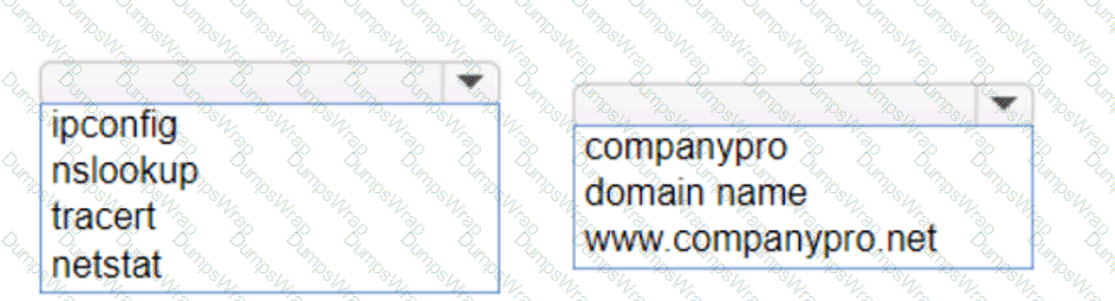
Options:
Answer:
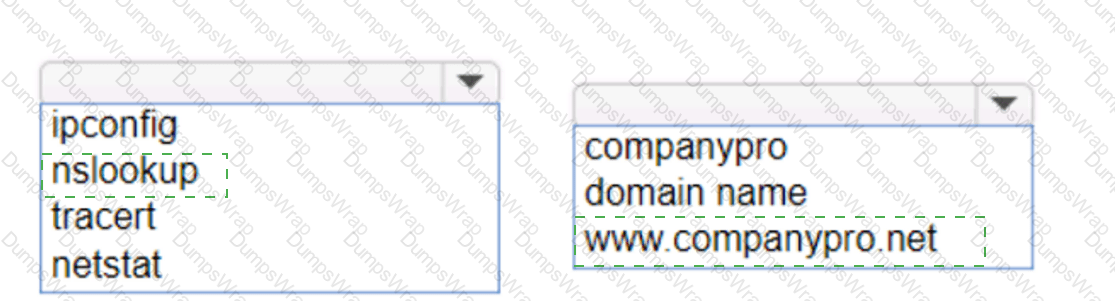
Explanation:
To list the IPv4 addresses associated with the host name you should use the following command:
nslookup
This command will query the DNS servers to find the IP address associated with the hostname provided. If you want to ensure that it returns the IPv4 address, you can specify the -type=A option, which stands for Address records that hold IPv4 addresses 1 . However, the nslookup command by default should return the IPv4 address if available.
To list the IPv4 addresses associated with the host name , you should use the nslookup command.
Command: nslookup
Target:
So, the completed command is:
nslookup
nslookup: This command is used to query the Domain Name System (DNS) to obtain domain name or IP address mapping or for any other specific DNS record.
: This is the domain name you want to query to obtain its associated IP addresses.
