
Pre-Summer Sale Discount Flat 70% Offer - Ends in 0d 00h 00m 00s - Coupon code: 70diswrap

F5 F5CAB1 Dumps

Page: 1 / 5
Total 49 questions

BIG-IP Administration Install, Initial Configuration, and Upgrade Questions and Answers

Question 1

A BIG-IP Administrator needs to verify the state of equipment in the data center.

A BIG-IP appliance has a solid yellow indicator on the status LED.

How should the administrator interpret this LED indicator?

Options:

A.

Appliance is halted or in End-User Diagnostic (EUD) mode

B.

Appliance is a standby member in a device group

C.

A warning-level alarm condition is present

D.

A power supply is NOT operating properly

Question 2

Which port is an exception to the Port Lockdown function of Self-IPs if a device-group synchronization cluster is configured?

Options:

A.

TCP 443

B.

TCP 4353

C.

UDP 53

Question 3

An administrator is in the process of reactivating the license using the interface displayed in the exhibit.

What is the address of the license server to which the BIG-IP device must be able to establish an outbound connection in order to use the Automatic Activation Method ?

Options:

A.

license.f5.com

B.

callhome.f5.com

C.

ask.f5.com

D.

activate.f5.com

Question 4

How should the BIG-IP Administrator block connections to a Self IP on port 443 while allowing connections to other ports?

Options:

A.

In the Configuration Utility, select System » Platform » SSH Allow. Enter the IP addresses of the clients allowed to connect to the Self IPs.

B.

In the Configuration Utility, select Network » Self IPs. Select the Self IP in question, then select ' Disable ' .

C.

In the Configuration Utility, go to Network » Self IPs. Select the Self IP in question, then select ' Port Lockdown ' and ' Allow Custom ' . Enter in only the allowed ports to that Self IP address.

D.

In the Configuration Utility, go to Network » Self IPs. Select the Self IP in question, then select ' Port Lockdown ' and ' Allow None ' .

Question 5

A BIG-IP Administrator is responsible for deploying a new software image on an F5 BIG-IP HA pair and has scheduled a one-hour maintenance window.

With a focus on minimizing service disruption, which of the following strategies is the most appropriate?

Options:

A.

Update the active node first, reboot to the newly updated boot location and verify functionality, then push the update from the active to the standby node and reboot the standby node.

B.

Reset the Device Trust, apply the update to each node separately, reboot both nodes, then re-establish the Device Trust.

C.

Update the standby node first and reboot it to the newly updated boot location, failover to the newly updated node and verify functionality. Repeat the upgrade procedures on the next node, which is now in standby mode.

D.

Update both nodes in the HA pair, then reboot both nodes simultaneously to ensure they run the same software version.

Question 6

Which two items demonstrate the creation of a new volume for software images?

(Choose two.)

Options:

A.

tmsh install software image /shared/images/BIGIP- < version > .iso volume HD1.5 create-volume

B.

tmsh install /sys software image BIGIP- < version > .iso volume HD1.5 create-volume

C.

Using the GUI, go to System > Disk Management , select New Volume . In the pop-up window, type the name or number of the new volume and click Apply .

D.

tmsh install sys software image /shared/images/BIGIP- < version > .iso volume HD1.5 create-volume

E.

Using the GUI, go to System > Software Management > Available Images > Install , and in the Install Software Image pop-up window, type the new volume name or number and click Install .

Question 7

A BIG-IP Administrator needs to install a HotFix on a standalone BIG-IP device, which has HD1.1 as the Active Boot Location.

The administrator has already re-activated the license and created a UCS archive.

In which sequence should the administrator perform the remaining steps?

Options:

A.

Install HotFix in HD1.2, Install base Image in HD1.2, Activate HD1.2

B.

Install HotFix in HD1.1, Reboot the BIG-IP device, Install UCS Archive

C.

Install base Image in HD1.2, Install HotFix in HD1.2, Activate HD1.2

D.

Activate HD1.2, Install base Image in HD1.2, Install HotFix in HD1.2

Question 8

A BIG-IP device will be dedicated to functioning as a WAF, requiring only the ASM module to be provisioned.

What provisioning level will ensure that the system allocates all CPU, memory, and disk resources to this module exclusively?

Options:

A.

Dedicated

B.

Comprehensive

C.

Maximal

D.

Nominal

Question 9

The BIG-IP Administrator uses Secure Copy Protocol (SCP) to upload a TMOS image to the /shared/images/ directory in preparation for an upgrade.

After the upload is complete, what will the system do before the image appears in the GUI under:

System » Software Management » Image List ?

Options:

A.

The system performs a reboot into the new partition

B.

The system verifies the internal checksum

C.

The system copies the image to /var/local/images/

Question 10

For security reasons, a BIG-IP Administrator needs to specify allowable IP ranges for access to the Configuration Utility (WebUI).

The exhibit shows the User Administration section of the Configuration Utility.
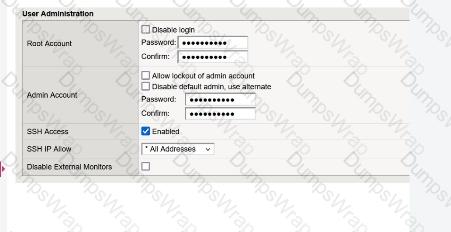
as

The administrator could not find any setting that explicitly restricts access to the Configuration Utility.

Which one of the following is a reason for that?

Options:

A.

Restricting access to the Configuration Utility can only be done from the Command Line Interface

B.

The administrator must restrict access by IP address for SSH, which will implicitly restrict access to the Configuration Utility

C.

To avoid locking out the administrator, recent versions of BIG-IP no longer allow restricting administrator access to the Configuration Utility by source IP address

D.

The administrator needs to switch to the “Advanced” view mode in order to display the relevant setting

Question 11

The BIG-IP Administrator wants to manage the newly built F5 system through an in-band Self-IP .

The administrator has configured a VLAN and Self-IP and can ping the IP from their workstation, but cannot access the system via SSH or HTTPS .

What port lockdown settings should the BIG-IP Administrator use to allow management access on the Self-IP?

(Choose two.)

Options:

A.

The Self-IP port lockdown behavior could be adjusted to Allow Default

B.

The Self-IP port lockdown behavior could be adjusted to Allow All

C.

The Self-IP port lockdown behavior could be adjusted to Allow Mgmt

D.

The Self-IP port lockdown behavior could be adjusted to Allow Management

Question 12

The BIG-IP Administrator needs to update access to the Configuration Utility to include the 172.28.31.0/24 and 172.28.65.0/24 networks.

From the TMOS Shell (tmsh), which command should the BIG-IP Administrator use to complete this task?

Options:

A.

modify /sys httpd allow add { 172.28.31.0/255.255.255.0 172.28.65.0/255.255.255.0 }

B.

modify /sys httpd allow add { 172.28.31.0 172.28.65.0 }

C.

modify /sys httpd permit add { 172.28.31.0/255.255.255.0 172.28.65.0/255.255.255.0 }

Question 13

When logged into the bash shell of a BIG-IP system, which of the following commands will display the management-ip address ?

(Choose two.)

Options:

A.

tmsh list /sys management-ip

B.

show mgmt ip

C.

ifconfig mgmt

D.

list / sys management-ip

Question 14

The BIG-IP Administrator uses Secure Copy Protocol (SCP) to upload a TMOS image to the /shared/images/ directory in preparation for a TMOS upgrade.

After the upload is completed, what will the system do before the image is shown in the GUI under:

System » Software Management » Image List ?

Options:

A.

The system performs a reboot into a new partition

B.

The system verifies the internal checksum

C.

The system copies the image to /var/local/images/

Page: 1 / 5
Total 49 questions