
Certified Forcepoint DSPM - Professional: Deploy and Administer Exam Questions and Answers
Ella needs to add a panel to the following dashboard. Where would she click to have access to add a panel to the dashboard?
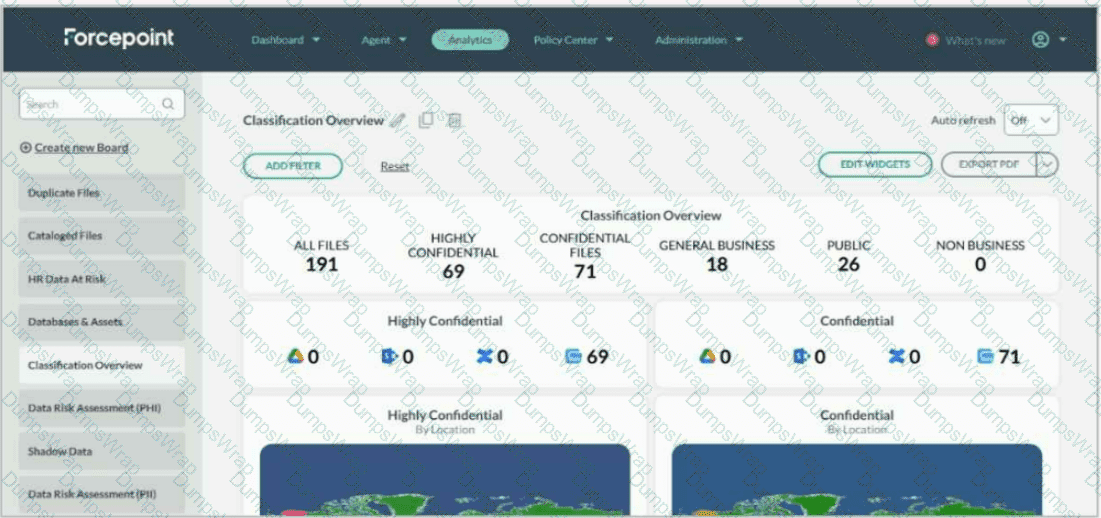
Options:
Answer:
Explanation:
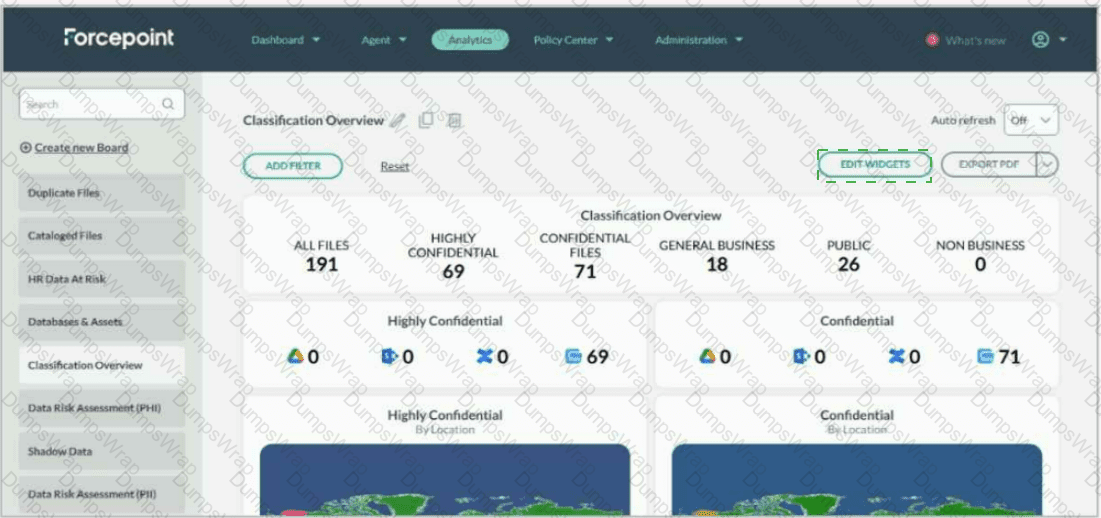
Click EDIT WIDGETS in the upper-right area of the dashboard.
Ella should click the EDIT WIDGETS button near the upper-right side of the dashboard, beside the EXPORT PDF button. This control opens the dashboard edit view, which exposes the controls required to modify dashboard content, including adding widgets and adding panels. In the screenshot, the correct click target is the green-outlined EDIT WIDGETS button above the dashboard panels.
Forcepoint documents dashboards as being primarily constructed from panels and widgets . A panel is the container that organizes one or more widgets, while widgets display selected datasets such as files, trustees, connectors, agents, or other DSPM analytics data. The Forcepoint documentation specifically states: “Edit Widgets: Click the Edit Widget button, to open the edit view.” It then lists Add widget and Add panel as functions available from that edit mode.
Therefore, Ella cannot add a panel by clicking the existing charts, the left navigation list, or the dashboard title. She must first enter edit mode through EDIT WIDGETS , then use the available Add panel option. References/topics: Analytics, Components of a Dashboard, Edit Widgets, Add Panel, Panels and Widgets .
Anna created a complex GQL query that she plans on using weekly to filter the results and export the data for review. How can she store this query for repeated use?
Options:
From Analytics, select Import to upload an Excel file that contains a list of GQL filters.
From Enterprise Search, select Import to upload an Excel file that contains a list of GQL filters.
From Enterprise Search, enter the GQL filter, select the star icon to bookmark the filter.
From Administration, select Bookmarks, enter the GQL filter, then select Save.
Answer:
CExplanation:
The correct answer is C . Forcepoint DSPM allows frequently used Enterprise Search filters to be saved as bookmarks, which is the appropriate method for Anna’s weekly workflow. The documented Enterprise Search capability states that the page lets users access recently used filters, save frequently used filters as bookmarks, customize column headings, and generate meaningful reports. It also supports advanced filtering through GetVisibility Query Language , where a GQL query narrows scanned-file results to a focused, manageable subset for analysis and action.
Operationally, Anna would go to Enterprise Search , enter the complex GQL filter in the search/query field, execute or validate the filter, and then select the star icon to bookmark it. Forcepoint support documentation confirms that administrators can save complex GQL queries by using the star icon, creating a GQL bookmark, and providing an appropriate description.
The other options are incorrect because DSPM does not use an Excel import workflow to load reusable GQL filters from Analytics or Enterprise Search. Administration is also not the documented location for saving Enterprise Search GQL bookmarks. References/topics: Enterprise Search, GQL Filtering, Bookmarked Filters, Exporting Data, Reusable Search Workflows .
How are data owners defined in Forcepoint DSPM?
Options:
Data owners are defined in security posture policies.
Data owners are defined in the imported user properties.
Each data storage is assigned to the single data owner.
DSPM resolves data owners based on file owner.
Answer:
CExplanation:
In Forcepoint DSPM, data ownership is treated as an explicit governance assignment tied to the organisation’s data asset inventory and data sources, not as a passive attribute inferred only from file metadata or imported directory fields. The closest correct option is C , because ownership is assigned at the data storage/data source or data asset level so that accountability, alert routing, review responsibility, and remediation workflows have a clearly identified business owner.
Forcepoint documentation describes the Data Asset Inventory workflow as requiring organisations to “assign an owner” for each asset and states that DSPM can “assign specific data owners to each data source.” This aligns with DSPM’s governance model: the owner is the accountable stakeholder for the data asset, not merely the technical file creator or last modifier. Release notes also describe a Data Owner column on the Data Assets page, where ownership may be automatically selected based on department owner and manually changed by the user.
Therefore, A is incorrect because policies define controls and requirements, not the owner itself. B is too narrow because imported user properties support identity context but do not alone define data ownership. D is incorrect because file owner metadata is not the authoritative ownership model for DSPM governance. References/topics: Data Register, Data Asset Inventory, Data Ownership, Controls Orchestration, Access Governance .
Match the type of detector with its primary function.

Options:
Answer:

Explanation:
Path Detectors = Monitor storage locations of sensitive data
Content Detectors = Analyze data within files for sensitive data
Attribute Detectors = Identify meta-data within documents
Forcepoint DSPM separates detector logic into path, content, and attribute-based functions so classification can be driven by where data is stored, what the file contains, and what scan-derived attributes describe the file. Path Detectors evaluate file path information, including directory location, filename, and extension. Forcepoint describes them as identifying and classifying files based on directory location and file extensions, which aligns with monitoring storage locations where sensitive data resides.
Content Detectors inspect the actual contents of files. Forcepoint states that content detectors analyze file content and categorize based on keywords, phrases, positive and negative terms, or patterns, making them the correct match for analyzing data within files for sensitive data.
Attribute Detectors operate on scan-result attributes rather than raw text content alone. Forcepoint describes them as defining criteria for “critical” and “sensitive” based on attributes in scan results, including ML output or path/content detector hits. This maps most closely to identifying metadata or scan-derived characteristics within documents. References/topics: Detectors, Path Detectors, Content Detectors, Attribute Detectors, AI Mesh, Classification Model .
What is the role of the File Audit Log in Forcepoint DSPM?
Options:
To display who has access to the file.
To display the number of discovered files from a data scan.
To display who has last accessed the file.
To display the status of data scanning and any errors.
Answer:
DExplanation:
The correct answer is D. To display the status of data scanning and any errors . In Forcepoint DSPM, the File Audit Log is tied to scan processing and file-level scan events. Forcepoint’s GQL reference defines the File Audit Log as “events associated with scanning of files,” and lists fields such as source , eventType , functionalityName , moduleName , createdAt , message , path , fileId , scanId , and configurationId . Those fields are designed to explain what happened to a file during the scan/classification process, including the relevant scan, module, event, and message detail.
This aligns with the scan analytics workflow. Forcepoint documents that when files are not classified, the interface can show the event indicating the classification failure, the file path, and the reason for the failure. It then allows the user to view the file audit log filtered by not-classified events, scan, and reason.
The other options describe different DSPM views. File access permissions are handled through access governance, discovered-file totals appear in scan analytics summaries, and last access information is a separate file activity or metadata concept. References/topics: Scan Analytics, File Audit Log, GQL File Audit Log Dataset, Scan Events, Classification Errors .
Place the following steps in the correct order to add a user to Forcepoint DSPM.
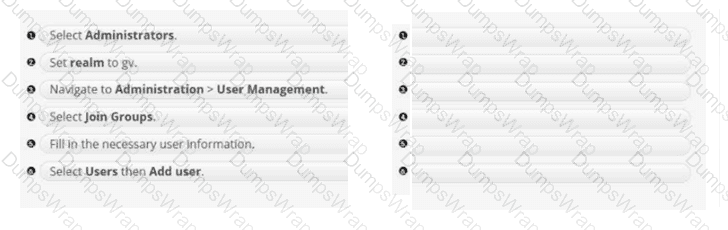
Options:
Answer:
Explanation:
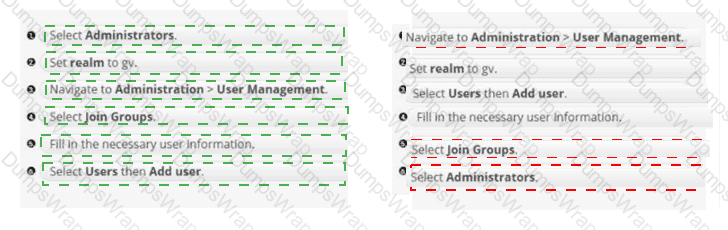
Correct order: 3 → 2 → 6 → 5 → 4 → 1
Navigate to Administration > User Management .
Set realm to gv .
Select Users , then Add user .
Fill in the necessary user information.
Select Join Groups .
Select Administrators .
Forcepoint DSPM user administration for a standalone deployment is performed through the Keycloak-based user management workflow. The sequence begins by entering the DSPM administration area and opening User Management , which places the administrator in the identity-management context used to control DSPM UI access. The next critical step is selecting the gv realm. Forcepoint documentation specifically instructs administrators to select the gv realm after logging into Keycloak and warns against changing settings in the Master realm, because the DSPM application authorization model is tied to the gv realm rather than the default administrative realm.
After the correct realm is active, the administrator creates the account by selecting Users , choosing Add user , and entering required identity fields such as username, email, first name, and last name. Once the user object exists, access is completed through RBAC group membership. Forcepoint’s RBAC guidance recommends group-based role assignment: navigate to the user, open the Groups area, search/select the appropriate group, and click Join . Selecting Administrators grants the required administrative group membership and resulting DSPM access.
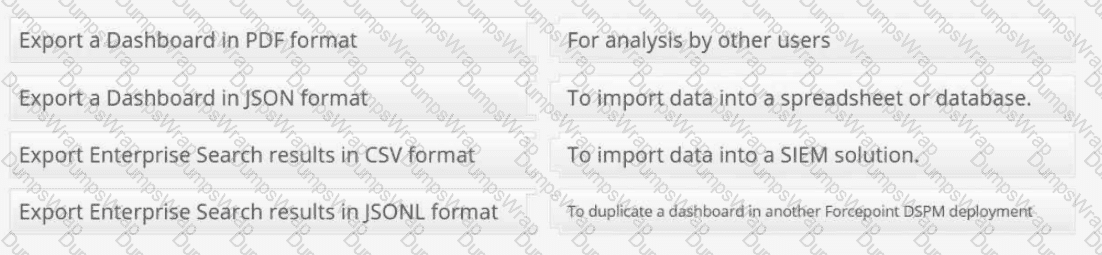
Match each export option with an appropriate use case:
Options:
Answer:
Explanation:
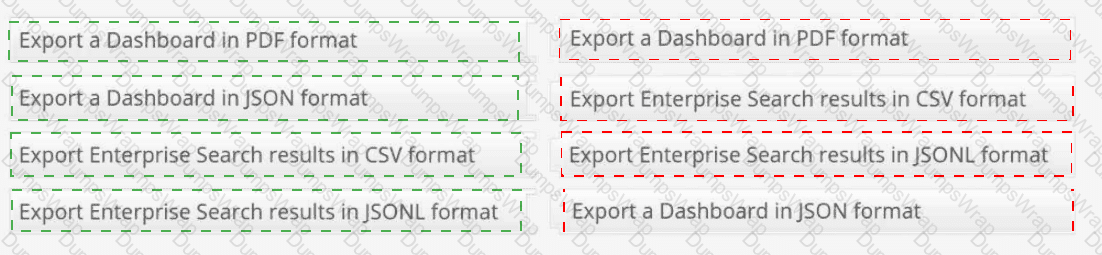
Export a Dashboard in PDF format → For analysis by other users
Export a Dashboard in JSON format → To duplicate a dashboard in another Forcepoint DSPM deployment
Export Enterprise Search results in CSV format → To import data into a spreadsheet or database
Export Enterprise Search results in JSONL format → To import data into a SIEM solution
Forcepoint DSPM uses different export formats for different operational purposes. A Dashboard PDF export is intended for human-readable sharing, review, and offline analysis. PDF is best when the dashboard needs to be distributed to managers, auditors, analysts, or department stakeholders who need a static visual report rather than a reusable configuration object. Forcepoint documents dashboard export capability as supporting PDF and JSON export from the dashboard interface.
A Dashboard JSON export preserves the dashboard definition rather than just the visual output. This makes JSON the correct format when the goal is to duplicate or migrate a dashboard into another Forcepoint DSPM deployment, because the dashboard structure, layout, panels, widgets, and configuration can be reused.
For Enterprise Search , CSV is the correct format for spreadsheet or database workflows. CSV is tabular, broadly compatible, and suited for Excel-style analysis, reporting, joins, and external data review. Forcepoint documents Enterprise Search export as producing CSV or JSON downloads of filtered data.
JSONL is most appropriate for SIEM ingestion because each line can represent an individual structured event or record, making it easier for log pipelines and event-processing systems to parse at scale. References/topics: Analytics Export, Dashboard Export, Enterprise Search Export, CSV, JSON/JSONL, SIEM Integration .
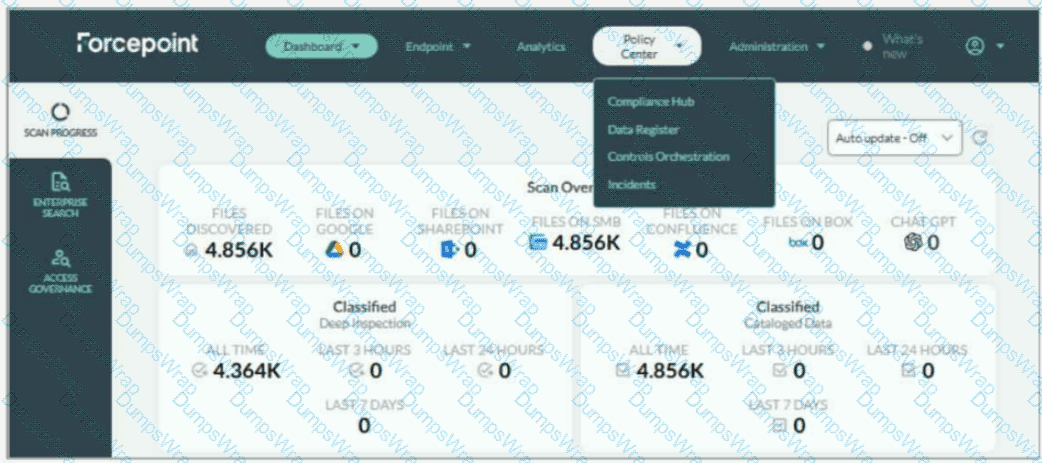
Adam needs to update the taxonomy tags in Forcepoint DSPM to match his company's policies. Where on the UI are taxonomy tags managed?
Options:
Answer:
Explanation:
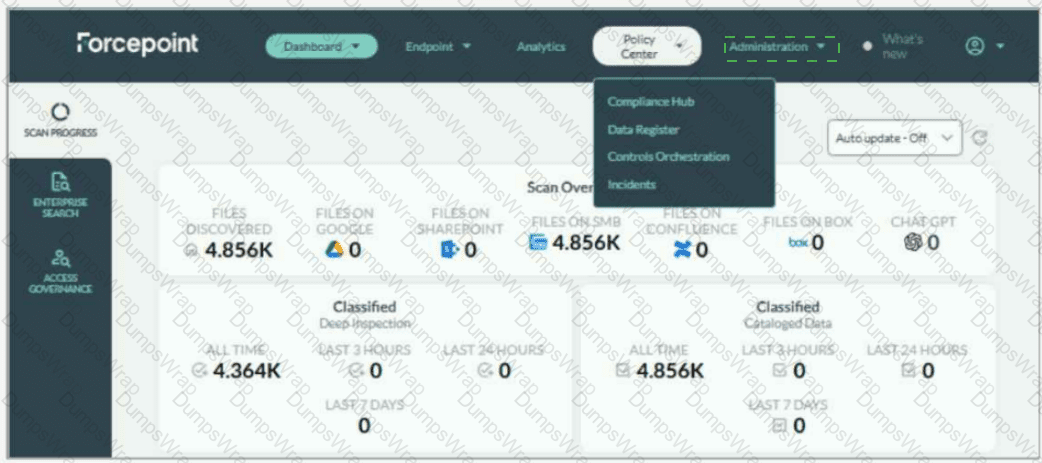
Administration > Taxonomy
Taxonomy tags are managed from the Administration menu, specifically under Administration > Taxonomy . In the screenshot, Adam should not select Policy Center ; the currently open menu shows Compliance Hub, Data Register, Controls Orchestration, and Incidents, but taxonomy management is not located there. The correct UI action is to open the Administration drop-down on the top navigation bar and select Taxonomy .
Forcepoint’s DSPM documentation states that the Taxonomy page displays predefined AI Mesh tags, which cannot be removed, and also allows administrators to add custom tags for pattern matching and detection rules. It further explains that taxonomy mapping can connect AI Mesh tags with data-source taxonomies so mapped tags can be written back as the organization’s own labels.
This location is important because taxonomy governs the classification language DSPM applies to scanned data. By updating taxonomy tags, Adam aligns DSPM classification output with the company’s internal handling policies, sensitivity labels, and compliance terminology. Forcepoint also notes that new taxonomy tags are created from the Taxonomy tab under the Administration section, and that applied tags are visible in the Data Asset Inventory. References/topics: Administration, Taxonomy, AI Mesh Tags, Classification Tags, Pattern Matching, Detection Rules .
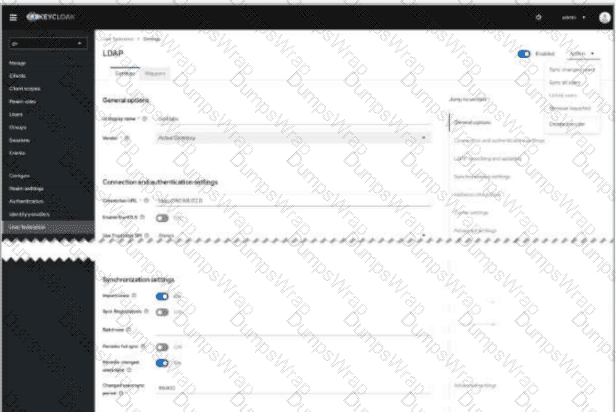
You have connected Forcepoint DSPM to your Active Directory using the User Federation configuration. You confirmed the connection is successful, but users have not synced after some time. Where in the UI would you go to manually initiate a user sync?
Options:
Answer:
Explanation:
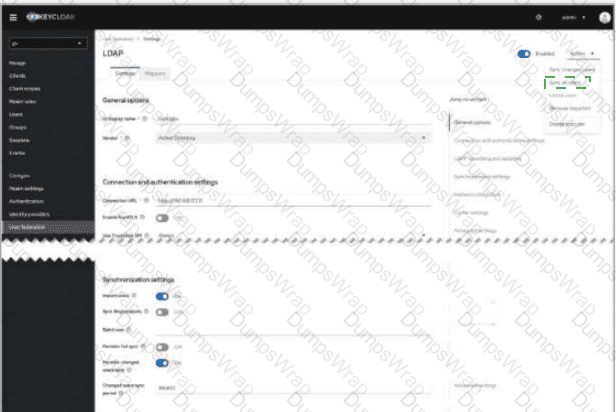
Select the Actions drop-down in the upper-right corner of the LDAP provider screen, then choose Sync all users or Sync changed users .
Manual synchronization is initiated from the LDAP provider configuration page inside Keycloak User Federation, not from the general DSPM dashboard or from the Users page. The correct UI location is the Actions menu at the upper-right of the LDAP provider screen. In the screenshot, this is the open drop-down containing options such as Sync all users , Sync changed users , Unlink users , and Remove imported . To force synchronization after a successful connection test, choose Sync all users for a full import or Sync changed users when only deltas are required.
Forcepoint DSPM uses Keycloak for Active Directory import. The official DSPM documentation states that AD users are added through Keycloak , with administrators selecting the gv realm, navigating to User Federation , and adding/configuring an LDAP provider. It also identifies synchronization settings such as Import users , Periodic full sync , and Periodic changed users sync as the mechanisms used to bring LDAP users into Keycloak and then into DSPM.
Therefore, the click target is the upper-right Actions drop-down on the LDAP provider page , specifically the sync command within that menu. References/topics: User Federation, LDAP Provider, Active Directory Import, Keycloak gv Realm, Synchronization Settings .
What is the purpose of assigning compliance tags to data patterns in Forcepoint DSPM?
Options:
To oversee user activity and generate reports.
To ensure regulatory adherence.
To manage data encryption policies.
To manage user credentials.
Answer:
BExplanation:
Compliance tags in Forcepoint DSPM are used to associate detected data patterns with regulatory or compliance obligations. The correct answer is B because these tags help the platform identify files and data objects that may fall under privacy, security, or industry-specific regulatory regimes. Forcepoint’s pattern-matching terminology defines Compliance as tags that help organizations conform to regulatory regimes, and gives the example of applying tags such as GDPR/PII to a Social Security number pattern so related documents can be identified.
Operationally, this means a pattern is not only detecting a technical string, such as a national identifier, payment card number, or health-related value; it is also attaching compliance meaning to the match. That compliance context can then support classification, filtering, analytics, remediation prioritisation, and audit evidence. Forcepoint also states that when adding a new pattern, selected Classification, Compliance, and Distribution values can override machine-learning model output during scans, making the assigned tags authoritative for scan results.
The other options are adjacent but incorrect. User monitoring and reporting are downstream analytics activities, encryption policy management is not the core purpose of pattern compliance tagging, and user credentials are handled through identity and access management workflows. References/topics: Pattern Matching, Compliance Tags, Classification Model, AI Mesh, Regulatory Data Identification .
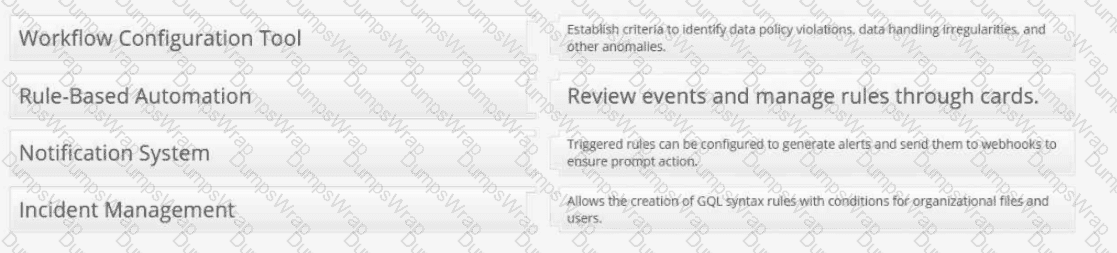
Provide the matching definitions for these Forcepoint DSPM Controls Orchestration terms:
Options:
Answer:
Explanation:
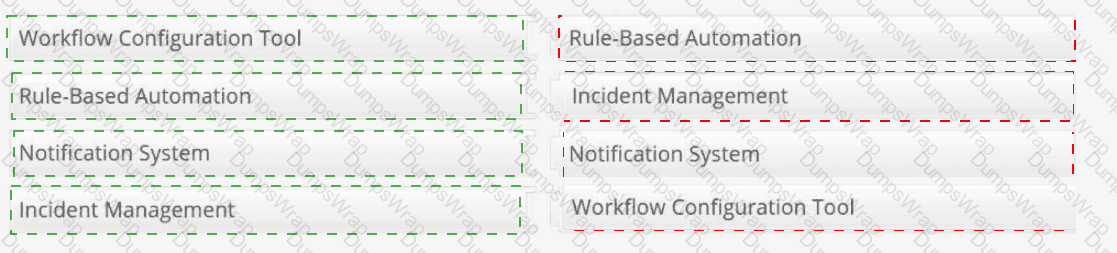
Workflow Configuration Tool → Allows the creation of GQL syntax rules with conditions for organizational files and users.
Rule-Based Automation → Establish criteria to identify data policy violations, data handling irregularities, and other anomalies.
Notification System → Triggered rules can be configured to generate alerts and send them to webhooks to ensure prompt action.
Incident Management → Review events and manage rules through cards.
Controls Orchestration in Forcepoint DSPM is the policy automation layer used to convert data-risk criteria into reviewable operational events. The Workflow Configuration Tool is represented by the rule-building interface under Policy Center > Controls Orchestration , where administrators define datasets, ownership, rule conditions, and GQL logic for organizational files, trustees, or agent activities. Forcepoint states that rules are created to identify data matching specific criteria and are applied during scans of the selected dataset.
Rule-Based Automation describes the criteria-driven detection model. Administrators establish rules that identify policy violations, data-handling irregularities, or other anomalies that require attention. Notification System maps to the ability to configure triggered rules to send external notifications, including webhook-based alerts, when matching data is detected. Incident Management maps to the Incidents workflow: Forcepoint states that each rule is automatically added as a card in the Incidents tab, and selecting the card takes the user back to the associated rule. References/topics: Policy Center, Controls Orchestration, GQL Conditions, Notifications, Webhooks, Incidents .
Which statement best describes what happens when a detector group is selected while creating a content detector?
Options:
The detector is excluded from scan results.
The detector becomes part of the AI Mesh and contributes to classification results.
The detector automatically revokes permissions on matching files.
The detector converts all keyword logic into taxonomy labels.
Answer:
BExplanation:
The correct answer is B . In Forcepoint DSPM, content detectors analyze file contents using configured search logic such as keywords, phrases, positive and negative terms, or regular expressions. During detector creation, administrators can associate the detector with a detector group. Forcepoint states that when a detector group is selected, the detector becomes part of the AI Mesh and contributes to classification results. If the administrator does not want the detector to influence classification, a non-AI Mesh detector group should be selected instead.
This is important because detector grouping controls whether detector hits are merely informational or actively influence classification decisions. A payroll detector, for example, may search for terms such as salary, payslip, compensation, or payroll. If tied into the AI Mesh, those hits can help classify files as sensitive or confidential. The other options misrepresent detector behavior. Detectors do not automatically revoke permissions, convert keywords directly into taxonomy labels, or disappear from scan results when grouped. References/topics: Administration > Detectors, Content Detectors, Detector Groups, AI Mesh, Classification Results, Contain/Not Contain Logic .
