Pre-Summer Sale Discount Flat 70% Offer - Ends in 0d 00h 00m 00s - Coupon code: 70diswrap

Fortinet FCP_FMG_AD-7.6 Dumps

Fortinet NSE 5 - FortiManager 7.6 Administrator Questions and Answers

Question 1

Push updates are failing on a FortiGate device located behind a network address translation (NAT) device?

Which two settings should the administrator check to correct this problem? (Choose two.)

Options:

A.

Make sure the NAT device IP address and the correct ports are configured on FortiManager.

B.

Make sure FortiGuard updates and web service are enabled on the FortiGuard service interface.

C.

Make sure the virtual IP address and the correct ports are configured on the NAT device.

D.

Make sure the Bind to IP address option on the FortiGuard service interface is set to the virtual IP address from the NAT device.

Question 2

An administrator notices that CLI scripts are failing on some FortiGate devices because they use different FortiOS versions.

Which two actions should the administrator take to fix the failing CLI scripts? Choose two answers.

Options:

A.

Create separate ADOMs for each FortiOS version.

B.

Disable CLI scripts for devices using older firmware.

C.

Modify the CLI scripts to include conditional commands based on FortiOS version.

D.

Create version-specific CLI script groups and assign them to the appropriate devices.

Question 3

The administrator uses FortiManager to push a CLI script using the Remote FortiGate Directly (via CLI) option to configure an IPsec VPN. However, when running the script, the administrator receives the following error:

config vpn ipsec phase2-interface [parameter(s) invalid. detail: object mismatch]

What must the administrator do to resolve the script error and successfully apply the IPsec configuration?

Options:

A.

Add the end command after finishing the IPsec phase 1-interface configuration block.

B.

Use IPsec templates to deploy provisioning templates.

C.

Add a second config vpn ipsec phase2-interface block without linking it to phase1.

D.

Run the script using the policy package or ADOM database method.

Question 4

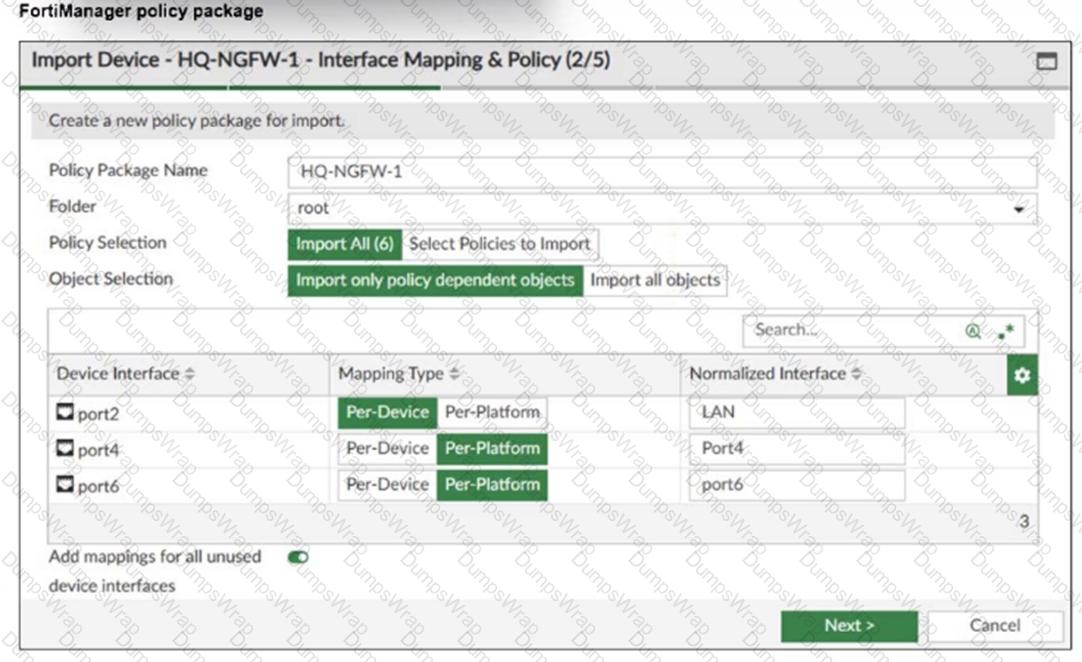
Refer to the exhibit.

as

An administrator added a FortiGate device to FortiManager with the default object settings at the ADOM layer.

What can you conclude from the import policy package process of the HQ-NGFW- 1 device?

Options:

A.

The administrator must select Per Platform for all interfaces to correctly detect all interfaces from HQ-NGFW-1.

B.

The administrator must manually create the port4 interface on the ADOM layer to avoid import policy errors.

C.

FortiManager will create LAN, port4, and port6 as normalized interfaces at the ADOM layer.

D.

FortiGate may not work as expected when the administrator does not import all objects.

Question 5

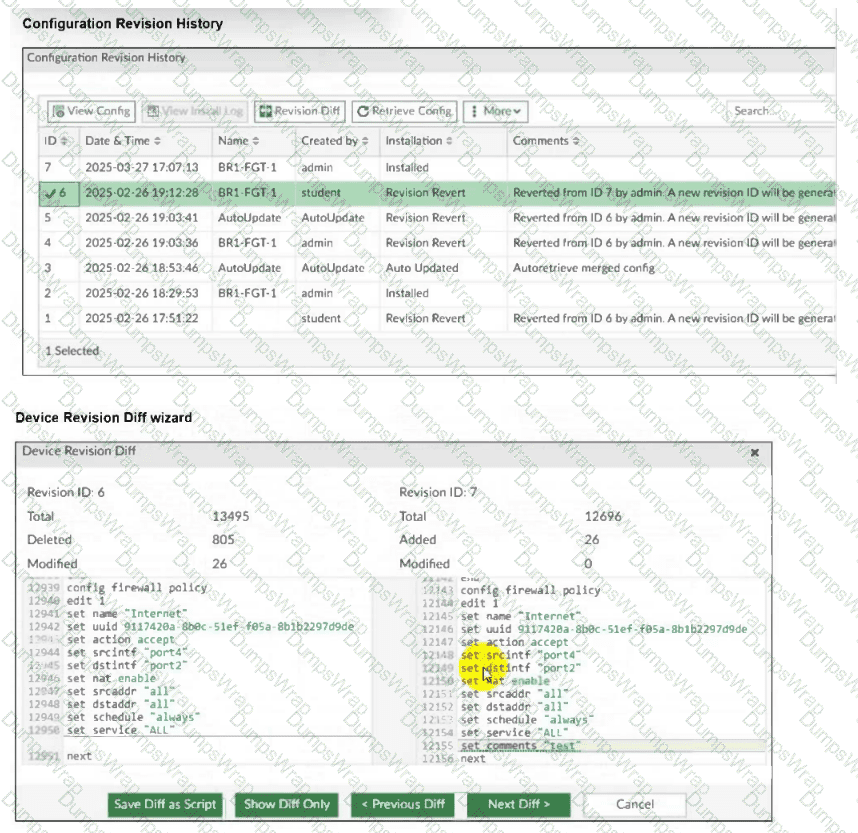
Refer to Exhibit:

as

An administrator admin used the Configuration Revision History window to revert the FortiGate device configuration to revision ID 6. After running the reinstall policy package, the administrator noticed problems with the firewall policy- they could not see the unset comment on policy ID 1.

Why did FortiManager not remove the comment from policy ID 1 when the administrator ran reinstall policy package?

Options:

A.

Because the administrator student must install the configuration changes to correctly see the expected results.

B.

Because the administrator must import the firewall policies to update the firewall policy package.

C.

Because every time the administrator uses the revert config file, they must use the Install Wizard instead of running the reinstall policy package.

D.

Because the administrator used the Revision Diff view, which shows what changed, not what will be installed.

Question 6

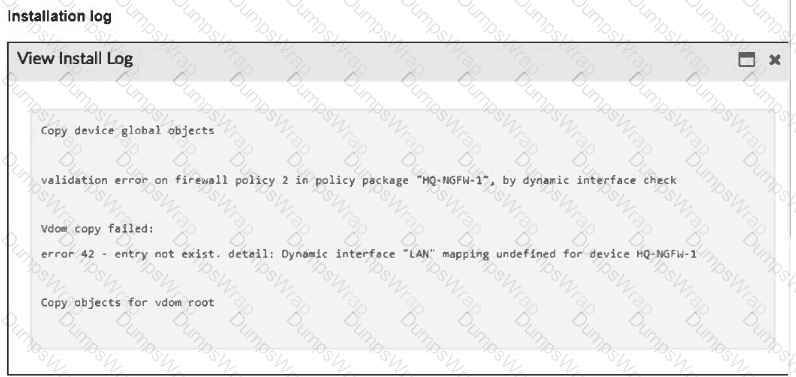
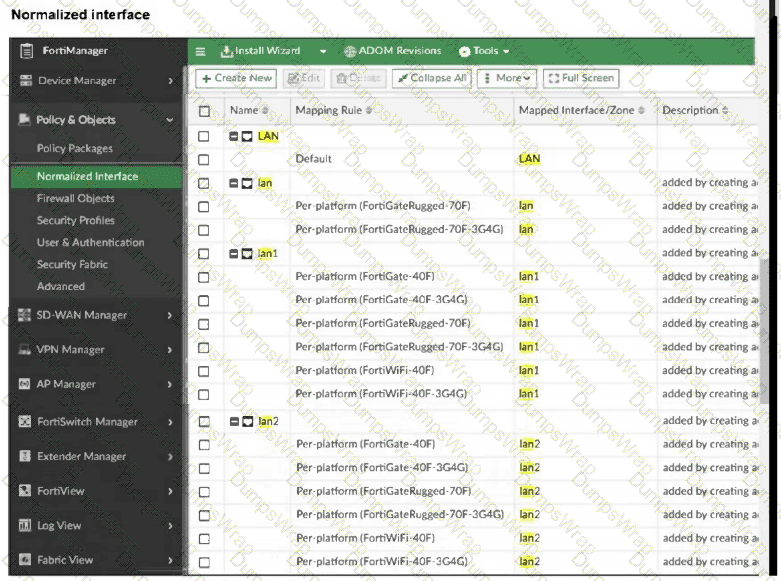
Refer to the exhibits.

as

as

as

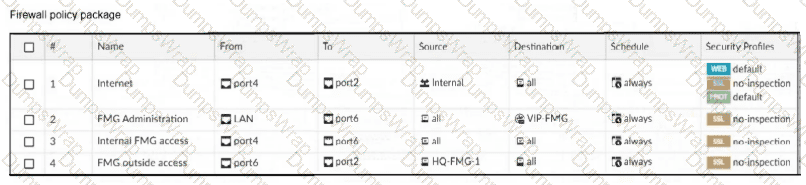
An administrator must replace the source LAN interface in policy ID 2 on their FortiGateRugged-70F.

However, when they try to install the policy package, they receive the error shown in the exhibit.

What should the administrator do to resolve the error?

Options:

A.

Use the API to assign a system template interface for FortiGateRugged-70F model.

B.

Use a metadata variable to dynamically assign an interface when this error occurs.

C.

Create a per-device mapping for the LAN interface.

D.

Replace LAN with lan1, which is supported by FortiGateRugged-70F models.

Question 7

Refer to the exhibits.

as

as

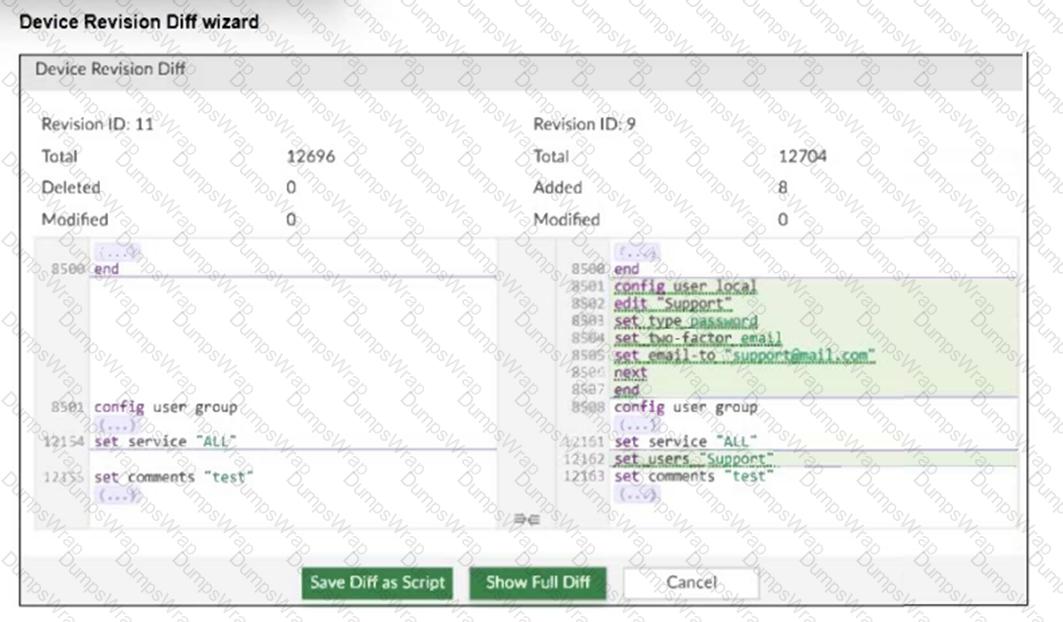
An administrator needed to recover all the configurations related to the user, Support. The configurations were saved in configuration revision ID 9.

The administrator reverted the configuration using the Configuration Revision History window and received the CLI output shown in the exhibit.

What can you conclude from the CLI output?

Options:

A.

The administrator set the flag to 0 to prevent configuration overrides.

B.

The administrator reinstalled the policy package.

C.

The administrator needs to retrieve the device to correctly detect the FortiGate firmware version.

D.

The administrator installed only the device-level configuration.

Question 8

A FortiManager administrator opens the revision history and choose to revert to a previous version.

What will this action do to the current device configuration?

Options:

A.

It will trigger an unknown device-level database status, and the administrator will have to import a policy package to sync.

B.

It will trigger a conflict status if it is using any provisioning template, and the administrator will have to install changes.

C.

It will revert both configurations: device-level database and policy layer database.

D.

It will modify the device-level database.

Question 9

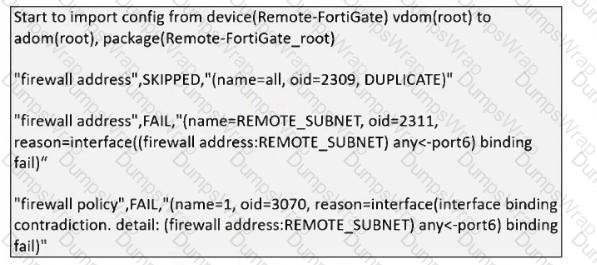
Refer to the exhibit.

as

What can you conclude from the downloaded import report?

Options:

A.

FortiManager does not support per-device mapping for firewall addresses.

B.

The administrator will see a new policy package named Remote-FortiGate_root in the FortiManager ADOM database.

C.

FortiManager will change the configuration of REMOTE_SUBNET to match the interface mapping coming in from Remote-FortiGate.

D.

As a result of this policy import process, FortiManager will create a new firewall address called REMOTE_SUBNET in the ADOM database.

Question 10

An administrator upgrades FortiManager with workspace mode per ADOM enabled to the latest version but notices that the ADOM versions did not change.

Why were the ADOMs not upgraded?

Options:

A.

The administrator did not run the database integrity check before performing the upgrade.

B.

FortiManager does not automatically upgrade ADOMs after a firmware upgrade.

C.

A FortiManager process task is stuck and blocking the ADOM upgrade, so the administrator must fix it.

D.

A user had all ADOMs locked before the upgrade, which stopped them from being upgraded.

Question 11

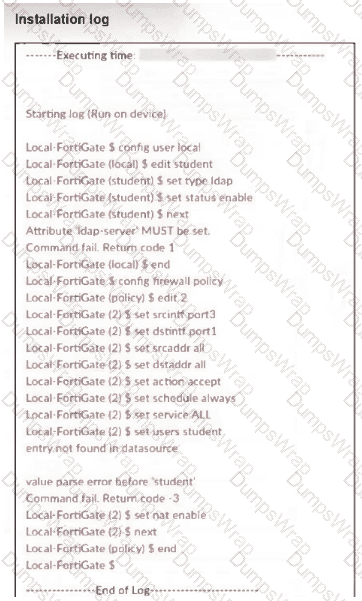
What can you conclude from the failed installation log shown in the exhibit?
as

Options:

A.

Policy ID 2 is installed in the disabled state.

B.

Policy ID 2 will not be installed.

C.

Policy ID 2 is installed without a source address.

D.

Policy ID 2 is installed without the remote user student.

Question 12

Refer to the exhibits.

as

as

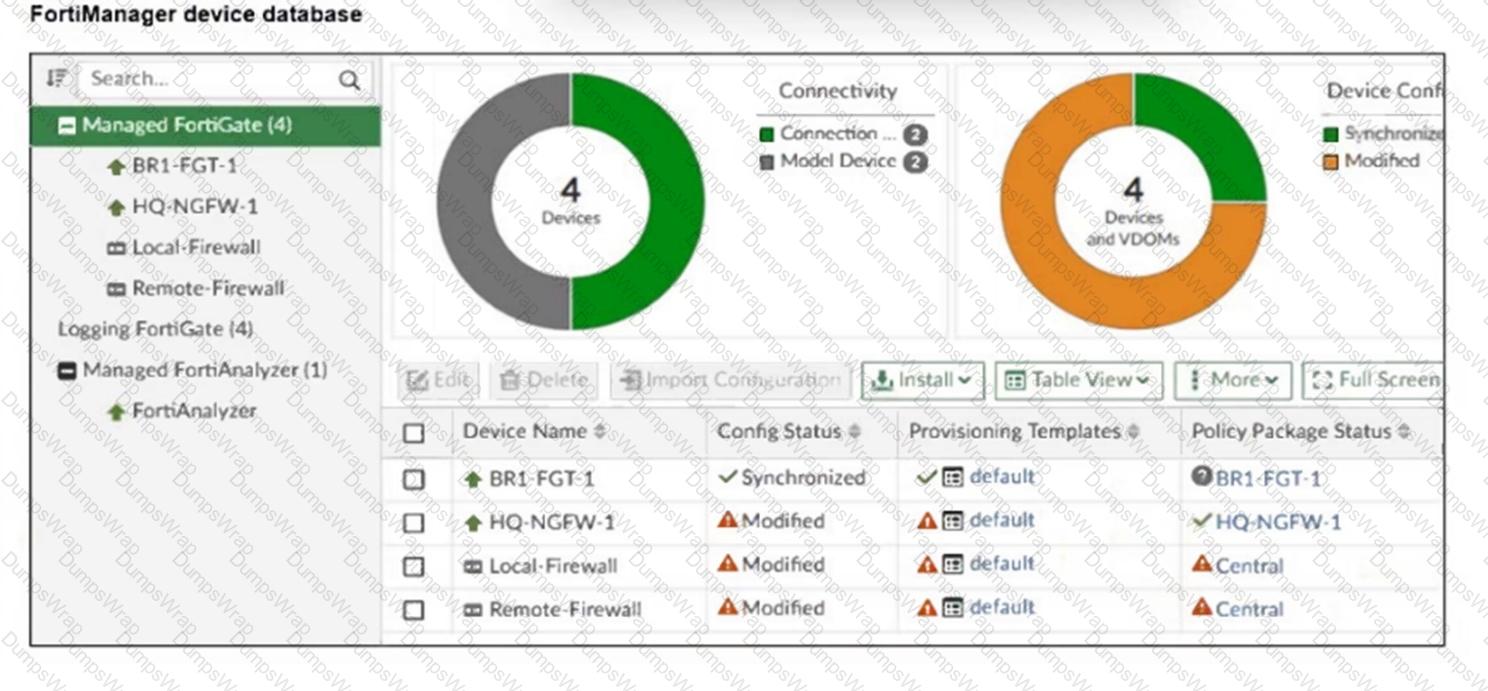
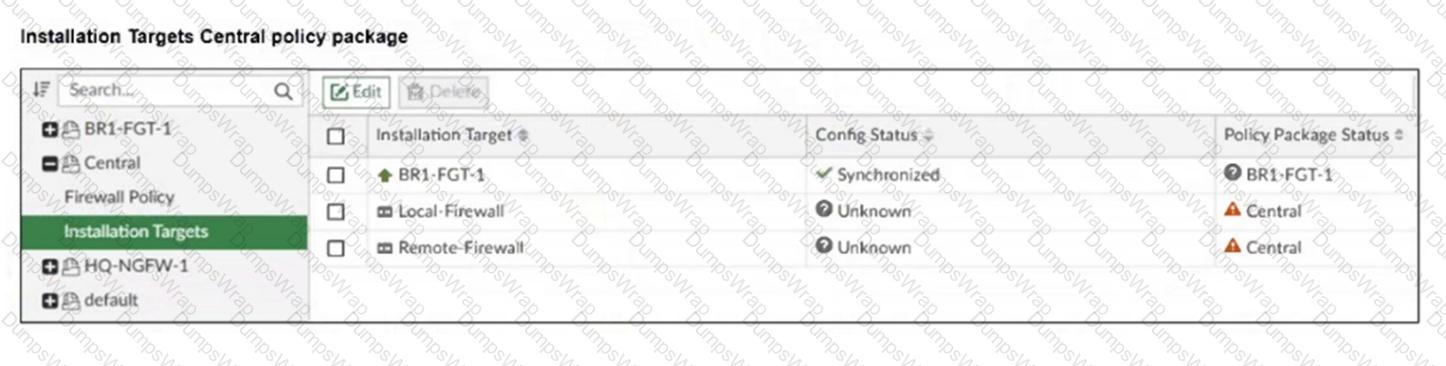
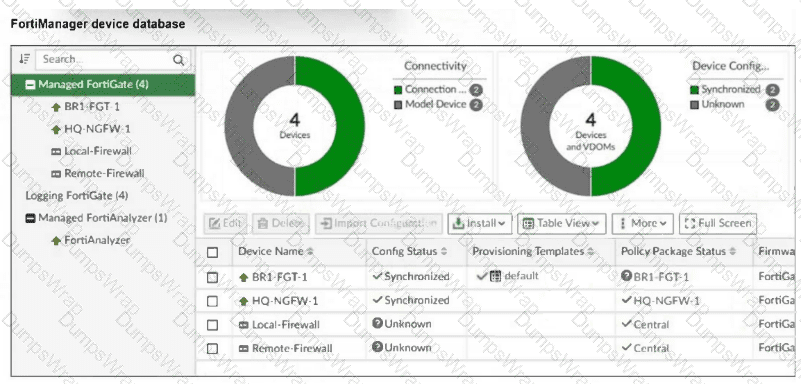
An administrator has been asked to install the same policies from a central policy package onto the BR1-FGT-1 firewall.

The administrator added BR1-FGT-1 as a target in the central policy package installation.

What should the administrator do when reinstalling the central policy package on the BR1-FGT-1 firewall?

Options:

A.

Assign only one policy package to the firewall because FortiManager does not allow more than one policy package assigned per device at the same time.

B.

Import the policy package to change the unknown status and synchronize the policy package.

C.

Use the install wizard to install the central policy package on the BR1-FGT-1 firewall.

D.

First resolve the modified status in the configuration and provisioning templates to allow a smooth installation.

Question 13

Refer to Exhibit:

as

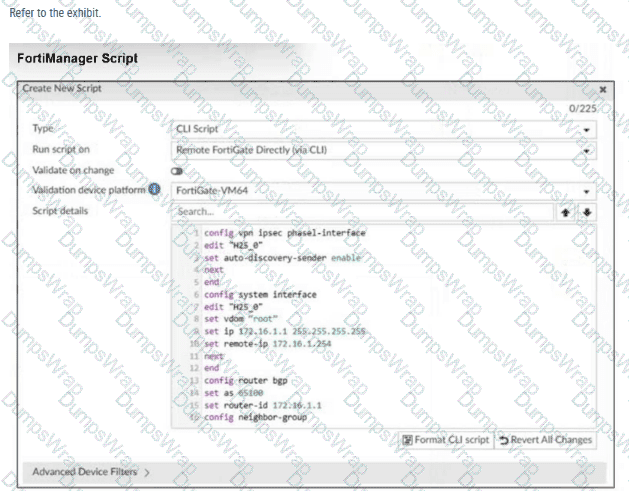
Which two actions will occur if you run the script using the Remote FortiGate Directly via CLI option? Choose two answers

Options:

A.

FortiManager will provide a preview of CLI commands before executing this script on a managed FortiGate.

B.

FortiManager will create a new revision history.

C.

FortiGate will auto-updated the FortiManager device-level database.

D.

You will have to install these changes using the Install Wizard.

Question 14

FortiGate is integrated with FortiAnalyzer and FortiManager.

When creating a firewall policy, which attribute must an administrator include to enhance functionality and enable log recording on FortiAnalyzer and FortiManager?

Options:

A.

Policy ID

B.

Log ID

C.

Universally Unique Identifier

D.

Sequence ID

Question 15

After correcting a policy package configuration issue, you want to prevent administrators from repeating the mistake that caused the issue.

Which FortiManager approach best meets this need?

Options:

A.

Configure an TCL script to run locally on FortiManager for each FortiGate.

B.

Restrict administrators with an administration profile from viewing the revision history to limit who can make changes.

C.

Enable the change note to require administrators to add a note whenever they change object configurations.

D.

Enable a workflow requiring approval before installing policy packages on any FortiGate.

Question 16

An administrator is copying a system template profile between ADOMs by running the following command:

execute fmprofile export-profile ADOM 3547 /tmp/Backup_File

output dump to file: [/tmp/Backup_File]

Where does this command export the system template profile from?

Options:

A.

FortiManager /tmp/Backup_File folder

B.

FortiManager ADOM policy database

C.

ADOM device database

D.

FortiManager configuration backup file

Question 17

While attempting to push a NetFlow configuration script through the FortiManager policy package: an administrator encounters an error stating that an object is unrecognized in line 4.

as

What must the administrator do to successfully apply the NetFlow configuration script and avoid the object unrecognized error?

Options:

A.

Make sure the user running the script has full access to the VDOM—AGEUSR.

B.

Run the script on the device database.

C.

Use metadata variables if they use VDOMs in the script.

D.

Create a normalized interface on the policy layer before running the script.

Question 18

Refer to the exhibits.

as

as

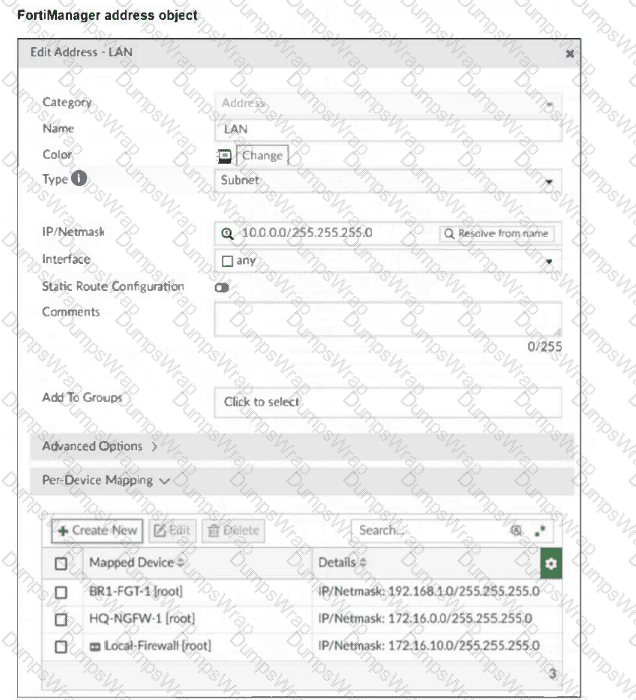
Which IP/netmask will be present in the LAN firewall address object on the Remote-Firewall?

Options:

A.

172.16.0.0/255.255.255.0

B.

10.0.0.0/255.255.255.0

C.

192.168.1.0/255.255.255.0

D.

172.16.10.0/255.255.255.0

Question 19

A FortiManager administrator has moved a FortiGate device to a new ADOM, but they cannot see the policy or object configurations for that FortiGate.

What should the administrator do to see the policy or object configurations?

Options:

A.

Use ADOM shared objects to restore all missing data.

B.

Reset the device and add it to the new ADOM again.

C.

Import the policy package manually using the Import Configuration wizard.

D.

Use ADOM sync to restore the missing configurations.

Page: 1 / 7
Total 65 questions