
Fortinet NSE 4 - FortiOS 7.6 Administrator Questions and Answers
Refer to the exhibit.

Which two ways can you view the log messages shown in the exhibit? (Choose two.)
Options:
By right clicking the implicit deny policy
Using the FortiGate CLI command diagnose log test
By filtering by policy universally unique identifier (UUID) and application name in the log entry
In the Forward Traffic section
Answer:
C, DExplanation:
The exhibit shows a FortiGate UTM application control log with fields such as:
type= " utm "
subtype= " app-ctrl "
action= " block "
policyid=1
appid=30220
appcat= " Video/Audio "
service= " HTTP "
apprisk= " elevated "
This is a forward traffic security log, generated by Application Control applied to a firewall policy.
Why the correct answers are C and D
C. By filtering by policy universally unique identifier (UUID) and application name in the log entry
Correct.
FortiOS logs can be viewed and filtered in:
Log & Report → Forward Traffic
Administrators can filter logs using fields such as:
Policy ID / Policy UUID
Application name (app)
Application ID (appid)
The log entry clearly includes application-related fields, making filtering by policy and application a valid and documented way to view these logs.
D. In the Forward Traffic section
Correct.
The log is a UTM Application Control log for traffic passing through a firewall policy.
Such logs are displayed under:
Log & Report → Forward Traffic
This is the standard and correct location to view application control, web filter, IPS, and other security profile logs related to user traffic.
Why the other options are incorrect
A. By right clicking the implicit deny policy
Incorrect.
Implicit deny policies do not generate UTM forward traffic logs like the one shown.
Application control logs are generated only by explicit firewall policies with security profiles enabled.
B. Using the FortiGate CLI command diagnose log test
Incorrect.
diagnose log test is used to test log connectivity and log settings, not to view historical log entries.
It does not display traffic or UTM logs.
Which statement correctly describes NetAPI polling mode for the FSSO collector agent?
Options:
The collector agent uses a Windows API to query DCs for user logins.
The NetSessionEnum function is used to track user logouts.
NetAPI polling can increase bandwidth usage in large networks.
The collector agent must search Windows application event logs.
Answer:
BExplanation:
NetAPI: Polls temporary sessions created on the DC when a user logs on or logs off and calls the NetSessionEnum function on Windows. It’s faster than the WinSec and WMI methods; however, it can miss some logon events if a DC is under heavy system load. This is because sessions can be quickly created and purged form RAM, before the agent has a chance to poll and notify FG.
An administrator creates a new address object on the root FortiGate (HQ-NGFW-1) in the Security Fabric. After synchronization, this object is not available on the downstream FortiGate (HQ-ISFW).
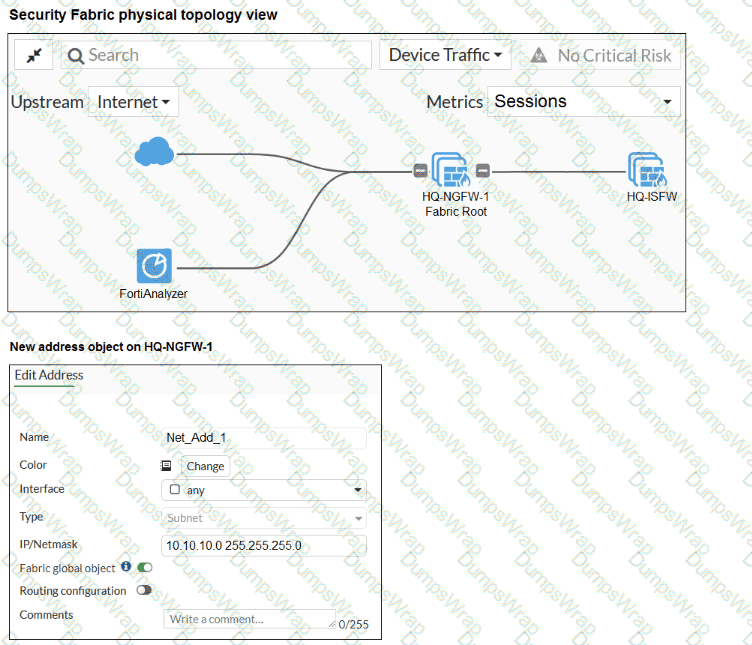
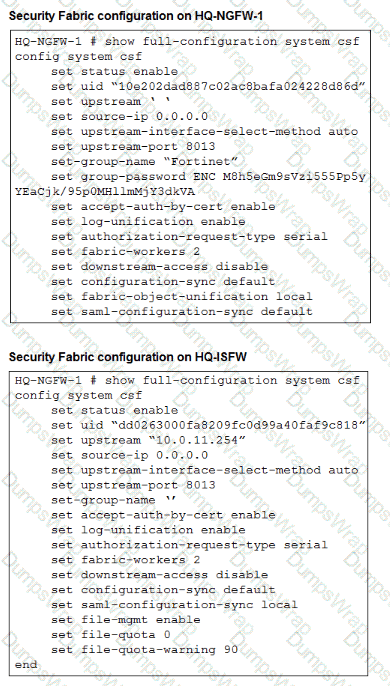
What must the administrator do to synchronize the address object?
Options:
Change the csf setting on HQ-ISFW (downstream) to set configuration-sync local.
Change the csf setting on HQ-ISFW (downstream) to set saml-configuration-sync default.
Change the csf setting on HQ-NGFW-1 (root) to set fabric-object-unification default.
Change the csf setting on both devices to set downstream-access enable.
Answer:
CExplanation:
The study guide text surfaced from the PDF did not return a matching paragraph for fabric-object-unification, but the exhibit itself shows these critical details:
On HQ-NGFW-1 , set configuration-sync default and set fabric-object-unification local
On HQ-ISFW , set configuration-sync default
The new address object on HQ-NGFW-1 has Fabric global object enabled
Those exhibit settings indicate that the object is intended to be a fabric-wide object, but the root FortiGate is currently configured with fabric-object-unification local , which prevents that object from being unified across the fabric.
Technical Deep Dive:
The correct answer is C .
Here is the key logic:
The address object was created on the root FortiGate with Fabric global object enabled .
Normal configuration sync is already set to default , so this is not a generic sync-disabled problem.
The root device is specifically configured with set fabric-object-unification local .
That setting keeps fabric objects local to the device rather than unifying them across downstream fabric members.
Therefore, to make the object propagate as a shared Security Fabric object, the administrator must change the root setting to:
config system csf
set fabric-object-unification default
end
Why the other options are wrong:
A is wrong because the downstream device already has configuration-sync default, and changing it to local would make synchronization more restrictive, not less.
B is wrong because saml-configuration-sync is unrelated to firewall address object synchronization.
D is wrong because downstream-access controls downstream management access behavior, not fabric object propagation.
Operationally, this feature matters when you want shared address objects, services, and policy-referenced objects to remain consistent across the Security Fabric. It reduces duplicate object administration and helps keep policy logic normalized across root and downstream FortiGate devices.
Refer to the exhibit.
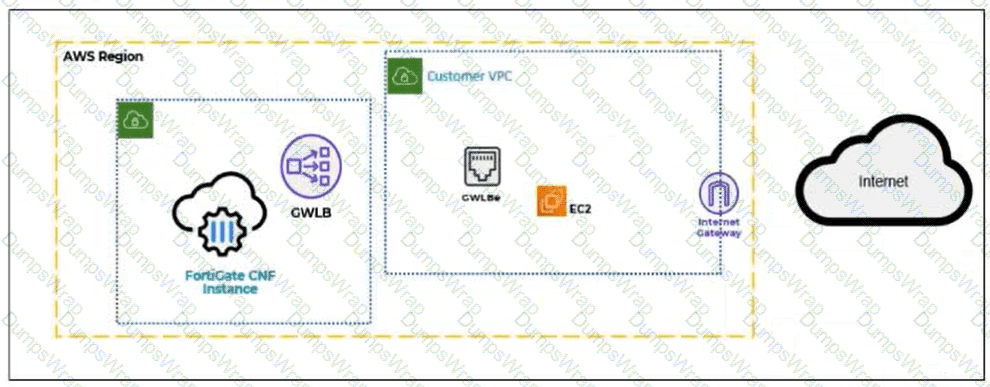
A partial cloud topology is shown.
You deployed a FortiGate Cloud-Native Firewall (CNF) in AWS for FortiGate CNF policy enforcement for EC2 instance traffic. Which path does the EC2 traffic take from the EC2 instance to the internet?
Options:
EC2 instance → GWLBe → FortiGate CNF → GWLBe → IGW → internet
EC2 instance → Internet Gateway (IGW) → Gateway Load Balancer (GWLB) → FortiGate CNF → internet
EC2 instance → FortiGate CNF → GWLB → GWLBe → IGW → internet
EC2 instance → GWLB endpoint (GWLBe) → FortiGate CNF → IGW → internet
Answer:
AExplanation:
FortiGate CNF in AWS uses a Gateway Load Balancer endpoint (GWLBe) in the protected VPC to steer workload traffic toward the FortiGate CNF service for inspection. The EC2 instance does not send traffic directly to the internet gateway first, and the CNF is not placed inline as a normal VM firewall inside the EC2 subnet. Instead, AWS routing sends the EC2 traffic to the relevant GWLBe. The traffic is then forwarded to FortiGate CNF, where security policies are evaluated and enforced. If the traffic is allowed, it is returned to the same GWLBe and then continues toward the internet gateway. Therefore, the correct traffic path is EC2 instance → GWLBe → FortiGate CNF → GWLBe → IGW → internet.
Refer to the exhibit.
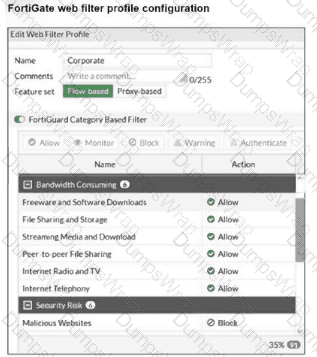
The exhibit shows the FortiGuard Category Based Filter section of a corporate web filter profile. An administrator must block access to download.com, which belongs to the Freeware and Software Downloads category. The administrator must also allow other websites in the same category. What are two solutions for satisfying the requirement? (Choose two answers)
Options:
Configure a static URL filter entry for download.com with Type and Action set to Wildcard and Block, respectively.
Configure a web override rating for download.com and select Malicious Websites as the subcategory.
Configure a separate firewall policy with action Deny and an FQDN address object for *.download.com as destination address.
Set the Freeware and Software Downloads category Action to Warning.
Answer:
A, BExplanation:
“In FortiOS, there are three main components of web filtering:
• Web content filtering...
• URL filtering: uses URLs and URL patterns to block or exempt web pages from specific sources ...
• FortiGuard Web Filtering service...”
“In the web filter profile, Fortiguard category filtering enhances the web filter features. Rather than block or allow websites individually, it looks at the category that a website has been rated with. Then, FortiGate takes action based on that category, not based on the URL.”
“If you consider that a particular URL does not have the correct category, you can ask to re-evaluate the rating in the Fortinet URL Rating Submission website. You can also override a web rating for an exceptional URL in the FortiGate configuration. ”
“Static URL filtering is another web filter feature, which provides more granularity. Configured URLs in the URL filter are checked from top to bottom against the visited websites. If FortiGate finds a match, it applies the configured action.”
“To find the exact match, URL filtering has three pattern types: Simple, Regular Expressions, and Wildcard .”
“So, with these different features, what is the inspection order? If you have enabled many of them, the inspection order flows as follows:
The local static URL filter
FortiGuard category filtering...”
Technical Deep Dive:
The correct answers are A and B .
A is correct because a static URL filter gives per-URL granularity. Since the category Freeware and Software Downloads is currently allowed in the profile, adding a local static URL filter entry for download.com with Block lets FortiGate deny only that site while continuing to allow the rest of the category. This also aligns with the documented inspection order, where the local static URL filter is checked before FortiGuard category filtering .
B is also correct because a web rating override can reclassify a specific exceptional URL. If download.com is re-rated into a blocked category such as Malicious Websites , it will be blocked by the profile while other sites in Freeware and Software Downloads remain allowed.
Why the others are wrong:
C is not the intended web-filter solution. A firewall policy with an FQDN object operates at policy/routing resolution level, not as a category-aware web filtering exception.
D is wrong because changing the whole category to Warning affects all sites in that category, not just download.com.
In production, the cleaner design is usually: keep the category allowed, then add a local URL-filter exception or a web-rating override for the specific site . For HTTPS traffic, remember FortiGate still needs enough SSL inspection visibility to identify the hostname correctly. A representative CLI approach for URL filtering is:
config webfilter urlfilter
edit 1
config entries
edit 1
set url " download.com "
set type wildcard
set action block
next
end
next
end
This is the most deterministic way to block one site without penalizing the rest of the category.
Which three methods are used by the collector agent for AD polling? (Choose three answers)
Options:
NetAPI
WMI
WinSecLog
DNS reverse lookup
FSSO REST API
Answer:
A, B, CExplanation:
“As previously stated, collector agent-based polling mode has three methods (or options) for collecting login information. The order on the slide from left to right shows most recommend to least recommended:
• WMI ...
• WinSecLog ...
• NetAPI ...”
Technical Deep Dive:
The correct three AD polling methods are WMI, WinSecLog, and NetAPI . These are the collector-agent polling options FortiGate FSSO uses against Windows domain controllers. WMI is generally the most efficient because the DC returns requested login events directly. WinSecLog polls Windows Security Event Logs and is typically more reliable than NetAPI for not missing recorded logons. NetAPI can be faster, but it is more prone to missing events under load because it depends on temporary session information rather than persistent security logs.
Why the other options are wrong:
DNS reverse lookup is not one of the three AD polling methods. DNS is used by FSSO to resolve workstation names to IP addresses and to track IP changes, but it is not itself a polling method for collecting AD logon events. FSSO REST API is also not one of the documented collector-agent AD polling methods in the study guide.
From an operational standpoint, FSSO login collection and workstation verification are separate functions. The collector agent may still rely on DNS and workstation checks after a login is learned, but the actual AD polling methods remain only WMI, WinSecLog, and NetAPI . On a FortiGate, when troubleshooting FSSO behavior, you would typically validate the collector feed and user cache with commands such as:
diagnose debug authd fsso list
diagnose debug authd fsso server-status
Those commands help confirm whether the users gathered by the collector through one of those three polling methods are reaching FortiGate correctly.
Refer to the exhibits.
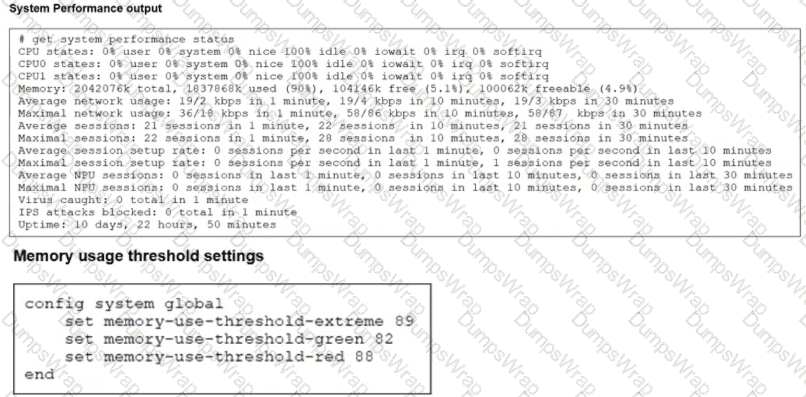
The exhibits show the system performance output and default configuration of high memory usage thresholds on a FortiGate device.
Based on the system performance output, what are the two possible outcomes? (Choose two.)
Options:
FortiGate drops new sessions.
Administrators can access FortiGate only through the console port.
Administrators can change the configuration.
FortiGate has entered conserve mode.
Answer:
A, DExplanation:
“Three different configurable thresholds define when FortiGate enters and exits conserve mode. If memory usage goes above the percentage of total RAM defined as the red threshold , FortiGate enters conserve mode.”
“If memory usage keeps increasing, it might exceed the extreme threshold . While memory usage is above this highest threshold, all new sessions are dropped. ”
“What actions does FortiGate take to preserve memory while in conserve mode?
• FortiGate does not accept configuration changes , because they might increase memory usage.”
“However, if the memory usage exceeds the extreme threshold, new sessions are always dropped , regardless of the FortiGate configuration.”
Technical Deep Dive:
The system performance output shows Memory: 2042076k total, 1837868k used (90%) . The configured thresholds shown are:
green = 82
red = 88
extreme = 89
Because memory usage is 90% , it is:
Above the red threshold (88%) → so FortiGate has entered conserve mode
Above the extreme threshold (89%) → so all new sessions are dropped
That makes A and D correct.
Why the others are wrong:
B is not stated anywhere in the study guide as an automatic outcome of conserve mode.
C is the opposite of what the guide says. In conserve mode, FortiGate does not accept configuration changes .
A useful verification command is:
diagnose hardware sysinfo conserve
Operationally, once a FortiGate crosses the red threshold , it starts protecting itself by limiting behavior that could increase memory usage. Once it crosses the extreme threshold , it becomes more severe and drops new sessions to keep the system from becoming unstable.
Refer to the exhibit.
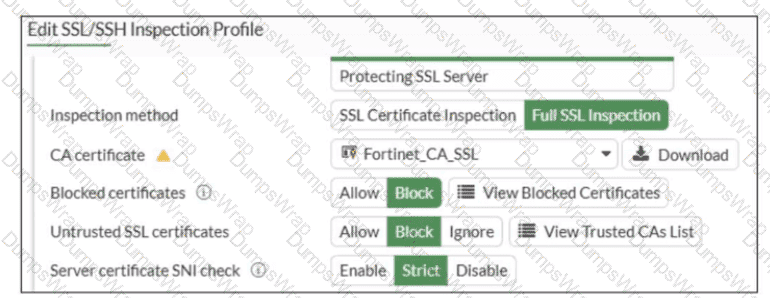
What would be the impact of these settings on the Server certificate SNI check configuration on FortiGate?
Options:
FortiGate will accept and use the CN in the server certificate for URL filtering if the SNI does not match the CN or SAN fields.
FortiGate will accept the connection with a warning if the SNI does not match the CN or SAN fields.
FortiGate will close the connection if the SNI does not match the CN or SAN fields.
FortiGate will close the connection if the SNI does not match the CN and SAN fields
Answer:
CExplanation:
Based on the exhibit and the FortiOS 7.6 SSL/SSH Inspection documentation, the correct answer is C.
Understanding the Exhibit Configuration
In the SSL/SSH Inspection Profile, the following settings are shown:
Inspection method: Full SSL Inspection
Server certificate SNI check: Strict
This setting directly controls how FortiGate validates the Server Name Indication (SNI) provided by the client during the TLS handshake.
FortiOS 7.6 Behavior of “Server certificate SNI check”
FortiOS supports three modes for Server certificate SNI check:
Disable
No validation between SNI and server certificate.
Enable
FortiGate checks SNI against the certificate.
If mismatch occurs, FortiGate may still allow the session with reduced validation.
Strict
FortiGate enforces a strict match.
The SNI must match either the CN (Common Name) or one of the SAN (Subject Alternative Name) entries in the server certificate.
If the SNI does not match either CN or SAN, the TLS session is immediately terminated.
The exhibit clearly shows Strict selected.
Why Option C is Correct
With Strict enabled, FortiGate rejects the TLS connection when:
The SNI does not match the CN, and
The SNI does not match any SAN entry
This results in the connection being closed, not allowed with warnings or fallback behavior.
Therefore:
C. FortiGate will close the connection if the SNI does not match the CN or SAN fields is exactly the documented behavior.
Why the Other Options Are Incorrect
A: FortiGate does not fall back to using the CN for URL filtering when Strict is enabled.
B: There is no “accept with warning” behavior in Strict mode.
D: Incorrect logical condition. FortiGate does not require mismatch with both CN and SAN simultaneously; a mismatch with either valid field set is sufficient to close the connection.
Refer to the exhibit.
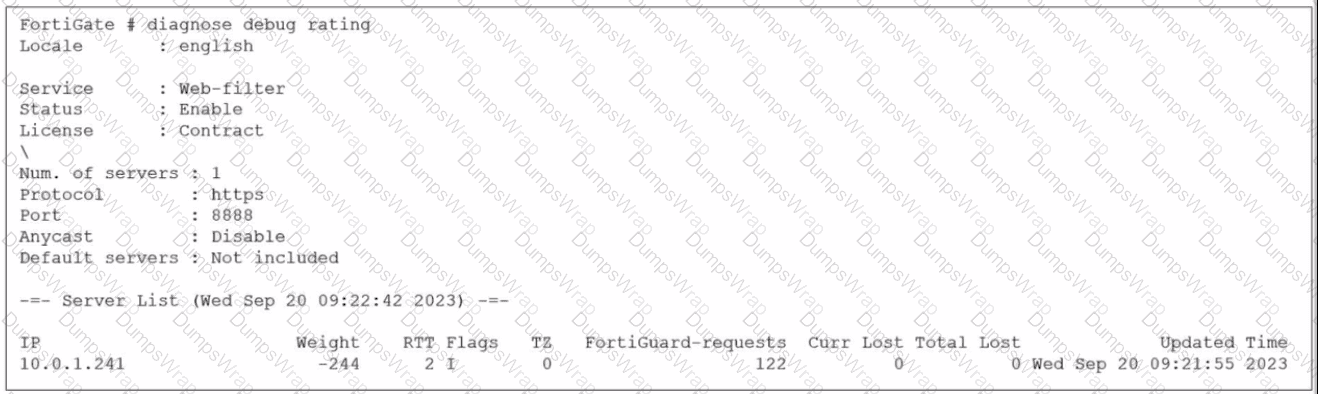
Which two statements about the FortiGuard connection are true? (Choose two.)
Options:
The weight increases as the number of failed packets rises
You can configure unreliable protocols to communicate with FortiGuard Server.
FortiGate identified the FortiGuard Server using DNS lookup.
FortiGate is using the default port for FortiGuard communication.
Answer:
A, DExplanation:
Based on the diagnose debug rating output provided in the exhibit and the standard behavior of the FortiGuard connection mechanism in FortiOS 7.6:
Weight Calculation (Statement A is True):
In FortiOS, the rating server selection process uses a weight-based system.
According to official documentation, the weight increases with failed packets (lost responses) and decreases with successful packets.
This mechanism ensures that servers with poor reliability are penalized by having higher weights, effectively pushing them to the bottom of the preference list.
Default Port Communication (Statement D is True):
The exhibit explicitly shows the communication is using HTTPS on port 8888.
In FortiOS 7.6 (and legacy versions like 6.2/6.4), FortiGuard filtering supports specific protocols and ports: HTTPS on ports 443, 53, and 8888, where 8888 is considered a default port for FortiGuard queries.
Ports 53 and 8888 are standard for both UDP and TCP/HTTPS FortiGuard communications to avoid common firewall blocks on standard web ports.
Why other options are incorrect:
Statement B (Unreliable protocols): While you can configure UDP (which is unreliable), the exhibit specifically shows HTTPS is being used, which is a reliable (TCP-based) protocol.
Statement C (DNS lookup): In the " Flags " column of the server list, a server found via DNS lookup would be marked with the " D " flag. The exhibit shows the flag as " I " (indicating the last INIT request was sent to this server) and a numeric " 2, " but the " D " flag is absent. Additionally, the IP 10.0.1.241 is a private address, suggesting it is a manually configured FortiManager or local override server rather than a public server found via global DNS lookup.
An administrator manages a FortiGate model that supports NTurbo
How does NTurbo acceleration enhance antivirus performance?
Options:
For flow-based inspection. NTurbo establishes a dedicated data path to redirect traffic between the IPS engine and FortiGate ingress and egress interfaces.
For flow-based inspection. NTurbo creates two inspection sessions on the FortiGate device.
For proxy-based inspection. NTurbo offloads traffic to the content processor.
For proxy-based inspection. NTurbo buffers the whole file and then sends it to the antivirus engine.
Answer:
AExplanation:
According to the FortiOS 7.6 Administration Guide and Fortinet hardware acceleration (NTurbo) documentation, the correct answer is A.
What NTurbo Is (FortiOS 7.6 – Verified)
NTurbo is a hardware-based acceleration feature available on specific FortiGate models. It is designed to improve antivirus and IPS performance when operating in flow-based inspection mode.
NTurbo works by creating a fast, optimized data path between:
FortiGate ingress interface
IPS/AV engine
FortiGate egress interface
This minimizes CPU involvement and reduces packet traversal overhead.
Why Option A Is Correct
A. For flow-based inspection, NTurbo establishes a dedicated data path to redirect traffic between the IPS engine and FortiGate ingress and egress interfaces.
This is exactly how NTurbo works, as documented:
NTurbo applies to flow-based inspection only
It accelerates IPS and antivirus scanning
It creates a dedicated fast path that bypasses unnecessary processing steps
This significantly improves throughput and lowers latency
This description matches Fortinet’s official explanation of NTurbo.
Why the Other Options Are Incorrect
B. NTurbo creates two inspection sessions
Incorrect. NTurbo does not duplicate sessions; it optimizes the packet path.
C. NTurbo offloads traffic to the content processor (proxy-based)
Incorrect. NTurbo does not apply to proxy-based inspection and does not offload to content processors.
D. NTurbo buffers the whole file and then sends it to the antivirus engine
Incorrect. Buffering entire files is a proxy-based behavior, not NTurbo.
FortiGate is integrated with FortiAnalyzer and FortiManager.
When creating a firewall policy, which attribute must an administrator include to enhance functionality and enable log recording on FortiAnalyzer and FortiManager?
Options:
Universally Unique Identifier
Policy ID
Sequence ID
Log ID
Answer:
AExplanation:
In FortiOS 7.6, when FortiGate is integrated with FortiAnalyzer and FortiManager, firewall policies rely on a Universally Unique Identifier (UUID) to ensure proper policy tracking, synchronization, and log correlation across devices.
Why the UUID is required
Every firewall policy in FortiOS has a UUID.
FortiManager uses the UUID to:
Track policies across managed FortiGate devices
Maintain policy consistency during installs and revisions
FortiAnalyzer uses the UUID to:
Correlate logs accurately to the correct firewall policy
Preserve log association even if policy order or policy ID changes
Without a UUID:
Policy-to-log mapping can break
FortiManager cannot reliably manage or synchronize policies
FortiAnalyzer log analysis becomes inconsistent
This is explicitly documented in Fortinet administration and logging architecture references.
Why the other options are incorrect
B. Policy IDPolicy ID can change when policies are moved and is not reliable for long-term correlation across FortiManager and FortiAnalyzer.
C. Sequence IDSequence ID reflects GUI ordering only and has no role in log correlation.
D. Log IDLog ID is generated per log event, not per firewall policy.
When configuring a FortiGate in a multi-WAN setup, why would an administrator enable session preservation on an interface? (Choose one answer)
Options:
To allow the FortiGate to dynamically change interfaces for all active sessions when a WAN link fails
To make sure all sessions without source NAT enabled always use the primary WAN link
To improve security by forcing users to authenticate again when the WAN link changes
To ensure that existing SSL VPN connections remain on the same interface even if route changes occur
Answer:
DExplanation:
A closely related routing principle from the guide is:
“For each session, FortiGate performs two route lookups... After completing these two lookups, FortiGate writes the routing information to its session table. Subsequent packets are routed according to the session table, not the routing table.”
Also, the guide notes an HA limitation that helps explain the same design principle for FortiGate-terminated sessions:
“Enabling session pickup allows active sessions to be seamlessly handed picked up by the new primary in the event of an HA failover... Note that there are some limitations to this – for example, any sessions that terminate at the FortiGate itself ( e.g. SSL VPN, proxy sessions ) cannot be handed off to another FortiGate and must be restarted on the new primary.”
Technical Deep Dive:
The correct answer is D .
In multi-WAN environments, session preservation is used so that traffic for sessions that are tightly bound to the FortiGate interface they terminate on—most notably SSL VPN and other FortiGate-terminated flows—does not suddenly switch to another egress interface just because the routing table changes. Those sessions are sensitive to interface consistency. If replies start leaving through a different WAN after a route recalculation, the remote peer may see an address/interface mismatch and the session can break.
That means:
A is the opposite of session preservation. Preservation is meant to avoid moving active sessions around.
B is not the purpose of the feature.
C is unrelated.
D correctly describes why an administrator would enable it.
Operationally, this matters most for SSL VPN , management-plane flows, and other sessions that terminate on the FortiGate itself , not just ordinary transit traffic. Transit sessions are generally tracked in the session table and can often survive normal routing behavior more gracefully, but FortiGate-terminated sessions are much more sensitive to WAN/interface changes.
A network administrator is configuring an IPsec VPN tunnel for a sales employee travelling abroad.
Which VPN Wizard template must the administrator apply?
Options:
Remote Access
Hub-and-Spoke
Site-to-Site
Dial-up User
Answer:
AExplanation:
Exact Extract:
“If you want the wizard to configure the VPN for you, then select the template type Site to Site, Hub-and-Spoke, or Remote Access that best matches your VPN.”
“Use remote access VPNs when remote internet users need to securely connect to the office to access corporate resources. The remote user connects to a VPN server located on the corporate premises, such as FortiGate, to establish a secure tunnel.”
“A common use of the IPsec wizard is for configuring a remote access VPN for FortiClient users.”
Technical Deep Dive:
The correct answer is A. Remote Access .
A sales employee travelling abroad is a remote user , not another branch office or headquarters firewall. That means the tunnel type is a remote access VPN , where the user connects from an internet location back to the corporate FortiGate. In this design, the remote client typically uses FortiClient , and FortiGate acts as the VPN server.
Why the other options are incorrect:
Hub-and-Spoke is for multi-site branch connectivity through a central hub.
Site-to-Site is for connecting two fixed networks, such as branch office to headquarters.
Dial-up User describes the remote-user behavior conceptually, but it is not the IPsec Wizard template choice shown in the study guide. The wizard template to select is Remote Access .
So for a travelling sales employee, the administrator must choose the Remote Access VPN Wizard template.
You have created a web filter profile named restrictmedia-profile with a daily category usage quota.
When you are adding the profile to the firewall policy, the restrict_media-profile is not listed in the available web profile drop down.
What could be the reason?
Options:
The web filter profile is already referenced in another firewall policy.
The firewall policy is in no-inspection mode instead of deep-inspection.
The naming convention used in the web filter profile is restricting it in the firewall policy.
The inspection mode in the firewall policy is not matching with web filter profile feature set.
Answer:
DExplanation:
In FortiOS 7.6, web filter profiles are inspection-mode dependent. Certain advanced web filtering features—such as daily category usage quota—are only supported when the firewall policy is operating in proxy-based inspection mode.
Why the profile is not visible
The profile restrictmedia-profile includes a daily category usage quota.
Daily quotas are a proxy-based web filtering feature.
If the firewall policy is configured with:
Inspection mode: Flow-based
Then FortiGate will not display proxy-only web filter profiles in the Web Filter drop-down list.
FortiGate automatically filters the available profiles based on feature compatibility with the policy’s inspection mode.
This behavior is explicitly documented in the FortiOS 7.6 Web Filtering and Inspection Mode Compatibility sections.
Why the other options are incorrect
A. Already referenced in another firewall policyWeb filter profiles can be reused across multiple policies. This does not hide them.
B. Firewall policy is in no-inspection mode instead of deep-inspectionSSL inspection depth affects HTTPS visibility, not whether a web filter profile appears in the drop-down list.
C. Naming convention restrictionFortiOS does not restrict profile selection based on naming conventions.
Which two statements describe characteristics of automation stitches? (Choose two answers)
Options:
Actions involve only devices included in the Security Fabric.
An automation stitch can have multiple triggers.
Multiple actions can run in parallel.
Triggers can involve external connectors.
Answer:
C, DExplanation:
According to the FortiOS 7.6 Administration Guide and Security Fabric documentation, automation stitches are designed to automate responses to security and system events across the network. A core characteristic of these stitches is their flexibility in action execution; specifically, multiple actions can run in parallel (Statement C). While the system allows for sequential execution with configurable delays between actions, the default behavior or configuration option allows for simultaneous responses, such as sending an email notification while simultaneously triggering a webhook or quarantining a host.
Furthermore, triggers can involve external connectors (Statement D). While many triggers are local to the FortiGate (such as reboots or log events), the Security Fabric allows the FortiGate to monitor and react to events from external components like FortiAnalyzer , FortiSIEM , or FortiClient EMS . For example, a FortiAnalyzer event handler can act as the trigger for a stitch on the root FortiGate. Statement A is incorrect because actions can target external systems like AWS Lambda or Slack which are not internal Fabric devices. Statement B is incorrect because each automation stitch is typically defined by a single trigger , though that trigger itself can be broad (e.g., " Any Security Rating Notification " ).
You are encountering connectivity problems caused by intermediate devices blocking IPsec traffic. In which two ways can you effectively resolve the problem? (Choose two answers)
Options:
You can use SSL VPN tunnel mode to prevent problems with blocked ESP and UDP ports (500 or 4500).
You can turn on fragmentation to fix large certificate negotiation problems.
You can configure a hub-and-spoke topology with SSL VPN tunnels to bypass blocked UDP ports.
You should use the protocol IKEv2.
Answer:
A, BExplanation:
“IKE uses UDP port 500. If NAT-T is enabled in a NAT scenario, IKE uses UDP port 4500.”
“IKEv2 provides a simpler operation, which is the result of using a single exchange mode and requiring less messages to bring up the tunnel.”
For the specific workaround asked in this question, Fortinet’s official documentation states that for an IP-level VPN, SSL VPN tunnel mode is useful to avoid issues caused by intermediate devices such as “ESP packets being blocked,” “UDP ports 500 or 4500 being blocked,” and “fragments being dropped, causing IKE negotiation that uses large certificates to fail if the peer does not support IKE fragmentation.” ( Fortinet Document Library )
Fortinet’s official documentation also states: “The ip-fragmentation command controls packet fragmentation before IPsec encapsulation, which can benefit packet loss in some environments.” ( Fortinet Document Library )
Technical Deep Dive:
The correct answers are A and B .
A is correct because SSL VPN tunnel mode can bypass the classic IPsec transport problems caused by intermediate devices filtering ESP or blocking UDP 500/4500 . Fortinet explicitly documents this as a practical workaround. ( Fortinet Document Library )
B is correct because enabling fragmentation helps when IKE negotiation uses large certificates and fragments are being dropped in transit. Fortinet documents this exact failure scenario and the related fragmentation control. ( Fortinet Document Library )
Why the others are not correct:
C is not the key fix. Hub-and-spoke is a topology choice, not the actual mechanism that solves blocked ESP or UDP 500/4500.
D is not sufficient for this problem. IKEv2 uses fewer messages, but it still relies on IPsec/IKE transport and does not itself solve intermediate devices blocking ESP or UDP 500/4500. The source PDF mentions simpler operation, not blocked-port avoidance.
So, the two effective fixes are:
Use SSL VPN tunnel mode
Enable fragmentation
An administrator wants to configure dead peer detection (DPD) on IPsec VPN for detecting dead tunnels. The requirement is that FortiGate sends DPD probes only when there is no inbound traffic.
Which DPD mode on FortiGate meets this requirement?
Options:
On Demand
Enabled
On Idle
Usabled
Answer:
AExplanation:
Based on the FortiOS 7.6 Infrastructure and IPsec VPN documentation, Dead Peer Detection (DPD) can be configured in three primary modes: On Demand, On Idle, and Disabled.
On Demand (Default Mode): This mode is specifically designed to minimize unnecessary traffic. In this mode, FortiGate sends DPD probes only when there is no inbound traffic but the FortiGate is attempting to send outbound traffic. Because network communication is typically bidirectional, the absence of inbound traffic while outbound traffic is being sent is a primary indicator of a potentially dead tunnel. This matches the specific requirement described in the question.
On Idle: In this mode, DPD probes are sent if no traffic (neither inbound nor outbound) has been observed in the tunnel for a specific period. It verifies the tunnel status even when the connection is completely idle.
Enabled: In older versions or specific CLI contexts, " Enabled " may refer to periodic DPD, but in the current FortiOS 7.x/7.6 GUI and CLI terminology for Phase 1 settings, the active modes are defined as on-demand or on-idle.
Disabled: In this mode, the FortiGate does not send DPD probes but will still respond to DPD probes sent by the remote peer.
The requirement that the administrator wants probes sent only when there is no inbound traffic (usually implying the FortiGate is sending but not receiving) is the fundamental definition of the On Demand mechanism in the Fortinet curriculum.
A new administrator is configuring FSSO authentication on FortiGate using DC Agent Mode. Which step is not part of the expected process?
Options:
The DC agent sends login event data directly to FortiGate.
FortiGate determines user identity based on the IP address in the FSSO list.
The collector agent forwards login event data to FortiGate.
The user logs into the windows domain.
Answer:
AFortiGate is operating in NAT mode and has two physical interfaces connected to the LAN and DMZ networks respectively. Which two statements about the requirements of connected physical interfaces on FortiGate are true? (Choose two.)
Options:
Both interfaces must have DHCP enabled and interfaces set to LAN and DMZ roles assigned.
Both interfaces must have the interface role assigned.
Both interfaces must have directly connected routes on the routing table.
Both interfaces must have IP addresses assigned.
Answer:
C, DExplanation:
In FortiOS 7.6, when a FortiGate is operating in NAT mode, physical interfaces that participate in traffic forwarding (such as LAN and DMZ) must meet certain fundamental requirements.
Correct statements
D. Both interfaces must have IP addresses assigned.
Correct
In NAT mode, FortiGate operates as a Layer-3 device.
Every interface that forwards traffic must have an IP address.
Without an IP address:
The interface cannot participate in routing
Firewall policies cannot be applied correctly
This is a mandatory requirement.
C. Both interfaces must have directly connected routes on the routing table.
Correct
When an IP address is assigned to an interface, FortiGate automatically installs a connected route for that subnet in the routing table.
These connected routes are required so FortiGate:
Knows how to reach the locally attached networks
Can forward traffic between LAN and DMZ
While administrators do not manually create these routes, their presence is required for correct operation.
Why the other options are incorrect
A. Both interfaces must have DHCP enabled and roles assigned.
Incorrect
DHCP is optional; interfaces can use static IPs.
Interface roles (LAN, DMZ, WAN) are administrative/GUI aids, not functional requirements.
B. Both interfaces must have the interface role assigned.
Incorrect
Interface roles affect GUI grouping and some default behavior.
They are not required for NAT mode operation or traffic forwarding.
Refer to the exhibits.
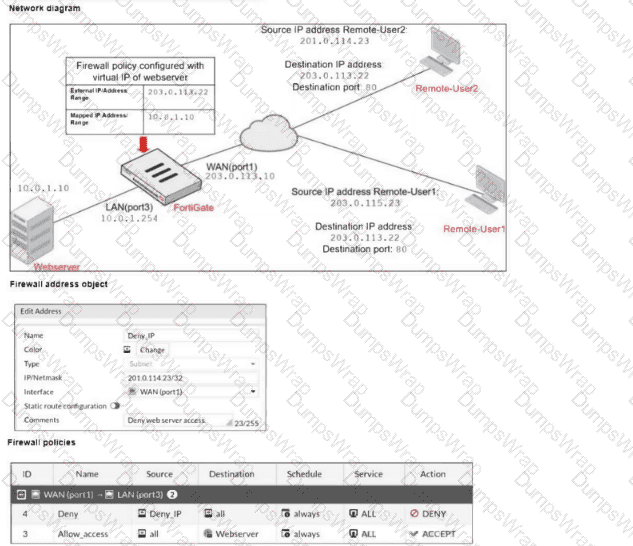
The exhibits show a diagram of a FortiGate device connected to the network, and the firewall configuration. An administrator created a Deny policy with default settings to deny Webserver access for Remote-User2. The policy should work such that Remote-User1 must be able to access the Webserver while preventing Remote-User2 from accessing the Webserver. Which additional configuration can the administrator add to a deny firewall policy, beyond the default behavior, to block Remote-User2 from accessing the Webserver? (Choose one answer)
Options:
Disable match-vip in the Allow_access policy.
Configure a One-to-One IP Pool object in a new policy.
Set the Destination address as Webserver in the Deny policy.
Set the Destination address as Deny_IP in the Allow_access policy.
Answer:
CExplanation:
“The example on this slide shows how FortiGate handles two incoming connections to the same external address, but on different ports... Both connections match the firewall policy ID, which references two VIPs as destination.”
“In FortiOS, VIPs and firewall address objects are completely different. They are stored separately with no overlap. Starting in version 7.2.4, the parameter match-vip is enable by default and allows the firewall address objects to match VIPs.”
“In the example shown on this slide, the destination of the first firewall policy is set to all . This means all destination addresses (0.0.0.0/0), by default, including the external addresses defined on the VIPs.”
Technical Deep Dive:
The correct answer is C. Set the Destination address as Webserver in the Deny policy.
FortiGate allows VIP objects to be used as destination objects in firewall policies . The study guide explicitly shows incoming connections matching firewall policies that reference VIPs as the destination. That means if the administrator wants to deny only Remote-User2 → Webserver , the clean and specific way is to set the Destination in the Deny policy to the Webserver VIP .
Why this is the best answer:
With the default deny-policy behavior, destination = all plus match-vip enabled by default means the deny rule can match VIP external addresses too.
But that is broader than necessary. If the intent is specifically to block access only to the published Webserver , then the deny rule should explicitly reference the Webserver VIP as the destination.
Why the other options are wrong:
A is incorrect because match-vip is relevant to deny policy behavior, and the study guide notes that match-vip is available only when the firewall policy action is set to DENY . An allow policy is not where this setting applies.
B is unrelated. IP pools are for SNAT behavior, not for selectively denying inbound access to a VIP.
D is incorrect because Deny_IP is the source object representing the remote user, not the destination web server.
So the proper additional configuration is to make the deny policy specific by setting:
Source = Deny_IP
Destination = Webserver
Action = DENY
That blocks Remote-User2 from the VIP-published web server while still allowing Remote-User1 to reach it through the lower allow policy.
Which two statements are correct when the FortiGate device enters conserve mode? (Choose two.)
Options:
FortiGate refuses to accept configuration changes.
FortiGate halts complete system operation and requires a reboot to regain available resources.
FortiGate continues to transmit packets without IPS inspection when the fail-open global setting in IPS is enabled.
FortiGate continues to run critical security actions, such as quarantine.
Answer:
A, CRefer to the exhibit showing a debug flow output.
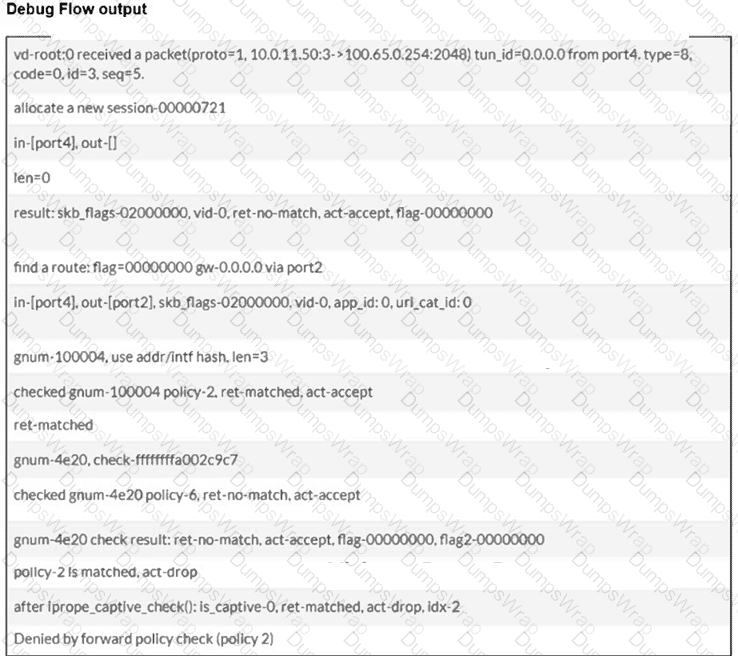
Which two conclusions can you make from the debug flow output? (Choose two answers)
Options:
The default gateway is configured on port2.
The RPF check fails.
The debug flow is for UDP traffic.
The matching firewall policy denies the traffic.
Answer:
A, DExplanation:
According to the FortiOS 7.6 Troubleshooting and Administration guides, the diagnose debug flow command provides a step-by-step trace of how the FortiGate unit processes a packet.
First, the line " find a route: flag=00000000 gw-0.0.0.0 via port2 " indicates that during the routing table lookup, the FortiGate matched the destination against its default route (represented by 0.0.0.0) and determined that the egress interface is port2 . This confirms that the default gateway for this traffic is reachable via port2 (Statement A).
Second, the debug trace concludes with the messages " policy-2 Is matched, act-drop " and " Denied by forward policy check (policy 2) " . This explicitly indicates that the packet successfully matched the criteria for firewall policy ID 2, and the action configured for that policy is set to Deny (Statement D).
Statement B is incorrect because a Reverse Path Forwarding (RPF) failure would be indicated by a specific " reverse path check fail, drop " message, which is absent here. Statement C is incorrect because the output shows " proto=1 " , which corresponds to ICMP (Ping) traffic. UDP traffic would be identified as protocol 17.
Refer to the exhibit.

What can you conclude from the log shown in the exhibit?
Options:
The IPS socket buffer is full and IPS engine needs more memory to create new sessions.
The IPS socket buffer is full and IPS engine cannot decode a packet.
The IPS scan is paused by the IPS diagnostic command with bypass mode option 5.
The IPS session scan is paused and reevaluating the packet because of a dirty flag.
Answer:
AExplanation:
“You can configure the fail-open setting under config ips global to control how the IPS engine behaves when the IPS socket buffer is full .”
“If the IPS engine does not have enough memory to build more sessions , the fail-open setting determines whether the FortiGate should drop the sessions or bypass the sessions without inspection .”
“It is important to understand that the IPS fail-open setting is not just for conserve mode—it kicks in whenever IPS fails. Most failures are due to a high CPU issue or a high memory (conserve mode) issue.”
Technical Deep Dive:
The correct answer is A .
The log text says:
logdesc= " IPS session scan paused "
action= " drop "
msg= " IPS session scan, enter fail open mode "
That combination indicates an IPS failure condition , specifically the condition described in the guide where the IPS socket buffer is full and the IPS engine lacks enough memory/resources to build additional sessions. In that state, FortiGate applies the configured IPS fail-open behavior . Since the log shows action= " drop " , the device is not bypassing those new sessions; it is dropping them.
Why the other choices are wrong:
B is wrong because the guide ties fail-open to socket buffer/resource exhaustion , not packet decode failure.
C is wrong because this is not evidence of a manual diagnostic pause.
D is wrong because the study guide does not associate this log with dirty-flag packet reevaluation.
Operationally, this usually points to high memory , high CPU , or conserve-mode pressure affecting the IPS engine. Useful checks are:
get system performance status
diagnose hardware sysinfo conserve
diagnose sys top
Those help confirm whether the IPS issue is being driven by memory pressure or CPU exhaustion.
Exhibits:
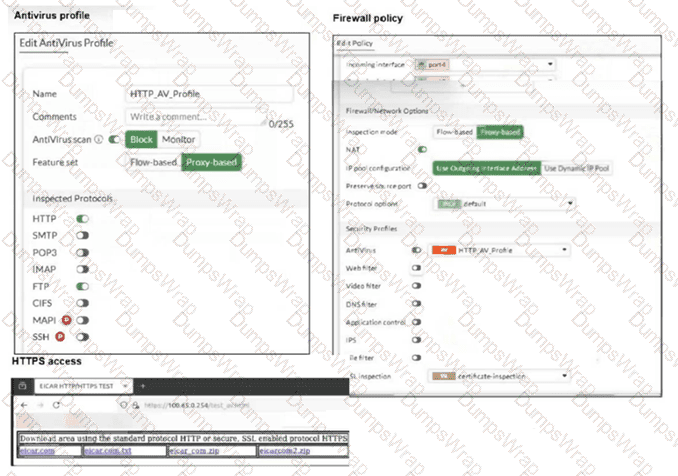
You are asked to implement an antivirus profile for files downloaded through FTP, HTTP, and HTTPS.
While testing, you are successful with HTTP and FTP protocols, but FortiGate does not block the file download over HTTPS.
What could be the cause?
Options:
The feature set in the antivirus profile is not set to Flow-based.
Web filter is not enabled on the firewall policy to complement the antivirus profile.
The action on the firewall policy is not set to deny.
The SSL inspection mode in the firewall policy is not deep content inspection.
Answer:
DExplanation:
“To perform SSL inspection on traffic flowing through the FortiGate device, you must allow the traffic with a firewall policy and apply an SSL inspection profile to the policy. Note that an SSL inspection profile alone will not trigger a security inspection. You must combine it with other security profiles like Antivirus, Web Filter, Application Control, or IPS.”
“By default, firewall policies are set with the no-inspection SSL profile. Therefore, any encrypted traffic flows through uninspected... For antivirus or IPS control, you should use a deep-inspection profile. ”
“When you use deep inspection, FortiGate impersonates the recipient of the originating SSL session, and then decrypts and inspects the content to find threats and block them . It then re-encrypts the content and sends it to the real recipient. Deep inspection protects from attacks that use HTTPS and other commonly used SSL-encrypted protocols...”
Technical Deep Dive:
The correct answer is D . HTTP and FTP are working because FortiGate can inspect those payloads directly with the antivirus profile. HTTPS is different because the traffic is encrypted. If the firewall policy uses only certificate inspection or another non-decrypting SSL mode, FortiGate can identify certificate/SNI information, but it cannot see the downloaded file contents. Without decrypting the HTTPS session, the antivirus engine never receives the payload to scan, so EICAR or other malware can pass.
Why the other options are wrong:
A is not the issue here. The exhibit shows the antivirus profile and policy are already aligned for proxy-based operation, and the failure is specific to HTTPS visibility.
B is wrong because web filter is not required for antivirus scanning.
C is wrong because firewall policies commonly use ACCEPT with security profiles; the antivirus engine can still block the file after policy match. The study guide explicitly says ACCEPT allows the session and then applies antivirus scanning and other packet-processing features.
To fix it, apply deep-inspection on the firewall policy:
config firewall policy
edit < policy-id >
set ssl-ssh-profile " deep-inspection "
set av-profile " HTTP_AV_Profile "
next
end
On real FortiGate hardware, this also has performance implications. Simple flow handling can often stay on accelerated paths, but full SSL deep inspection forces decryption and content scanning through the inspection engine, increasing CPU/WAD workload.
You have configured the below commands on a FortiGate.
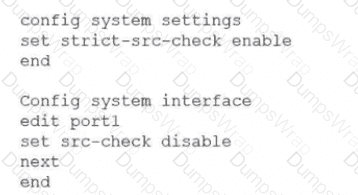
What would be the impact of this configuration on FortiGate?
Options:
FortiGate will enable strict RPF on all its interfaces and porti will be exempted from RPF checks.
FortiGate will enable strict RPF on all its interfaces and porti will be enable for asymmetric routing.
The global configuration will take precedence and FortiGate will enable strict RPF on all interfaces.
Port1 will be enabled with flexible RPF. and all other interfaces will be enabled for strict RPF
Answer:
AWhat is the primary FortiGate election process when the HA override setting is enabled? (Choose one answer)
Options:
Connected monitored ports > Priority > HA uptime > FortiGate serial number
Connected monitored ports > Priority > System uptime > FortiGate serial number
Connected monitored ports > HA uptime > Priority > FortiGate serial number
Connected monitored ports > System uptime > Priority > FortiGate serial number
Answer:
AExplanation:
According to the FortiOS 7.6 Study Guide and technical documentation regarding High Availability (HA), the FortiGate Clustering Protocol (FGCP) uses a specific set of rules to elect the primary unit in a cluster. By default, the election order follows: Connected Monitored Ports > HA Uptime > Priority > Serial Number.
However, when the HA override setting is enabled , the election logic is modified to prioritize the administrator-defined priority value over the uptime of the cluster members. In this specific configuration, the election process follows this sequence:
Connected monitored ports : The unit with the most functioning monitored interfaces is preferred.
Priority : The unit with the highest manually configured priority value (e.g., 255) is selected next.
HA uptime : If monitored ports and priority are equal, the unit that has been up in the HA cluster the longest is chosen.
FortiGate serial number : As a final tie-breaker, the unit with the higher serial number is elected. 1
Statement A is correct because it reflects the shift where Priority is evaluated immediately after monitored ports, overriding the standard uptime advantage. Statements B and D are incorrect because the FGCP uses HA uptime , not system uptime, for its calculations.
Which two statements about equal-cost multi-path (ECMP) configuration on FortiGate are true? (Choose two answers)
Options:
If SD-WAN is enabled, you control the load balancing algorithm with the parameter load-balance-mode.
If SD-WAN is disabled, you can configure the parameter v4-ecmp-mode to volume-based.
If SD-WAN is enabled, you can configure routes with unequal distance and priority values to be part of ECMP.
If SD-WAN is disabled, you configure the load balancing algorithm in config system settings.
Answer:
A, DExplanation:
“If SD-WAN is disabled, you can change the ECMP load balancing algorithm on the FortiGate CLI using the commands shown on this slide.”
“When SD-WAN is enabled, FortiOS hides the v4-ecmp-mode setting and replaces it with the load-balance-mode setting under config system sdwan . That is, when you enable SD-WAN, you control the ECMP algorithm with the load-balance-mode setting.”
“There are some differences between the two settings. The main difference is that load-balance-mode supports the volume algorithm, and v4-ecmp-mode does not .”
“These routes are called equal cost multipath (ECMP) routes...”
Technical Deep Dive:
The correct answers are A and D .
A is correct because when SD-WAN is enabled, FortiOS no longer uses v4-ecmp-mode; it uses load-balance-mode under config system sdwan. That is the explicit SD-WAN control point for ECMP behavior.
D is correct because when SD-WAN is disabled, ECMP configuration is done in the regular system routing settings, not under SD-WAN. The study guide states that you change the ECMP algorithm on the FortiGate CLI when SD-WAN is disabled, which corresponds to the classic config system settings ECMP controls.
Why the others are wrong:
B is wrong because the guide explicitly says load-balance-mode supports volume , while v4-ecmp-mode does not . So you cannot set v4-ecmp-mode to volume-based.
C is wrong because ECMP requires equal-cost routes. If distance or priority differ, they are no longer ECMP candidates; FortiGate selects the preferred route instead. The concept of ECMP itself requires equal route cost attributes.
From an implementation standpoint, the common CLI patterns are:
config system settings
set v4-ecmp-mode source-ip-based
end
and, with SD-WAN enabled:
config system sdwan
set load-balance-mode source-ip-based
end
On hardware platforms, ECMP still affects session distribution at the routing decision stage before later security services are applied. NP offload can accelerate forwarding after route selection, but the ECMP decision itself is a FortiOS control-plane routing function.
Refer to the exhibits.
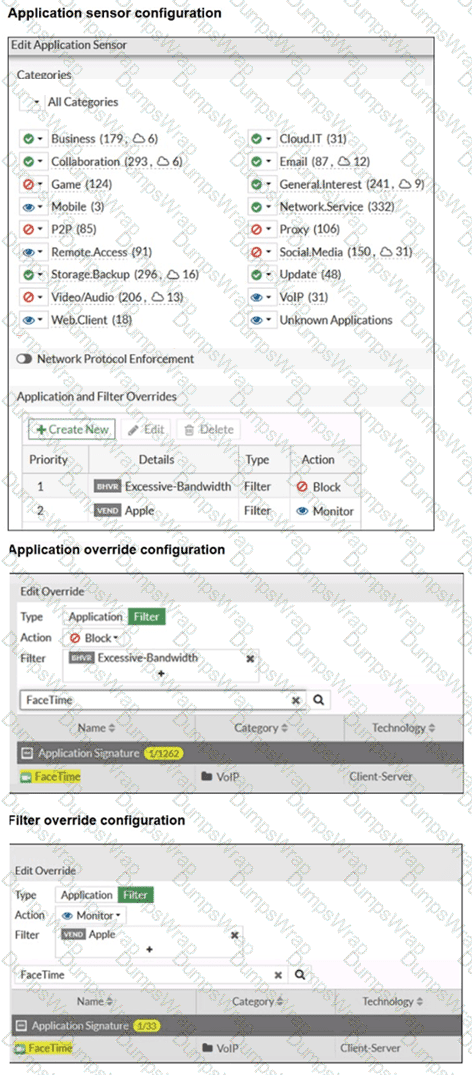
The exhibits show the application sensor configuration and the Excessive-Bandwidth and Apple filter details. Based on the configuration, what will happen to Apple FaceTime if there are only a few calls originating or incoming? (Choose one answer)
Options:
Apple FaceTime will be allowed, based on the Video/Audio category configuration.
Apple FaceTime will be blocked, based on the Excessive-Bandwidth filter configuration.
Apple FaceTime will be allowed, based on the Apple filter configuration.
Apple FaceTime will be allowed only if the Apple filter in Application and Filter Overrides is set to Allow.
Answer:
BExplanation:
According to the FortiOS 7.6 Administrator Study Guide, the Application Control engine processes traffic by evaluating the Application and Filter Overrides section first, using a top-down matching logic similar to firewall policies. In the provided exhibit, there are two override entries:
Priority 1 : A behavior-based filter for Excessive-Bandwidth with the action set to Block .
Priority 2 : A vendor-based filter for Apple with the action set to Monitor .
The exhibit titled " Application override configuration " explicitly shows that Apple FaceTime is one of the signatures included within the Excessive-Bandwidth behavior filter. When the FortiGate inspects FaceTime traffic, it matches the first entry (Priority 1) because the signature belongs to the " Excessive-Bandwidth " group. Since the action for this priority is Block , the traffic is dropped immediately.
The phrase " only a few calls " is a common exam distractor; in this context, the " Excessive-Bandwidth " filter refers to the classification of the application (as one that typically consumes high bandwidth) rather than a real-time measurement of the specific session ' s throughput. Because the engine stops searching once a match is found in the overrides, it never reaches the Priority 2 " Monitor " rule or the general Category settings.
