
Fortinet NSE 5 - FortiNAC-F 7.6 Administrator Questions and Answers
A healthcare organization is integrating FortiNAC-F with its existing MDM. Communication is failing between the systems.
What could be a probable cause?
Options:
Security Fabric traffic is failing
SSH communication is failing
REST API communication is failing
SOAP API communication is failing
Answer:
CExplanation:
The integration between FortiNAC-F and Mobile Device Management (MDM) platforms (such as Microsoft Intune, VMware Workspace ONE, or Jamf) is a critical component for providing visibility into mobile assets that do not connect directly to the managed infrastructure via standard wired or wireless protocols.
According to theFortiNAC-F MDM Integration Guide, the communication between the FortiNAC-F appliance and the MDM server is handled throughREST APIcalls. FortiNAC-F acts as an API client, periodically polling the MDM server to retrieve device metadata, compliance status, and ownership information. If communication is failing, it is most likely because the API credentials (Client ID/Secret) are incorrect, the MDM ' s API endpoint is unreachable from the FortiNAC-F service port, or the SSL certificate presented by the MDM is not trusted by the FortiNAC-F root store.
While SSH (B) is used for switch CLI management and the Security Fabric (A) uses proprietary protocols for FortiGate synchronization, neither is the primary vehicle for MDM data exchange. SOAP API (D) is an older protocol that has been largely replaced by REST in modern FortiNAC integrations.
" FortiNAC integrates with MDM systems by utilizingREST APIcommunication to query the MDM database for device information. To establish this link, administrators must configure the MDM Service Connector with the appropriateAPI URLand authentication credentials. If the ' Test Connection ' fails, verify that the FortiNAC can reach the MDM provider via theREST APIport (usually HTTPS 443). " —FortiNAC-F Administration Guide: MDM Integration and Troubleshooting.
When creating a device profiling rule, what is an advantage of modeling the endpoint as a device in the inventory view?
Options:
The device will have historic connection logs.
The devices can have scheduled connection status polling.
The devices will have connection logs.
The devices can be associated with a logged on user.
Answer:
BExplanation:
The correct answer is B . When a device profiling rule classifies an endpoint, the Register as setting can place the device in the host view, the topology/inventory view, or both. The study guide explains that if the profiled endpoint is registered into the topology view, the administrator must select a topology container.
The advantage of modeling the endpoint as a device in the inventory view is that it can be treated as a pingable device , where FortiNAC-F can use Contact Status settings. The guide explains that a modeled pingable device has contact status controls that allow polling to be enabled or disabled, the polling interval to be set, and the last successful and last attempted poll to be displayed.
Option A and option C are not the best answers because connection logs are associated with host connection tracking, not the key advantage of placing a profiled endpoint into inventory as a modeled device. Option D is wrong because user association applies more naturally to hosts or BYOD ownership workflows; it is not the main benefit of inventory modeling. The tested benefit is scheduled reachability monitoring through contact status polling.
When preparing network infrastructure devices for visibility, what are the two main advantages of using MAC notification traps on supported devices instead of link-up and link-down traps? (Choose two.)
Options:
MAC notification traps include IP address information.
Overhead on FortiNAC-F and the infrastructure device is reduced.
Hosts connecting to downstream non-managed hubs are immediately learned.
Faster visibility updates with only a slight increase in processing.
Answer:
B, CExplanation:
Comprehensive and Detailed Explanation From Exact Extract of FortiNAC-F 7.6 Administrator Guide or Knowledge:
Exact Extract:
The FortiNAC-F study guide states that MAC notification traps are preferred because FortiNAC-F does not need to connect back to the infrastructure device every time a link-up or link-down trap is received. The required MAC and port information is already included in the MAC notification trap, which makes database updates faster and uses fewer resources. It also states that hosts and devices connected through hubs or IP phones are seen immediately, even when the downstream device cannot generate link-up or link-down traps.
Technical Deep Dive:
The correct answers are B and C . With link-up/link-down traps, the trap only tells FortiNAC-F that an interface changed state. FortiNAC-F then has to perform an L2 poll against the switch forwarding table to discover which MAC address appeared or disappeared. That means extra SNMP/CLI activity, more delay, and more processing on both FortiNAC-F and the switch. The guide confirms that link traps trigger FortiNAC-F to perform a Layer 2 poll, while MAC notification traps directly contain the learned or removed MAC address and associated port.
Option A is wrong because MAC notification traps are Layer 2 visibility events. They identify MAC address and port , not IP address. IP-to-MAC correlation comes from Layer 3 polling or DHCP fingerprinting, not MAC notification traps. Option D is badly worded and should not be selected: MAC notification traps do provide faster updates, but the processing overhead is reduced, not slightly increased.
Operationally, on supported switches you enable SNMP traps for MAC address-table changes and point the trap destination to FortiNAC-F. On Cisco-style infrastructure, this is usually done with commands such as snmp-server host < FortiNAC-IP > version 2c < community > plus MAC notification trap configuration. Do not enable MAC notification traps on uplinks, because uplinks learn many downstream MAC addresses and would create misleading endpoint-location data.
Which two statements are true about integrating a third-party device using SNMP traps from that device as input to generate an event? (Choose two.)
Options:
The sending device must be modeled in the inventory topology.
The sending device must support SNMPv3.
set allowaccess snmp must be configured using the CLI on the FortiNAC-F receiving interface.
The IP address OID and MAC address OID must be configured in the trap MIB file.
Answer:
A, CExplanation:
The correct answers are A and C . Fortinet’s FortiNAC-F 7.6 documentation states that, to receive and interpret traps from devices or applications, those devices or applications must be modeled in FortiNAC and must have an associated IP address. That validates option A directly. The same Fortinet Trap MIB Files documentation also lists a FortiNAC-OS requirement: the snmp option must be included in the set allowaccess command. That validates option C .
Option B is wrong because Trap MIB integration is not limited to SNMPv3. Fortinet states that Trap MIB supports receiving SNMPv1 and SNMPv2 traps from external devices, while SNMPv3 is discussed separately for traps that populate host and user records.
Option D is the trap. The Fortinet documentation explicitly says IP address OID, MAC address OID, and user ID OID are not all required ; any one OID can be used to identify the host or user that triggered the trap. So the statement that both the IP address OID and MAC address OID must be configured is false.
Refer to the exhibits.
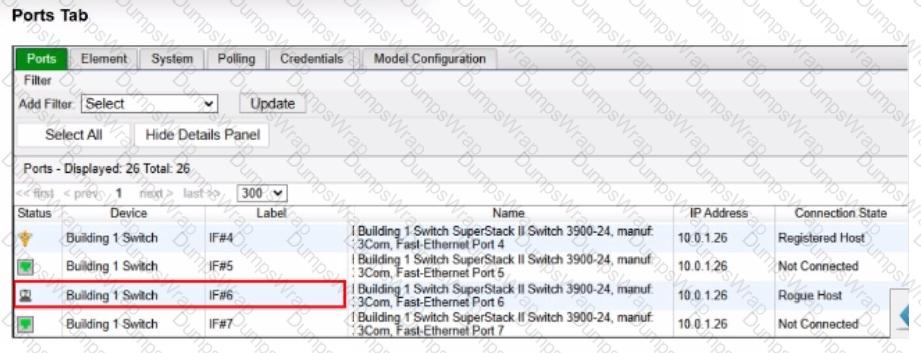
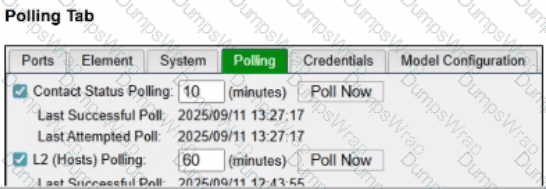
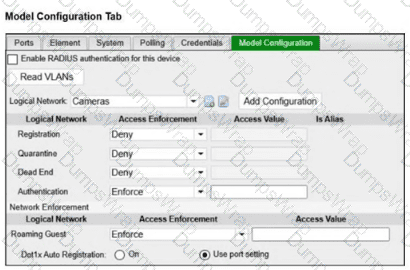
An administrator is troubleshooting visibility issues on a modeled switch The switch is configured to use link traps and to provision hosts based on network access policies. The administrator is seeing hosts on ports with no hosts connected and not seeing hosts on ports where hosts are known to be connected.
What is the most likely cause?
Options:
The logical networks are set to deny.
The host has uninstalled the FortiNAC-F agent.
The switch cannot be contacted by FortiNAC-F
The credentials are incorrect.
Answer:
CExplanation:
The correct answer is C . In a link-trap-based wired deployment, the switch sends a linkUp or linkDown SNMP trap to FortiNAC-F, but that trap does not contain the endpoint MAC address. After receiving the link trap, FortiNAC-F must contact the switch and perform a Layer 2 poll to read the forwarding table and determine which MAC address was added or removed on the port. The FortiNAC-F study guide states that link traps trigger FortiNAC-F to perform a Layer 2 poll to update its awareness of devices connected to the edge device, and the wired link-trap workflow specifically shows FortiNAC-F performing a Layer 2 poll before locating the host record and provisioning access.
The symptoms in the exhibit are classic stale Layer 2 visibility: FortiNAC-F still shows a rogue host on a port where no host is connected, while also failing to show hosts on ports where endpoints are actually connected. That means FortiNAC-F is not successfully refreshing the switch MAC table information. Since link traps depend on FortiNAC-F being able to poll the switch after the trap, a contact failure with the modeled switch is the most likely cause.
Option A is wrong because logical network settings affect access enforcement, not whether FortiNAC-F can see current MAC-to-port mappings. Option B is wrong because the FortiNAC-F agent is not required for basic switch-port visibility; Layer 2 visibility comes from switch polling, MAC notification traps, or RADIUS. Option D is tempting, but the broader failure shown here is not merely a policy or endpoint-side issue—it is that FortiNAC-F cannot obtain current Layer 2 data from the switch. In practice, you would still verify SNMP/CLI credentials while troubleshooting, but the best answer to the symptom pattern is that FortiNAC-F cannot contact/query the switch successfully.
In which three ways would deploying a FortiNAC-F Manager into a large environment consisting of several FortiNAC-F CAs simplify management? (Choose three.)
Options:
Global infrastructure device inventory
Global version control
Global authentication security policies
Pooled licenses
Global visibility
Answer:
B, D, EExplanation:
TheFortiNAC-F Manager (FortiNAC-M)is designed as a centralized management platform for large-scale distributed environments where multiple FortiNAC-F Control and Application (CA) appliances are deployed across different sites. According to theFortiNAC-F Manager Administration Guide, the deployment of a Manager simplifies administrative overhead in three specific ways:
First, it providesGlobal Version Control (B). The Manager serves as a central repository for firmware and software updates, allowing administrators to push specific versions to all managed CAs simultaneously, ensuring consistency across the entire fabric. Second, it enablesPooled Licenses (D). Instead of purchasing and managing individual licenses for every CA, licenses are centralized on the Manager. The Manager then distributes these licenses to the CAs as needed based on their host counts. This " floating " license model optimizes cost and prevents individual sites from running out of capacity while others have excess. Third, it offersGlobal Visibility (E). The Manager aggregates host and device data from every managed CA into a single console. This " single pane of glass " allows an administrator to search for a specific MAC address or user across the entire global organization without logging into individual servers.
While the Manager can assist with configuration templates, authentication security policies (C) and infrastructure modeling (A) are still predominantly managed at the local CA level to ensure site-specific logic and performance.
" The FortiNAC Manager provides a central management console for multiple FortiNAC-F servers (CAs). Key benefits include: •License Management: Licenses are pooled on the Manager and allocated to managed CAs as needed. •Software Management: Firmware updates can be centrally managed and pushed to all CAs from the Manager. •Centralized Monitoring: Provides a global view of all hosts, adapters, and events across the entire managed environment. " —FortiNAC-F Manager Administration Guide: Overview and Benefits.
Refer to the exhibit.

Which devices are automatically evaluated by these device profiling rules?
Options:
Rogue devices, only when they are initially added to the database
Known trusted devices, each time they connect
All hosts, each time they connect
Rogue devices, each time they change location
Answer:
AExplanation:
The correct answer is A . In FortiNAC-F, device profiling rules are used primarily to classify unknown or untrusted devices when they are first discovered. The study guide explains that when a device does not already exist in the database, FortiNAC-F adds it, treats it as a rogue, and evaluates it against enabled device profiling rules. It also states that devices are initially evaluated against device profiling rules only if they do not already exist in the database, because this avoids unnecessary repeated evaluation of known devices.
The exhibit also matters: the rules are enabled and set to Automatic registration, but Confirm Rule On Connect is not enabled and Confirm Rule Interval is set to None . That means FortiNAC-F will not automatically revalidate already-profiled or trusted devices every time they connect. Option B is wrong because trusted devices are not repeatedly evaluated unless rule confirmation is configured. Option C is too broad because all hosts are not processed through profiling rules on every connection. Option D is also wrong because changing location does not by itself force automatic device profiling; location can be used as a rule method, but the automatic evaluation described here applies when the rogue device is initially added to the database.
Refer to the exhibit.
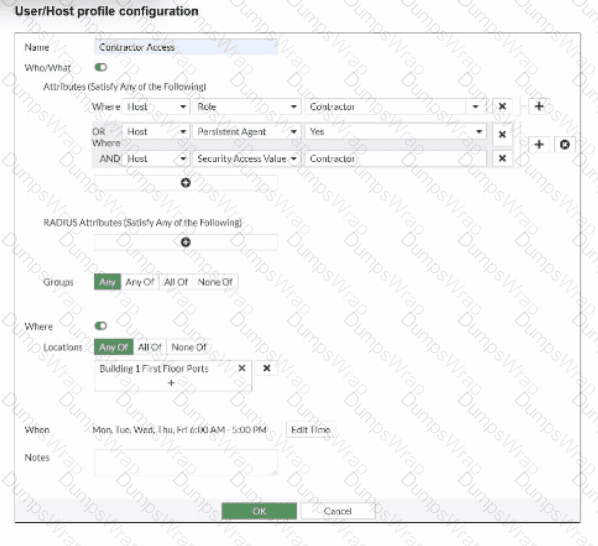
If a host is connected to a port in the Building 1 First Floor Ports group, what must also be true to match this user/host profile?
Options:
The host must have a role value of contractor, an installed persistent agent or a security access value of contractor, and be connected between 6 AM and 5 PM.
The host must have a role value of contractor or an installed persistent agent, a security access value of contractor, and be connected between 9 AM and 5 PM.
The host must have a role value of contractor or an installed persistent agent or a security access value of contractor, and be connected between 6 AM and 5 PM.
The host must have a role value of contractor or an installed persistent agent and a security access value of contractor, and be connected between 6 AM and 5 PM.
Answer:
DExplanation:
TheUser/Host Profilein FortiNAC-F is the fundamental logic engine used to categorize endpoints for policy assignment. As seen in the exhibit, the configuration uses a combination of Boolean logic operators (ORandAND) to define the " Who/What " attributes.
According to theFortiNAC-F Administrator Guide, attributes grouped together within the same bracket or connected by anORoperator require only one of those conditions to be met. In the exhibit, the first two attributes are " Host Role = Contractor " OR " Host Persistent Agent = Yes " . This forms a single logical block. This block is then joined to the third attribute ( " Host Security Access Value = Contractor " ) by anANDoperator. Consequently, a host must satisfyat least oneof the first two conditionsANDsatisfy the third condition to match the " Who/What " section.
Furthermore, the profile includesLocationandWhen(time) constraints. The exhibit shows the location is restricted to the " Building 1 First Floor Ports " group. The " When " schedule is explicitly set toMon-Fri 6:00 AM - 5:00 PM. For a profile to match,allenabled sections (Who/What, Locations, and When) must be satisfied simultaneously. Therefore, the host must meet the conditional contractor/agent criteria, possess the specific security access value, and connect during the defined 6 AM to 5 PM window.
" User/Host Profiles use a combination of attributes to identify a match. Attributes joined byORrequire any one to be true, while attributes joined byANDmust all be true. If aSchedule(When) is applied, the host must also connect within the specified timeframe for the profile to be considered a match. All criteria in the Who/What, Where, and When sections are cumulative. " —FortiNAC-F Administration Guide: User/Host Profile Configuration.
Refer to the exhibit.
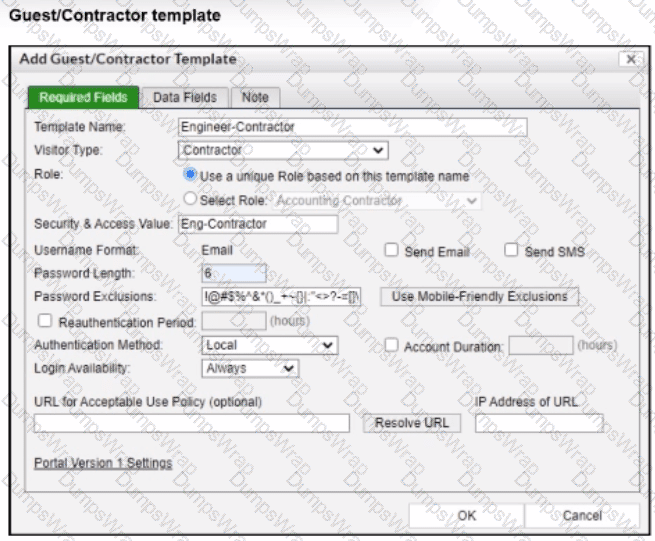
When a contractor account is created using this template, which value is set in the accounts Role field?
Options:
Engineer-Contractor
Eng-Contractor
Contractor
Accounting Contractor
Answer:
AExplanation:
The correct answer is A . In the exhibit, the Template Name is Engineer-Contractor , and the selected Role option is Use a unique Role based on this template name . That means FortiNAC-F uses the template name itself as the role value for any account created from this guest/contractor template. The study guide confirms this behavior: by default, the Role field is populated with the template name, although the administrator can alternatively select from an existing role list. It also states that the role value in the guest and contractor template populates the Role field of any account created from that template.
Option B , Eng-Contractor , is wrong because that value is entered in the Security and Access Value field, not the Role field. That value can still be used in user/host profiles or policies, but it does not populate the account Role field. Option C , Contractor , is only the Visitor Type , which controls the kind of guest/contractor account and associated icon behavior. Option D , Accounting Contractor , is visible in the disabled Select Role dropdown, but that option is not selected because the template is configured to use a unique role based on the template name.
Refer to the exhibit.
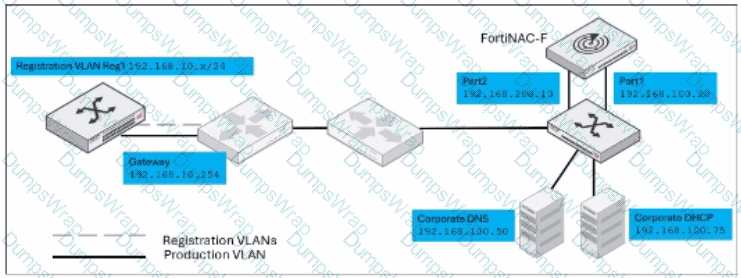
Given this topology, and a layer 3 registration network configuration, which IP address would be designated in the DHCP relay configuration for the registration network?
Options:
192.168.10.254
192.168.100 75
192.168.100.20
192.168.200.10
Answer:
DExplanation:
The correct answer is D . In a Layer 3 registration or isolation network design, DHCP requests from the isolated registration VLAN are not served locally on that VLAN by a normal production DHCP server. Instead, the registration VLAN’s DHCP relay must forward DHCP traffic to FortiNAC-F port2 , because port2 is the captive network service interface. The study guide states that in Layer 3 captive networks, DHCP traffic is relayed to port2 from the captive networks, and that the FortiNAC-F port2 interface provides DHCP, DNS, and captive portal services for hosts assigned to those captive networks.
In the exhibit, the registration VLAN is 192.168.10.x/24 , with gateway 192.168.10.254 . That gateway is where the DHCP relay would be configured, but it is not the relay destination. The relay destination must be the FortiNAC-F port2 address, shown as 192.168.200.10 . The corporate DHCP server 192.168.100.75 is for production network addressing, not registration isolation. The FortiNAC-F port1 address 192.168.100.20 is the administrative or production-facing interface, not the captive network service interface. Therefore, the DHCP relay should point to 192.168.200.10 .
An administrator wants FortiNAC-F to pass firewall tags to FortiGate to leverage dynamic address groups used in firewall policies. On FortiNAC-F, what determines the values that are passed?
Options:
Model configuration
Device profiling rule
Security rule
RADIUS group attribute
Answer:
AExplanation:
The correct answer is A . FortiNAC-F passes firewall tags to FortiGate through Security Fabric integration so FortiGate can use those values as dynamic address groups in firewall policies. The study guide explains that firewall tags are administrator-defined string values and that FortiNAC-F dynamically assigns them based on a security policy or logical network. More specifically for network access enforcement, it states that the network access configuration defines the logical network , and the logical network defines the firewall tag through the device model configuration .
This is the same mechanism used in VPN and Fabric workflows: the FortiGate device model contains the mappings of logical networks to the actual tags or groups that FortiNAC-F sends to FortiGate. The guide states that FortiNAC-F network access policies and logical networks determine the group or tag information, while the FortiGate model configuration contains the mappings used for the values sent.
Option B is not the best answer because a device profiling rule can classify a device and may cause it to match a policy, but it does not directly define the FortiGate tag value sent for policy enforcement. Option C can apply firewall tags in security automation scenarios, but the standard FortiGate dynamic address group mapping is defined in model configuration. Option D is unrelated; RADIUS attributes are used in RADIUS access responses, not FortiGate Fabric tag propagation.
Refer to the exhibit.
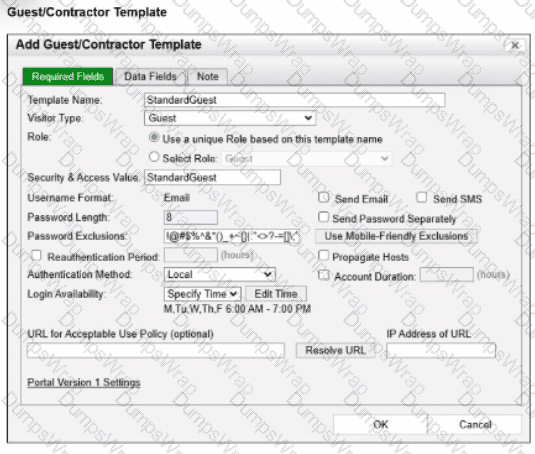
What will happen to the host of a guest user created from this template if the time of connection is 8:00 PM?
Options:
The host will be marked as non-authenticated.
The host will be marked as a rogue device.
The host will be marked as at-risk.
The host will be administratively disabled.
Answer:
AExplanation:
In FortiNAC-F, theGuest & Contractor Templateis a configuration object that defines the parameters for accounts created by sponsors or through self-registration. One of the critical security controls within this template is theLogin Availabilitysetting. This setting restricts the specific days and times during which a guest or contractor is permitted to authenticate and access the network.
As shown in the exhibit, the " StandardGuest " template hasLogin Availabilityset to " Specify Time " , with a schedule defined asMon-Fri, 6:00 AM to 7:00 PM. If a guest user attempts to connect or authenticate at8:00 PM, which is outside of the permitted window, FortiNAC-F ' s policy engine will automatically deny the authentication request. When an authentication attempt is denied due to schedule restrictions, the system does not move the host into the " Authenticated " or " Registered " state required for production access. Instead, the host ismarked as non-authenticatedin the adapter or host view.
This behavior ensures that even if a guest possesses valid credentials, their access is strictly bound by the organizational policy for visitor hours. The host will typically remain in its current isolation or registration VLAN, and the user will see a message on the captive portal indicating that their account is not currently authorized for login. It is important to distinguish this from " at-risk " (C), which relates to security scan failures, or " rogue " (B), which typically refers to unknown devices that have not yet been associated with a valid account or profiling rule.
" Login Availabilitydefines the timeframe during which the guest or contractor account is valid for network access. This schedule is enforced at the time of authentication. If a user attempts to log in outside of the designated window, the authentication is rejected by the system. Consequently, the host record will reflect anon-authenticatedstatus, and the device will remain restricted to the isolation or registration network until a valid login window is reached. " —FortiNAC-F Administration Guide: Guest and Contractor Templates Section.
An administrator wants each department to create and manage its own contractor accounts but not be able to manage contractor accounts for other departments. What must the administrator configure to limit the sponsor ' s capabilities?
Options:
The contractor ' s template
The portal settings on the kiosk portal page
The user/host profile applied to the contractor
The sponsor ' s administrative profile
Answer:
DExplanation:
The correct answer is D . FortiNAC-F limits what a sponsor can create and manage through the administrator profile assigned to that sponsor. The study guide explains that sponsors can be restricted to specific guest or contractor templates and that the Manage Guests settings in the admin profile define whether the sponsor can manage all accounts, no accounts, or only accounts they created. It also states that allowed templates are defined in the admin profile, meaning each department can be given access only to its own contractor template.
The contractor template defines account fields, role values, authentication method, account duration, and related account properties, but it does not by itself restrict what a sponsor can manage. Portal settings control how users interact with the captive portal or kiosk page, not sponsor administrative scope. A user/host profile is used for matching users or hosts in policy decisions; it does not delegate sponsor permissions. For departmental separation, the administrator must create sponsor-specific administrative profiles that allow only the appropriate templates and account-management scope.
When creating a user or host profile, which three criteria can you apply? (Choose three.)
Options:
Host or user group memberships
Host or user attributes
Adapter current VLAN
An applied access policy
Location
Answer:
A, B, EExplanation:
TheUser/Host Profileis the primary mechanism in FortiNAC-F for identifying and categorizing endpoints to determine their level of network access. According to theFortiNAC-F Administration Guide, a profile is built using a combination of criteria that define " Who " is connecting, " What " device they are using, and " Where " they are located on the network.
The three main categories of criteria available in the configuration are:
Host or User Attributes (B):This includes specific details such as the host ' s operating system, the user ' s role (e.g., Employee, Contractor), or custom attributes assigned to the record.
Host or User Group Memberships (A):Profiles can be configured to match endpoints that are members of specific internal FortiNAC groups or synchronized directory groups (like LDAP or Active Directory groups). This allows for broad policy application based on organizational structure.
Location (E):The " Where " component allows administrators to restrict a profile match to specific physical or logical areas of the network, such as a particular switch, a group of ports, or a specific SSID.
Criteria like an " applied access policy " (D) are theoutcomeof a profile match rather than a criterion used to define the profile itself. Similarly, the " Adapter current VLAN " (C) is a dynamic state that changes based on enforcement and is not a standard static identifier used for profile matching.
" User/Host Profiles are used to identify the hosts and users to which a policy will apply. Profiles are created by selecting various criteria in theWho/What(Attributes and Groups) andWhere(Locations) sections. Attributes can include Host Role, User Role, and OS. Group memberships allow matching based on internal or directory-based groups. Location criteria allow for filtering based on the device or port where the host is connected. " —FortiNAC-F Administration Guide: User/Host Profile Configuration.
What must an administrator configure to allow FortiNAC-F to process incoming syslog messages that are not supported by default?
Options:
A Syslog Service Connector
A Security Action
A Security Event Parser
A Log Receiver
Answer:
CExplanation:
FortiNAC-F provides a robust engine for processing security notifications from third-party devices. For standard integrations, such as FortiGate or Check Point, the system comes pre-loaded with templates to interpret incoming data. However, when an administrator needs FortiNAC-F to process syslog messages from a vendor or device that is not supported by default, they must configure aSecurity Event Parser.
TheSecurity Event Parseracts as the translation layer. It uses regular expressions (Regex) or specific field mappings to identify key data points within a raw syslog string, such as the source IP address, the threat type, and the severity. Without a parser, FortiNAC-F may receive the syslog message but will be unable to " understand " its contents, meaning it cannot generate the necessarySecurity Eventrequired to trigger automated responses. Once a parser is created, the system can extract the host ' s IP address from the message, resolve it to a MAC address via L3 polling, and then apply the appropriate security rules. This allows for the integration of any security appliance capable of sending RFC-compliant syslog messages.
" FortiNAC parses the information based onpre-defined security event parsersstored in FortiNAC ' s database... If the incoming message format is not recognized, a newSecurity Event Parsermust be created to define how the system should extract data fields from the raw syslog message. This enables FortiNAC to generate a security event and take action based on the alarm configuration. " —FortiNAC-F Administration Guide: Security Event Parsers.
An administrator manages a corporate environment where all users log into the corporate domain each time they connect to the network. The administrator wants to leverage login scripts to use a FortiNAC-F agent to enhance endpoint visibility
Which agent can be deployed as part of a login script?
Options:
Persistent
Dissolvable
Mobile
Passive
Answer:
AExplanation:
In a corporate domain environment where " enhanced endpoint visibility " is required, thePersistent Agentis the recommended choice. Unlike the Dissolvable Agent, which is temporary and intended for one-time compliance scans during registration, the Persistent Agent is an " install-and-stay-resident " application.
The Persistent Agent is specifically designed to be distributed through automated enterprise methods, includinglogin scripts, Group Policy Objects (GPO), or third-party software management tools. When deployed via a login script, the agent can be configured to silently install and immediately begin communicating with the FortiNAC-F service interface. Once active, it provides continuous visibility by reporting host details such as logged-on users, installed applications, and adapter information. It also listens for Windows session events (logon/logoff) to trigger automatic single-sign-on (SSO) registration in FortiNAC-F, ensuring that as soon as a user connects to the domain, their device is identified and assigned the correct network access policy.
" The Persistent Agent can be distributed to Windows domain machines vialogin scriptor by any other software distribution method your organization might use. The Persistent Agent remains installed on the host at all times. Once the agent is installed it runs in the background and communicates with FortiNAC at intervals established by the FortiNAC administrator. " —FortiNAC-F Administration Guide: Persistent Agent Overview.
Refer to the exhibit.
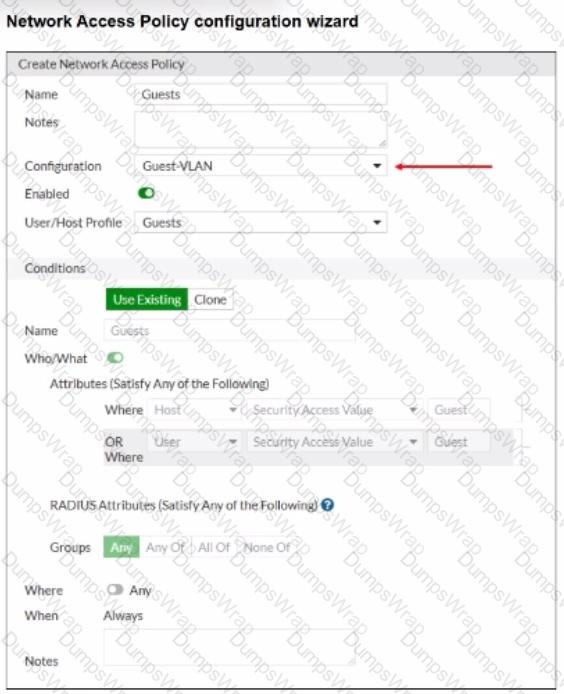
When configuring guest access using a network access policy, where would an administrator configure the Guest-VLAN value?
Options:
In the Model configuration
In the Guest template
In the User/Host profile
in the Guest portal configuration
Answer:
AExplanation:
The correct answer is A . In the exhibit, Guest-VLAN is selected as the network access policy Configuration . That policy configuration points to a logical network, but the actual access value for that logical network is not defined inside the guest template, user/host profile, or guest portal. The FortiNAC-F study guide explains that logical networks translate policy-level names into device-specific access values, and those values are configured in the Model Configuration of the infrastructure device. It specifically states that device-specific configurations for infrastructure devices associate the configuration values with the devices, and that after a logical network is created, it appears within the model configuration of each modeled infrastructure device.
So, Guest-VLAN is the logical network selected by the network access policy, while the actual VLAN ID, VLAN name, SSID role, controller group, or vendor-specific access value is configured under the relevant switch, AP, controller, or firewall Model Configuration . Option B is wrong because the guest template defines guest account properties such as role, security/access value, password settings, account duration, and login availability. Option C is wrong because the user/host profile defines the matching condition for guests. Option D is wrong because the guest portal controls onboarding or login behavior, not the infrastructure access value used to provision the endpoint.
