Weekend Special - 75% Discount Offer - Ends in 0d 00h 00m 00s - Coupon code: w75best

Fortinet NSE6_FMG_AD-7.6 Dumps

Fortinet NSE 6 - FortiManager 7.6 Administrator Questions and Answers

Question 1

If one of the secondary FortiManager devices fails, which action must be performed to return the FortiManager HA manual mode to a working state?

Options:

A.

The FortiManager high availability HA state transition is transparent to administrators and does not require any reconfiguration.

B.

Run a sanity check on the failed device to make sure HA heartbeat packets are using TCP port 5199.

C.

Manually promote one of the working secondary devices to the primary role.

D.

Remove the peer IP of the failed device on the primary device.

Question 2

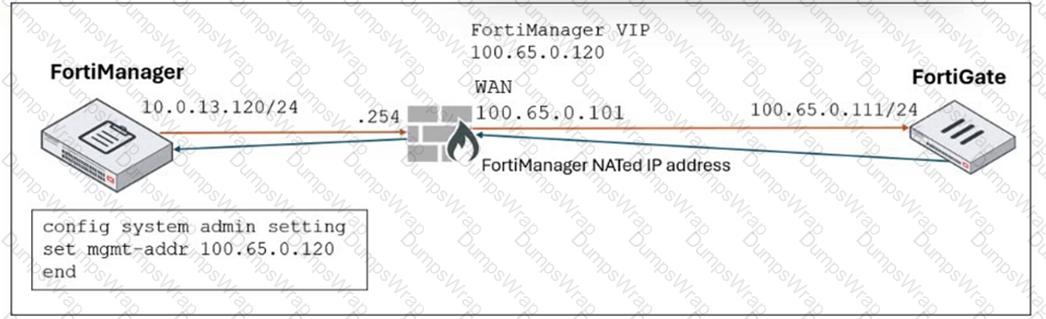
Refer to the exhibit.

as

FortiManager is operating behind a network address translation (NAT) device, and the administrator configured the FortiManager NATed IP address under the FortiManager system administration settings.

What is the expected result during discovery?

Options:

A.

FortiManager sets both the 100.65.0.120 IP address and 10.0.13.120 IP address on FortiGate.

B.

FortiManager sets both the 100.65.0.120 IP address and 100.65.0.101 IP address on FortiGate.

C.

FortiManager sets the 100.65.0.101 IP address on FortiGate.

D.

FortiManager sets the 100.65.0.120 IP address on FortiGate.

Question 3

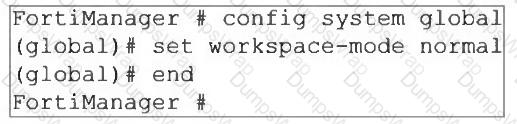
An administrator wants to configure and manage multiple objects in the FortiManager database and give access to other users who work in the same database.

To stay in control of the changes made to firewall policies by other team members, the administrator needs a setup where all modifications go through a central check before they can be installed.

How can the administrator create this setup?

Options:

A.

Enable the prompt asking the administrator to accept firewall policies changes before saving.

B.

Enable the workspace (for all ADOMs) to control all changes made by any administrator.

C.

Enable device lock and the advanced mode feature in the ADOM.

D.

Enable workflow mode and the ADOM lock feature.

Question 4

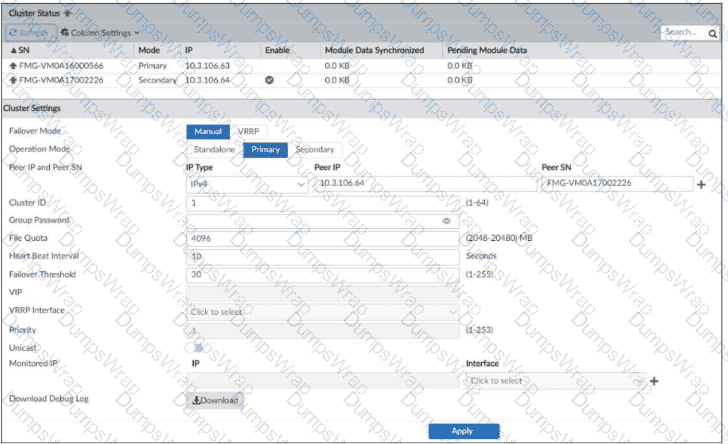
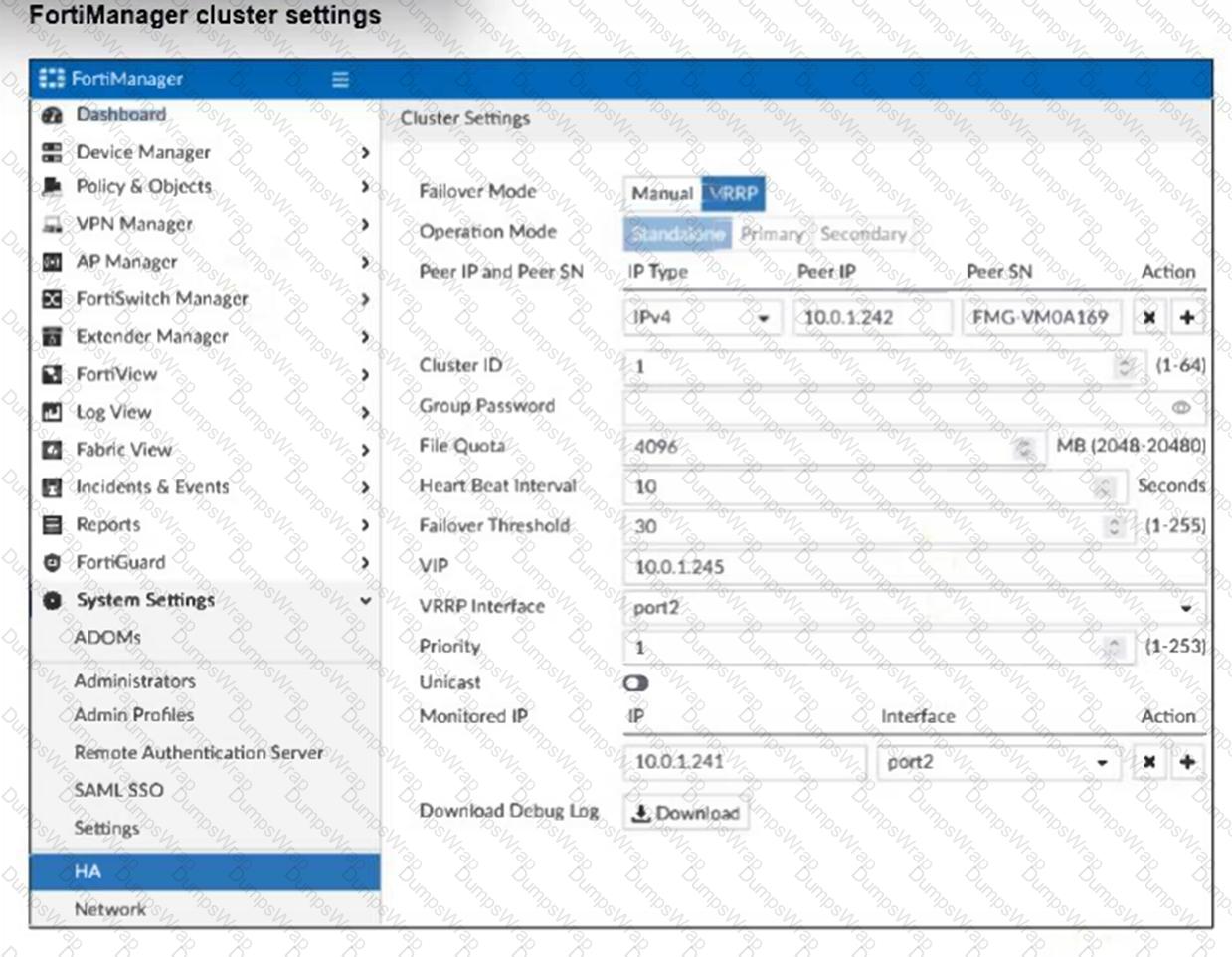
Refer to the exhibit.

as

Which statement about the environment shown in the exhibit is true? Choose one answer

Options:

A.

You must restart the secondary device if you promote it to primary.

B.

No FortiGuard packages have been synchronized between the cluster members.

C.

A failover will take place after five minutes without receiving heartbeat packets.

D.

FortiAnalyzer features are not enabled on this FortiManager device.

Question 5

Which two conditions trigger FortiManager to create a new revision history? (Choose two.)

Options:

A.

When FortiManager installs device-level changes on a managed device

B.

When changes to the device-level database are made on FortiManager

C.

When FortiManager is auto-updated with configuration changes made directly on a managed device

D.

When a provisioning template is assigned to a managed device on the device-level database

Question 6

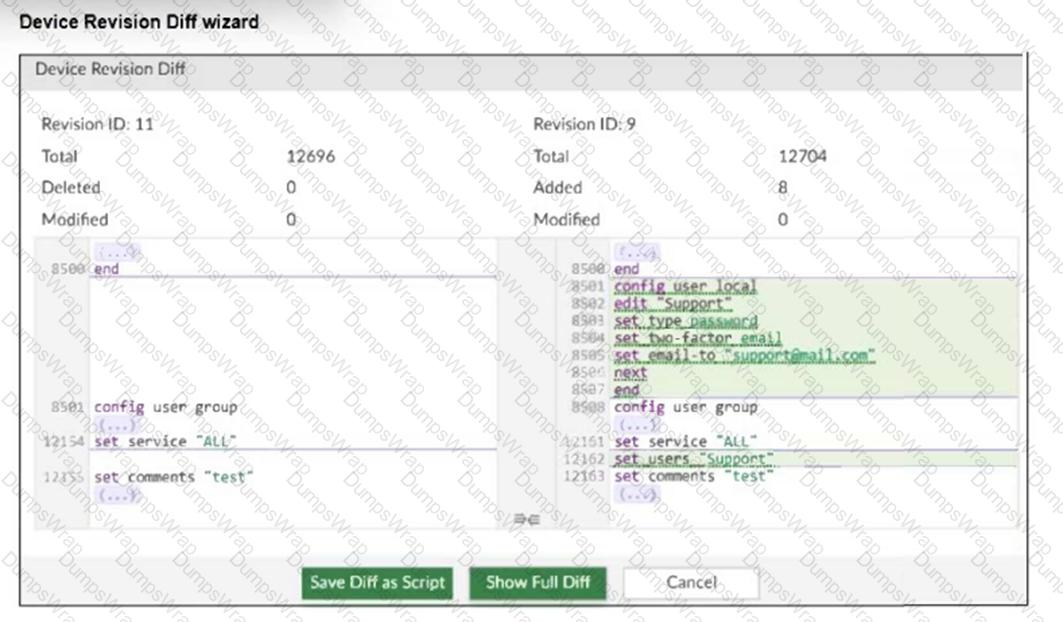
Refer to the exhibits.

as

as

An administrator needed to recover all the configurations related to the user, Support. The configurations were saved in configuration revision ID 9.

The administrator reverted the configuration using the Configuration Revision History window and received the CLI output shown in the exhibit.

What can you conclude from the CLI output?

Options:

A.

The administrator set the flag to 0 to prevent configuration overrides.

B.

The administrator reinstalled the policy package.

C.

The administrator needs to retrieve the device to correctly detect the FortiGate firmware version.

D.

The administrator installed only the device-level configuration.

Question 7

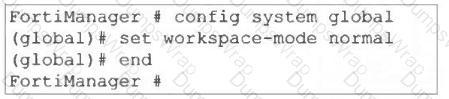
Refer to the exhibit.

as

What are two results from the configuration shown in the exhibit? Choose two answers.

Options:

A.

The same administrator can lock more than one ADOM at the same time.

B.

Multiple administrators can lock and work on separate ADOMs at the same time.

C.

All changes must be approved before they can be installed on a device.

D.

Concurrent read-write access to an ADOM is disabled.

Question 8

An administrator upgrades FortiManager with workspace mode per ADOM enabled to the latest version but notices that the ADOM versions did not change.

Why were the ADOMs not upgraded?

Options:

A.

The administrator did not run the database integrity check before performing the upgrade.

B.

FortiManager does not automatically upgrade ADOMs after a firmware upgrade.

C.

A FortiManager process task is stuck and blocking the ADOM upgrade, so the administrator must fix it.

D.

A user had all ADOMs locked before the upgrade, which stopped them from being upgraded.

Question 9

Refer to the exhibit.

as

What are two results from the configuration shown in the exhibit? (Choose two.)

Options:

A.

Ungraceful closed sessions will keep the ADOM in a locked state until the administrator session times out.

B.

The administrator can lock policy blocks and FortiManager global ADOM.

C.

The same administrator can lock more than one ADOM at the same time.

D.

The administrator must have access to the ADOM to approve changes.

Question 10

A FortiManager administrator opens the revision history and choose to revert to a previous version.

What will this action do to the current device configuration?

Options:

A.

It will trigger an unknown device-level database status, and the administrator will have to import a policy package to sync.

B.

It will trigger a conflict status if it is using any provisioning template, and the administrator will have to install changes.

C.

It will revert both configurations: device-level database and policy layer database.

D.

It will modify the device-level database.

Question 11

An administrator must create a policy and install it on a FortiGate device within an ADOM in backup mode.

How can the administrator perform this task?

Options:

A.

Use the Install Wizard located on the device manager.

B.

Enable workflow mode to allow policy creation and approval.

C.

Make sure the ADOM and FortiGate firmware versions match and use the ADOM policy package.

D.

Use a FortiManager script to apply the configuration changes.

Question 12

Refer to the exhibit.

as

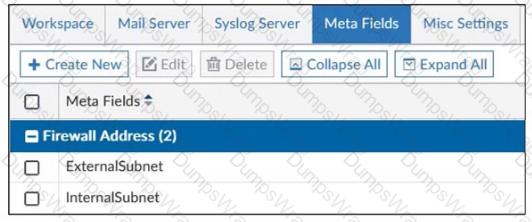
An administrator created two new meta fields in FortiManager.

Which operation can you perform with these parameters?

Options:

A.

You can add them to objects as custom attributes.

B.

You can export them to be used in other ADOMs.

C.

You can use them as variables in scripts.

D.

You can invoke them using the $ character.

Question 13

Refer to the exhibit.

as

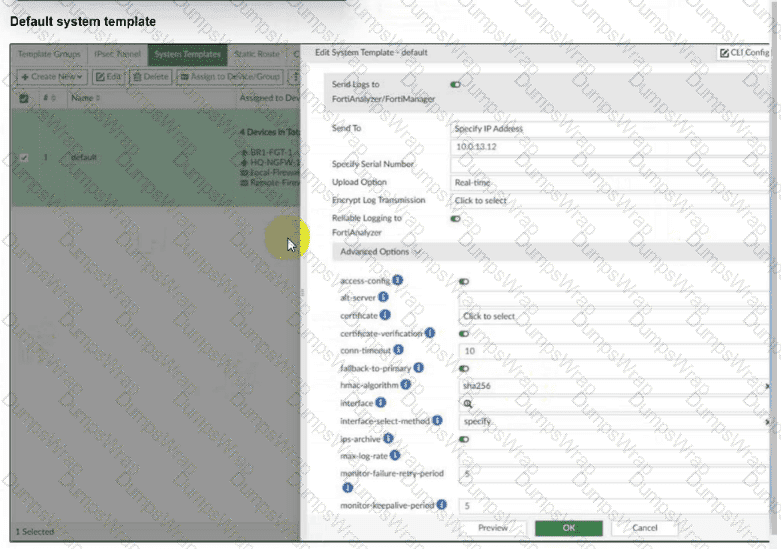
An administrator has assigned the default system template to install all devices with the FortiAnalyzer IP address 10.0.13.12. However, not all FortiGate devices can reach FortiAnalyzer using the default interface. Some devices may use the LAN interface, while others may use the WAN interface. How can the administrator change the source interface for FortiGate devices using the default system template? Choose one answer

Options:

A.

Use per-device dynamic object configurations at the ADOM level and apply them in the template.

B.

Configure a metadata variable at the ADOM level and use it in the template.

C.

Create a different system template for each FortiGate, if the configuration is different.

D.

Create a meta field on FortiManager system settings of type Device and use it in the template.

Question 14

What are two outcomes of ADOM revisions? Choose two answers.

Options:

A.

ADOM revisions can save the current state of the entire ADOM.

B.

ADOM revisions do not increase the size of configuration backups.

C.

ADOM revisions can save the current state of all policy packages and objects for an ADOM.

D.

ADOM revisions appear in the Install Policy and Package Settings section of the install wizard.

Question 15

Refer to the exhibit.

as

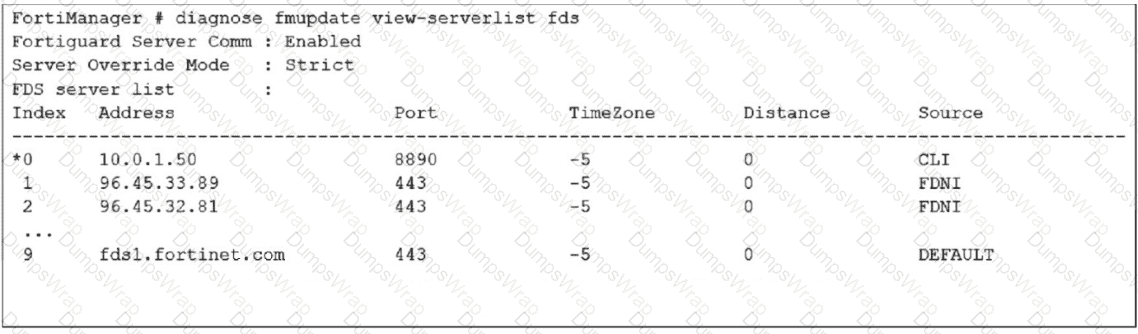
How does FortiManager get antivirus and IPS updates? Choose one answer

Options:

A.

It uses all URLs in the list that contain the fds host name.

B.

It gets updates from the server with IP address 10.0.1.50.

C.

It connects to all servers marked as FortiGuard Distribution Network through Internet FDNI sources.

D.

It connects to the public FortiGuard servers listed in the configuration

Question 16

An administrator has a FortiGate-HQ device with VDOMs—root, HR and Facilities, currently managed under the FortiManager ADOM—Site1. They try to move VDOM HR to the FortiManager ADOM—Site2, but it does not work.

Why is the administrator not able to move FortiGate-HQ VDOM HR to FortiManager ADOM—Site2?

Options:

A.

The FortiGate-HQ must be managed under the FortiManager ADOM—root to allow moving its VDOMs to different ADOMs.

B.

The administrator must have full access in the device layer of FortiGate-HQ VDOM-root before they can VDOMs to different ADOMs.

C.

FortiManager must be in ADOM normal mode, which does not allow VDOMs to be managed separately.

D.

The administrator must delete the FortiGate-HQ device from FortiManager and add it again using the Add Device wizard before moving the VDOM.

Question 17

Refer to the exhibit.

as

If the monitored interface for the primary FortiManager device fails, what must you do to maintain high availability (HA)?

Options:

A.

The FortiManager HA failover is transparent to administrators and does not require any additional action.

B.

Manually promote one of the working secondary devices to the primary role: and reboot the original primary device to remove the peer IP address of the failed device.

C.

Reconfigure the primary device to remove the peer IP address of the failed device from its configuration.

D.

Check the integrity database of the primary device to force a secondary device to become the new primary with all active interfaces.

Question 18

Refer to the exhibit.

as

Which two statements about the output are true? (Choose two.)

Options:

A.

The latest revision history for the managed FortiGate does not match the device-level database.

B.

Configuration changes have been installed on FortiGate, updating policy and device-level database.

C.

The latest revision history for the managed FortiGate does match the FortiManager policy database.

D.

The system template default will override device-level database configurations.

Question 19

What allows FortiManager to run CLI scripts on FortiGate devices without prompting for SSH authentication each time?

Options:

A.

FortiGate devices using the legacy login method.

B.

The secure management tunnel between FortiManager and FortiGate devices.

C.

The script using the Remote FortiGate Directly via CLI option.

D.

The script on the FortiManager device database.

Page: 1 / 7
Total 65 questions