
Fortinet NSE 6 - FortiNAC-F 7.6 Administrator Questions and Answers
Where should you configure MAC notification traps on a supported switch?
Options:
Only on ports that generate linkup and linkdown traps
Only on ports defined as learned uplinks
On all ports on the switch
On all ports except uplink ports
Answer:
DExplanation:
In FortiNAC-F,MAC notification traps(also known as MAC Move or MAC Change traps) are essential for achieving real-time visibility of endpoint connections and disconnections. When a device connects to a switch port, the switch generates an SNMP trap that informs FortiNAC-F of the new MAC address on that specific interface. This allows FortiNAC-F to immediately initiate the profiling and policy evaluation process without waiting for the next scheduled L2 poll.
According to theFortiNAC-F Administration GuideandSwitch Integrationdocumentation, MAC notification traps should be configured onall ports except uplink ports. Uplink ports are the interfaces that connect one switch to another or to the core network. Because these ports see the MAC addresses of every device on the downstream switches, enabling MAC notification on uplinks would cause the switch to send a massive volume of redundant traps to FortiNAC-F every time any device anywhere in the downstream branch moves or reconnects. This can overwhelm the FortiNAC-F process queue and degrade system performance.
By only enabling these traps on " edge " or " access " ports—where individual endpoints like PCs, printers, and VoIP phones connect—FortiNAC-F receives precise data regarding exactly where a device is physically located. Uplinks should be identified in the FortiNAC-F inventory as " Uplink " or " Learned Uplink, " which tells the system to ignore MAC data seen on those specific ports.
" To ensure accurate host tracking and optimal system performance, SNMP MAC notification traps must be enabled on all access (downlink) ports.Do not enable MAC notification traps on uplink ports, as this will result in excessive and unnecessary trap processing. Uplink ports should be excluded to prevent the system from attempting to map multiple downstream MAC addresses to a single infrastructure interface. " —FortiNAC-F Administration Guide: SNMP Configuration for Network Devices.
How can an administrator configure FortiNAC-F to normalize incoming syslog event levels across vendors?
Options:
Configure severity mappings.
Configure the vendor OUI settings.
Configure the security rule settings.
Configure event to alarm mappings.
Answer:
AExplanation:
FortiNAC-F serves as a central manager for security events originating from a diverse ecosystem of third-party security appliances, such as FortiGate, Check Point, and Cisco. Each vendor utilizes its own internal scale forseverity levelswithin syslog messages (e.g., Check Point uses a 1–5 scale, while others may use 0–7). To provide a consistent response regardless of the source, FortiNAC-F usesSeverity Mappingsto normalize these incoming values.
According to theFortiNAC-F Administration Guide, severity mappings allow the administrator to translate vendor-specific threat levels into standardizedFortiNAC Security Levels(such as High, Medium, or Low Violation). When a syslog message arrives, the parser extracts the vendor ' s severity code, and the system immediately references theSecurity Event Severity Level Mappingstable to determine how that event should be categorized internally. This normalization is vital because it allows a singleSecurity Alarmto be configured to respond to any " High Violation " event, whether it was reported as a " Critical " by one vendor or a " Level 5 " by another. Without these mappings, the administrator would have to create separate, redundant security rules for every vendor to account for their different naming conventions and numerical scales.
" Each vendor defines its own severity levels for syslog messages. The following table shows the equivalent FortiNAC security level... To normalize these events, configure theSeverity Level Mappingsfound in the device integration guides. This allows FortiNAC to generate a consistent security event that can then trigger an alarm regardless of the reporting vendor ' s specific terminology. " —FortiNAC-F Administration Guide: Vendor Severity Levels and Syslog Management.
A network administrator is troubleshooting a network access issue for a specific host. The administrator suspects the host is being assigned a different network access policy than expected.
Where would the administrator look to identify which network access policy, if any, is being applied to a particular host?
Options:
The Policy Logs view
The Connections view
The Policy Details view for the host
The Port Properties view of the hosts port
Answer:
CExplanation:
When troubleshooting network access in FortiNAC-F, it is often necessary to verify exactly why a host has been granted a specific level of access. Since FortiNAC-F evaluates policies from the top down and assigns access based on the first match, an administrator needs a clear way to see the results of this evaluation for a specific live endpoint.
ThePolicy Details (C)view is the designated tool for this purpose. By navigating to theHosts > Hosts(or Adapter View) in the Administration UI, an administrator can search for the specific MAC address or IP of the host in question. Right-clicking on the host record reveals a context menu from whichPolicy Detailscan be selected. This view provides a real-time " look " into the policy engine ' s decision for that specific host, showing theNetwork Access Policythat was matched, theUser/Host Profilethat triggered the match, and the resultingNetwork Access Configuration(VLAN/ACL) currently applied.
WhilePolicy Logs (A)provide a historical record of all policy transitions across the system, they are often too high-volume to efficiently find a single host ' s current state. TheConnections view (B)shows the physical port and basic status but lacks the granular policy logic breakdown. ThePort Properties (D)view shows the configuration of the switch interface itself, which is only one component of the final access determination.
" To identify which policy is currently applied to a specific endpoint, use thePolicy Detailsview. Navigate toHosts > Hosts, select the host, right-click and choosePolicy Details. This window displays the specificNetwork Access Policy, User/Host Profile, and Network Access Configuration currently in effect for that host record. " —FortiNAC-F Administration Guide: Policy Details and Troubleshooting.
Which two actions must the administrator perform to allow FortiNAC-F to process incoming syslog messages from an unknown vendor? (Choose two answers)
Options:
The device must be added as a server in the Host view
The device sending the messages must be modeled in the Network Inventory view
The device must be added as a log receiver in FortiNAC-F
The device must have an event parser created for it
Answer:
B, DExplanation:
FortiNAC-F requires both source-device recognition and a parser capable of interpreting the vendor-specific syslog structure .
First, the sending device must be modeled in Network > Inventory using the IP address that FortiNAC-F will see as the source of the messages. The FortiNAC-F 7.6 Administrator Study Guide explicitly states that a security device sending alerts must be modeled in Inventory using the source IP address. This prevents FortiNAC-F from accepting arbitrary syslog/security-event traffic from unrecognized sources.
Second, because the vendor is unknown or unsupported, the administrator must create a custom Security Event Parser under System > Settings > System Communication > Security Event Parsers . The guide states that adding a new parser enables support for virtually any device producing CSV, CEF, or Tag/Value-formatted syslog .
After modeling the device, its Incoming Events setting is associated with the appropriate parser.
Option A is unrelated to security-device integration. Option C is incorrect because Log Receivers define external destinations that receive FortiNAC-F-generated logs; they do not configure inbound syslog processing.
Study Guide Reference: Security Device Integration and Automated Response – Integration Using Syslog Messages; Security Event Parsers , pp. 316–318, 338–339 .
As part of a FortiNAC-F integration with FortiGate for management of VPN users, what must be configured on FortiGate to keep FortiNAC-F up to date with VPN session information?
Options:
SNMP traps
RADIUS accounting
Security Fabric integration
Syslog messages
Answer:
DExplanation:
The correct answer is D . For FortiGate VPN integration, FortiNAC-F depends on syslog from FortiGate to receive VPN user, IP address, and session information. The FortiNAC-F study guide states that after a remote user successfully authenticates and establishes a VPN connection, FortiGate sends user, IP, and session information to FortiNAC-F using syslog. This keeps FortiNAC-F aware of the VPN session so it can apply the correct access control state and update FortiGate when the device becomes trusted.
Option A is wrong because SNMP traps are commonly used for infrastructure events, link traps, or third-party event inputs, but this VPN workflow uses FortiGate syslog. Option B is wrong because RADIUS accounting can update session information in some NAC workflows, but the FortiGate VPN integration described in the guide uses syslog. Option C is wrong because Security Fabric integration is not the required mechanism for keeping FortiNAC-F updated with VPN session details in this scenario.
Refer to the exhibits.
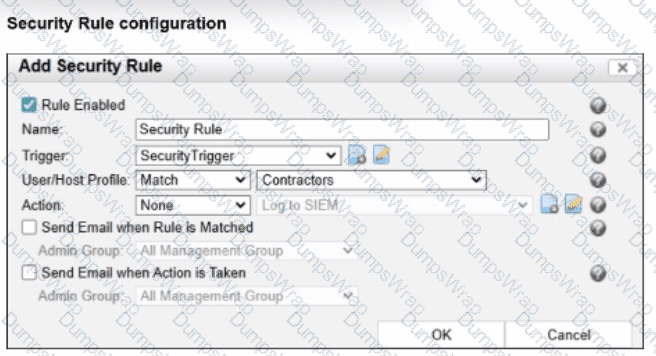
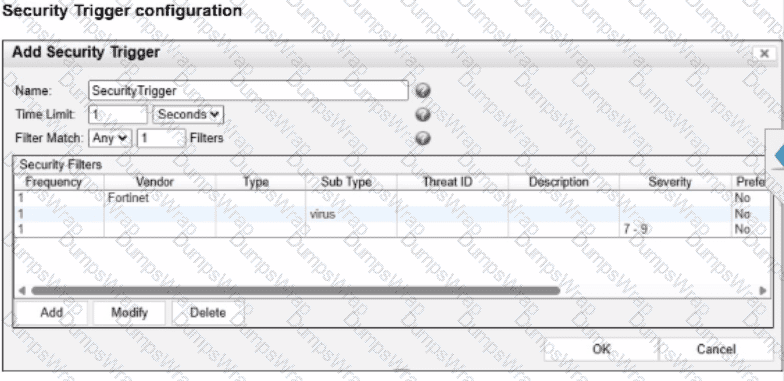
Given the current configuration, what would happen if a contractor triggered two of the defined security filters?
Options:
Two security events would be generated, but no security alarm would be generated
A security alarm and two security events would be generated.
Three security events and one security alarm would be generated.
A security event and a security alarm would be generated.
Answer:
BExplanation:
The correct answer is B . In the trigger exhibit, the Filter Match setting is configured as Any 1 Filters , meaning the security trigger is satisfied when any one of the defined filters matches within the configured time window. The contractor triggers two of the defined filters, so two separate security events are generated because FortiNAC-F creates a security event whenever a security filter matches. The study guide confirms that each matched filter generates a security event, and when a trigger contains multiple filters, multiple matched filters can be associated with the resulting alarm.
The security rule exhibit also shows User/Host Profile: Match Contractors . Because the triggering user is a contractor, the user/host profile condition is satisfied. Once the trigger is satisfied and the user/host profile matches, FortiNAC-F generates a security alarm . The fact that Action is set to None does not stop the alarm from being generated; it only means no automated or manual response action is executed from that rule. Option A is wrong because the contractor profile matches, so an alarm is generated. Option C is wrong because only two filters were triggered, not three. Option D is wrong because two filters matched, so two events are generated, not one.
The exhibits show an enabled Security Rule using the SecurityTrigger , with the User/Host Profile configured as Match → Contractors . The associated trigger contains multiple security filters and uses Filter Match = Any . Because the endpoint in the scenario is a contractor, the User/Host Profile condition is satisfied.
The critical FortiNAC-F distinction is between a security event and a security alarm . The Study Guide states that a security event is generated whenever a security filter evaluates as true . Therefore, if the contractor triggers two security filters, two separate security events are generated .
The trigger is also satisfied, and because the Contractors profile matches, the security rule matches. A successful security-rule match generates one security alarm . The guide explicitly explains that a trigger can contain multiple filters and that each matched filter generates a security event; consequently, multiple events can be associated with a single alarm.
The exhibit ' s Action = None does not suppress alarm creation—it only means no response action is executed.
Therefore: 2 matched filters = 2 security events + 1 security alarm.
Study Guide Reference: Security Device Integration and Automated Response — Security Rules, Security Events and Alarms, Security Triggers , pp. 328–333 .
Refer to the output below.

Examine the communication between a primary FortiNAC-F (192.168.10.10) and a secondary FortlNAC-F (192.168.10.110) configured as a 1+1 HA pair. What is the current state of the FortiNAC-F HA pair?
Options:
The secondary server is running and in control.
The database replication failed
Failover from the primary server to the secondary server is in progress.
The primary server is running and in control.
Answer:
DExplanation:
The correct answer is D . The log output shows the local IP address as 192.168.10.10 , which the question identifies as the primary FortiNAC-F server. In the same output, FortiNAC-F reports inControl true and controlServer true , which means the local primary server is currently the control server. The line showing communication to 192.168.10.110 returns Running - Not In Control , confirming that the secondary server is alive but is not the active controlling node.
This matches FortiNAC-F 1+1 HA behavior. The study guide describes a 1+1 HA pair as an active-passive deployment where one FortiNAC-F device is designated primary and the other secondary. Database and configuration synchronization keep the devices aligned, but only one server is in control at a time. If the primary fails, the secondary assumes control automatically; otherwise, the primary remains the active control server.
Option A is wrong because the secondary explicitly reports Not In Control . Option B is wrong because the output does not show database replication failure. Option C is wrong because failover is not in progress; the output shows a stable state where the primary is in control and the secondary is running as the passive node.
An administrator wants to use FortiNAC-F to prevent internal engineers from accessing specific websites as defined in web filter categories on FortiGate. In addition to a security trigger and associated action, which configuration must also be defined on FortiNAC-F?
Options:
A compliance policy
A firewall policy
A user/host profile
A profiling method
Answer:
CExplanation:
The correct answer is C . FortiNAC-F security automation does not rely only on a trigger and action. After a security alert is received and the security trigger is satisfied, FortiNAC-F can also evaluate an associated user/host profile before generating the security alarm and executing the action. The study guide explains that user/host profiles are the same profiles used by security policies and are used in security rules to leverage “who, what, where, and when” visibility information. This is exactly what the question requires: the rule must apply specifically to internal engineers , not every user who triggers the FortiGate web-filter category event.
A compliance policy is wrong because compliance policies evaluate endpoint health, posture, scans, or agent results; they do not scope FortiGate web-filter-triggered automation to a user population. A firewall policy is configured on FortiGate, not as the FortiNAC-F-side matching condition in the security rule. A profiling method is also wrong because profiling methods classify rogue or unknown devices, such as printers, cameras, or phones; they do not identify internal engineers for a security automation workflow. The user/host profile is the correct FortiNAC-F object because it lets the same FortiGate security trigger produce a different response depending on the matched user, host, group, location, or ownership context.
When configuring isolation networks in the configuration wizard, why does a layer 3 network typo allow for mora than ono DHCP scope for each isolation network typo?
Options:
The layer 3 network type allows for one scope for each possible host status.
Configuring more than one DHCP scope allows for DHCP server redundancy
There can be more than one isolation network of each type
Any scopes beyond the first scope are used if the initial scope runs out of IP addresses.
Answer:
CExplanation:
In FortiNAC-F, theLayer 3 Network typeis specifically designed for deployments where the isolation networks—such as Registration, Remediation, and Dead End—are separated from the FortiNAC appliance ' s service interface (port2) by one or more routers. This architecture is common in large, distributed enterprise environments where endpoints in different physical locations or branches must be isolated into subnets that are local to their respective network equipment.
The reason the Configuration Wizard allows for more than one DHCP scope for a single isolation network type (state) is thatthere can be more than one isolation network of each typeacross the infrastructure. For instance, if an organization has three different sites, each site might require its own unique Layer 3 registration subnet to ensure efficient routing and to accommodate local IP address management. By allowing multiple scopes for the " Registration " state, FortiNAC can provide the appropriate IP address, gateway, and DNS settings to a rogue host regardless of which site ' s registration VLAN it is placed into.
When an endpoint is isolated, the network infrastructure (via DHCP Relay/IP Helper) directs the DHCP request to the FortiNAC service interface. FortiNAC then identifies which scope to use based on the incoming request ' s gateway information. This flexibility ensures that the system is not limited to a single flat subnet for each isolation state, supporting a scalable, multi-routed network topology.
" Multiple scopes are allowed for each isolation state (Registration, Remediation, Dead End, VPN, Authentication, Isolation, and Access Point Management). Within these scopes, multiple ranges in the lease pool are also permitted... This configWizard option is used when Isolation Networks are separated from the FortiNAC Appliance ' s port2 interface by a router. " —FortiNAC-F Configuration Wizard Reference Manual: Layer 3 Network Section.
Refer to the exhibit.
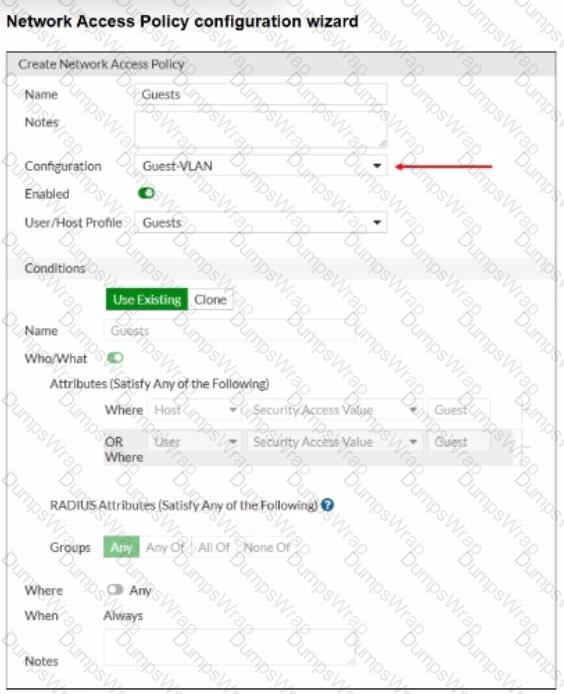
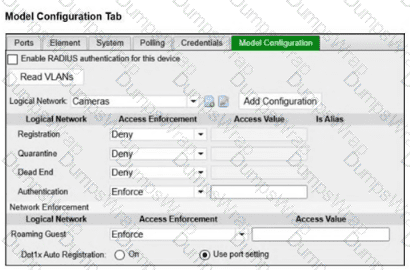
When configuring guest access using a network access policy, where would an administrator configure the Guest-VLAN value?
Options:
In the Model configuration
In the Guest template
In the User/Host profile
in the Guest portal configuration
Answer:
AExplanation:
The correct answer is A . In the exhibit, Guest-VLAN is selected as the network access policy Configuration . That policy configuration points to a logical network, but the actual access value for that logical network is not defined inside the guest template, user/host profile, or guest portal. The FortiNAC-F study guide explains that logical networks translate policy-level names into device-specific access values, and those values are configured in the Model Configuration of the infrastructure device. It specifically states that device-specific configurations for infrastructure devices associate the configuration values with the devices, and that after a logical network is created, it appears within the model configuration of each modeled infrastructure device.
So, Guest-VLAN is the logical network selected by the network access policy, while the actual VLAN ID, VLAN name, SSID role, controller group, or vendor-specific access value is configured under the relevant switch, AP, controller, or firewall Model Configuration . Option B is wrong because the guest template defines guest account properties such as role, security/access value, password settings, account duration, and login availability. Option C is wrong because the user/host profile defines the matching condition for guests. Option D is wrong because the guest portal controls onboarding or login behavior, not the infrastructure access value used to provision the endpoint.
Refer to the exhibits.
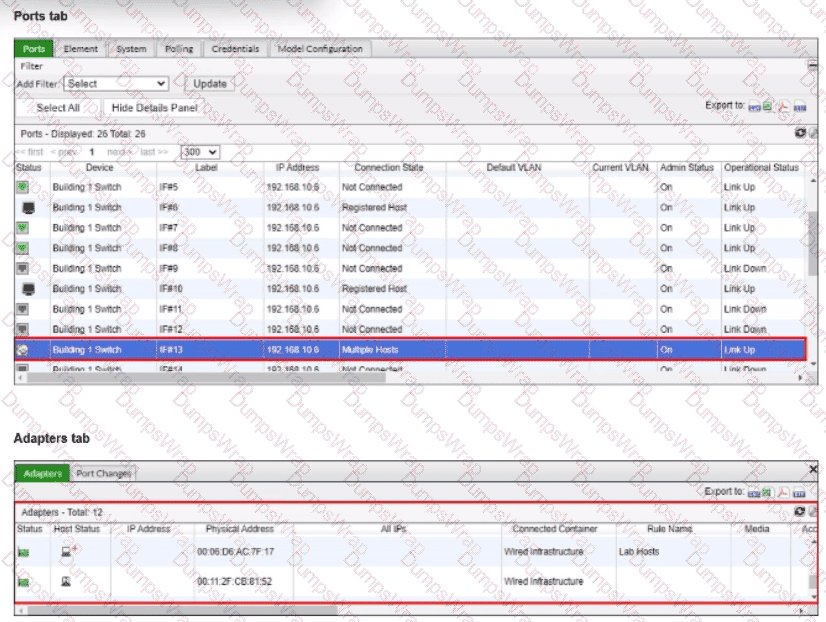
What would happen if the highlighted port with connected hosts was placed in both the Forced Registration and Forced Remediation port groups?
Options:
Both types of enforcement would be applied
Enforcement would be applied only to rogue hosts
Multiple enforcement groups could not contain the same port.
Only the higher ranked enforcement group would be applied.
Answer:
AExplanation:
A FortiNAC-F port can belong to both Forced Registration and Forced Remediation system groups . These enforcement groups are not mutually exclusive and are not evaluated according to a ranking between the groups. Instead, FortiNAC-F determines the applicable enforcement according to the state of each host connected through that point of connection .
The Study Guide explicitly demonstrates overlapping enforcement membership: all Building 1 ports are members of Forced Registration , while second- and third-floor ports are additionally members of Forced Remediation .
FortiNAC-F then applies state-specific logic:
A rogue/unregistered host on the port satisfies Forced Registration and is moved to the Registration isolation network.
An at-risk host on the same port satisfies Forced Remediation and is moved to the Quarantine/Remediation isolation network.
The exhibit is particularly relevant because the highlighted port shows Multiple Hosts connected. Each host is evaluated independently according to its state, so different enforcement mechanisms can apply to different endpoints sharing that port.
Therefore, placing the port in both groups enables both types of enforcement , depending on the state of the connected hosts.
Study Guide Reference: State-Based Control → System Groups; Logic to Determine Isolation; Non-Normal Status Device Evaluation , pp. 212–214 .
Top of Form
Bottom of Form
An administrator wants to control user access to corporate resources by integrating FortiNAC-F with FortiGate using firewall tags defined on FortiNAC-F.
Where would the administrator assign the firewall tag value that will be sent to FortiGate?
Options:
RADIUS group attribute
Logical network
Device profiling rule
Security rule
Answer:
BExplanation:
Questions no:9
Verified Answer: B
Comprehensive and Detailed 250 to 300 words each Explanation with Exact Matched Extract from FortiNAC-F Administrator library and documentation for current versions (including F 7.2, 7.4, and 7.6) documents:
In FortiNAC-F, the integration with FortiGate for Security Fabric and Single Sign-On (FSSO) allows the system to communicate the access level of an endpoint directly to the firewall usingfirewall tags. This eliminates the need for complex VLAN steering in some environments by allowing the FortiGate to apply policies based on these dynamic tags instead of just a physical or virtual network segment.
The actual assignment of the firewall tag value occurs within aLogical Network. In the FortiNAC-F architectural model, a Logical Network acts as a container for " Access Values " . When an administrator configures a Logical Network (located underNetwork > Logical Networks), they define what that network represents—such as " Corporate Access " or " Contractor Limited " . Within that definition, they assign the specificFirewall Tagthat matches the tag created on the FortiGate. Once a user or host matches aNetwork Access Policy, FortiNAC-F identifies the associated Logical Network and pushes the defined tag to the FortiGate via the FSSO connector.
It is important to note that whileNetwork Access Policies(and by extensionSecurity Rules) are the logic engines thattriggerthe assignment, they do not hold the tag value itself. They simply point to a Logical Network, which serves as the central repository for that specific access configuration.
" To assign firewall tags, navigate toNetwork > Logical Networks. Select the desired logical network and clickEdit. Under theAccess Valuesection, selectFirewall Tagas the type and enter the tag name exactly as it appears on the FortiGate. When a Network Access Policy matches a host, FortiNAC sends this tag to the FortiGate as an FSSO message. " —FortiNAC-F Administration Guide: Logical Networks and Security Fabric Integration.
Refer to the exhibits.
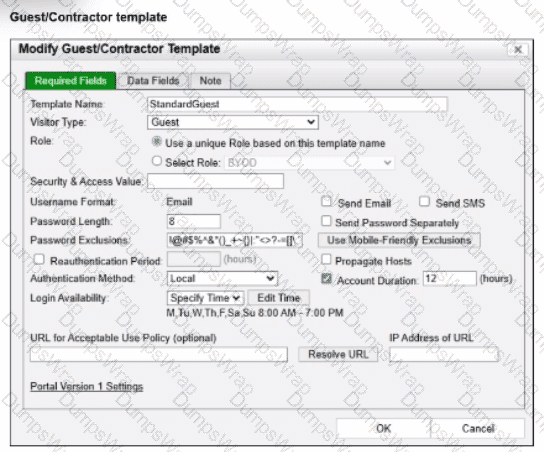
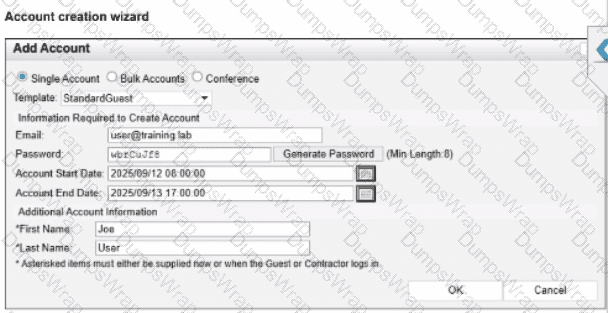
Based on the given configurations and settings, on which date and time would a guest account created at 8:00 AM on 2025/09/12 expire?
Options:
2025/09/12 at 8:00 PM
2025/09/12 at 7:00 PM
2025/09/12 at 17:00:00
2025/09/13 at 17:00:00
Answer:
DExplanation:
In FortiNAC-F, the expiration of a guest or contractor account is determined by the configuration settings within theAccount Creation Wizardand the associatedGuest/Contractor Template. While a template can define a default " Account Duration " (as seen in the 12-hour setting in the second exhibit), theAccount Creation Wizardallows an administrator to manually specify or override the start and end parameters for a specific user session.
According to theFortiNAC-F Administration Guideregarding guest management, theAccount End Datefield in the creation wizard is the definitive timestamp for when the account object will be disabled or deleted from the system. In the provided exhibit (Account Creation Wizard), the administrator has explicitly set theAccount Start Dateto2025/09/12 08:00:00and theAccount End Dateto2025/09/13 17:00:00.
Even though the template indicates an " Account Duration " of 12 hours, this value typically serves as a pre-populated default. When a manual date and time are entered into the wizard, those specific values take precedence for that individual account. The account will remain active and valid until5:00 PM (17:00:00)on the following day,2025/09/13. It is also important to note the " Login Availability " from the template (8:00 AM - 7:00 PM); while the accountexistsuntil the 13th at 17:00:00, the user would only be able to authenticate during the active hours defined by the login schedule on both days.
" When creating an account, the administrator can select a template to provide default settings. However, specific values such as theAccount End Datecan be modified within theAccount Creation Wizard. The date and time specified in the ' Account End Date ' field determines the absolute expiration of the account. Once this time is reached, the account is moved to an expired state and the user ' s network access is revoked. " —FortiNAC-F Administration Guide: Guest and Contractor Account Management.
An administrator is configuring FortiNAC-F to manage FortiGate VPN users. As part of the configuration, the administrator must configure a few FortiGate firewall policies. What is the purpose of the FortiGate firewall policy that applies to clients not yet authorized by FortiNAC-F? (Choose one answer)
Options:
To allow access to only the production DNS server
To allow access to only the production DNS server
To allow access to only the FortiNAC-F VPN interface
To allow access to only the FortiGate VPN interface
Answer:
CExplanation:
The firewall policy for an unauthorized VPN host is an isolation policy. When a remote endpoint first establishes its VPN tunnel, FortiGate assigns the client an IP address plus two DNS servers: the production DNS server as primary and the FortiNAC-F Port2 VPN-context address as secondary . Until FortiNAC-F validates the endpoint, FortiGate firewall policies restrict the client ' s traffic so that it can communicate only with the FortiNAC-F Port2 VPN interface .
This restriction deliberately prevents access to the primary production DNS server. Consequently, DNS resolution against the primary server fails and the endpoint falls back to the secondary DNS server—FortiNAC-F. FortiNAC-F then resolves the request toward its VPN isolation interface and presents the VPN captive portal . The user can subsequently run or download the required FortiNAC-F agent, allowing FortiNAC-F to perform identification and endpoint-compliance validation.
After successful authorization, FortiNAC-F sends the appropriate group/tag information to FortiGate, causing the host to match a different firewall policy that permits the required production resources and blocks the isolation interface.
Study Guide Reference: Advanced Features → FortiGate VPN Integration → VPN Host Isolation and Firewall Policies , pp. 346–354 .
Refer to the exhibits.
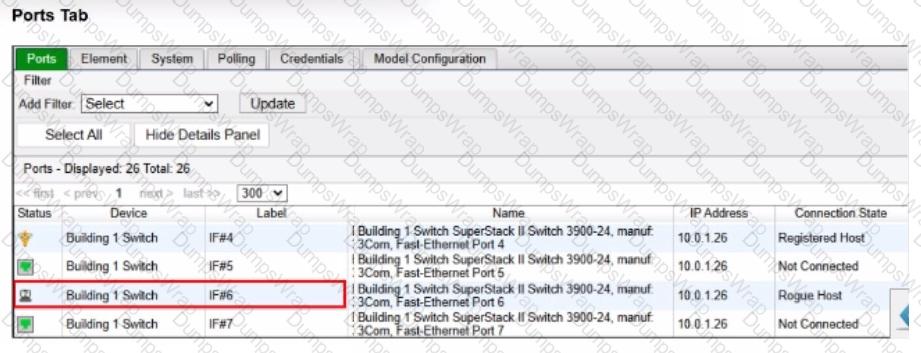
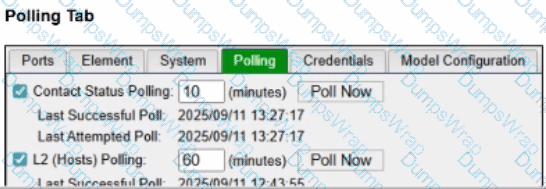
An administrator is troubleshooting visibility issues on a modeled switch The switch is configured to use link traps and to provision hosts based on network access policies. The administrator is seeing hosts on ports with no hosts connected and not seeing hosts on ports where hosts are known to be connected.
What is the most likely cause?
Options:
The logical networks are set to deny.
The host has uninstalled the FortiNAC-F agent.
The switch cannot be contacted by FortiNAC-F
The credentials are incorrect.
Answer:
CExplanation:
The correct answer is C . In a link-trap-based wired deployment, the switch sends a linkUp or linkDown SNMP trap to FortiNAC-F, but that trap does not contain the endpoint MAC address. After receiving the link trap, FortiNAC-F must contact the switch and perform a Layer 2 poll to read the forwarding table and determine which MAC address was added or removed on the port. The FortiNAC-F study guide states that link traps trigger FortiNAC-F to perform a Layer 2 poll to update its awareness of devices connected to the edge device, and the wired link-trap workflow specifically shows FortiNAC-F performing a Layer 2 poll before locating the host record and provisioning access.
The symptoms in the exhibit are classic stale Layer 2 visibility: FortiNAC-F still shows a rogue host on a port where no host is connected, while also failing to show hosts on ports where endpoints are actually connected. That means FortiNAC-F is not successfully refreshing the switch MAC table information. Since link traps depend on FortiNAC-F being able to poll the switch after the trap, a contact failure with the modeled switch is the most likely cause.
Option A is wrong because logical network settings affect access enforcement, not whether FortiNAC-F can see current MAC-to-port mappings. Option B is wrong because the FortiNAC-F agent is not required for basic switch-port visibility; Layer 2 visibility comes from switch polling, MAC notification traps, or RADIUS. Option D is tempting, but the broader failure shown here is not merely a policy or endpoint-side issue—it is that FortiNAC-F cannot obtain current Layer 2 data from the switch. In practice, you would still verify SNMP/CLI credentials while troubleshooting, but the best answer to the symptom pattern is that FortiNAC-F cannot contact/query the switch successfully.
An administrator manages a corporate environment where all users log into the corporate domain each time they connect to the network. The administrator wants to leverage login scripts to use a FortiNAC-F agent to enhance endpoint visibility. Which agent can be deployed as part of a login script?
Options:
Persistent
Dissolvable
Mobile
Passive
Answer:
DExplanation:
The Passive Agent is the agent specifically associated in the FortiNAC-F 7.6 curriculum with domain login/logoff scripts . The Study Guide states that the Passive Agent is “deployed by a login/logoff script” and is designed to register and scan Windows endpoints joined to a domain when a domain user logs in .
The administrator places the Passive Agent executable in a user-accessible location, such as SYSVOL , configures the FortiNAC-F server information through administrative templates, and invokes the executable through the domain controller ' s login/logoff scripts. This allows FortiNAC-F to obtain endpoint information and track users without requiring interactive installation by the user. Passive Agent configurations can register the user and associated host, perform compliance scanning if configured, and track login/logout activity.
The Administration Guide reinforces this workflow by specifying GPO User Configuration > Windows Settings > Scripts (Logon/Logoff) and using the Passive Agent with -logon and -logoff parameters.
Therefore, the exam-specific answer is Passive Agent .
Study Guide Reference: Identification and Classification of Rogues → Passive Agent , pp. 125–126 .
A healthcare organization is integrating FortiNAC-F with its existing MDM. Communication is failing between the systems.
What could be a probable cause?
Options:
Security Fabric traffic is failing
SSH communication is failing
REST API communication is failing
SOAP API communication is failing
Answer:
CExplanation:
The integration between FortiNAC-F and Mobile Device Management (MDM) platforms (such as Microsoft Intune, VMware Workspace ONE, or Jamf) is a critical component for providing visibility into mobile assets that do not connect directly to the managed infrastructure via standard wired or wireless protocols.
According to theFortiNAC-F MDM Integration Guide, the communication between the FortiNAC-F appliance and the MDM server is handled throughREST APIcalls. FortiNAC-F acts as an API client, periodically polling the MDM server to retrieve device metadata, compliance status, and ownership information. If communication is failing, it is most likely because the API credentials (Client ID/Secret) are incorrect, the MDM ' s API endpoint is unreachable from the FortiNAC-F service port, or the SSL certificate presented by the MDM is not trusted by the FortiNAC-F root store.
While SSH (B) is used for switch CLI management and the Security Fabric (A) uses proprietary protocols for FortiGate synchronization, neither is the primary vehicle for MDM data exchange. SOAP API (D) is an older protocol that has been largely replaced by REST in modern FortiNAC integrations.
" FortiNAC integrates with MDM systems by utilizingREST APIcommunication to query the MDM database for device information. To establish this link, administrators must configure the MDM Service Connector with the appropriateAPI URLand authentication credentials. If the ' Test Connection ' fails, verify that the FortiNAC can reach the MDM provider via theREST APIport (usually HTTPS 443). " —FortiNAC-F Administration Guide: MDM Integration and Troubleshooting.
While discovering network infrastructure devices, a switch appears in the inventory topology with a question mark (?) on the icon. What would cause this?
Options:
The wrong SNMP community string was entered during discovery.
The SNMP ObjectlD is not recognized by FortiNAC-F.
A read-only SNMP community siring was used.
SNMP is not enabled on the switch.
Answer:
BExplanation:
In FortiNAC-F, theInventory topologyuses specific icons to represent the status and model of discovered network infrastructure. When a switch or other network device is discovered via SNMP, FortiNAC-F retrieves itsSystem ObjectID (sysObjectID)to identify the specific make and model. This OID is then compared against the internal database of supported device mappings.
Aquestion mark (?)icon appearing on a discovered switch indicates that while the discovery process successfully communicated with the device (meaning SNMP credentials were correct), theSNMP ObjectID is not recognizedor mapped in the current version of FortiNAC-F. This essentially means the device is " unsupported " by the current software out-of-the-box. Because the OID is unknown, FortiNAC-F does not know which CLI or SNMP command set to use for critical functions like L2 polling (host visibility) or VLAN switching (enforcement). To resolve this, an administrator can manually " Set Device Mapping " to a similar existing model or a " Generic SNMP Device " if only basic L3 visibility is required.
" Discovered devices displaying a ' ? ' iconindicate the currently running version does not have a mapping for that device ' sSystem OID(device is not supported). Device mappings are used to manage the device by performing functions such as L2/L3 Polling, Reading, and Switching VLANs. " —Fortinet Technical Tip: Options for devices unable to be modeled in Inventory.
