
Fortinet NSE 7 - Security Operations 7.6 Architect Questions and Answers
Review the following incident report:
Attackers leveraged a phishing email campaign targeting your employees.
The email likely impersonated a trusted source, such as the IT department, and requested login credentials.
An unsuspecting employee clicked a malicious link in the email, leading to the download and execution of a Remote Access Trojan (RAT).
The RAT provided the attackers with remote access and a foothold in the compromised system.
Which two MITRE ATT & CK tactics does this incident report capture? (Choose two.)
Options:
Initial Access
Defense Evasion
Lateral Movement
Persistence
Answer:
A, DExplanation:
Understanding the MITRE ATT & CK Tactics:
The MITRE ATT & CK framework categorizes various tactics and techniques used by adversaries to achieve their objectives.
Tactics represent the objectives of an attack, while techniques represent how those objectives are achieved.
Analyzing the Incident Report:
Phishing Email Campaign: This tactic is commonly used for gaining initial access to a system.
Malicious Link and RAT Download: Clicking a malicious link and downloading a RAT is indicative of establishing initial access.
Remote Access Trojan (RAT): Once installed, the RAT allows attackers to maintain access over an extended period, which is a persistence tactic.
Mapping to MITRE ATT & CK Tactics:
Initial Access:
This tactic covers techniques used to gain an initial foothold within a network.
Techniques include phishing and exploiting external remote services.
The phishing campaign and malicious link click fit this category.
Persistence:
This tactic includes methods that adversaries use to maintain their foothold.
Techniques include installing malware that can survive reboots and persist on the system.
The RAT provides persistent remote access, fitting this tactic.
Exclusions:
Defense Evasion:
This involves techniques to avoid detection and evade defenses.
While potentially relevant in a broader context, the incident report does not specifically describe actions taken to evade defenses.
Lateral Movement:
This involves moving through the network to other systems.
The report does not indicate actions beyond initial access and maintaining that access.
Conclusion:
The incident report captures the tactics of Initial Access and Persistence .
Which three end user logs does FortiAnalyzer use to identify possible IOC compromised hosts? (Choose three.)
Options:
Email filter logs
DNS filter logs
Application filter logs
IPS logs
Web filter logs
Answer:
B, D, EExplanation:
Overview of Indicators of Compromise (IoCs) : Indicators of Compromise (IoCs) are pieces of evidence that suggest a system may have been compromised. These can include unusual network traffic patterns, the presence of known malicious files, or other suspicious activities.
FortiAnalyzer ' s Role : FortiAnalyzer aggregates logs from various Fortinet devices to provide comprehensive visibility and analysis of network events. It uses these logs to identify potential IoCs and compromised hosts.
Relevant Log Types :
DNS Filter Logs :
DNS requests are a common vector for malware communication. Analyzing DNS filter logs helps in identifying suspicious domain queries, which can indicate malware attempting to communicate with command and control (C2) servers.
You want to use the queue and shift management feature to automatically assign newly created low-priority tasks to members of the L1 queue. However, you are unable to add the Tasks module to the Module Types list. What is the problem? Choose one answer.
Options:
The Queueable option is disabled for the Tasks module.
There is a higher priority queue for the Tasks module.
The Tasks module is not supported by queue and shift management.
Shift-based assignment is disabled.
Answer:
AExplanation:
Exact Extract: “The first step in creating a queue occurs on the Queue Definition page, where you define a name and description, and specify the modules that you want to associate with the queue… Note that for the module to be selectable under Module Types, you must enable the Queueable setting under Application Editor > Modules.”
The correct answer is A because FortiSOAR only allows a module to appear in the queue Module Types list when that module has the Queueable setting enabled under Application Editor > Modules . The issue is not the task priority or queue priority. A higher priority queue only affects tie-breaking when multiple queues match the same record criteria; it does not prevent a module from being selected. The Tasks module can be used as a FortiSOAR record module, so C is not the best answer. Shift-based assignment is also separate: it controls whether assignment follows shift availability after the queue exists, but it does not control whether the module appears in the Module Types list.
Technical Deep Dive: Queue and shift management is metadata-driven. First, the module must be queue-enabled. Then queue rules can match records, such as newly created low- priority tasks. After that, user assignment logic can assign records to the queue lead, leave them unassigned, or distribute them by round robin, optionally using shift-based availability. So the first fix is: Application Editor > Modules > Tasks > enable Queueable.
Which two statements about the FortiAnalyzer Fabric topology are true? (Choose two.)
Options:
Downstream collectors can forward logs to Fabric members.
Logging devices must be registered to the supervisor.
The supervisor uses an API to store logs, incidents, and events locally.
Fabric members must be in analyzer mode.
Answer:
B, DExplanation:
Understanding FortiAnalyzer Fabric Topology:
The FortiAnalyzer Fabric topology is designed to centralize logging and analysis across multiple devices in a network.
It involves a hierarchy where the supervisor node manages and coordinates with other Fabric members.
Analyzing the Options:
Option A: Downstream collectors forwarding logs to Fabric members is not a typical configuration. Instead, logs are usually centralized to the supervisor.
Option B: For effective management and log centralization, logging devices must be registered to the supervisor. This ensures proper log collection and coordination.
Option C: The supervisor does not primarily use an API to store logs, incidents, and events locally. Logs are stored directly in the FortiAnalyzer database.
Option D: For the Fabric topology to function correctly, all Fabric members need to be in analyzer mode. This mode allows them to collect, analyze, and forward logs appropriately within the topology.
Conclusion:
The correct statements regarding the FortiAnalyzer Fabric topology are that logging devices must be registered to the supervisor and that Fabric members must be in analyzer mode.
Review the incident report. A fake HR login page was sent to several employees through email. The page copied the company’s branding and captured usernames and passwords. The attacker later used the stolen credentials to sign in through the company’s web VPN. Which two MITRE ATT & CK tactics best characterize this report? Choose two answers.
Options:
Initial Access
Command and Control
Credential Access
Defense Evasion
Answer:
A, CExplanation:
Exact Extract: “MITRE ATT & CK classifies and describes cyberattacks and intrusions through 14 tactics, each representing an adversary ' s technical objective… These categories are further broken down into specific techniques and subtechniques.”
Exact Extract: “When an incident contains alerts correlated with known adversary techniques, they are displayed on the MITRE ATT & CK matrix directly in the incident view. This helps analysts quickly understand the attack progression, identify affected tactics… and prioritize response actions based on threat context.”
The correct answers are A and C . The fake HR login page captured usernames and passwords, which maps to Credential Access because the attacker’s objective was to steal valid credentials. The later use of those stolen credentials to sign in through the company’s web VPN maps to Initial Access , because the attacker used valid credentials to gain access to the victim environment.
B is wrong because the scenario does not describe command-and-control beaconing, remote control, or malware maintaining communication with attacker infrastructure. D is wrong because there is no evidence of log clearing, obfuscation, masquerading for evasion after compromise, or disabling defenses.
Technical Deep Dive: In Fortinet SOC terms, the evidence chain would likely include FortiMail phishing delivery logs, web/DNS logs for the fake HR page, FortiClient or browser telemetry if available, and FortiGate SSL VPN successful-login events. FortiSOAR can enrich the phishing URL/domain, link affected users, and escalate the VPN login into an incident. The higher-value detection is not only blocking the domain; it is correlating credential harvesting with subsequent successful VPN authentication. NP/CP acceleration is not the main factor because the detection depends on logs, identity correlation, and MITRE mapping.
Refer to the exhibits.
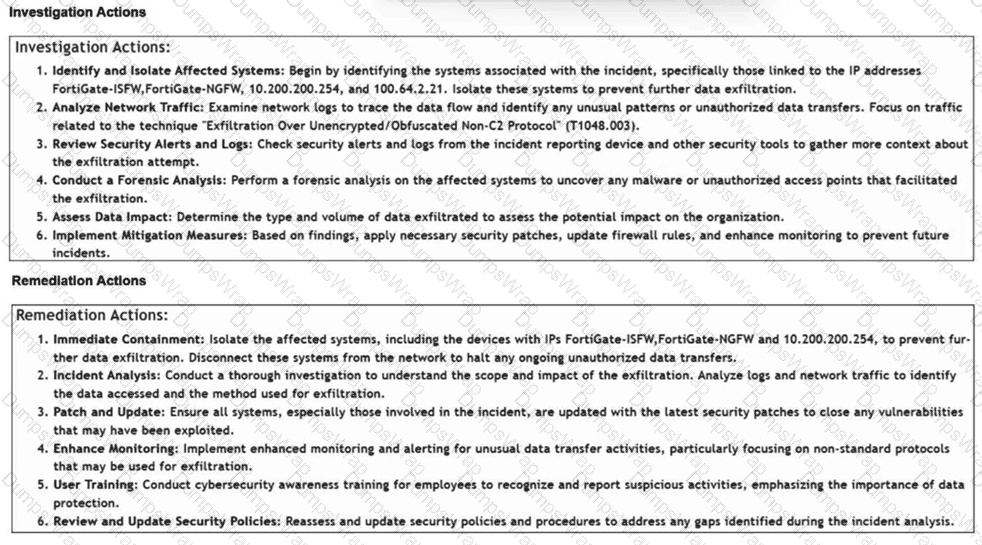
How is the investigation and remediation output generated on FortiSIEM? (Choose one answer)
Options:
By exporting an incident
By running an incident report
By using FortiAI to summarize the incident
By viewing the Context tab of an incident
Answer:
CExplanation:
In FortiSIEM 7.3 , a key innovation is the integration of FortiAI , which provides generative AI capabilities to assist SOC analysts during the triage and response process.
Generative AI Summary: When an incident occurs, FortiAI can automatically analyze the underlying logs, correlation logic, and MITRE ATT & CK techniques (such as " Exfiltration Over Alternative Protocol " shown in the exhibit) to generate a human-readable summary.
Structured Output: The output displayed in the exhibit—specifically the categorized Investigation Actions (identifying affected systems, analyzing traffic) and Remediation Actions (immediate containment, patching, user training)—is the typical result of a FortiAI summary request.
Analyst Efficiency: This feature is designed to reduce the " mean time to respond " (MTTR) by providing analysts with immediate, actionable steps without requiring them to manually piece together the recommended response plan from static documentation or disparate log views.
Why other options are incorrect:
Exporting an incident (A): Exporting an incident typically results in a raw data file (CSV/JSON/PDF) containing the log data and metadata, rather than an AI-generated strategic plan for investigation and remediation.
Running an incident report (B): Standard incident reports provide statistical and historical data about incidents over time. They do not dynamically generate specific, numbered investigation steps tailored to the unique context of a single live incident.
Context tab (D): The Context tab in FortiSIEM is primarily used to view the CMDB information of the involved assets (e.g., host details, owner, location) and related historical events. While it provides the data needed for an investigation, it does not provide the list of actions to take.
A FortiSOAR playbook includes a Wait step that is configured to pause execution after initiating a reputation lookup on an indicator. Which two configurations of the Wait step are valid? Choose two answers.
Options:
The playbook resumes when a specified amount of time has elapsed.
The playbook resumes when the indicator record is updated.
The Wait step can retry a specific step in the playbook at scheduled intervals until it succeeds.
The Wait step, during the AWAITING state, can execute child playbooks.
Answer:
A, BExplanation:
Exact Extract: “Use the Wait step to specify the time that the playbook should wait after a specific step before continuing with the remaining steps in the playbook. Alternatively, specify the conditions that must be met before the playbook continues. For example, investigation playbooks should wait for enrichment to finish before continuing with the subsequent steps.”
The correct answers are A and B . A Wait step can resume after a defined duration, so option A is valid. It can also resume when a condition is met, such as the indicator record being updated after the reputation lookup or enrichment process completes, so option B is also valid. Option C is not a Wait-step function; retrying failed actions at intervals belongs to step execution/error-handling behavior, not the Wait step’s purpose. Option D is also wrong because executing another playbook is handled by a separate reference/playbook execution step, not by the Wait step while it is paused. The guide separately identifies “Reference a Playbook” as the step used to execute another playbook.
Technical Deep Dive: In FortiSOAR playbooks, Wait is a control-flow gate. Use time-based waiting when an external system has predictable processing latency, for example waiting 60 seconds after submitting an IOC to a sandbox or reputation service. Use condition-based waiting when the downstream update is asynchronous, for example waiting until an indicator’s reputation, enrichment status, or related field changes. This prevents the playbook from reading incomplete enrichment data. This is SOAR workflow orchestration; FortiGate NP/CP hardware offloading is irrelevant because no traffic forwarding, session acceleration, or content processor inspection is involved.
Which two ways can you create an incident on FortiAnalyzer? (Choose two answers)
Options:
Using a custom event handler
Using a connector action
Manually, on the Event Monitor page
By running a playbook
Answer:
A, DExplanation:
In FortiAnalyzer 7.6 and related SOC versions, incidents serve as centralized containers for tracking and analyzing security events. There are two primary automated and manual methods to initiate an incident:
Using a custom event handler (A): In FortiAnalyzer, event handlers are used to generate events from raw logs. 1 A critical feature in recent versions is the Automatically Create Incident setting within a custom event handler. 2 When enabled, the system automatically elevates a triggered event into a new incident record, allowing analysts to bypass the manual review of every individual event before an incident is raised. 3
By running a playbook (D): Playbooks provide a powerful way to automate the incident lifecycle. 4 A playbook can be configured with an Event Trigger , meaning it executes as soon as an event matches specific criteria. One of the core actions available within these playbooks is the Create Incident action, which can automatically populate incident details, severity, and category based on the triggering event ' s data. 5 This ensures high-fidelity events are consistently captured for investigation.
Why other options are incorrect:
Using a connector action (B): While connectors allow FortiAnalyzer to communicate with external systems (like ITSM or Security Fabric devices), the act of " creating an incident " inside FortiAnalyzer is a function of the internal event engine or playbook automation, not a standalone connector action used for external integration.
Manually, on the Event Monitor page (C): While you can view, filter, and acknowledge events on the Event Monitor page, the process of manually raising an incident typically occurs from the Incidents module or by right-clicking an event to " Raise Incident " in the Log View or FortiView, rather than being a core function defined as occurring " on the Event Monitor page " in the same architectural sense as handlers and playbooks.
Which role does a threat hunter play within a SOC?
Options:
investigate and respond to a reported security incident
Collect evidence and determine the impact of a suspected attack
Search for hidden threats inside a network which may have eluded detection
Monitor network logs to identify anomalous behavior
Answer:
CExplanation:
Role of a Threat Hunter :
A threat hunter proactively searches for cyber threats that have evaded traditional security defenses. This role is crucial in identifying sophisticated and stealthy adversaries that bypass automated detection systems.
Key Responsibilities :
Proactive Threat Identification :
Threat hunters use advanced tools and techniques to identify hidden threats within the network. This includes analyzing anomalies, investigating unusual behaviors, and utilizing threat intelligence.
Refer to the exhibits.
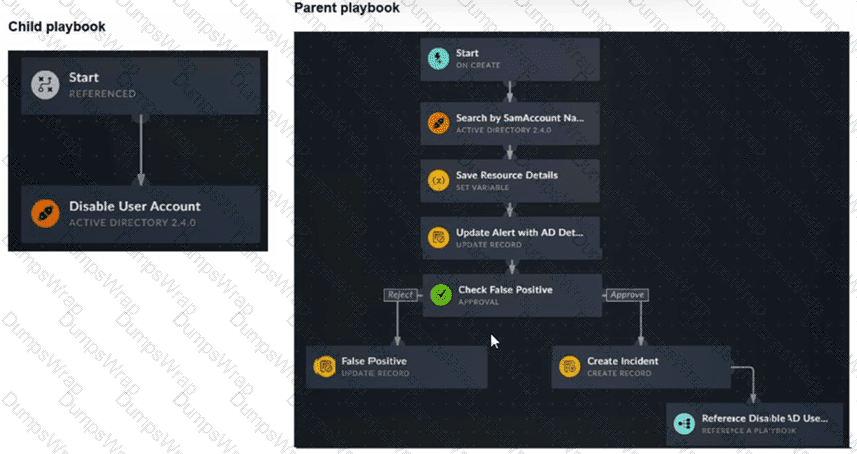
You have a playbook that, depending on whether an analyst deems the alert to be a true positive, could reference a child playbook. You need to pass variables from the parent playbook to the child playbook.
Place the steps needed to accomplish this in the correct order.
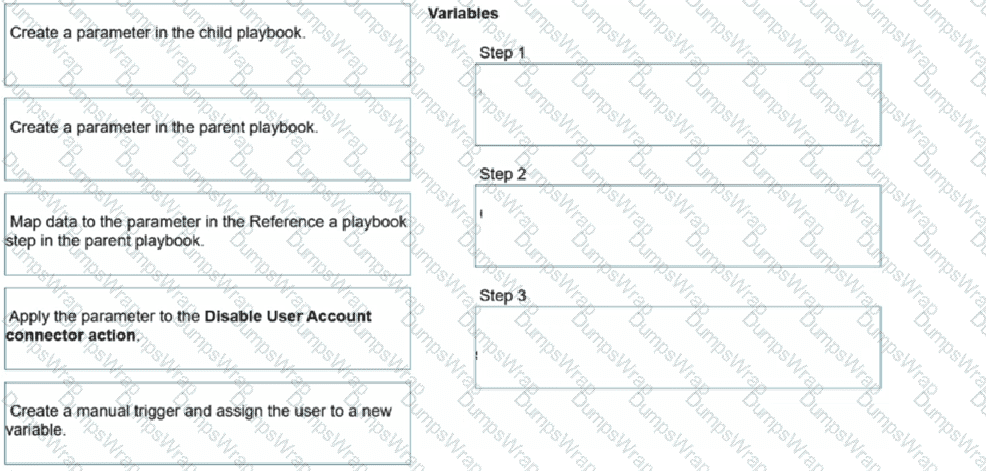
Options:
Answer:
Explanation:
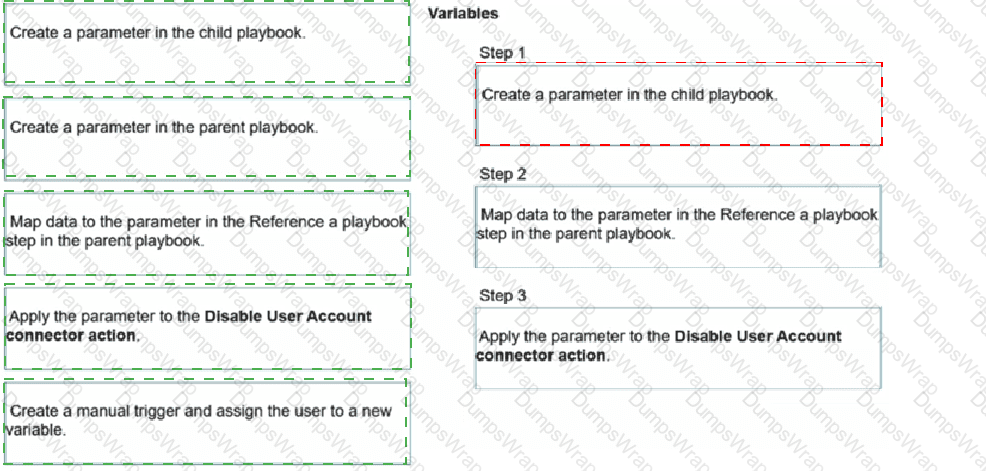
Step 1: Create a parameter in the child playbook.
Step 2: Map data to the parameter in the Reference a Playbook step in the parent playbook.
Step 3: Apply the parameter to the Disable User Account connector action.
Exact Extract: “To make the child playbook function properly, you must pass information from the parent playbook to the child playbook. If the child playbook is not aware of the AD user queried in the parent playbook, the action to disable a user cannot be completed. The easiest way to accomplish this task is to create a parameter in the child playbook.”
Exact Extract: “After it is created, you can go back to your parent playbook to the Reference a Playbook step for the associated child playbook. You will find a new field to map data to. After the data is mapped in the parent playbook, when you return to the child playbook, you can see the parameter is available in the Dynamic Values window.”
The correct order is child parameter → parent mapping → child connector usage . The child playbook must first expose an input parameter, such as user_name, because a referenced child playbook does not automatically inherit every variable from the parent workflow. After the child parameter exists, the parent playbook’s Reference a Playbook step displays that parameter as a mappable input field. The parent can then pass the AD username discovered earlier in the workflow. Finally, inside the child playbook, that parameter is selected from Dynamic Values and applied to the Disable User Account Active Directory connector action.
The option “Create a parameter in the parent playbook” is not required. The parent only maps data into the child’s parameter. The option “Create a manual trigger and assign the user to a new variable” is also wrong because the parent playbook in the exhibit already starts from an On Create trigger and already retrieves the AD account details before referencing the child playbook.
Technical Deep Dive: Referenced playbooks are modular automation units. Their clean design depends on explicit input parameters, just like function arguments in programming. This avoids brittle dependencies on parent-step variable names and allows the same child playbook to be reused by multiple parent workflows. Hardware offloading such as FortiGate NP/CP acceleration is irrelevant here because this is FortiSOAR workflow orchestration, not FortiGate data-plane traffic processing.
When does FortiAnalyzer generate an event?
Options:
When a log matches a filter in a data selector
When a log matches an action in a connector
When a log matches a rule in an event handler
When a log matches a task in a playbook
Answer:
CExplanation:
Understanding Event Generation in FortiAnalyzer:
FortiAnalyzer generates events based on predefined rules and conditions to help in monitoring and responding to security incidents.
Analyzing the Options:
Option A: Data selectors filter logs based on specific criteria but do not generate events on their own.
Option B: Connectors facilitate integrations with other systems but do not generate events based on log matches.
Option C: Event handlers are configured with rules that define the conditions under which events are generated. When a log matches a rule in an event handler, FortiAnalyzer generates an event.
Option D: Tasks in playbooks execute actions based on predefined workflows but do not directly generate events based on log matches.
Conclusion:
FortiAnalyzer generates an event when a log matches a rule in an event handler.
Refer to the exhibits.
You configured a spearphishing event handler and the associated rule. However. FortiAnalyzer did not generate an event.
When you check the FortiAnalyzer log viewer, you confirm that FortiSandbox forwarded the appropriate logs, as shown in the raw log exhibit.
What configuration must you change on FortiAnalyzer in order for FortiAnalyzer to generate an event?
Options:
In the Log Type field, change the selection to AntiVirus Log(malware).
Configure a FortiSandbox data selector and add it tothe event handler.
In the Log Filter by Text field, type the value: .5 ub t ype ma Iwa re..
Change trigger condition by selecting. Within a group, the log field Malware Kame (mname > has 2 or more unique values.
Answer:
BExplanation:
Understanding the Event Handler Configuration :
The event handler is set up to detect specific security incidents, such as spearphishing, based on logs forwarded from other Fortinet products like FortiSandbox.
An event handler includes rules that define the conditions under which an event should be triggered.
Analyzing the Current Configuration :
The current event handler is named " Spearphishing handler " with a rule titled " Spearphishing Rule 1 " .
The log viewer shows that logs are being forwarded by FortiSandbox but no events are generated by FortiAnalyzer.
Key Components of Event Handling :
Log Type : Determines which type of logs will trigger the event handler.
Data Selector : Specifies the criteria that logs must meet to trigger an event.
Automation Stitch : Optional actions that can be triggered when an event occurs.
Notifications : Defines how alerts are communicated when an event is detected.
Issue Identification :
Since FortiSandbox logs are correctly forwarded but no event is generated, the issue likely lies in the data selector configuration or log type matching.
The data selector must be configured to include logs forwarded by FortiSandbox.
Solution :
B. Configure a FortiSandbox data selector and add it to the event handler :
By configuring a data selector specifically for FortiSandbox logs and adding it to the event handler, FortiAnalyzer can accurately identify and trigger events based on the forwarded logs.
Steps to Implement the Solution :
Step 1 : Go to the Event Handler settings in FortiAnalyzer.
Step 2 : Add a new data selector that includes criteria matching the logs forwarded by FortiSandbox (e.g., log subtype, malware detection details).
Step 3 : Link this data selector to the existing spearphishing event handler.
Step 4 : Save the configuration and test to ensure events are now being generated.
Conclusion :
The correct configuration of a FortiSandbox data selector within the event handler ensures that FortiAnalyzer can generate events based on relevant logs.
Review the incident report:
An attacker identified employee names, roles, and email patterns from public press releases, which were then used to craft tailored emails.
The emails were directed to recipients to review an attached agenda using a link hosted off the corporate domain.
Which two MITRE ATT & CK tactics best fit this report? (Choose two answers)
Options:
Reconnaissance
Discovery
Initial Access
Defense Evasion
Answer:
A, CExplanation:
Based on the official documentation for FortiSIEM 7.3 (which utilizes the MITRE ATT & CK mapping for incident correlation) and FortiSOAR 7.6 (which uses these tactics for incident classification and playbook triggering):
Reconnaissance (Tactic TA0043): This tactic consists of techniques that involve adversaries actively or passively gathering information that can be used to support targeting. In this scenario, the attacker identifies " employee names, roles, and email patterns from public press releases. " This is categorized under Gather Victim Org Information (T1591) and Search Open Technical Databases (T1596) . Since this activity happens prior to the compromise and involves gathering intelligence, it is strictly Reconnaissance.
Initial Access (Tactic TA0001): This tactic covers techniques that use various entry vectors to gain an initial foothold within a network. The act of sending " tailored emails... to recipients to review an attached agenda using a link " is the definition of Phishing: Spearphishing Link (T1566.002) . This is the specific delivery mechanism used to gain the initial entry.
Why other options are incorrect:
Discovery (B): This tactic involves techniques an adversary uses to gain knowledge about the internal network after they have already gained access. Since the attacker is looking at public press releases, they are operating outside the perimeter.
Defense Evasion (D): This tactic consists of techniques that adversaries use to avoid detection throughout their compromise. While using an external link might bypass some basic reputation filters, the primary goal described in the report is the act of establishing contact and access, which is the core of the Initial Access tactic.
Refer to the exhibit.
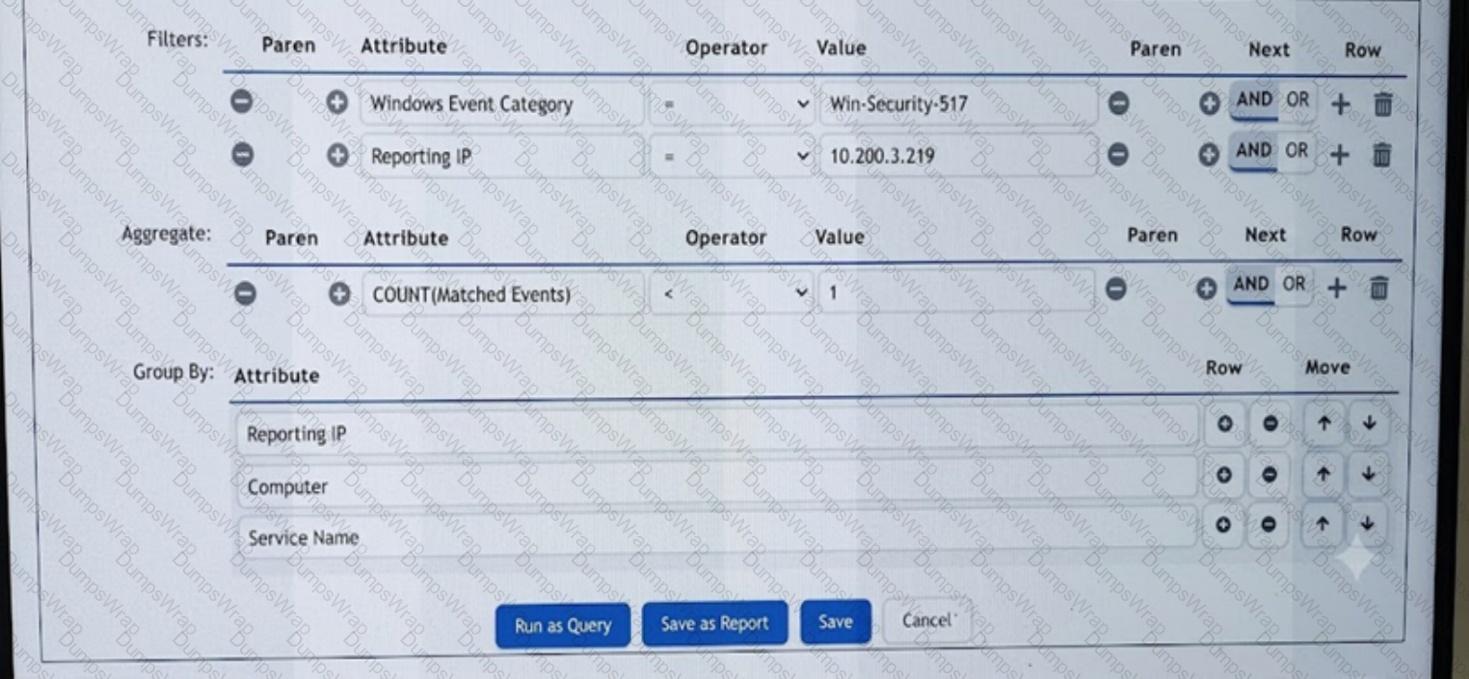
What are the two mistakes in the incident subpattern rule configuration? Choose two answers.
Options:
The subpattern is missing a time window definition.
The aggregate operator is incorrect.
The Group By attributes conflict with each other.
The mandatory Event Type attribute is missing.
Answer:
B, DExplanation:
Exact Extract: “Rule subpatterns consist of a filter, aggregate, and group by condition. In the Filters section, you must specify the criteria for determining which event attributes and values the rule monitors… Next, in the Aggregate section, you must define the number of event matches required for the rule to trigger. Finally, in the Group By section, you must define which event attributes will be used to group the events before the group constraints are applied.”
Exact Extract: “FortiSIEM always sets the Aggregate condition to COUNT(Matched Events) > = 1.”
The two mistakes are B and D . In the exhibit, the aggregate condition is configured as COUNT(Matched Events) < 1 , which is logically wrong for an incident rule that should trigger when a matching event occurs. It should be COUNT(Matched Events) > = 1 or another positive threshold, depending on the detection objective. The second problem is that the filter uses Windows Event Category = Win-Security-517 instead of defining the mandatory Event Type condition. FortiSIEM rules should match the normalized event type, such as Event Type = Win-Security-517 , because Event Type identifies the parsed event FortiSIEM is correlating. The Group By fields—Reporting IP, Computer, and Service Name—do not conflict; they define how matching events are grouped. The time window is normally configured at the rule condition level, not necessarily inside this subpattern edit view, so A is not the best answer.
Technical Deep Dive: FortiSIEM correlation logic works in three layers: the Filter selects candidate events, the Aggregate decides whether enough matching events exist, and Group By controls per-entity correlation. Here, using < 1 means the rule is effectively looking for zero matching events, which is not how a Windows service-event detection should be triggered. Also, Windows Event Category is not the normalized FortiSIEM event identity; Event Type is the key normalized field used for rule accuracy. This is SIEM correlation logic only; FortiGate NP/CP offloading is irrelevant because no packet-forwarding or ASIC inspection path is involved.
You want to automate a workflow on FortiSOAR so that whenever an incident is moved to the Aftermath phase, it is automatically set to status Resolved and assigned to a purple team specialist as incident lead to write an incident report. In addition, a manual task, assigned to the same specialist, will be created so they are aware of the pending work. Which three steps will accomplish this task? Choose three answers.
Options:
Create a Find Record step to find matching incidents.
Create a Condition step to assign both the incident and task to the specialist.
Create a Manual Task step to assign the task to the specialist.
Create an Update Record step to set the incident lead.
Create an On Update trigger with a trigger condition that matches the Aftermath phase.
Answer:
C, D, EExplanation:
Exact Extract: “FortiSOAR incident handling phases are closely aligned with NIST incident handling phases… The Post-Incident Activity phase is renamed Aftermath. Functionally, they are identical.”
Exact Extract: “Use the Update Record step to update a record in a module within FortiSOAR. Use the Find Record step to find a record in a module within FortiSOAR.”
Exact Extract: “Use the Manual Task step to pause the playbook’s execution until you mark the task as skipped or completed.”
The correct answers are C, D, and E . The workflow must start when an existing incident is changed to the Aftermath phase, so the correct trigger is an On Update trigger with a condition that matches the incident phase. After the trigger fires, the incident already exists as the current playbook record, so a Find Record step is unnecessary. To set the incident status to Resolved and assign the purple team specialist as the incident lead, use an Update Record step. To create and assign the follow-up work item, use a Manual Task step assigned to the same specialist.
Option B is wrong because a Condition/Decision step evaluates logic; it does not assign records or create work. Option A is wrong because the playbook is already triggered by the updated incident record, so searching for matching incidents adds unnecessary complexity.
Technical Deep Dive: The clean playbook structure is: On Update trigger → Update Record → Manual Task. The trigger condition should check the incident phase field for Aftermath. The Update Record step should modify the current incident, setting fields such as Status = Resolved and Incident Lead = purple team specialist. The Manual Task step then creates analyst-visible work, such as “Write incident report,” assigned to that same user. This is FortiSOAR workflow automation; FortiGate NP/CP hardware offloading is irrelevant because there is no traffic-forwarding path involved.
Refer to the exhibits.
You configured a custom event handler and an associated rule to generate events whenever FortiMail detects spam emails. However, you notice that the event handler is generating events for both spam emails and clean emails.
Which change must you make in the rule so that it detects only spam emails?
Options:
In the Log Type field, select Anti-Spam Log (spam)
In the Log filter by Text field, type type==spam.
Disable the rule to use the filter in the data selector to create the event.
In the Trigger an event when field, select Within a group, the log field Spam Name (snane) has 2 or more unique values.
Answer:
AExplanation:
Understanding the Custom Event Handler Configuration:
The event handler is set up to generate events based on specific log data.
The goal is to generate events specifically for spam emails detected by FortiMail.
Analyzing the Issue:
The event handler is currently generating events for both spam emails and clean emails.
This indicates that the rule ' s filtering criteria are not correctly distinguishing between spam and non-spam emails.
Evaluating the Options:
Option A: Selecting the " Anti-Spam Log (spam) " in the Log Type field will ensure that only logs related to spam emails are considered. This is the most straightforward and accurate way to filter for spam emails.
Option B: Typing type==spam in the Log filter by Text field might help filter the logs, but it is not as direct and reliable as selecting the correct log type.
Option C: Disabling the rule to use the filter in the data selector to create the event does not address the issue of filtering for spam logs specifically.
Option D: Selecting " Within a group, the log field Spam Name (snane) has 2 or more unique values " is not directly relevant to filtering spam logs and could lead to incorrect filtering criteria.
Conclusion:
The correct change to make in the rule is to select " Anti-Spam Log (spam) " in the Log Type field. This ensures that the event handler only generates events for spam emails.
Which two statements accurately describe the Custom API Endpoint playbook trigger? Choose two answers.
Options:
It supports token-based, basic, and no authentication.
One custom API endpoint can trigger multiple playbooks at the same time.
It supports HTTP POST, GET, and PUT methods.
An external system can initiate a playbook using an arbitrary endpoint on FortiSOAR.
Answer:
A, DExplanation:
Exact Extract: “Custom API Endpoint: Specify an arbitrary endpoint used to externally start a playbook. Uses a REST API POST action from another system. Supports token-based, basic, and no authentication.”
The correct answers are A and D. A Custom API Endpoint trigger allows an external system to start a FortiSOAR playbook through a defined arbitrary endpoint. It supports token-based authentication, basic authentication, or no authentication, depending on how you configure the trigger. C is wrong because the guide specifies REST API POST, not GET and PUT. B is not supported by the described trigger behavior; the endpoint is configured as a trigger for a playbook, not as a broadcast mechanism to trigger multiple playbooks simultaneously.
Technical Deep Dive: This trigger is useful when an external system cannot use a native FortiSOAR connector but can make an HTTP API call. Common use cases include webhook-style ingestion, third-party alert forwarding, and external workflow integration. Secure it properly; “no authentication” is possible but usually unacceptable in production unless protected by network controls.
Refer to the exhibit.
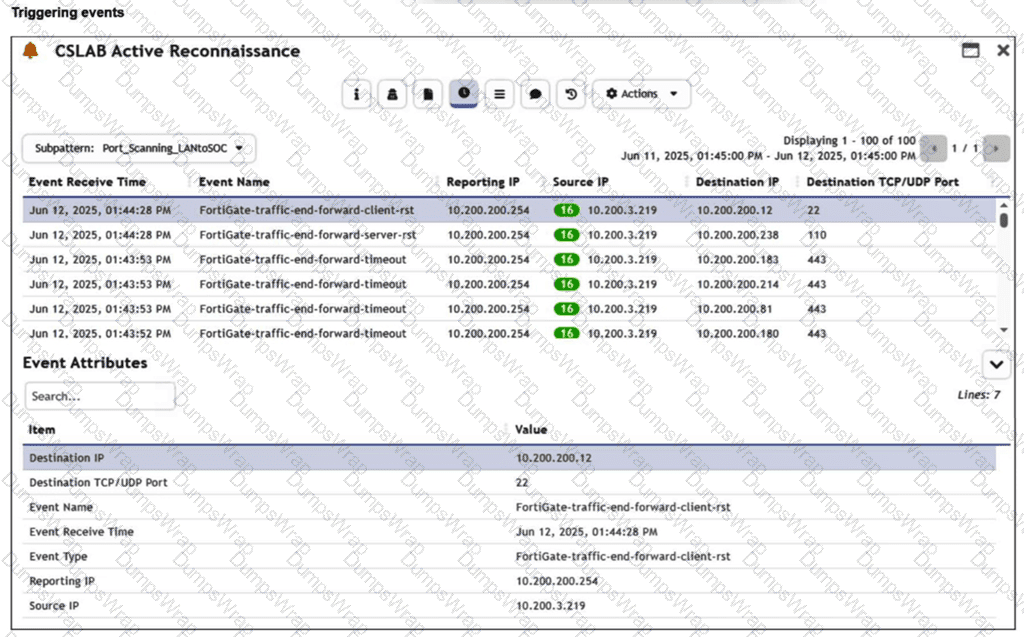
You are reviewing the Triggering Events page for a FortiSIEM incident. You want to remove the Reporting IP column because you have only one firewall in the topology. How do you accomplish this? (Choose one answer)
Options:
Clear the Reporting IP field from the Triggered Attributes section when you configure the Incident Action.
Disable correlation for the Reporting IP field in the rule subpattern.
Remove the Reporting IP attribute from the raw logs using parsing rules.
Customize the display columns for this incident.
Answer:
AExplanation:
Exact Extract: “Action: Click the edit icon to define the incident attributes and triggered attributes that this rule must generate. You must define at least one incident before you can save a rule.”
Exact Extract: “Triggered Attributes: Select the attributes from the triggering events that you want to include as columns in the Dashboard and Incidents interfaces for this event.”
The correct answer is A . The Reporting IP column is controlled by the rule’s Triggered Attributes configuration under the Define Action / Incident Action settings. If Reporting IP is selected there, FortiSIEM includes it as a displayed incident-related column. Since the topology has only one firewall, the Reporting IP value is repetitive and provides little analytical value, so you remove it by clearing Reporting IP from the Triggered Attributes list.
Option B is wrong because correlation/grouping logic is configured in the rule condition or subpattern, not used to hide columns. Option C is reckless and incorrect; Reporting IP is a normalized event attribute and should not be removed from raw logs or parser output just to change a display column. Option D is only a display-level idea and does not address the rule-generated triggered attributes that define which event attributes are exposed for the incident.
Technical Deep Dive: FortiSIEM separates rule detection logic from incident presentation metadata. The subpattern filter and aggregate decide whether an incident triggers. The Triggered Attributes decide which matching event fields analysts see as incident columns. In this case, you do not change parsing, event normalization, or correlation. You only tune the incident action output so analysts focus on useful fields such as Source IP, Destination IP, and Destination Port. FortiGate NP/CP acceleration is irrelevant because this is FortiSIEM event presentation logic, not firewall packet forwarding or ASIC offload behavior.
Refer to the Exhibit:
An analyst wants to create an incident and generate a report whenever FortiAnalyzer generates a malicious attachment event based on FortiSandbox analysis. The endpoint hosts are protected by FortiClient EMS integrated with FortiSandbox. All devices are logging to FortiAnalyzer.
Which connector must the analyst use in this playbook?
Options:
FortiSandbox connector
FortiClient EMS connector
FortiMail connector
Local connector
Answer:
AExplanation:
Understanding the Requirements :
The objective is to create an incident and generate a report based on malicious attachment events detected by FortiAnalyzer from FortiSandbox analysis.
The endpoint hosts are protected by FortiClient EMS, which is integrated with FortiSandbox. All logs are sent to FortiAnalyzer.
Key Components :
FortiAnalyzer : Centralized logging and analysis for Fortinet devices.
FortiSandbox : Advanced threat protection system that analyzes suspicious files and URLs.
FortiClient EMS : Endpoint management system that integrates with FortiSandbox for endpoint protection.
Playbook Analysis :
The playbook in the exhibit consists of three main actions: GET_EVENTS, RUN_REPORT, and CREATE_INCIDENT.
EVENT_TRIGGER : Starts the playbook when an event occurs.
GET_EVENTS : Fetches relevant events.
RUN_REPORT : Generates a report based on the events.
CREATE_INCIDENT : Creates an incident in the incident management system.
Selecting the Correct Connector :
The correct connector should allow fetching events related to malicious attachments analyzed by FortiSandbox and facilitate integration with FortiAnalyzer.
Connector Options :
FortiSandbox Connector :
Directly integrates with FortiSandbox to fetch analysis results and events related to malicious attachments.
Best suited for getting detailed sandbox analysis results.
Selected as it is directly related to the requirement of handling FortiSandbox analysis events.
FortiClient EMS Connector :
Used for managing endpoint security and integrating with endpoint logs.
Not directly related to fetching sandbox analysis events.
Not selected as it is not directly related to the sandbox analysis events.
FortiMail Connector :
Used for email security and handling email-related logs and events.
Not applicable for sandbox analysis events.
Not selected as it does not relate to the sandbox analysis.
Local Connector :
Handles local events within FortiAnalyzer itself.
Might not be specific enough for fetching detailed sandbox analysis results.
Not selected as it may not provide the required integration with FortiSandbox.
Implementation Steps :
Step 1 : Ensure FortiSandbox is configured to send analysis results to FortiAnalyzer.
Step 2 : Use the FortiSandbox connector in the playbook to fetch events related to malicious attachments.
Step 3 : Configure the GET_EVENTS action to use the FortiSandbox connector.
Step 4 : Set up the RUN_REPORT and CREATE_INCIDENT actions based on the fetched events.
Refer to the exhibit.
Which two options describe how the Update Asset and Identity Database playbook is configured? (Choose two.)
Options:
The playbook is using a local connector.
The playbook is using a FortiMail connector.
The playbook is using an on-demand trigger.
The playbook is using a FortiClient EMS connector.
Answer:
A, DExplanation:
Understanding the Playbook Configuration:
The playbook named " Update Asset and Identity Database " is designed to update the FortiAnalyzer Asset and Identity database with endpoint and user information.
The exhibit shows the playbook with three main components: ON_SCHEDULE STARTER, GET_ENDPOINTS, and UPDATE_ASSET_AND_IDENTITY.
Analyzing the Components:
ON_SCHEDULE STARTER: This component indicates that the playbook is triggered on a schedule, not on-demand.
GET_ENDPOINTS: This action retrieves information about endpoints, suggesting it interacts with an endpoint management system.
UPDATE_ASSET_AND_IDENTITY: This action updates the FortiAnalyzer Asset and Identity database with the retrieved information.
Evaluating the Options:
Option A: The actions shown in the playbook are standard local actions that can be executed by the FortiAnalyzer, indicating the use of a local connector.
Option B: There is no indication that the playbook uses a FortiMail connector, as the tasks involve endpoint and identity management, not email.
Option C: The playbook is using an " ON_SCHEDULE " trigger, which contradicts the description of an on-demand trigger.
Option D: The action " GET_ENDPOINTS " suggests integration with an endpoint management system, likely FortiClient EMS, which manages endpoints and retrieves information from them.
Conclusion:
The playbook is configured to use a local connector for its actions.
It interacts with FortiClient EMS to get endpoint information and update the FortiAnalyzer Asset and Identity database.
A very long FortiSOAR playbook failed at step 30 because of an intermittent networking issue, which has now been resolved. You want to finish executing the playbook without repeating earlier steps or losing prior context. Which action should you take? Choose one answer.
Options:
Use mock input for step 30 and re-run the playbook.
Use the Load ENV JSON option in the Jinja Editor and then render the output.
Use the Rerun From Last Failed Step option from the executed playbook logs.
Add a connector from the trigger to step 30 directly and re-run the playbook.
Answer:
CExplanation:
Exact Extract: “Click a playbook step to display the input, output, and configuration for that step. You can click ENV to toggle between the environment in which the playbook was executed and the steps of the playbook.” The guide also states that the ENV view contains “the complete environmental context, including input, output, and variables across all steps.”
Exact Extract: “Click Error Details to view the reason for a playbook failure. This helps you identify the root cause of the error and troubleshoot.”
The correct answer is C . The goal is to continue execution from the failed point while preserving the already-built runtime context from steps 1 through 29. Rerun From Last Failed Step is specifically designed for this situation. It avoids repeating prior successful steps and continues with the original environment, variables, inputs, and outputs already generated before the failure.
Option A is wrong because mock input is for testing or debugging and can override real step output. Option B is only useful for testing Jinja expressions against an environment JSON; it does not continue playbook execution. Option D is a bad design change: manually rewiring the playbook bypasses intended workflow logic and does not reliably preserve prior execution context.
Technical Deep Dive: In FortiSOAR, long playbooks often build dependency chains where later connector actions rely on earlier outputs, variables, decisions, record IDs, and enrichment data. Starting over can duplicate records, re-run remediation, or overwrite evidence. The correct operational recovery is to use the executed playbook log and resume from the failed step after fixing the transient condition. FortiGate NP/CP offloading is irrelevant because this is SOAR workflow execution state, not firewall packet processing.
You configured a new module named Users . Next, you want to configure a playbook that creates users from ingested data. When new records are created, you want to ensure that duplicate users do not overwrite existing user records and their fields. However, you also want the playbook to continue running even if duplicates are encountered so that any non-duplicate records are still created. Which two actions fulfill the requirements? Choose two answers.
Options:
Use the Stop the create process option in the Create Record step.
Ensure the Users module has record uniqueness conditions configured.
Configure the Execution Mode to run in parallel.
Use the Do not create new record (keep existing intact) option in the Create Record step.
Answer:
B, DExplanation:
Exact Extract: “If there are conflicts with any unique constraints (in other words, a new record is evaluated as being a duplicate record), you can configure the Create Record step to do one of the following: Stop the create process… Do not create a new record (keep the existing intact)… Update existing record… Selectively update some fields of the existing record.”
Exact Extract: “Do not create a new record (keep the existing intact): The playbook does not make any changes to the existing record, and the subsequent steps of the playbook work on the existing record if they refer to this step result. The duplicate record does not cause the playbook to fail.”
The correct answers are B and D . Duplicate handling only works if the module has uniqueness conditions, such as unique username, email address, employee ID, or another reliable identity field. Without uniqueness conditions, FortiSOAR cannot determine whether an incoming user record is a duplicate. Then, in the Create Record step, you select Do not create new record (keep existing intact) so the existing user record is not overwritten and the playbook does not fail when a duplicate is encountered.
A is wrong because it stops the playbook on duplicates. C is wrong because parallel execution affects processing behavior and speed, not duplicate protection or overwrite behavior.
Technical Deep Dive: The right design is: configure uniqueness at the module level, then choose duplicate behavior at the Create Record step. For user ingestion, use stable identifiers. Do not use mutable display names as uniqueness keys. In bulk or loop-based creation, this prevents duplicate records while allowing clean records to continue. This is FortiSOAR database and workflow logic; FortiGate NP/CP offloading is irrelevant.
Refer to the exhibits.
The FortiMail Sender Blocklist playbook is configured to take manual input and add those entries to the FortiMail abc. com domain-level block list. The playbook is configured to use a FortiMail connector and the ADD_SENDER_TO_BLOCKLIST action.
Why is the FortiMail Sender Blocklist playbook execution failing7
Options:
You must use the GET_EMAIL_STATISTICS action first to gather information about email messages.
FortiMail is expecting a fully qualified domain name (FQDN).
The client-side browser does not trust the FortiAnalzyer self-signed certificate.
The connector credentials are incorrect
Answer:
BExplanation:
Understanding the Playbook Configuration:
The playbook " FortiMail Sender Blocklist " is designed to manually input email addresses or IP addresses and add them to the FortiMail block list.
The playbook uses a FortiMail connector with the action ADD_SENDER_TO_BLOCKLIST.
Analyzing the Playbook Execution:
The configuration and actions provided show that the playbook is straightforward, starting with an ON_DEMAND STARTER and proceeding to the ADD_SENDER_TO_BLOCKLIST action.
The action description indicates it is intended to block senders based on email addresses or domains.
Evaluating the Options:
Option A: Using GET_EMAIL_STATISTICS is not required for the task of adding senders to a block list. This action retrieves email statistics and is unrelated to the block list configuration.
Option B: The primary reason for failure could be the requirement for a fully qualified domain name (FQDN). FortiMail typically expects precise information to ensure the correct entries are added to the block list.
Option C: The trust level of the client-side browser with FortiAnalyzer ' s self-signed certificate does not impact the execution of the playbook on FortiMail.
Option D: Incorrect connector credentials would result in an authentication error, but the problem described is more likely related to the format of the input data.
Conclusion:
The FortiMail Sender Blocklist playbook execution is failing because FortiMail is expecting a fully qualified domain name (FQDN).
You are trying to create a playbook that creates a manual task showing a list of public IPv6 addresses. You were successful in extracting all IP addresses from a previous action into a variable called ip_list , which contains both private and public IPv4 and IPv6 addresses. You must now filter the results to display only public IPv6 addresses. Which two Jinja expressions can accomplish this task? (Choose two answers)
Options:
{{ vars.ip_list | ipv6addr( ' public ' ) }}
{{ vars.ip_list | ipaddr( ' public ' ) | ipv6 }}
{{ vars.ip_list | ipaddr( ' !private ' ) | ipv6 }}
{{ vars.ip_list | ipv6 | ipaddr( ' public ' ) }}
Answer:
B, DExplanation:
In FortiSOAR 7.6 , the playbook engine utilizes the powerful ipaddr family of Jinja filters (derived from the Ansible netaddr library) to manipulate network data. To isolate public IPv6 addresses from a mixed list, the order of operations in the filter chain ensures the correct data is extracted:
Double Filtering Sequence (B): In the expression {{ vars.ip_list | ipaddr( ' public ' ) | ipv6 }}, the first filter ipaddr( ' public ' ) processes the entire list and retains only public addresses, including both IPv4 and IPv6 versions. The second filter in the pipe, | ipv6, then takes that subset of public addresses and filters them again to keep only those that conform to the IPv6 standard. The final result is a list containing only public IPv6 addresses.
Version-First Filtering (D): In the expression {{ vars.ip_list | ipv6 | ipaddr( ' public ' ) }}, the logic is reversed but equally effective. The first filter | ipv6 immediately strips all IPv4 and non-IP strings from the list, leaving only IPv6 addresses (both private and public). The subsequent filter | ipaddr( ' public ' ) then evaluates these IPv6 addresses and discards any that fall within the private/unique-local ranges (like ULA or link-local), resulting in the same set of public IPv6 addresses.
Why other options are incorrect:
A (ipv6addr ' public ' ): While ipv6addr is a valid filter in many Ansible environments, FortiSOAR ' s standard documentation for manual task creation and data manipulation primarily emphasizes the use of the generic ipaddr filter with specific flags or chained version filters (like | ipv6) to ensure cross-compatibility with the underlying Python libraries used by the SOAR engine.
C (!private syntax): The ipaddr filter utilizes specific keywords for classification. While " not private " is the logical requirement, the filter expects positive assertions such as ' public ' , ' private ' , or ' multicast ' . The !private syntax is not a supported or documented operator for this filter within the Fortinet SOC ecosystem.
Refer to the exhibits.
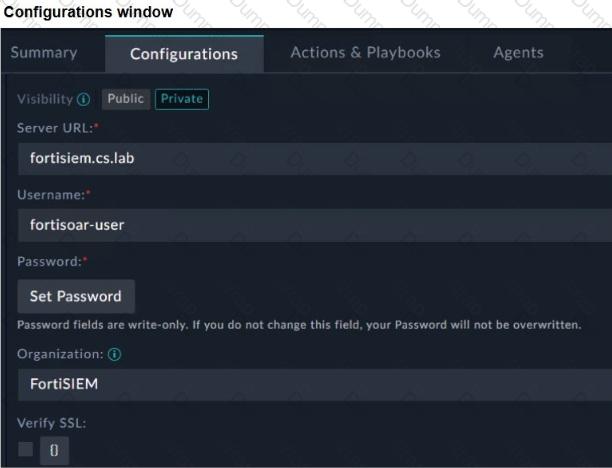
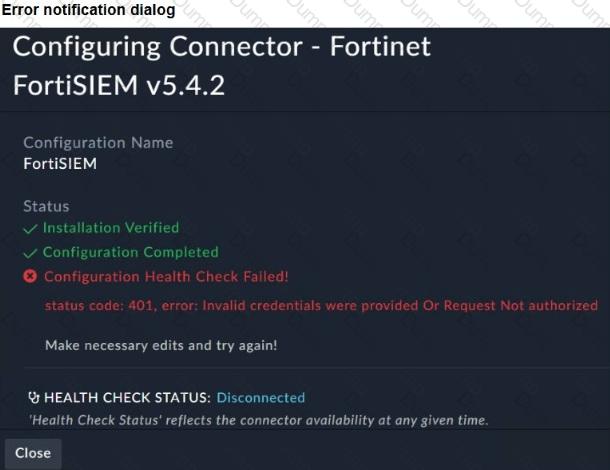
You configured the FortiSIEM connector on FortiSOAR. However, when you try to save the configuration, you see the error shown in the exhibit. What are two possible causes? Choose two answers.
Options:
The Visibility option must be set to Public.
FortiSOAR cannot reach FortiSIEM.
The organization should be Super.
The user credentials do not match FortiSIEM.
Answer:
C, DExplanation:
Exact Extract: “To configure the FortiSIEM connector on FortiSOAR, you must define the following parameters: Server URL… Username… Password… Organization: Specify the name of the organization that you will access on the FortiSIEM server. For an enterprise deployment model with no tenants, super is the organization.”
Exact Extract: “The minimum privileges required are Read and Update access on Incidents and access to Run Advanced Search Query.”
The correct answers are C and D . The error dialog shows status code: 401 with Invalid credentials were provided Or Request Not authorized . A 401 response means FortiSOAR reached FortiSIEM, but FortiSIEM rejected authentication or authorization. In the configuration exhibit, the Organization value is set to FortiSIEM . For a non-tenant enterprise deployment, the guide states that the organization should be super , so an incorrect organization can cause authorization failure. The other valid cause is incorrect FortiSIEM credentials, because username and password are mandatory connector configuration parameters.
A is wrong because Visibility controls whether the connector configuration is public or private inside FortiSOAR; it does not cause FortiSIEM API authentication failure. B is wrong because a reachability problem would normally produce a connection, DNS, timeout, or SSL error—not a FortiSIEM-generated 401 authorization response.
Technical Deep Dive: FortiSOAR connector health checks validate both transport and API authentication. Since installation and configuration completed but health check failed with 401, the network path and connector installation are not the primary issue. Fix the FortiSIEM username/password, confirm the account exists in FortiSIEM, confirm it has required permissions, and set the correct organization—typically super for an enterprise deployment without tenants. This is API authentication and authorization behavior; FortiGate NP/CP hardware offload is irrelevant because no firewall data-plane traffic processing is being analyzed.
Based on the Pyramid of Pain model, which two statements accurately describe the value of an indicator and how difficult it is for an adversary to change? (Choose two answers)
Options:
IP addresses are easy because adversaries can spoof them or move them to new resources.
Tactics, techniques, and procedures are hard because adversaries must adapt their methods.
Artifacts are easy because adversaries can alter file paths or registry keys.
Tools are easy because often, multiple alternatives exist.
Answer:
A, BExplanation:
The Pyramid of Pain (David Bianco) is a core concept taught in FortiSIEM 7.3 and FortiSOAR 7.6 curriculum to help SOC analysts prioritize threat intelligence and detection logic. The model ranks indicators based on the " pain " or effort they cause an adversary to change:
IP Addresses (Easy): These are classified as " Easy " to change. An attacker can simply rotate through a proxy service, use a different VPS, or utilize a new compromised host to continue their campaign. While more valuable than a file hash, they provide relatively low-long term value to the defender because they are so ephemeral.
TTPs (Tough/Hard): This is the apex of the pyramid. TTPs (Tactics, Techniques, and Procedures) represent the fundamental way an adversary operates. If a defender successfully detects and blocks a Tactic (e.g., a specific way an attacker performs privilege escalation), the adversary is forced to reinvent their entire operational process, which is time-consuming and difficult.
Why other options are incorrect:
Artifacts (C): According to the pyramid, Network/Host Artifacts are classified as " Annoying " , not " Easy " . While an attacker can change them, it requires modifying their code or script behavior, which causes more friction than simply switching an IP address.
Tools (D): Tools are classified as " Challenging " . While alternatives exist, an adversary usually invests significant time mastering a specific toolset; losing the ability to use that tool effectively disrupts their efficiency significantly.
You wish to use FortiAI to help you design playbooks. Which two configurations on FortiSOAR are required? Choose two answers.
Options:
Train the FortiSOAR machine learning engine.
Install and configure the OpenAI connector.
Grant CRUD permissions to the Playbook user.
Install the FortiAI solution pack and run the configuration wizard.
Answer:
C, DExplanation:
Exact Extract: “FortiAI integration on FortiSIEM and FortiSOAR connects directly to LLMs from OpenAI… FortiAI lets you connect to your own OpenAI account, using your own OpenAI license key.” The guide also shows FortiSOAR configuration under Content Hub > FortiAI Connector.
Exact Extract: “Only authorized users can invoke the FortiAI assistant and perform CRUD operations to the relevant modules, based on FortiSOAR RBAC.”
The correct answers are C and D. To use FortiAI for playbook design, FortiSOAR must have the FortiAI content installed and configured so it can communicate with the LLM service. In addition, the user invoking FortiAI must have the correct RBAC permissions, including CRUD permissions on the relevant playbook modules. FortiAI is not the FortiSOAR machine learning engine, so A is wrong. B is misleading because the FortiSOAR-side configuration is handled through FortiAI/FortiAI connector content, not by training a local model.
Technical Deep Dive: FortiAI can generate playbook workflow logic, but it does not remove the need for human validation. Generated playbooks may still require variable mapping, connector credential validation, permission checks, and testing through execution logs. FortiGate NP/CP offloading is irrelevant because this is FortiSOAR automation design, not firewall data-plane processing.
