Fortinet NSE 7 - FortiSASE 25 Enterprise Administrator Questions and Answers
What is required to enable the MSSP feature on FortiSASE? (Choose one answer)
Options:
Multi-tenancy must be enabled on the FortiSASE portal.
MSSP user accounts and permissions must be configured on the FortiSASE portal.
The MSSP add-on license must be applied to FortiSASE.
Role-based access control (RBAC) must be assigned to identity and access management (IAM) users using the FortiCloud IAM portal.
Answer:
DExplanation:
To enable the Managed Security Service Provider (MSSP) feature on FortiSASE, the administrative framework must be established outside of the local SASE instance within the broader FortiCloud ecosystem.
FortiCloud IAM Integration: The FortiSASE MSSP portal relies on FortiCloud Identity & Access Management (IAM) to define the scope of management for internal teams. Administrators do not create local "MSSP users" within the SASE portal itself; instead, they must use the FortiCloud IAM portal to assign specific Role-Based Access Control (RBAC) to IAM users.
Permissions and Scope: These RBAC settings determine which customer tenants (Organizational Units or OUs) an MSSP administrator can view, configure, or monitor. Without the proper role assignment in the IAM portal, the MSSP portal and its multi-tenant viewing capabilities will not be accessible to the user, even if the account has the necessary licenses.
Hierarchical Management: Once RBAC is correctly assigned, the MSSP administrator can leverage the FortiCloud Organizations service to manage multiple customer accounts from a single pane of glass. This centralized approach ensures that security policies and configurations can be standardized across the entire customer base while maintaining strict data isolation between tenants.
According to the FortiSASE 25 Multitenant Deployment Guide, configuring the IAM portal is the primary prerequisite that grants an MSSP internal team the permissions necessary to perform operations on customer FortiSASE tenants.
What are two benefits of deploying secure private access (SPA) with SD-WAN? (Choose two answers)
Options:
ZTNA posture check performed by the hub FortiGate
Support of both TCP and UDP applications
A direct access proxy tunnel from FortiClient to the on-premises FortiGate
Inline security inspection by FortiSASE
Answer:
B, DExplanation:
According to the NSE7 SASE Enterprise Guide (Pages 46 & 61), deploying Secure Private Access (SPA) with SD-WAN provides advanced security and networking capabilities by routing traffic through global Points of Presence (PoPs).
Inline Security Inspection (D): A major advantage of this approach is that traffic is routed through FortiSASE PoPs before it reaches private applications. This enables inline security inspection, providing robust protection against threats by applying the full SASE security stack—including antivirus, intrusion prevention, and deep packet inspection—to private access traffic.
Support for TCP and UDP (B): Organizations with existing FortiGate SD-WAN deployments benefit from broader and seamless access to privately hosted applications. The SD-WAN SPA use case explicitly supports both TCP- and UDP-based applications, ensuring that legacy or specialized services that rely on UDP function correctly over the secure tunnel.
SD-WAN Optimization: This method leverages the benefits of SD-WAN to optimize traffic flow between the SASE PoP and the corporate SD-WAN hub or data center FortiGate. It is particularly useful for mission-critical applications that require an extra layer of security combined with path optimization.
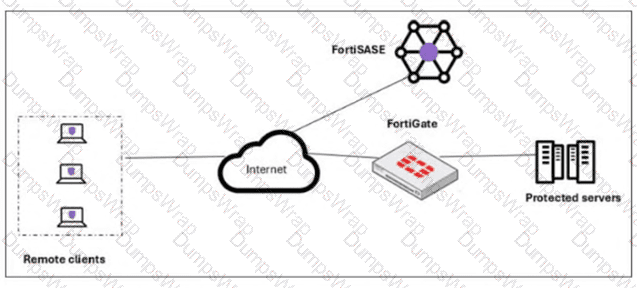
Architecture: In this configuration, the FortiSASE Security PoPs act as spokes in the organization’s SD-WAN network, relying on IPsec VPN overlays and BGP for secure dynamic routing.
While ZTNA posture checks are a feature of the broader ecosystem, the NSE7 Guide specifically highlights inline inspection and application support (TCP/UDP) as primary advantages of the SD-WAN integrated SPA approach.
What is the purpose of security posture tagging in ZTNA? (Choose one answer)
Options:
To assign usernames to different devices for security logs
To ensure that all devices and users are monitored continuously
To provide granular access control based on the compliance status of devices and users1
To categorize devices and users based on their role in the organization
Answer:
CExplanation:
In the context of Zero Trust Network Access (ZTNA), security posture tagging is the fundamental mechanism used to enforce compliance and security standards before granting access to protected resources.
Granular Access Control: The primary purpose of tagging is to provide granular access control.3 Instead of relying solely on static credentials, ZTNA uses these dynamic tags to determine if a device or user meets specific security requirements at the moment of the connection request.
Compliance-Based Enforcement: Tags are assigned based on the compliance status of the endpoint. For example, the FortiSASE Endpoint Management Service (EMS) can verify if a device has an active antivirus, is running a specific OS version, or is joined to the corporate domain.5 If the device fails any of these checks, the "Compliant" tag is removed, and access is automatically revoked.
Dynamic and Continuous Assessment: Unlike traditional VPNs that check posture only at login, ZTNA posture tagging allows for continuous assessment. If a device's security posture changes—for instance, if the user disables their firewall—the tag is updated in real-time across the Security Fabric, and the ZTNA policy will immediately deny further access.8
Integration with Policies: On the FortiGate (acting as a ZTNA proxy) or within FortiSASE, these tags are used as source criteria in ZTNA policies.9 Only traffic originating from endpoints with the required tags (e.g., "EMS-Tag: Corporate-Managed") is permitted to reach the protected application.
When accessing the FortiSASE portal for the first time, an administrator must select data center locations for which three FortiSASE components? (Choose three.)
Options:
Endpoint management
Points of presence
SD-WAN hub
Logging
Authentication
Answer:
A, B, DExplanation:
When accessing the FortiSASE portal for the first time, an administrator must select data center locations for the following FortiSASE components:
Endpoint Management:
The data center location for endpoint management ensures that endpoint data and policies are managed and stored within the chosen geographical region.
Points of Presence (PoPs):
Points of Presence (PoPs) are the locations where FortiSASE services are delivered to users. Selecting PoP locations ensures optimal performance and connectivity for users based on their geographical distribution.
Logging:
The data center location for logging determines where log data is stored and managed. This is crucial for compliance and regulatory requirements, as well as for efficient log analysis and reporting.
Refer to the exhibit.
In the user connection monitor, the FortiSASE administrator notices the user name is showing random characters. Which configuration change must the administrator make to get proper user information?
Options:
Turn off log anonymization on FortiSASE.
Add more endpoint licenses on FortiSASE.
Configure the username using FortiSASE naming convention.
Change the deployment type from SWG to VPN.
Answer:
AExplanation:
In the user connection monitor, the random characters shown for the username indicate that log anonymization is enabled. Log anonymization is a feature that hides the actual user information in the logs for privacy and security reasons. To display proper user information, you need to disable log anonymization.
Log Anonymization:
When log anonymization is turned on, the actual usernames are replaced with random characters to protect user privacy.
This feature can be beneficial in certain environments but can cause issues when detailed user monitoring is required.
Disabling Log Anonymization:
Navigate to the FortiSASE settings.
Locate the log settings section.
Disable the log anonymization feature to ensure that actual usernames are displayed in the logs and user connection monitors.
Your organization is currently using FortiSASE for its cybersecurity. They have recently hired a contractor who will work from the HQ office and who needs temporary internet access in order to set up a web-based point of sale (POS) system. How can you provide secure internet access to the contractor using FortiSASE? (Choose one answer)
Options:
Use a proxy auto-configuration (PAC) file and provide secure web gateway (SWG) service as an explicit web proxy.
Use a tunnel policy with a contractors user group as the source on FortiSASE to provide internet access.
Use zero trust network access (ZTNA) and tag the client as an unmanaged endpoint.
Use the self-registration portal on FortiSASE to grant internet access.
Answer:
AExplanation:
In the FortiSASE architecture, there are two primary methods for delivering Secure Internet Access (SIA): Agent-based (using FortiClient) and Agentless (using Secure Web Gateway/SWG).
Use Case Analysis: The scenario describes a contractor—an unmanaged user—who requires temporary access for a web-based application (the POS system). For contractors or guests using personal/non-corporate devices where installing the FortiClient agent is either not feasible or not desired, FortiSASE provides the SIA Agentless deployment model.
Mechanism (SWG & PAC): In this mode, FortiSASE functions as an explicit web proxy. To steer the contractor's web traffic (HTTP/HTTPS) to the SASE cloud for inspection, the administrator provides the user with a proxy auto-configuration (PAC) file. The contractor simply configures their browser or operating system to point to the URL of this PAC file.
Security Enforcement: Once the PAC file is applied, all web traffic from the contractor's device is redirected to the FortiSASE SWG PoP. Here, the traffic is subject to the organization’s full security stack, including SSL deep inspection, Antivirus, Web Filtering, and Application Control, ensuring that even temporary contractor access is fully secured and logged.
Why other options are incorrect:
Option B (Tunnel Policy): This refers to agent-based access where a VPN tunnel is established. This requires FortiClient, which is generally not used for temporary contractors on unmanaged devices.
Option C (ZTNA Unmanaged): While ZTNA supports agentless access to private applications (SPA), providing internet access (SIA) to an unmanaged endpoint is specifically the role of the SWG/Proxy service.
Option D (Self-registration): While FortiSASE has a User Portal for onboarding, it is a method for user registration/credential management, not the technical traffic-steering mechanism used to provide internet connectivity.
According to the FortiSASE 25 Secure Internet Access Architecture Guide, the SWG (Agentless) approach is the recommended best practice for securing web-only traffic from unmanaged endpoints and third-party contractors.
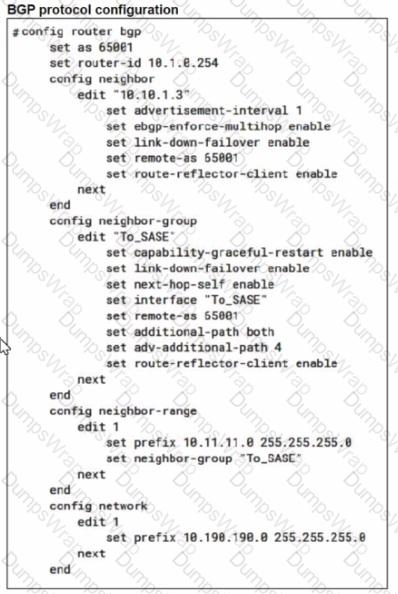
When you configure FortiSASE Secure Private Access (SPA) with SD-WAN integration, you must establish a routing adjacency between FortiSASE and the FortiGate SD-WAN hub. Which routing protocol must you use?
Options:
BGP
IS-IS
OSPF
EIGRP
Answer:
AExplanation:
When configuring FortiSASE Secure Private Access (SPA) with SD-WAN integration, establishing a routing adjacency between FortiSASE and the FortiGate SD-WAN hub requires the use of the Border Gateway Protocol (BGP).
BGP (Border Gateway Protocol):
BGP is widely used for establishing routing adjacencies between different networks, particularly in SD-WAN environments.
It provides scalability and flexibility in managing dynamic routing between FortiSASE and the FortiGate SD-WAN hub.
Routing Adjacency:
BGP enables the exchange of routing information between FortiSASE and the FortiGate SD-WAN hub.
This ensures optimal routing paths and efficient traffic management across the hybrid network.
How does FortiSASE hide user information when viewing and analyzing logs?
Options:
By hashing data using Blowfish
By hashing data using salt
By encrypting data using Secure Hash Algorithm 256-bit (SHA-256)
By encrypting data using advanced encryption standard (AES)
Answer:
BExplanation:
FortiSASE hides user information when viewing and analyzing logs by hashing data using salt. This approach ensures that sensitive user information is obfuscated, enhancing privacy and security.
Hashing Data with Salt:
Hashing data involves converting it into a fixed-size string of characters, which is typically a hash value.
Salting adds random data to the input of the hash function, ensuring that even identical inputs produce different hash values.
This method provides enhanced security by making it more difficult to reverse-engineer the original data from the hash value.
Security and Privacy:
Using salted hashes ensures that user information remains secure and private when stored or analyzed in logs.
This technique is widely used in security systems to protect sensitive data from unauthorized access.
Which service is included in a secure access service edge (SASE) solution, but not in a security service edge (SSE) solution? (Choose one answer)
Options:
SWG
SD-WAN1
CASB
ZTNA
Answer:
BExplanation:
The distinction between SASE (Secure Access Service Edge) and SSE (Security Service Edge) is a fundamental architectural concept in modern networking and security.
SASE Definition: SASE is a comprehensive framework that converges networking capabilities (specifically SD-WAN) with cloud-native security services (SSE) into a single, unified service model.
SSE Definition: SSE represents the security-focused subset of SASE.4 It encompasses the core security pillars required for secure access, including Secure Web Gateway (SWG), Cloud Access Security Broker (CASB), and Zero Trust Network Access (ZTNA).
The Key Differentiator: While both solutions share the same security stack (SWG, CASB, ZTNA), SD-WAN (Software-Defined Wide Area Network) is the specific networking component that exists in a full SASE solution to provide intelligent path selection and optimized connectivity. SSE intentionally excludes these wide-area networking functions, focusing purely on the security service delivery layer.
According to the FortiSASE 25 Enterprise Administrator Study Guide, organizations that already have a robust networking infrastructure and only require a cloud-delivered security overlay would opt for SSE, whereas those seeking a complete transformation of both network and security would deploy a full SASE solution that includes SD-WAN.
An organization needs to resolve internal hostnames using its internal rather than public DNS servers for remotely connected endpoints. Which two components must be configured on FortiSASE to achieve this? (Choose two.)
Options:
SSL deep inspection
Split DNS rules
Split tunnelling destinations
DNS filter
Answer:
B, CExplanation:
To resolve internal hostnames using internal DNS servers for remotely connected endpoints, the following two components must be configured on FortiSASE:
Split DNS Rules:
Split DNS allows the configuration of specific DNS queries to be directed to internal DNS servers instead of public DNS servers.
This ensures that internal hostnames are resolved using the organization's internal DNS infrastructure, maintaining privacy and accuracy for internal network resources.
Split Tunneling Destinations:
Split tunneling allows specific traffic (such as DNS queries for internal domains) to be routed through the VPN tunnel while other traffic is sent directly to the internet.
By configuring split tunneling destinations, you can ensure that DNS queries for internal hostnames are directed through the VPN to the internal DNS servers.
When deploying FortiSASE agent-based clients, which three features are available compared to an agentless solution? (Choose three.)
Options:
Vulnerability scan
SSL inspection
Anti-ransomware protection
Web filter
ZTNA tags
Answer:
A, B, DExplanation:
When deploying FortiSASE agent-based clients, several features are available that are not typically available with an agentless solution. These features enhance the security and management capabilities for endpoints.
Vulnerability Scan:
Agent-based clients can perform vulnerability scans on endpoints to identify and remediate security weaknesses.
This proactive approach helps to ensure that endpoints are secure and compliant with security policies.
SSL Inspection:
Agent-based clients can perform SSL inspection to decrypt and inspect encrypted traffic for threats.
This feature is critical for detecting malicious activities hidden within SSL/TLS encrypted traffic.
Web Filter:
Web filtering is a key feature available with agent-based clients, allowing administrators to control and monitor web access.
This feature helps enforce acceptable use policies and protect users from web-based threats.
Which secure internet access (SIA) use case minimizes individual workstation or device setup, because you do not need to install FortiClient on endpoints or configure explicit web proxy settings on web browser-based end points?
Options:
SIA for inline-CASB users
SIA for agentless remote users
SIA for SSLVPN remote users
SIA for site-based remote users
Answer:
BExplanation:
The Secure Internet Access (SIA) use case that minimizes individual workstation or device setup is SIA for agentless remote users. This use case does not require installing FortiClient on endpoints or configuring explicit web proxy settings on web browser-based endpoints, making it the simplest and most efficient deployment.
SIA for Agentless Remote Users:
Agentless deployment allows remote users to connect to the SIA service without needing to install any client software or configure browser settings.
This approach reduces the setup and maintenance overhead for both users and administrators.
Minimized Setup:
Without the need for FortiClient installation or explicit proxy configuration, the deployment is straightforward and quick.
Users can securely access the internet with minimal disruption and administrative effort.
Refer to the exhibits.

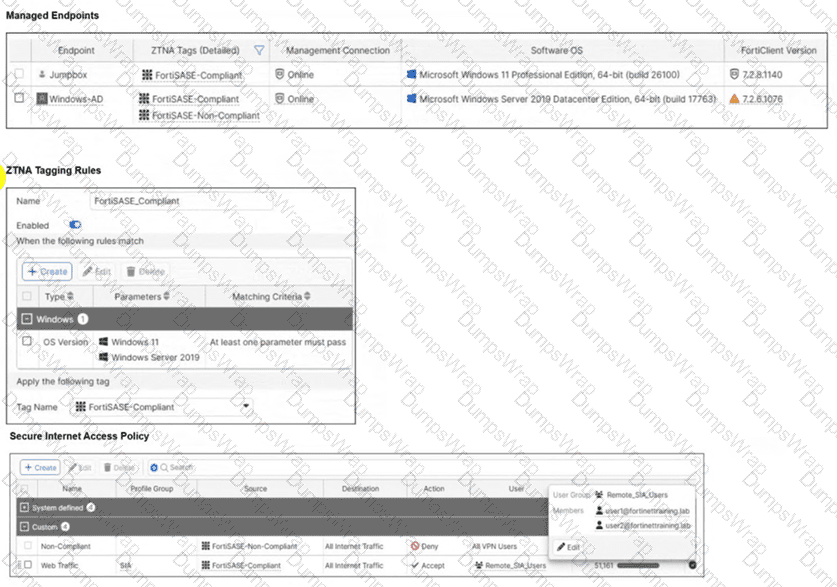
Jumpbox and Windows-AD are endpoints from the same remote location. Jumpbox can access the internet through FortiSASE, while Windows-AD can no longer access the internet. Based on the information in the exhibits, which reason explains the outage on Windows-AD? (Choose one answer)
Options:
The device security posture for Windows-AD has changed.
The FortiClient version installed on Windows-AD does not match the expected version on FortiSASE.
Windows-AD is excluded from FortiSASE management.
The remote VPN user on Windows-AD no longer matches any VPN policy.
Answer:
AExplanation:
In FortiSASE, Zero Trust Network Access (ZTNA) tags—also known as security posture tags—are used to dynamically grant or deny access based on the real-time security state of an endpoint. This mechanism ensures that only devices meeting specific compliance requirements can access protected resources or the internet.
Endpoint Analysis: The Managed Endpoints exhibit shows that while Jumpbox only has the FortiSASE-Compliant tag, the Windows-AD endpoint has been assigned both FortiSASE-Compliant and FortiSASE-Non-Compliant tags. This indicates that a security posture check on the Windows-AD device has failed, triggering a rule that applies the non-compliant tag.
Policy Evaluation: The Secure Internet Access Policy table shows two custom policies. The first policy, named Non-compliant, uses the FortiSASE-Non-Compliant tag as its source and has the action set to Deny. The second policy, Web Traffic, allows access for FortiSASE-Compliant users.
Root Cause of Outage: Because FortiSASE (powered by FortiOS) processes security policies in a top-down sequence, the "Non-compliant" policy is evaluated first. Since Windows-AD matches the source criteria for this "Deny" policy, its traffic is blocked before it can reach the "Accept" policy.
Although the exhibit shows a warning icon for the FortiClient version on Windows-AD, the direct cause of the internet outage is the explicit Deny policy triggered by the change in the device's security posture (the application of the Non-Compliant tag).
A customer wants to upgrade their legacy on-premises proxy to a could-based proxy for a hybrid network. Which FortiSASE features would help the customer to achieve this outcome?
Options:
SD-WAN and NGFW
SD-WAN and inline-CASB
zero trust network access (ZTNA) and next generation firewall (NGFW)
secure web gateway (SWG) and inline-CASB
Answer:
DExplanation:
For a customer looking to upgrade their legacy on-premises proxy to a cloud-based proxy for a hybrid network, the combination of Secure Web Gateway (SWG) and Inline Cloud Access Security Broker (CASB) features in FortiSASE will provide the necessary capabilities.
Secure Web Gateway (SWG):
SWG provides comprehensive web security by inspecting and filtering web traffic to protect against web-based threats.
It ensures that all web traffic, whether originating from on-premises or remote locations, is inspected and secured by the cloud-based proxy.
Inline Cloud Access Security Broker (CASB):
CASB enhances security by providing visibility and control over cloud applications and services.
Inline CASB integrates with SWG to enforce security policies for cloud application usage, preventing unauthorized access and data leakage.
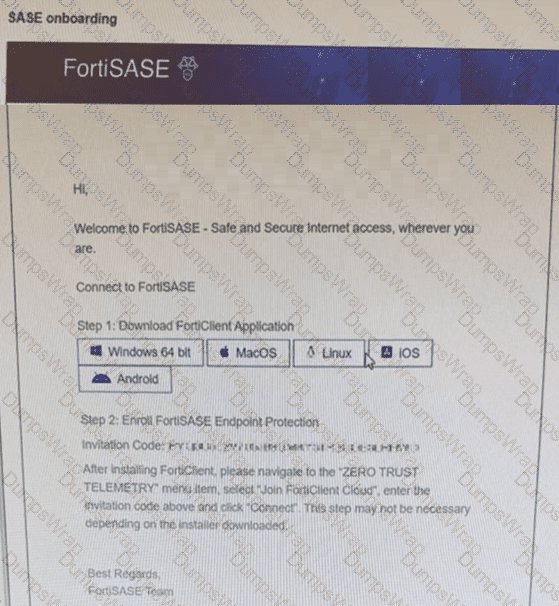
Refer to the exhibit.

Which two statements about the onboarding process shown in the exhibit are true? (Choose two answers)
Options:
The user must manually select which FortiSASE components to install during the FortiClient setup.
Depending on the installer used, the invitation code step may be skipped.
The invitation code must always be entered manually after installing FortiClient.
This is an email from the FortiSASE platform to an end user.
Answer:
B, DExplanation:
The exhibit (image_6361c9.jpg) displays a standard SASE onboarding email sent from the FortiSASE platform to an end user to facilitate the enrollment of their device.
Communication Source (D): This email is generated by the FortiSASE administrator through the Onboard Users menu in the FortiSASE portal. It provides the user with direct download links for the FortiClient application and a unique Invitation Code required for telemetry connection.
Installer Types and Automation (B): FortiSASE provides two primary methods for deploying the client agent:
Pre-configured Installer: This version is pre-packaged with the organization's unique invitation code built-in. When a user runs this installer, the invitation code step is skipped as the client automatically registers to the correct FortiSASE instance upon installation.
Manual Installer: This version requires the user to manually copy and paste the invitation code from the onboarding email into the FortiClient "Zero Trust Telemetry" menu to complete enrollment.
Analysis of Incorrect Options:
Option A: FortiSASE utilizes a unified agent (FortiClient). The components (VPN, ZTNA, Web Filter, etc.) are managed via Endpoint Profiles assigned in the SASE portal and pushed to the client automatically; they are not manually selected by the user during installation.
Option C: As noted above, if the administrator provides a pre-configured installer, the manual entry of the code is not required, making the statement that it must "always" be entered manually false.
A customer configured the On/off-net detection rule to disable FortiSASE VPN auto-connect when users are inside the corporate network. The rule is set to Connects with a known public IP using the company’s public IP address. However, when the users are on the corporate network, the FortiSASE VPN still auto-connects. The customer has confirmed that traffic is going to the internet with the correct IP address.
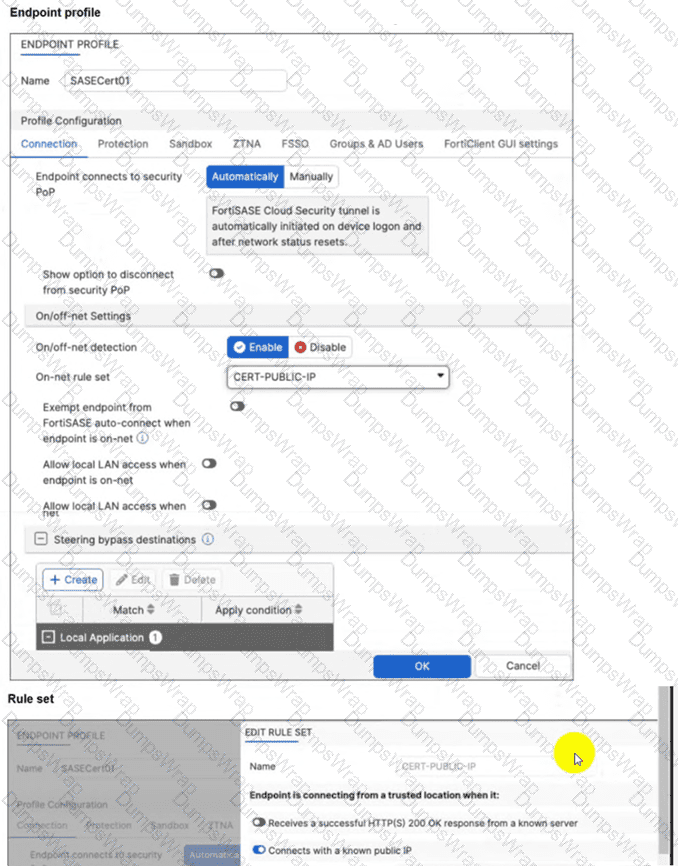
Which configuration is causing the issue? (Choose one answer)
Options:
The On-net rule set configuration is incorrect.
Allow local LAN access when endpoint is on-net is disabled when it should be enabled.
Exempt endpoint from FortiSASE auto-connect is disabled when it should be enabled.
Is connected to a known DNS server should be enabled and configured.
Answer:
CExplanation:
The FortiSASE On/off-net detection feature is a two-part configuration designed to optimize bandwidth and user experience by determining when a device is in a trusted environment.
Rule Set Definition: The first part involves defining what constitutes an "on-net" or "on-fabric" status. In this scenario, the customer successfully configured a rule set named CERT-PUBLIC-IP using the Connects with a known public IP detection type. This tells FortiSASE that if the endpoint’s public WAN IP matches the corporate gateway, it is considered to be on the corporate network.
Profile Exemption Logic: Defining the rule set is not enough to stop the VPN connection. Within the Endpoint Profile (under the Connection tab > On/off-net Settings), there is a specific toggle labeled Exempt endpoint from FortiSASE auto-connect when endpoint is on-net (or in some versions, Bypass FortiSASE when endpoint is on-net).
Exhibit Analysis: Looking at the provided exhibit (image_57097d.jpg), the "Exempt endpoint from FortiSASE auto-connect..." toggle is clearly disabled (switched to the left).
Root Cause: Because this toggle is disabled, FortiClient identifies that it is "on-net" based on the IP rule, but it has no instruction to skip the VPN connection. Consequently, the "Automatically" initiate tunnel setting remains the dominant instruction, causing the VPN to connect regardless of the network location.
To resolve the issue, the administrator must enable the Exempt endpoint from FortiSASE auto-connect when endpoint is on-net option in the SASECert01 profile.
What is the role of ZTNA tags in the FortiSASE Secure Internet Access (SIA) and Secure Private Access (SPA) use cases? (Choose one answer)
Options:
ZTNA tags are created to isolate browser sessions in SIA and enforce data loss prevention in SPA for all devices.
ZTNA tags determine device posture for non-web traffic protocols and are applied only in agentless deployments for SIA.
ZTNA tags determine device posture for endpoints running FortiClient and are used to grant or deny access in SIA or SPA based on that posture.
ZTNA tags are applied to unmanaged endpoints without FortiClient to secure HTTP and HTTPS traffic in SIA and SPA.
Answer:
CExplanation:
In the Fortinet SASE architecture, Zero Trust Network Access (ZTNA) tags (which have been renamed to Security Posture Tags starting with FortiClient/EMS 7.4.0) play a critical role in continuous posture assessment. These tags are dynamic metadata assign8ed to an endpoint based on specific conditions or "tagging rules" defined in the FortiSASE Endpoint Management Service (EMS).
Posture Determination: The FortiClient agent, installed on the endpoint, monitors the device for various security attributes—such as whether an antivirus is running, the presence of specific registry keys, OS version, or the absence of critical vulnerabilities.
SIA (Secure Internet Access) Use Case: In SIA scenarios, FortiSASE uses these tags within security policies to control internet access. For example, a policy may allow full internet access only to endpoints tagged as "Compliant" while redirecting "Non-Compliant" devices to a restricted remediation portal.
SPA (Secure Private Access) Use Case: In SPA (specifically ZTNA Proxy mode), the tags are synchronized from FortiSASE to the corporate FortiGate (acting as the ZTNA Access Proxy).12 When a user attempts to access a private application, the FortiGate checks the endpoint's client certificate and its synchronized ZTNA tags.13 If the endpoint does not meet the required posture (e.g., it is missing a required "Domain-Joined" tag), access is denied at the session level.
According to the FortiSASE 25 Enterprise Administrator Study Guide, ZTNA tags are fundamental to the "Zero Trust" principle because they move beyond static identity (username/password) to verify the real-time security state of the device before granting access to either the internet or internal private resources.
Which three traffic flows are supported by FortiSASE Secure Private Access (SPA)? (Choose three answers)
Options:
From private resources to FortiSASE agent-based users.
From private resources to the internet.
From agent-based users to private resources behind the Fortinet SD-WAN.
From private resources to other private resources (SPA to SPA).
From thin branches/branch on-ramp to private resources behind the Fortinet SD-WAN.
Answer:
A, C, EExplanation:
FortiSASE Secure Private Access (SPA) provides flexible connectivity to internal corporate resources using a hub-and-spoke architecture where FortiSASE PoPs act as spokes to an organization's FortiGate hub.
Flow from Agent-based users to Private Resources (C): This is the core functionality of SPA. Remote users running FortiClient (agent-based) connect to the nearest FortiSASE PoP. The PoP, integrated into the corporate SD-WAN fabric, uses IPsec and BGP to route traffic to the private applications located behind the FortiGate hub or associated spokes.
Flow from Thin Branches/Branch On-ramp to Private Resources (E): FortiSASE extends its security and connectivity to physical locations through "Thin Edge" (e.g., FortiExtender, FortiAP) or "Branch On-ramp" (e.g., branch FortiGates). These sites form tunnels to the FortiSASE PoP, which then provides them with access to the same private resources in the SD-WAN network as the remote agent-based users.
Flow from Private Resources to Agent-based users (A): The SPA architecture is designed for bidirectional communication. Documentation confirms that traffic can be initiated from the FortiGate hub (or local networks behind it) to the remote VPN agents. This "Server-to-Client" flow is essential for administrative tasks, log forwarding, or real-time communication applications like VoIP.
Incorrect Options:
Option B: Traffic from private resources to the internet is handled via Secure Internet Access (SIA) or local gateway policies, not the SPA use case, which is dedicated to internal private application access.
Option D: While FortiSASE can facilitate branch-to-branch communication via ADVPN shortcuts, the term "SPA" specifically refers to the access layer for users and is not used to describe resource-to-resource or hub-to-hub traffic.
Refer to the exhibits.


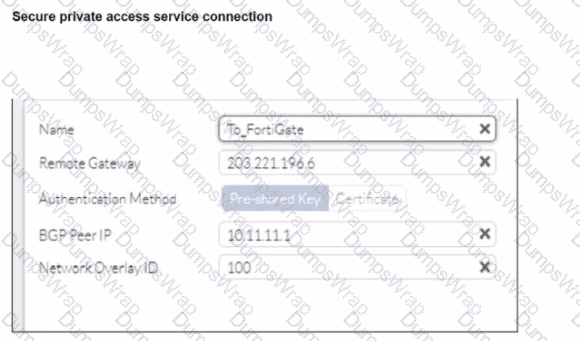
A FortiSASE administrator is trying to configure FortiSASE as a spoke to a FortiGate hub. The VPN tunnel does not establish
Based on the provided configuration, what configuration needs to be modified to bring the tunnel up?
Options:
NAT needs to be enabled in the Spoke-to-Hub firewall policy.
The BGP router ID needs to match on the hub and FortiSASE.
FortiSASE spoke devices do not support mode config.
The hub needs IKEv2 enabled in the IPsec phase 1 settings.
Answer:
CExplanation:
The VPN tunnel between the FortiSASE spoke and the FortiGate hub is not establishing due to the configuration of mode config, which is not supported by FortiSASE spoke devices. Mode config is used to assign IP addresses to VPN clients dynamically, but this feature is not applicable to FortiSASE spokes.
Mode Config in IPsec:
The configuration snippet shows that mode config is enabled in the IPsec phase 1 settings.
Mode config is typically used for VPN clients to dynamically receive an IP address from the VPN server, but it is not suitable for site-to-site VPN configurations involving FortiSASE spokes.
Configuration Adjustment:
To establish the VPN tunnel, you need to disable mode config in the IPsec phase 1 settings.
This adjustment will allow the FortiSASE spoke to properly establish the VPN tunnel with the FortiGate hub.
Steps to Disable Mode Config:
Access the VPN configuration on the FortiSASE spoke.
Edit the IPsec phase 1 settings to disable mode config.
Ensure other settings such as pre-shared key, remote gateway, and BGP configurations are correct and consistent with the FortiGate hub.
Refer to the exhibits.

An endpoint is assigned an IP address of 192.168.13.101/24. Which action will be run on the endpoint? (Choose one answer)
Options:
The endpoint will be able to bypass the on-net rule because it is connecting from a known subnet.
The endpoint will be detected as off-net.
The endpoint will be exempted from auto-connect to the FortiSASE tunnel.
The endpoint will automatically connect to the FortiSASE tunnel.
Answer:
CExplanation:
Based on the provided exhibits and the logic of FortiSASE On/off-net detection, the endpoint's behavior is determined by its network environment relative to the configured rules.
Subnet Matching and Detection: The On-net rule set (named "On-Premises") is configured to identify a trusted location when the endpoint "Connects from a known local subnet". The administrator has defined the known subnet as $192.168.13.0/24$. Since the endpoint's IP address is $192.168.13.101$, it falls within this range. Consequently, FortiClient detects the endpoint as being on-net (on-fabric).
Action Logic (Exemption): In a FortiSASE Endpoint Profile, when On/off-net detection is enabled and an endpoint matches an "On-net" rule, the standard behavior is to exempt the endpoint from auto-connecting to the FortiSASE VPN tunnel. This design assumes the endpoint is already in a secured office environment where the corporate firewall (FortiGate) provides the necessary protection, making the SASE tunnel redundant.
Comparison of Other Options: * Option B: Incorrect, because the IP matches the defined "known local subnet" rule for on-net detection.
Option D: Incorrect, as auto-connect only triggers when the endpoint is detected as off-net to ensure remote security.
An organization wants to block all video and audio application traffic but grant access to videos from CNN Which application override action must you configure in the Application Control with Inline-CASB?
Options:
Allow
Pass
Permit
Exempt
Answer:
DExplanation:
To block all video and audio application traffic while granting access to videos from CNN, you need to configure an application override action in the Application Control with Inline-CASB. Here is the step-by-step detailed explanation:
Application Control Configuration:
Application Control is used to identify and manage application traffic based on predefined or custom application signatures.
Inline-CASB (Cloud Access Security Broker) extends these capabilities by allowing more granular control over cloud applications.
Blocking Video and Audio Applications:
To block all video and audio application traffic, you can create a policy within Application Control to deny all categories related to video and audio streaming.
Granting Access to Specific Videos (CNN):
To allow access to videos from CNN specifically, you must create an override rule within the same Application Control profile.
The override action "Exempt" ensures that traffic to specified URLs (such as those from CNN) is not subjected to the blocking rules set for other video and audio traffic.
Configuration Steps:
Navigate to the Application Control profile in the FortiSASE interface.
Set the application categories related to video and audio streaming to "Block."
Add a new override entry for CNN video traffic and set the action to "Exempt."
Which two statements about FortiSASE Geofencing with regional compliance are true? (Choose two answers)
Options:
You can configure regional compliance on the security POP or the on-premises device, not both.1
If no regional compliance rule is configured, the connection is made to the closest security POP.
A regional compliance rule can connect only to an on-premises device or only to a security POP.2
The connection order for a regional compliance rule is always the security POP first, followed by the on-premises device.
Answer:
B, CExplanation:
FortiSASE Geofencing and Regional Compliance allow administrators to control where remote users connect based on their physical location, which is determined by the endpoint's public IP address.3
Default Connection Behavior: By default, FortiSASE uses a "best-effort" geolocation logic to ensure the lowest latency for the user. If an administrator has not configured a specific regional compliance rule for a user's country or region, FortiClient will automatically attempt to connect to the closest available FortiSASE security PoP (Point of Presence) based on proximity.4
Regional Compliance Rules: When an organization must enforce data residency or specific security routing requirements, they create Regional Compliance rules. According to the FortiSASE 25 Feature Administration Guide, these rules allow the administrator to override the default "closest PoP" behavior for specific countries.
Connectivity Options: Within a regional compliance rule, the administrator must specify the destination for the traffic. The system provides a choice between two distinct connection types: a FortiSASE Security PoP or an On-premises device (such as a FortiGate acting as a gateway).5 The documentation specifies that a rule is designed to point to one of these types at a time to satisfy the compliance requirement for that specific region.
Connection Priority: While multiple connections can be managed in a priority table, the logic for Regional Compliance is focused on directing the user to the designated compliant entry point. Option D is incorrect because the connection order is determined by the Priority and custom fail-over connections table; an administrator can manually adjust the sequence, so it is not "always" the security PoP first.
You are configuring FortiSASE SSL deep inspection. What is required for FortiSASE to inspect encrypted traffic? (Choose one answer)
Options:
FortiSASE uses a third-party CA certificate without importing it to client machines, and SSL deep inspection supports only web filtering and application control.
FortiSASE acts as a root CA without needing a certificate, and SSL deep inspection is used only for split DNS and video filtering.
FortiSASE requires an external CA to issue certificates to client machines, and SSL deep inspection supports only antivirus and file filter.
FortiSASE acts as a certificate authority (CA) with a self-signed or internal CA certificate, requiring the root CA certificate to be imported into client machines.
Answer:
DExplanation:
SSL deep inspection (DPI) is a critical security function that allows FortiSASE to decrypt and inspect the actual payload of encrypted traffic (such as HTTPS, SMTPS, and FTPS) to identify and block hidden threats.
The Role of the CA: For this process to occur, FortiSASE must act as a "man-in-the-middle" by intercepting the SSL session, decrypting it for inspection, and then re-encrypting it before sending it to the endpoint.2 To re-encrypt the traffic, FortiSASE acts as a Certificate Authority (CA) and signs a new certificate for the destination website on the fly.
Certificate Types: This CA role can be fulfilled using the default self-signed certificate provided by Fortinet (typically Fortinet_CA_SSL) or a certificate issued by an organization's internal/private CA. Publicly trusted third-party CAs (like DigiCert or Let's Encrypt) do not sell CA-capable certificates that can be used for this type of inspection.
Client Machine Requirement: Because the endpoint’s browser or operating system will not natively trust a certificate signed by a private or self-signed CA, the root CA certificate must be imported into the Trusted Root Certification Authorities store on all managed client machines. Failure to do so results in persistent certificate warnings or blocked connections for the end user.
Supported Features: Once enabled, SSL deep inspection provides the necessary visibility for high-level security features to function, including Antivirus, Web Filtering, Data Loss Prevention (DLP), File Filter, and Application Control.
One user has reported connectivity issues; no other users have reported problems. Which tool can the administrator use to identify the problem? (Choose one answer)
Options:
Mobile device management (MDM) service to troubleshoot the connectivity issue.
Digital experience monitoring (DEM) to evaluate the performance metrics of the remote computer.
Forensics service to obtain detailed information about the user's remote computer performance.
SOC-as-a-Service (SOCaaS) to get information about the user's remote computer.
Answer:
BExplanation:
In a FortiSASE deployment, Digital Experience Monitoring (DEM) is the primary diagnostic tool used to troubleshoot connectivity and performance issues specifically for a single user or endpoint.
End-to-End Visibility: DEM provides real-time, end-to-end visibility into the network path between the end-user's device and the application they are trying to reach. This is critical when only one user reports an issue, as it allows administrators to pinpoint whether the problem resides on the local device, the local ISP, the SASE backbone, or the destination application.
Performance Metrics: The DEM agent (often integrated with the FortiMonitor agent on the endpoint) collects granular performance metrics such as latency, jitter, packet loss, and RTT (Round Trip Time). It also provides device-specific health data, including CPU and memory usage, to determine if the connectivity issue is actually caused by the remote computer's performance.
Hop-by-Hop Analysis: Unlike standard monitoring, DEM offers End-to-End Continuous Hop Analytics. This path monitoring visualizes every "hop" in the traffic route and highlights exactly where degraded service is occurring. For a single user experiencing issues while everyone else is fine, this tool immediately triangulates if a specific "problem hop" in their unique connection path is the cause.
Operational Comparison: * MDM (A) is used for managing device configurations and software distribution, not for real-time network performance troubleshooting.
Forensics (C) is a security-focused service used for investigating malware incidents or data breaches, not for measuring network latency.
SOCaaS (D) is a managed security service for threat monitoring and event triage; while it handles "security" connectivity issues (like a blocked IP), it is not a tool for performance metric evaluation.