Associate Certification - InsuranceSuite Developer - Mammoth Proctored Exam Questions and Answers
Given the following code example:
Code snippet
var query = gw.api.database.Query.make(Claim)
query.compare(Claim#ClaimNumber, Equals, "123-45-6798")
var claim = query.select().AtMostOneRow
According to best practices, which logic returns notes with the topic of denial and filters on the database?
Options:
var notesQuery = gw.api.database.Query.make(Note); var denialNotes = notesQuery.select().where(\elt -> elt.Topic==NoteTopicType.TC_DENIAL)
var denialNotes = claim.Notes.where(\elt -> elt.Topic==NoteTopicType.TC_DENIAL)
var notesQuery = gw.api.database.Query.make(Note); notesQuery.compare(Note#Topic, Equals, NoteTopicType.TC_DENIAL); notesQuery.compare(Note#Claim, Equals, claim); var denialNotes = notesQuery.select()
var notesQuery = gw.api.database.Query.make(Note); notesQuery.compare(Note#Topic, Equals, NoteTopicType.TC_DENIAL); var denialNotes = notesQuery.select()
Answer:
CExplanation:
Efficiency in Guidewire performance relies heavily on the "Database-First" principle. To fulfill the requirement of filtering notes by bothClaimandTopicspecifically on the database, a new query must be constructed using theQuery API.
Option C is the only correct answer because it uses the .compare() method to apply two specific filters:
Topic Filter:It filters for the specific typecode TC_DENIAL.
Claim Filter:It links the query to the specific claim object found in the previous step.
By setting these parametersbeforecalling .select(), Guidewire generates a single SQL statement: SELECT * FROM cc_note WHERE topic = 'denial' AND claimid = .... The database performs the heavy lifting and returns only the relevant records.
Options A and B areanti-patterns. They fetch all notes (Option B) or execute a broad query (Option A) and then use the Gosu .where() method to filter in the application server's memory. This is highly inefficient. Option D is incomplete as it would returneverydenial note in the entire system, regardless of which claim it belongs to.
The following Gosu statement is the Action part of a validation rule:

It produces the following compilation error:
Gosu compiler: Wrong number of arguments to function rejectFieldQava.lang.String, typekey.ValidationLevel, java.lang.string, typekey.ValidationLevel, java.lang.string). Expected 5, got 3
What needs to be added to or deleted from the statement to clear the error?
Options:
The two nulls must be replaced with a typekey and a string
A left parenthesis must be delete
The word "State' must be replaced with a DisplayKey
A right parenthesis must be added.
Answer:
AExplanation:
In GuidewireValidation Rules, the rejectField method is a critical tool for identifying specific fields that fail business logic checks. This method allows the application to highlight the exact UI widget in red and provide a specific error message to the user.
As indicated by the compiler error, the rejectField method on a Guidewire entity (like Contact or Claim) has a very specific signature that requiresfive parameters:
Field Name (String):The name of the property being validated (e.g., "State").
Validation Level (ValidationLevel):The severity of the failure (e.g., TC_LOADSAVE).
Error Message (String):The text displayed to the user.
Error Group (ValidationLevel):An optional group for categorizing the error.
Error ID (String):An optional unique identifier for the specific error.
When the compiler reports"Expected 5, got 3", it means the developer only provided the first three arguments. To resolve this error according to Guidewire best practices, the developer must complete the signature. While null is often passed for the final two arguments if they are not needed, the compiler requires them to be present so it can identify which version of the overloaded rejectField method is being called.
The reason Option A is the recognized answer in this context is that simply adding null, null is often insufficient if the types aren't explicitly recognized or if the code had "placeholder" nulls that didn't match the expected typekey/string types. By ensuring the 4th argument is aValidationLeveltypekey and the 5th is aString, the developer satisfies the Gosu compiler's strict type-checking requirements. This ensures the validation logic is correctly registered within the current bundle transaction and will properly interrupt the commit process if the condition is met.
A business analyst provided a requirement to create a list of Payment Types accepted by vendors. The list will include the values Cash, Credit Card, Debit Card, Check, and EFT. It will be linked to Company Vendors. Following best practices for creating a new typelist, how can this requirement be configured in the data model?
Options:
PaymentType_Ext.ttx in the Extensions -> Typelist folder and add typecodes with the _Ext suffix to the typelist for the five payment types
PaymentType.tix in the Metadata -> Typelist folder and add typecodes with the _Ext suffix to the typelist for the five payment types
PaymentType_Ext.tti in the Extensions -> Typelist folder and add typecodes for the five payment types to the typelist
PaymentType.tti in the Metadata -> Typelist folder and add typecodes to the typelist for the five payment types
Answer:
CExplanation:
When a developer needs to introduce an entirely new set of values that does not exist in the base InsuranceSuite product, they must create anew Typelist. According to the Guidewire Data Model architecture, the proper way to define a new, customer-specific typelist is by creating a.tti (Typelist Interface)file within theExtensionsfolder of the configuration.
Following the naming conventions established for Guidewire Cloud and InsuranceSuite extensions, any new metadata object created by a customer should include the_Extsuffix. Therefore, the typelist should be named PaymentType_Ext.tti (Option C). This suffix clearly distinguishes the insurer's custom metadata from any current or future "Out of the Box" (OOTB) typelists provided by Guidewire. By placing it in the Extensions -> Typelist folder, the developer ensures that the new list is recognized by the metadata compiler and correctly integrated into the application.
It is important to understand why the other options are incorrect:
Option A:Uses a .ttx file. .ttx files are used only toextend existingbase typelists (adding new codes to a list Guidewire already provides). They cannot be used to define a brand-new list.
Option B:Uses a .tix extension, which is not a valid Guidewire metadata extension, and places it in the Metadata folder, which is reserved for base product files.
Option D:Places a .tti in the Metadata folder without the required _Ext suffix, which violates the upgrade-safety principle and risks a name collision with future base product updates.
Given this function:
Code snippet
929 public function checkConnection() {
930 try
931 {
932 var conn = DriverManager.getConnection(url)
933 // logic here
934 }
935 catch (e : Exception)
936 {
937 // handle exception
938 }
939 }
What action will align the function with Gosu best practices?
Options:
Move left curly braces on lines 931, 934, and 936 to the end of the previous lines
Change line 935 to read 'catch {e: Exception)'
In line 933, change DriverManager to driver Manager (camel case)
Add a comment for lines with significant code (specifically, lines 933 and 937)
Answer:
AExplanation:
TheGuidewire InsuranceSuite Developer Fundamentalscourse emphasizes the importance of a consistent coding style to ensure that configuration code is readable and maintainable. This consistency is enforced through theGosu Style Guide, which dictates specific rules for formatting and indentation that all Guidewire developers should follow.
One of the most foundational rules in the Gosu Style Guide concerns the placement of curly braces ({). In Gosu, as in many modern programming languages derived from C-style syntax, there are two primary styles of brace placement: "Expanded" (where the brace is on its own line) and "K&R" or "1TBS" (where the brace is on the same line as the statement).Guidewire strictly adheres to the practice of placing the opening curly brace at the end of the linethat begins the block (the "1TBS" style).
Therefore, in the provided code snippet:
The brace on line 931 should be moved to the end of line 930 (try {).
The brace on line 936 should be moved to the end of line 935 (catch (e : Exception) {).
Adhering to this style is more than just a preference; it is a requirement for passingQuality Gatesin a Guidewire Cloud environment. When code is pushed to a repository in Guidewire Cloud, automated inspections check for these formatting issues. Code that fails these style checks may be flagged as technical debt or even prevent a successful build if strict quality gates are enabled. By moving the braces to the end of the previous lines (Option A), the developer ensures the code matches the visual pattern of the base Guidewire application, making it easier for other team members and Guidewire support to review and maintain the code over time.
Which statement accurately defines automated Guidewire inspections?
Options:
Developers need to toggle on all of the inspections they want to execute against their code.
Inspections cannot be modified by developers but will be used as delivered in Studio.
Inspections enable static analysis to enforce standards and detect Gosu anti-patterns.
All Guidewire inspections are incorporated into a plugin that can be installed in Guidewire Studio.
Answer:
CExplanation:
Guidewire Inspectionsare a cornerstone of theStatic Analysisframework built directly into Guidewire Studio. Unlike dynamic testing (like GUnits) which requires code to run, inspections analyze the source code "as written" to find potential issues early in the development lifecycle.
The primary purpose of these inspections (Option C) is to enforceCloud Delivery Standardsand identifyGosu anti-patterns. Common anti-patterns include:
Using query.select().toList().where(...) (filtering in memory instead of the database).
Hardcoding strings instead of using DisplayKeys.
Missing the _Ext suffix on custom metadata.
By detecting these issues in real-time within the IDE, developers can fix architectural flaws before they are ever committed to Git. Option A is incorrect because many core inspections are enabled by default to ensure baseline quality. Option B is incorrect because Guidewire provides the ability to configure the severity of certain inspections (Warning vs. Error). Option D is incorrect because inspections are a native feature of the Guidewire plugin for IntelliJ/Studio, not a separate secondary plugin.
When a user marks the InspectionComplete field and clicks Update, the user making the update and the date/time of the update need to be recorded in separate fields. Which approach will accomplish this?
Options:
Create a Validation Rule that checks for a change in the InspectionComplete field...
Enable Reflection on the InspectionComplete widget...
Create aPreupdate Rulethat checks for a change in the InspectionComplete field and updates the UpdatedBy and UpdatedDateTime fields
Create an EventFired Rule that would be triggered...
Answer:
CExplanation:
In the GuidewireGosu Rulesframework,Preupdate rulesare the designated location for performing last-minute entity modifications before they are committed to the database. According to theInsuranceSuite Developer Fundamentalsguide, Preupdate rules are ideal for audit-trailing or setting "shadow fields" that depend on the state of other fields.
When the user clicks "Update," the bundle enters the commit phase. The Preupdate ruleset is executed while the transaction is still "in-flight." By checking if the InspectionComplete field is "changed" (using the isFieldChanged() method), the rule can programmatically set the user and timestamp. This ensures the data is captured regardless of which PCF page or API call triggered the update. Options likeValidation Rules(A) are meant for error checking, not data assignment.EventFired Rules(D) occurafterthe database commit, meaning any changes made there would require a whole new bundle and transaction, which is highly inefficient and creates infinite loops.
This sample code uses array expansion with dot notation and has performance issues:

What best practice is recommended to resolve the performance issues?
Options:
Rewrite the code to use a nested for loop
Break the code into multiple queries to process each array
Replace the .where clause with a .compare function
Replace the dot notation syntax with ArrayLoader syntax
Answer:
AExplanation:
In the Guidewire InsuranceSuite Developer training, specifically within theAdvanced Gosumodules, the "Array Expansion Operator" (*.) is identified as a double-edged sword. While it provides a clean, declarative syntax for gathering properties from an array of objects into a new collection, it is a common source of performance degradation in complex configurations.
The technical reason for this performance hit is that every time the expansion operator is invoked, Gosu must create anintermediate, temporary collectionin memory to hold the projected values. If you are expanding multiple levels (e.g., Claim.Exposures*.Contacts*.Address), the system is essentially building multiple "throwaway" lists in the application server's heap. For large datasets, this leads to high memory overhead and triggers frequent garbage collection cycles, which slows down the entire application.
Guidewire’s official recommendation is torewrite the code using a nested for loop(Option A). By using explicit procedural iteration, the developer eliminates the need for these hidden intermediate collections. A nested loop allows for "streaming" the data—processing each item as it is reached rather than collecting everything into a list first. This is significantly more memory-efficient. Additionally, nested loops allow developers to integrate "early exit" logic or filters that can prevent the system from even attempting to load certain records from the database, further optimizing the transaction. Following this best practice ensures that the code is not only easier to debug using the Guidewire Profiler but also scales predictably as the insurer's data volume grows.
A developer needs to run multiple GUnit test classes so that they can be run at the same time. Which two statements are true about the included tests? (Select two)
Options:
They must be based on the same GUnit base class
They must be in the same GUnit class
They must set TestResultsDir property
They must use the assertTrue() function
They must have the same @Suite annotation
Answer:
A, EExplanation:
In theGuidewire System Health & Qualitymodules, the focus is on scaling automated testing usingGUnit. When a developer has a large number of tests, running them individually is inefficient. To group tests logically and execute them as a batch—often as part of a CI/CD pipeline in TeamCity—Guidewire utilizesTest Suites.
To group multiple test classes into a single suite (Option E), they must share the same @Suite annotation. This annotation tells the GUnit runner that these classes are part of a specific collection, such as a "Smoke Test Suite" or a "Financials Logic Suite." This allows for structured execution and reporting across the entire implementation.
Additionally, for tests to run together effectively and share a consistent environment, they typicallymust be based on the same GUnit base class(Option A). In Guidewire, base classes like GWTestBase or custom insurer-specific base classes provide the necessary "scaffolding"—such as database connection handling, bundle management, and authentication—required for the tests to run within the InsuranceSuite framework. Without a shared base class, individual tests might attempt to initialize the system in conflicting ways, leading to "flaky" tests or execution failures.
Options B and C are incorrect because the goal of a suite is to groupdifferentclasses, and properties like TestResultsDir are usually handled by the build runner (TeamCity) rather than the individual test code. Option D is a specific assertion method and has no bearing on how tests are grouped or executed in parallel.
The Panel Ref in the screenshot below displays a List View with a toolbar. Add and Remove buttons have been added to the toolbar, but they appear in red, indicating an error. The Row Iterator has toAdd and toRemove buttons correctly defined.
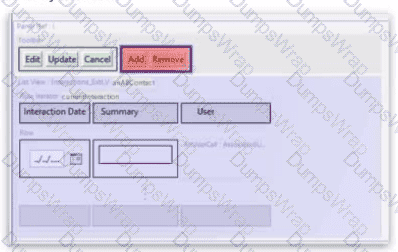
What needs to be configured to fix the error?
Options:
Set the toCrealeAndAdd property of the row iterator
Sel the addVisible and removeVisible properties of the Add and Remove buttons
Set the iterator property of the Add and Remove buttons
Set the Visible property of the row iterator
Answer:
CExplanation:
In the GuidewirePage Configuration Framework (PCF), there is a strict functional relationship between toolbar buttons and the data they manipulate. When dealing withList Views (LVs), the "Add" and "Remove" buttons are specialized widgets known asIterator Buttons.
According to theInsuranceSuite Developer Fundamentalscurriculum, placing an Iterator Button in a toolbar is only the first step. For the button to be valid, it must be linked to a specificRow Iteratorlocated within the List View. This is accomplished by setting theiteratorproperty on the Add or Remove button to theIDof the target Row Iterator.
The red error in Guidewire Studio signifies a metadata validation failure. Even if the Row Iterator has the correct toAdd and toRemove logic defined (the "how" of the operation), the buttons themselves do not yet know "where" that logic resides. By setting the iterator property, you create a direct reference that tells the button which array of objects it is responsible for managing.
Why other options are incorrect:
Option A:toCreateAndAdd is an optional property of the Row Iterator used for overriding the default object creation logic; it does not resolve the connection error between the button and the iterator.
Option B:addVisible and removeVisible are boolean expressions used to hide buttons based on user permissions or object state; they do not fix structural metadata errors.
Option D:The Visible property on an iterator affects whether the list is rendered, not whether the toolbar buttons are correctly linked.
Linking the button to the iterator ID is a fundamental best practice that ensures the UI remains synchronized with the underlying data bundle.
Which logging statement follows best practice?
Options:
If(_logger.InfoEnabled) { _logger.debug("Adding '${contact.PublicID}' to ContactManager") }
_logger.error(DisplayKey.get("Web.ContactManager.Error.GeneralException", e.Message))
If(_logger.DebugEnabled) { _logger.debug(logPrefix + someReallyExpensiveOperation()) }
_logger.info(logPrefix + "[Address#AddressLine1=" + address.AddressLine1 + "] [Address#City" + address.City + "] [Address#State" + address.State + "]")
Answer:
CExplanation:
Logging efficiency is a critical component of Guidewire application performance. In a production environment, logging levels are typically set to INFO or WARN. However, developers often include DEBUG level logs to assist with troubleshooting. The primary performance risk occurs when a log statement requires significant computational resources to construct the message string—such as calling a method that performs complex calculations or database lookups—even when the log level is currently disabled.
Option C follows the absolute best practice by wrapping the log call in anIsDebugEnabledcheck. This ensures that the someReallyExpensiveOperation() method is only executed if the system is actually configured to record debug logs. Without this check, the application would waste CPU cycles performing the "expensive operation" only to have the logger discard the resulting string because the level was set to INFO.
Other options fail for various reasons: Option A incorrectly checks InfoEnabled before calling debug, which is a logical mismatch. Option B is risky because passing raw exception messages (e.Message) into a display key can lead to inconsistent formatting or potential security issues if the message is shown to users. Option D demonstrates "Chatty Logging" and string concatenation without a level check, which can negatively impact performance and clutter log files with non-essential state data. Guidewire's logging framework (built on Log4J/SLF4J principles) thrives when developers use guards like DebugEnabled to protect system resources.
The sources describe different types of deployment strategies for InsuranceSuite applications. What are characteristics of a selective deployment?
Options:
It is primarily used for deploying builds to production star systems.
It always involves a database restore from production.
It requires deploying all InsuranceSuite and EnterpriseEngage applications simultaneously.
It is the only strategy that supports rolling updates.
It allows deployment of only the selected InsuranceSuite applications.
Answer:
EExplanation:
InGuidewire Cloud Platform (GWCP), deployment flexibility is key to managing complex multi-application environments. ASelective Deployment(Option E) is a strategy where a developer or release manager chooses to deploy a subset of the available applications rather than the entire suite.
For example, if a developer has only made configuration changes toPolicyCenterandContactManager, they can trigger a selective deployment for just those two applications while leavingClaimCenterandBillingCenterat their current versions. This is particularly useful in non-production environments (like Dev or QA) to speed up the build-and-deploy cycle and minimize disruption to other teams working on different applications.
Key characteristics include:
Granular Control:You choose which specific components (e.g., PC, BC, CC, or Digital applications) are pushed.
Environment Stability:It reduces the risk of side effects on applications that haven't changed.
Pipeline Efficiency:Since fewer containers are being built and restarted, the overall deployment time is often shorter than a full suite deployment.
Option C describes the opposite (a Full Deployment). Option A is incorrect as production deployments typically follow a more rigid, all-inclusive "Release" structure to ensure synchronization. Option B is a data management task (masking/refreshing), which is distinct from the deployment of application code.
What is a commit in Git?
Options:
A snapshot of all of the files in a project
A floating pointer to a stream of file changes
A fixed pointer that identifies the changes to a file
A list of files with the changes made to each file over time
Answer:
AExplanation:
When working withGuidewire Cloud Platform (GWCP), developers use Git for version control. Understanding the internal mechanics of Git is essential for managing InsuranceSuite configuration changes. A common misconception is that Git stores "diffs" or just the changes made to files. However, according to theDeveloping with Guidewire Cloudtraining, acommitis fundamentally asnapshot of the entire project at a specific point in time.
When you perform a commit, Git takes a "picture" of what all your files look like at that moment. To stay efficient, if a file has not changed, Git doesn't store the file again; instead, it stores a link to the previous identical version it has already stored. This snapshot includes metadata such as the author, the timestamp, and a reference to the "parent" commit that came before it. This allows Git to reconstruct the entire state of the configuration at any point in history.
Option C is incorrect because it describes a pointer to changes (a delta), which is how older version control systems like SVN worked. Option B is more descriptive of a "Branch," which is a moving pointer to a commit. Option D describes the "History" or "Log" view. By treating every commit as a complete snapshot, Git ensures that the integrity of the Guidewire metadata is maintained, even when merging complex changes across different developer streams.
An insurer wants to add a new typecode for an alternate address to a base
typelist EmployeeAddress that has not been extended.
Options:
Following best practices, which step must a developer take to perform
this task?
Create an EmployeeAddress_Ext.tti file and add a new typecode
alternate
Open the EmployeeAddress.tti and add a new typecode alternate
Create an EmployeeAddress.ttx file and add a new typecode
alternate_Ext
Create an EmployeeAddress.tix file and add a new typecode
alternate_Ext
Answer:
DExplanation:
In the Guidewire InsuranceSuite framework, maintaining the integrity of the base configuration is paramount for ensuring a smooth upgrade path. This is achieved through a strict "extension-only" philosophy for out-of-the-box (OOTB) components. When a developer needs to modify a base typelist—like EmployeeAddress—they must understand the distinction between.tti (Typelist Interface)files and.ttx (Typelist Extension)files.
A .tti file defines the original structure and initial typecodes of a typelist. These files are considered "base" and should never be edited directly (making Option C incorrect). If a developer were to modify the base .tti, those changes would be overwritten during the next platform update. To safely add a new typecode to an existing base typelist, Guidewire requires the creation of a .ttx file with the exact same name as the base typelist (e.g., EmployeeAddress.ttx). This extension file tells the Guidewire metadata engine to merge the new entries with the existing ones at runtime.
Furthermore, Guidewire best practices for metadata extensions require specific naming conventions to prevent future "namespace collisions." While the .ttx file itself adopts the base name, the newtypecodeadded within that file should be suffixed with _Ext (e.g., alternate_Ext). This ensures that if Guidewire later releases a product update that adds an "alternate" code to the base EmployeeAddress typelist, the customer's custom code remains unique and does not conflict with the new base code.
Option B is incorrect because you do not create a new .tti with an _Ext suffix for an existing list. Option E is incorrect because .tix is not a valid Guidewire metadata file extension; the correct extension is .ttx. Therefore, Option D is the only choice that follows the correct file creation and naming convention protocols required by the Guidewire development lifecycle.
Which rule is written in the correct form for a rule which sets the claim segment and leaves the ruleset?
A)

B)

C)

D)

Options:
Option A
Option B
Option C
Option D
Answer:
AExplanation:
In the GuidewireGosu Rules engine, managing the logic flow within a ruleset is a fundamental skill for any developer. A ruleset is essentially a collection of "If-Then" statements that the application evaluates sequentially. When a business requirement dictates that an action should be taken—such as categorizing a claim by setting its Segment property—and then no further rules in that specific set should be processed, the developer must use theactionsutility object.
The correct method to terminate the current ruleset execution is actions.exit(). As shown inOption A, the logic must be ordered procedurally: first, the state of the entity is modified (claim.Segment = TC_AUTO_LOW), and then the exit() command is called to stop the engine from evaluating subsequent rules. Using the typecode constant (TC_AUTO_LOW) is the best practice for assignment, as it provides compile-time checking, whereas using a hardcoded string (Option B) is error-prone and discouraged in Guidewire development.
Furthermore, the placement of the exit command is critical. InOption C, the actions.exit() is placed before the assignment; this results in the rule terminating immediately, and the claim segment is never actually updated.Option Dis incorrect because actions.stop() is not the standard method for exiting a ruleset in the Gosu rule architecture. By following the pattern in Option A, developers ensure that once a "mutually exclusive" business condition is met and handled, the system efficiently moves to the next ruleset or stage in the claim lifecycle, preventing redundant processing or accidental overwrites of the segment value by lower-priority rules.
The Officials list view in ClaimCenter displays information about an official called to the scene of a loss (for example, police, fire department, ambulance). The base product captures and displays only three fields for officials. An insurer has added additional fields but still only displays three fields. The insurer has requested a way to edit a single record in the list view to view and edit all of the officials fields. Which location type can be used to satisfy this requirement?
Options:
Forward
Page
Popup
Location group
Answer:
CExplanation:
In Guidewire InsuranceSuite UI design, balancing information density is a common challenge.List Views (LVs)are optimized for showing multiple records at once but are limited by horizontal screen real estate. When an entity has more fields than can comfortably fit in a table—as is the case with the expanded "Officials" entity—Guidewire best practices recommend using aPopup(Option C) for detailed editing.
A Popup is a specializedLocationtype that opens a secondary window over the current page. This allows the developer to embed a fullDetail View (DV)containing all the new fields (police badge numbers, department contact info, etc.) without navigating the user away from the main Claim screen. This "List-Detail" pattern is typically implemented by making one of the fields in the List View (like the Official's name) aLinkor by adding an "Edit" button that calls the popover or push method to launch the Popup.
Other location types are inappropriate for this specific requirement. AForward(Option A) is a non-visual location used for logical branching (deciding where to send a user based on data). APage(Option B) would take the user completely away from the current context, which is disruptive for a simple edit. ALocation Group(Option D) is used for structural navigation in the sidebar, not for individual record interaction. By utilizing a Popup, the developer provides a focused, high-density editing environment that maintains the user's workflow within the ClaimCenter application.
A developer wrote the following query to create a list of activities sorted by activity pattern, and then returns the first activity for a failed policy bind:

This query uses the sortBy() and firstwhere() methods which are anti-patterns. Where should the developer handle the filtering and sorting to follow best practices?
Options:
On the application server
In the application cache
In the database
In a block statement
Answer:
CExplanation:
In Guidewire InsuranceSuite development, one of the most critical performance principles is "database-first" processing. When using the GosuQuery API, developers have two ways to manipulate data: at theDatabase level(via the Query object) or at theApplication Server level(via the Result/Collection object).
Methods like sortBy() and firstWhere() are part of the Gosu collection library. When applied to a query result, these methods trigger the execution of the SQL query, fetchallmatching records from the database into the application server's memory, and then perform the sorting and filtering in the Java/Gosu heap. This is a significant anti-pattern because it consumes excessive memory and CPU cycles on the application server, especially if the underlying table (like Activity) contains thousands or millions of rows.
According to best practices, the developer should handle filtering and sortingin the database(Option C). This is achieved by using the compare() and orderBy() methods directly on the Query object before calling .select(). By doing so, Guidewire generates a SQL statement with a WHERE clause for filtering and an ORDER BY clause for sorting. The database engine, which is highly optimized for these operations, then returns only the specific record needed. For the "first" record requirement, the developer should combine the database-level orderBy() with a getFirstResult() call on the result set. This ensures that only the minimal required data is transferred over the network and loaded into memory, maintaining high application throughput and preventing "OutOfMemory" errors.
You need to retrieve Claim entity instances created after a specific date. Which methods ensure that the filtering is performed in the database for optimal performance?
Options:
Retrieve all claims and filter the collection in Gosu memory using the where ( ) method.
Retrieve claims using a query and then filter the results collection using the filterwhere method.
Use the filter () .where () methods on the query object to filter the records by their creation date.
Use the compare method on the query object to filter claim records by their creation date.
Use the where method on the query object to filter claim records by their creation date.
Answer:
DExplanation:
In Guidewire InsuranceSuite development, performance is heavily dependent on how data is retrieved from the relational database. When dealing with potentially large datasets, such as the Claim entity, it is critical to perform filtering at thedatabase level(via SQL WHERE clauses) rather than at theapplication level(in Gosu memory).
The GuidewireQuery APIprovides the primary mechanism for constructing these database-level filters. When a developer creates a query object (e.g., gw.api.database.Query.make(Claim)), they must use specific methods to define the criteria that will be translated into a SQL query. The compare() method is the standard approach for adding these constraints. It allows the developer to specify the property (such as CreateTime), the comparison operator (such as GreaterThan), and the value (the specific date). Because the compare() method is called directly on the Query object before the query is executed, the filtering happens within the database engine.
In contrast, methods like where() or filter() used on acollectionor aQueryBuilderresult (Option A, C, and E) often trigger the execution of the query first, fetching all records into the Gosu application server's memory, and then discarding the ones that don't match. This "in-memory filtering" leads to severe performance degradation, high memory consumption, and potential "Out of Memory" errors. Option D correctly utilizes the Query API's ability to refine the result set at the source. Understanding the lifecycle of a query—from construction using compare() to execution—is a fundamental skill for any Guidewire developer to ensure the application remains scalable and responsive under high data volumes.
An insurer stores the date a company was established in the company records. A business analyst identified a new requirement to calculate a company's years in business at the time a loss occurred. The years in business will be determined using the date established field and the claim date of loss.
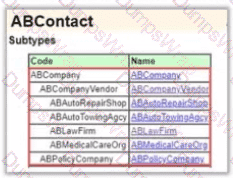
The image below shows the Contact structure in the data model:

Which configuration steps will satisfy the requirement? (Select two)
Options:
Create a new enhancement class for the Company entity under the insurer package
Create a function to calculate the years In business in a Company enhancement
Create a setter property to calculate the years in business in the Contact enhancement
Create a new enhancement class for the Contact entity under the gw package
Create a function to calculate the years in business in a Ul Helper class under the gw package
Create a getter property to calculate the years in business in a Company enhancement
Answer:
AExplanation:
In Guidewire development, the preferred way to extend base entities with business logic or derived data is throughGosu Enhancements. This approach allows you to add properties or methods to an entity that appear as if they were part of the original class.
1. Enhancement Location and Package (Option A)
According to theGuidewire InsuranceSuite Developer Fundamentalsguide, any custom enhancement must be placed in acustomer-specific package(e.g., si.pc.contact for Succeed Insurance). Using the gw package (Options D and E) is strictly prohibited as it is reserved for Guidewire's internal product code. Because "Date Established" is specific to the Company entity (as indicated in the Contact hierarchy), the enhancement should target the Company entity directly.
2. Using a Getter Property (Option G)
The requirement is to "calculate" a value based on existing data. The most efficient and readable way to implement this in Gosu is via agetter property(property get). Unlike a standard function (Option B), a getter property allows you to access the value in PCFs or rules using simple dot notation (e.g., myCompany.YearsInBusiness_Ext), making the code cleaner and more maintainable.
Why other options are incorrect:
Option B:While a function would technically work, a getter property is the best practice for a value that logically represents a "read-only" attribute of the entity.
Option C:Asetteris used towritedata to a field. Since "Years in Business" is a derived calculation, it should not be manually set; it should be calculated on-the-fly from the source date fields.
Options D and E:As mentioned, these use the gw package, which violates upgrade-safety standards and would cause the "Cloud Assurance" checks to fail.
By creating a Company enhancement in the customer's package and providing a property get, the developer creates a reusable, performant solution that follows the platform's core architectural principles.
Which statement is true about the Project Release branch for an implementation using Git?
Options:
It stores the current production code and is updated whenever the production system is updated
It is used by the implementation team to develop code for a specific release
It is used by the implementation team to stabilize the code for a specific release
It contains product releases from Guidewire
Answer:
CExplanation:
In the Guidewire Cloud Platform (GWCP) development lifecycle, effective source control management is essential for maintaining a stable path to production. Guidewire recommends a specific branching strategy tailored for InsuranceSuite implementations using Git (typically hosted in Bitbucket).
TheProject Release branch(often named release/*) serves a very specific purpose:stabilization. According to the "Developing with Guidewire Cloud" course, the standard workflow involves developers working on feature branches and merging them into a develop or integration branch. Once a set of features is deemed complete for a specific deployment cycle, a Release branch is created.
The primary goal of this branch is to isolate the release-ready code from the ongoing, potentially volatile development occurring in the main integration branch. On the Release branch, the team performs final GUnit testing, regression testing, and bug fixes specifically identified during the QA phase for that version. No new features should be introduced here. This isolation ensures that the "Candidate for Production" is stable and that any fixes applied are strictly for high-priority issues.
Option A refers to the master or main branch, which holds the current production state. Option B describes the function of feature or development branches. Option D is incorrect because product releases from Guidewire are provided as base code updates, which are typically merged into the customer's repository rather than existing as a "Project Release" branch. By focusing on stabilization, the Release branch minimizes the risk of introducing "noise" or untested features into the final production deployment.
You have created a list view file BankAccountsLV that will display a list of bank accounts. You have added a Toolbar and Iterator Buttons, but when you try to select the Iterator related to the Iterator Buttons, the list of available Iterators is empty.
What is needed to fix this problem?
Options:
In the BankAccountsLV file, click on the Row, select the "Exposes" tab, click the "+", select 'Expose Iterator', and select the iterator defined in BankAccountsLV.
Manually enter the Iterator name of BankAccountsLV, and Studio will find the file.
In the BankAccountsLV file, click on the Row Iterator, select the "Exposes" tab, click the "+", select "Expose Iterator", and select the iterator defined in BankAccountsLV.
In the BankAccountsLV file -> "Exposes" tab, click the "+", select "Expose Iterator", and select the iterator defined in BankAccountsLV.
Replace the Iterator Buttons with separate Toolbar Buttons to "Add" and "Remove" rows from the Iterator.
Open the BankAccountsLV file and from the top menu select "Build -> Recompile BankAccountsLV"
Answer:
CExplanation:
In the Guidewire Page Configuration Framework (PCF), communication between widgets is strictly governed by visibility and scope. A common scenario involves usingIterator Buttons(Add/Remove) within a toolbar to manipulate a list of data. These buttons must be explicitly linked to aRow Iteratorwidget to know which collection of data they should act upon.
The issue described—where the "Iterator" dropdown is empty when configuring the buttons—is a result of the Iterator's properties not being "exposed" to the containing page. In Guidewire Studio, widgets within a PCF file (like an LV) are not automatically visible to the external pages that call them. To make an internal widget like a Row Iterator accessible to a parent container (such as a Detail View panel or a Screen where the toolbar resides), the developer must use theExposestab.
According to best practices, the developer should select theRow Iteratorelement in the BankAccountsLV file, navigate to theExposestab, and add an entry for "Expose Iterator." This creates a reference that allows the PCF editor to "see" the iterator. Once this configuration is saved, the Iterator Buttons on the calling page will find the named iterator in the dropdown menu. Options A, B, and D are incorrect because they target the wrong level of the PCF hierarchy or suggest manual entry which the Studio UI does not support for this specific linkage. Option E is a workaround that bypasses the built-in functionality of Iterator Buttons, and Option F is a general maintenance step that does not resolve metadata configuration issues.
The Marketing department wants to add information for attorneys and doctors;
For doctors, store the name of their medical school. For attorneys, store the name of their law school.
Which two data model extensions follow best practices to fulfill this requirement? (Select two)
Options:
An entity named LawSchooLExt. and a foreign key to it from AB.Attorney
A varchar column on ABDoctor, named MedSchool_Ext
A varchar column on ABAttorney, named LawSchooLExt
An entity named ProfessionalSchooLExt. storing the school's name and type
An array on ABPerson. named ProfessionalSchools_Ext
An entity named MedSchooLExt and a foreign key to it from AB_Doctor
Answer:
B, CExplanation:
When extending the Guidewire Data Model, developers must choose the most efficient storage mechanism based on the nature of the data and its relationship to existing entities. In this scenario, the requirement is to store a single piece of information—a school name—for two specific subtypes of person contacts: Doctors and Attorneys.
According to Guidewire best practices for Entity Extensions, if a piece of data has a one-to-one relationship with an entity and is a simple data type (like a String/Varchar), it should be added directly to the entity extension file (.etx) as a column. Options B and C follow this principle. By adding MedSchool_Ext to the ABDoctor entity and LawSchool_Ext to the ABAttorney entity, the developer ensures that the data is stored in the specific table where it is relevant. This avoids unnecessary complexity in the database schema and simplifies UI configuration, as the fields can be accessed directly from the object without traversing a foreign key or array.
Alternatives like creating separate entities for the school names (Options A, D, and F) or using an array on the base person entity (Option E) represent "over-engineering." Creating a separate entity and a foreign key is only recommended if the data needs to be normalized (e.g., if multiple people share the exact same school record and that record has its own attributes like address or accreditation). In the context of a Marketing request to simply capture a name, adding a varchar column with the mandatory _Ext suffix is the most performant and maintainable approach. It keeps the database joins to a minimum and follows the Guidewire "KISS" (Keep It Simple, Stupid) principle for configuration.
The company has requested to group 3 new Pages, within Claim Details, in the left navigation. Which configuration best practice should be used to implement this requirement?
Options:
Implement each new Page as a LocationRef with its own Hyperlink widget.
Configure the new Page navigations within the TabBar definition.
Define the Page links in a reusable InputSet file to group the new pages.
Use a MenuItemIterator widget to create the heading and organize the Page links.
Configure a new LocationGroup to group the new pages.
Answer:
EExplanation:
The Guidewire UI is organized into a hierarchy ofLocations, and the primary mechanism for grouping related pages in the side navigation (the "sidebar" or "west panel") is theLocationGroup. When a business requirement calls for grouping multiple pages under a single heading—such as adding three specialized inquiry pages within the "Claim Details" area—a LocationGroup is the standard architectural choice.
A LocationGroup acts as a container for multiple LocationRef elements (which point to specific Pages, Worksheets, or other Groups). By defining a new LocationGroup (Option E), the developer can create a nested navigation structure. This results in a cleaner UI where a single parent entry in the sidebar can be expanded to reveal the three sub-pages. This follows the design pattern used throughout InsuranceSuite (for example, the "Financials" or "Parties Involved" sections in ClaimCenter).
Options A, B, and C are incorrect because they use the wrong widgets or locations for side-navigation logic. TabBar (Option B) is for top-level application switching (like moving between Claim, Policy, and Desktop), not for internal page grouping. InputSet (Option C) is for grouping fields within a page, not for managing navigation locations. MenuItemIterator (Option D) is generally used for dynamic menu generation (like a list of recent claims) rather than static structural navigation. Using a LocationGroup ensures that the navigation remains declarative and consistent with the platform's breadcrumb and security permission logic.
A developer has completed a configuration change in an InsuranceSuite application on their local environment. According to the development lifecycle described in the training, which initial steps are required to move this change towards testing and deployment? Select Two
Options:
Deploy the application directly to a pre-production planet.
Schedule automated builds in TeamCity
Push the code changes to the remote source code repository in Bitbucket.
Trigger a TeamCity build via Guidewire Home if it has not already begun automatically.
Create a new physical star system in Guidewire Home.
Configure pre-merge quality gates in Bitbucket.
Answer:
C, DExplanation:
TheGuidewire Cloud Platform (GWCP)development lifecycle is built around a modern CI/CD (Continuous Integration/Continuous Delivery) pipeline. This process moves code from a developer's local workstation through various "Planets" (environments) using integrated tools like Bitbucket, TeamCity, and Guidewire Home.
The first step in moving a local change toward production is committing andpushing the code to Bitbucket(Option C). Bitbucket serves as the centralized Git-based source code repository. This action triggers the "Build" phase of the lifecycle. Once the code is in Bitbucket, the next step involves the CI server,TeamCity. TeamCity is responsible for compiling the Gosu code, running automated GUnit tests, and performing static code analysis (Quality Gates). While TeamCity is often configured to trigger automatically upon a push, a developer may need to manuallytrigger or monitor the build via Guidewire Home(Option D) if they need immediate feedback or if the automation is set to a specific schedule.
Options such as "Deploying directly to pre-production" (Option A) are impossible in the GWCP model, as code must first pass through the "Dev" planet and satisfy quality gates before being promoted. "Scheduling automated builds" (Option B) is an administrative task, not an initial step for a developer's specific change. Finally, "creating a star system" (Option E) refers to the infrastructure setup usually handled by Guidewire Cloud operations, not a part of the standard code-change lifecycle. Following the C and D sequence ensures that the code is properly versioned, tested, and validated before it ever reaches a runtime environment.