
Junos - Associate (JNCIA-Junos) Junos OS 21.2 Questions and Answers
Which two statements accurately describe the relationship between the routing table and the forwarding table on a Junos device? (Choose two.)
Options:
The routing table resides in the data plane for fast lookups.
The routing table selects the best route based on routing information.
The forwarding table is built from the routing table.
The routing table is built from the forwarding table.
Answer:
B, CExplanation:
The relationship between the routing table (Routing Information Base or RIB) and the forwarding table (Forwarding Information Base or FIB) is the cornerstone of the Junos OS architectural separation between the control and data planes. The routing table resides in the control plane on the Routing Engine (RE). Its primary role is to aggregate all reachability information from every configured protocol and select the best route for each destination prefix based on criteria like preference and metrics.
Once the Routing Engine has identified the single " active " best path for a destination, it distills this complex routing data into a simplified, streamlined version called the forwarding table . The forwarding table contains only the essential information needed to move a packet: the destination prefix, the egress interface, and the Layer 2 next-hop MAC address. The RE then " pushes " this forwarding table to the Packet Forwarding Engine (PFE) in the data plane. By having the PFE use a table built from the routing table , Junos ensures that transit traffic can be processed at wire speed without the overhead of complex routing logic. This one-way flow—from the comprehensive RIB on the RE to the optimized FIB on the PFE—allows the device to maintain high performance even while routing protocols are recalculating or the management plane is under heavy load.
How many usable hosts are in a /24 subnet mask?
Options:
250
254
255
256
Answer:
BExplanation:
In the IPv4 addressing architecture, a /24 prefix length (standard Class C subnet mask of 255.255.255.0) signifies that the first 24 bits of the 32-bit address are reserved for the network portion, leaving 8 bits for the host portion. To calculate the total number of available IP addresses within this range, the formula $2^n$ is applied, where $n$ represents the number of host bits. For a /24 mask, $2^8$ results in 256 total addresses.
However, standard networking conventions—which Junos OS adheres to for interface configuration and routing—require the reservation of two specific addresses within any given subnet. The first address in the range is the network address (where all host bits are 0), used to identify the subnet itself in the routing table. The last address in the range is the directed broadcast address (where all host bits are 1), utilized to communicate with all hosts on that segment simultaneously. Therefore, the number of " usable " hosts that can be assigned to device interfaces, such as ge-0/0/0.0 or a workstation, is calculated as $2^n - 2$. In this instance, $256 - 2 = 254$. Understanding this calculation is fundamental for an architect when performing IP address management (IPAM) and ensuring that the Packet Forwarding Engine is configured with valid, assignable host addresses within a defined broadcast domain.
Which routing table is used for IPv6 unicast routes by default?
Options:
inet.0
inet.6
inet.1
inet6.0
Answer:
DExplanation:
In Junos OS, routing information is meticulously organized into separate databases known as routing tables, each identified by a specific name corresponding to an address family and its intended operational purpose. The master routing table for IPv4 unicast information is inet.0 . For the IPv6 address family, Junos OS utilizes inet6.0 as the default master routing table for all unicast reachability information. This table stores all IPv6 prefixes learned from directly connected interfaces, static configurations, and dynamic routing protocols such as OSPFv3, IS-IS, or BGP.
It is a core architectural principle in Junos to isolate these families to ensure management clarity and prevent address space collisions. While the system utilizes other specialized tables for specific functions—such as inet.3 for MPLS path information or inet.1 for multicast forwarding caches— inet6.0 remains the primary repository for IPv6-based forwarding decisions. When a Junos device receives an IPv6 packet, the Packet Forwarding Engine (PFE) performs a lookup against the entries derived from this table to determine the appropriate egress interface and next-hop address. Understanding this default table structure is essential for network architects when troubleshooting dual-stack environments or configuring protocol-specific import and export policies.
Which two statements about prefix lists in Junos are correct? (Choose two.)
Options:
Prefix lists can be re-used in multiple routing policies.
Prefix lists can be used in both firewall filters and routing policies.
Prefix lists cannot be used in routing policies.
Prefix lists cannot be used in firewall filters.
Answer:
A, BExplanation:
Prefix lists in Junos OS are named collections of IP addresses or network prefixes defined under the [edit policy-options] hierarchy. One of their most powerful features is their versatility and reusability. Because they are defined as independent objects, a single prefix list can be referenced in multiple different routing policies across the device. This modularity ensures consistency; for instance, if a set of " internal " prefixes changes, an administrator only needs to update the list in one location for those changes to propagate to every policy that utilizes it.
Furthermore, prefix lists are designed to be used across different functional areas of the Junos architecture. They are equally valid for use in routing policies (to control the import or export of routes between protocols like BGP or OSPF) and in firewall filters (to match source or destination addresses for transit or management traffic). When used in a routing policy, the prefix list typically performs an exact match on the prefix length unless modified by a match type like orlonger. In a firewall filter, it acts as a high-speed lookup table for the Packet Forwarding Engine. This dual-purpose capability makes prefix lists a foundational tool for architects seeking to implement scalable, automated security and routing logic within a unified configuration framework.
What is the maximum number of IP addresses that would be assigned to hosts in the 192.168.1.0/24 network?
Options:
24
32
128
254
Answer:
DExplanation:
In the IPv4 addressing scheme used within Junos OS, the /24 prefix length (representing a subnet mask of 255.255.255.0) allocates 24 bits for the network portion and 8 bits for the host portion of the 32-bit address. To determine the total number of addresses in this block, the formula $2^n$ is applied, where $n$ is the number of host bits. With 8 bits available ($2^8$), there are a total of 256 possible IP addresses.
However, the architecture of standard IP networking requires the reservation of two specific addresses within any subnet, making them unavailable for assignment to individual host interfaces. The first address (192.168.1.0) is the network address, which identifies the subnet itself. The last address (192.168.1.255) is the directed broadcast address, used to send traffic to all hosts on the segment simultaneously. Consequently, the maximum number of addresses that can be assigned to actual hosts—such as router interfaces, servers, or workstations—is calculated as $2^n - 2$. In this specific scenario, $256 - 2 = 254$. This calculation is a fundamental requirement for network architects when defining address pools and ensuring the Packet Forwarding Engine (PFE) is correctly configured with valid host-layer identifiers.
Exhibit:
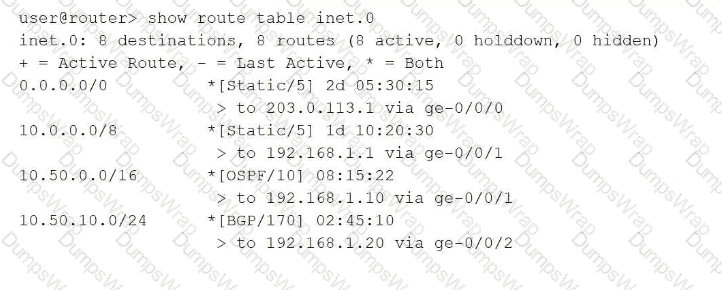
Referring to the exhibit, which route will be selected for a packet destined to IP address 10.50.10.55?
Options:
Route 0.0.0.0/0 will be selected using next hop 203.0.113.1 because the default route matches all destinations and has been active the longest.
Route 10.50.0.0/16 will be selected using next hop 192.168.1.10 because OSPF has a better preference value than BGP.
Route 10.50.10.0/24 will be selected using next hop 192.168.1.20 because it has the longest prefix match for the destination address.
Route 10.0.0.0/8 will be selected using next hop 192.168.1.1 because it was learned from the static routing protocol which has the lowest preference value.
Answer:
CExplanation:
In Junos OS, the Routing Information Base (RIB) selection process follows a strict hierarchy where the Longest Prefix Match (LPM) is the absolute primary tie-breaker. When a packet is destined for 10.50.10.55 , the Routing Engine searches the inet.0 table for all matching entries. In this exhibit, four routes match: the default route ( 0.0.0.0/0 ), a general static route ( 10.0.0.0/8 ), an OSPF route ( 10.50.0.0/16 ), and a BGP route ( 10.50.10.0/24 ).
The LPM rule dictates that the router must select the most specific route available, which is defined as the entry with the highest number of matching bits in the subnet mask. The 10.50.10.0/24 route matches 24 bits of the destination address, making it more specific than the 16-bit, 8-bit, or 0-bit alternatives. It is critical to understand that route preference (e.g., Static at 5, OSPF at 10, or BGP at 170) is only evaluated if there are multiple paths to the exact same prefix and length. Because these prefixes vary in length, the length takes precedence over the protocol preference. Therefore, the BGP-learned route via 192.168.1.20 is selected as the active path, ensuring traffic follows the most granular routing information provided to the device. Reference: Routing Fundamentals, Routing Table Selection, Longest Prefix Match.
==========
Which two statements about firewall filters are correct? (Choose two.)
Options:
Firewall filters are stateful.
Firewall filters can match Layer 4 parameters.
Firewall filters can match Layer 7 parameters.
Firewall filters are stateless.
Answer:
B, DExplanation:
In Junos OS, standard firewall filters operate as a primary security and traffic management tool within the forwarding plane. These filters are fundamentally stateless, meaning they evaluate each packet individually and in isolation without maintaining a session table or tracking the state of network connections. This stateless nature allows the Packet Forwarding Engine (PFE) to process filters at hardware speeds, ensuring minimal latency for transit traffic. This distinguishes them from the stateful security policies found on Junos security devices like the SRX Series, which track the entire lifecycle of a flow.
Furthermore, firewall filters are designed to inspect and match header information up to Layer 4 of the OSI model. This capability allows administrators to define terms based on parameters such as source and destination IP addresses (Layer 3) as well as TCP or UDP port numbers and protocol types (Layer 4). While they provide granular control over packet flow, they do not natively inspect Layer 7 application payloads, which is typically reserved for advanced services like Intrusion Detection and Prevention (IDP). By combining stateless execution with Layer 4 matching, Junos firewall filters provide an efficient method for implementing transit protection, rate limiting through policing, and protecting the local Routing Engine through loopback interface filtering. Reference: Routing Policy and Firewall Filters, Firewall Filter Framework.
==========
Which statement describes the primary purpose of a routing policy in Junos OS?
Options:
It controls which routes are accepted or advertised by a routing protocol. B. It determines the physical interface used for forwarding traffic. C. It sets the maximum number of routes in the routing table. D. It enables automatic rollback of routing changes.
Answer:
AExplanation:
In Junos OS, a routing policy is a powerful tool used to manage the flow of routing information between the Routing Information Base (RIB) and routing protocols. Unlike forwarding decisions, which are handled by the Packet Forwarding Engine, routing policies function within the control plane on the Routing Engine. Their primary purpose is to define specific criteria for importing routes into the routing table from neighbors or exporting routes from the routing table to neighbors.
Routing policies consist of terms containing from (match) and then (action) statements. They allow administrators to filter prefixes (e.g., denying specific BGP routes), modify route attributes (e.g., changing OSPF metrics or BGP communities), and manipulate path selection behavior. For example, an export policy might be used to ensure that only specific internal subnets are advertised to an ISP via BGP, preventing the accidental leakage of private infrastructure addresses. By default, Junos applies " default policies " for each protocol (such as OSPF accepting all OSPF routes), but custom policies allow for granular control over how the device interacts with the rest of the network. This ensures that the routing table contains only the desired paths for optimal traffic engineering.
Which two characteristics describe Junos OS software? (Choose two.)
Options:
Junos OS is a monolithic code base.
Junos OS supports automation features.
Junos OS runs only on routers.
Junos OS uses a modular architecture with independent processes.
Answer:
B, DExplanation:
Junos OS is distinguished from legacy network operating systems by its modern, modular architecture . Unlike a monolithic system where a single failure can crash the entire kernel, Junos runs various software functions—such as the routing protocol process (rpd), the interface process (dcd), and the management daemon (mgd)—as independent processes in their own protected memory spaces. This modularity ensures high availability; if one daemon encounters an error, it can be restarted without impacting the overall system stability or traffic forwarding.
Furthermore, Junos OS is a leader in automation features . It was built with a programmable foundation, utilizing an XML-based configuration database and supporting NETCONF for standardized remote management. This allows network architects to utilize modern DevOps tools like Ansible, Python (PyEZ), and SaltStack to automate complex configuration tasks, perform bulk upgrades, and enforce state compliance. By treating the network as code, Junos enables high-velocity operations that reduce human error. While Junos originally powered routers, it now runs across a vast portfolio including EX/QFX switches and SRX firewalls, proving its versatility far beyond just routing platforms.
What is the primary purpose of an IPv6 link-local address?
Options:
to provide Layer 2 connectivity
to assign a unique address for multicast traffic
to enable communication between devices on the same segment
to replace the default gateway in IPv6 networks
Answer:
CExplanation:
IPv6 link-local addresses, which are identified by the fe80::/10 prefix, are a mandatory component of the IPv6 architecture. The primary purpose of a link-local address is to enable immediate communication between devices located on the same local network segment (the same " link " ) without the requirement for a global unicast address or an external routing infrastructure. These addresses are non-routable, meaning they are never forwarded by a router to another network segment.
Every IPv6-enabled interface on a Junos device automatically generates a link-local address, typically derived from the interface ' s MAC address using the EUI-64 format or a stable privacy algorithm. These addresses are essential for several core functions: they are used by the Neighbor Discovery Protocol (NDP) to resolve MAC addresses, they serve as the source address for routing protocol adjacency formation (such as OSPFv3 or RIPng), and they are frequently used as the next-hop address in IPv6 routing tables. While they do not provide Layer 2 connectivity themselves (which is the role of the MAC address), they provide the necessary Layer 3 link-level presence required for nodes to discover one another and communicate across the physical medium before any global addressing is configured.
How are the Routing Engine and the Packet Forwarding Engine components connected?
Options:
They use shared memory access.
They use external breakout cables.
They use an MPLS connection.
They use an internal Ethernet link.
Answer:
DExplanation:
The fundamental architecture of Junos OS is built upon the clean separation of the Control Plane (Routing Engine or RE) and the Forwarding Plane (Packet Forwarding Engine or PFE). While these two components perform vastly different tasks, they must maintain a high-speed, reliable communication channel to synchronize the state of the device. This connection is achieved through an internal Ethernet link .
This internal link serves several critical functions. First, it allows the Routing Engine to " push " the distilled forwarding table (FIB) to the PFE, ensuring that the hardware knows exactly how to handle incoming transit traffic at wire speed. Second, it acts as a conduit for exception traffic . If the PFE receives a packet that it cannot handle alone—such as an OSPF hello, a BGP update, or an ICMP " Time Exceeded " message—it sends that packet over the internal Ethernet link to the RE for processing. This link is carefully policed by built-in rate limiters to ensure that a flood of transit-related exception traffic cannot overwhelm the Routing Engine ' s CPU, a mechanism known as control plane protection. By using a standard Ethernet-based internal fabric, Junos ensures a scalable and modular design where the RE can focus on complex protocol calculations while the PFE focuses on the heavy lifting of packet switching.
You successfully committed a configuration change. You now realize an issue exists and must revert back to the previous configuration. Which command entered in configuration mode will accomplish this task when committed?
Options:
show | compare
save config
rollback 0
rollback 1
Answer:
DExplanation:
Junos OS features a sophisticated configuration management system that automatically creates a snapshot of the active configuration every time a commit is successfully performed. These snapshots are stored as rollback files in a historical archive. Within the configuration mode hierarchy, the rollback command allows an administrator to discard current candidate changes and load a previously committed configuration into the candidate buffer.
The numbering of these rollback files is sequential and follows a specific logic: rollback 0 represents the configuration that is currently active and running on the system. To revert to the state that existed immediately prior to the most recent commit, the administrator must use rollback 1. This command overwrites the current candidate configuration with the previous operational state. It is important to note that executing rollback 1 does not immediately impact the running system; it merely populates the candidate database. The changes must still be verified—often using show | compare—and then finalized by executing the commit command. By default, Junos maintains up to 50 of these rollback configurations (and up to 100 on certain platforms/versions), providing a robust safety net for operational recovery and auditing. Reference: Configuration Basics, Managing Configurations, Rollback configurations.
Which statement describes the purpose of configuring traceoption log files in Junos OS?
Options:
The traceoption log files automatically optimize routing decisions based on traffic patterns.
The traceoption log files enable detailed debugging of specific protocols or processes.
The traceoption log files allow permanent storage of all system logs for compliance purposes.
The traceoption log files provide real-time monitoring of interface bandwidth utilization.
Answer:
BExplanation:
Traceoptions represent an essential diagnostic facility within Junos OS, primarily used by network engineers for deep-level troubleshooting and protocol analysis. The fundamental purpose of configuring traceoption log files is to enable detailed debugging of specific protocols—such as BGP, OSPF, or IS-IS—or specific system processes like the Routing Protocol Process (rpd). When enabled, the system captures detailed information about the internal operations of the protocol, including the exchange of packets, state machine transitions, and error conditions, writing this data to a dedicated file in the /var/log directory.
Unlike standard system logging (syslog), which captures high-level events and warnings, traceoptions provide a granular, " behind-the-scenes " view of how a protocol is interacting with its neighbors. This is particularly useful for identifying the root cause of complex adjacency issues or route instability that standard show commands may not reveal. However, because tracing can be resource-intensive, it is typically configured with specific flags to limit the output to relevant events and is disabled once the troubleshooting task is complete. Traceoptions do not serve to optimize routing automatically , nor are they intended for permanent compliance storage or simple bandwidth monitoring. Instead, they remain the premier tool for clinical debugging and protocol verification within the Junos environment. Reference: Operational Monitoring and Maintenance, Troubleshooting Tools and Traceoptions.
==========
Which protocol is used to discover the Layer 2 (MAC) address of a next hop for IPv6 hosts?
Options:
DHCP
ARP
NDP
DNS
Answer:
CExplanation:
In the IPv6 protocol suite, the traditional Address Resolution Protocol (ARP) used in IPv4 has been deprecated and replaced by the Neighbor Discovery Protocol (NDP). NDP is a multifaceted protocol built upon the Internet Control Message Protocol version 6 (ICMPv6). Its primary purpose is to allow a host or router to determine the Layer 2 hardware (MAC) address of a neighbor on the same local link when only the neighbor ' s IPv6 address is known.
This specific process is known as Neighbor Solicitation and Neighbor Advertisement. When a Junos device needs to resolve a MAC address for an IPv6 next hop, it sends a Neighbor Solicitation (ICMPv6 Type 135) message to the solicited-node multicast address. The target host responds with a Neighbor Advertisement (ICMPv6 Type 136) containing its physical MAC address. Beyond address resolution, NDP also handles Router Discovery, Prefix Discovery, and Duplicate Address Detection (DAD). Unlike ARP, which relies on broadcasts that can impact all hosts on a segment, NDP utilizes efficient multicast communication. Understanding NDP is critical for Junos architects, as it is the foundational mechanism that facilitates logical-to-physical address mapping in modern IPv6 environments, ensuring that the Packet Forwarding Engine can properly encapsulate frames for local delivery.
What are two fiber-optic connector types? (Choose two.)
Options:
LC
RJ-45
SC
BNC
Answer:
A, CExplanation:
Physical layer connectivity for Junos devices involves a variety of media types, with fiber-optic cabling being the standard for high-speed, long-distance, or high-density uplink requirements. Two of the most prevalent connector types used in these environments are the LC (Lucent Connector) and the SC (Subscriber Connector) .
The LC connector is a small-form-factor (SFF) connector that uses a 1.25 mm ferrule. Due to its compact size and " push-and-latch " mechanism, it is the primary connector type found on SFP, SFP+, and XFP transceivers used in Juniper EX, MX, and QFX series hardware. Its high-density design allows for more ports in a limited space on a line card or chassis. The SC connector , often referred to as a " square connector, " utilizes a larger 2.5 mm ferrule and a " push-pull " snapping mechanism. While it was highly common in older legacy hardware and fiber patch panels, it has largely been superseded by the LC in modern data center and enterprise switching environments.
In contrast, the RJ-45 is a standard copper Ethernet connector (typically used with Category 5e/6 cables), and the BNC (Bayonet Neill–Concelman) is a miniature quick connect/disconnect RF connector used for coaxial cable. As a Senior Architect, distinguishing between these physical interfaces is critical when specifying the correct Small Form-factor Pluggable (SFP) modules and patch cables required to bring a Junos interface into an operational up/up state.
You are using the factory default configuration on a new Juniper router. You must successfully commit the configuration and activate the device. Which component must be configured before Junos OS will allow you to accomplish this task?
Options:
a system hostname
a root-authentication password
at least one logical interface with family inet enabled
a management IP address on the fxp0 interface
Answer:
BExplanation:
When a Junos device is initialized for the first time or after a factory reset, it operates with a " factory-default " configuration. This configuration contains the minimum settings necessary for the device to boot, but it lacks essential security parameters. The Junos OS kernel enforces a strict security mechanism that prevents any administrator from successfully executing a commit command until a root-level password has been defined.
Specifically, the root-authentication object must be configured under the [edit system] hierarchy. This requirement ensures that no Junos device is deployed into a production environment with an open, unauthenticated root account. If an administrator attempts to commit changes without this setting, the configuration parser will return a " missing mandatory statement " error and the commit process will fail. While other settings—such as a system hostname, management IP address (on the fxp0 or me0 interfaces), or logical interface configurations—are critical for operational readiness, they are not strictly enforced by the system validation logic for the initial activation. Only the root-authentication (which can be a plain-text password or an encrypted key) is a hard prerequisite for transitioning the device from a default state to an active, running configuration.
What does the Junos CLI prompt indicate when it ends with a hash symbol (#)?
Options:
The user is in operational mode.
The user is in configuration mode.
The user is in shell mode.
The user is in recovery mode
Answer:
BExplanation:
In the Junos OS, the Command Line Interface (CLI) uses distinct prompt symbols to provide the administrator with immediate contextual awareness of their current operating environment. When the prompt ends with a hash symbol (#) , it indicates that the user is in configuration mode .
This mode is the " engine room " of the device, where you modify the candidate configuration. Here, you can add, delete, or modify statements across the various hierarchies like [edit system], [edit interfaces] , or [edit protocols]. It is important to remember that changes made while the # prompt is visible are not active until a commit command is successfully executed.
Contrast this with the operational mode , which is indicated by a greater-than symbol ( > ) . Operational mode is used for monitoring, troubleshooting, and viewing the system status (e.g., show commands). Moving between these modes is a fundamental part of the Junos workflow: you enter configuration mode by typing configure and return to operational mode by typing exit or quit. If you see a percent sign (%), you ' ve wandered into the FreeBSD shell mode , which is a lower-level Unix environment typically reserved for advanced system maintenance. Recognizing that # means you have the power to change the system ' s " brain " is a key safety check for any network architect.
Which two statements are correct about logical units? (Choose two.)
Options:
A physical interface can host multiple logical units.
Logical units can have multiple IP addresses.
Logical units are used only for management interfaces.
A physical interface can host only one logical unit.
Answer:
A, BExplanation:
In the Junos OS architecture, interfaces are strictly divided into physical and logical components. The physical interface represents the actual hardware port (e.g., ge-0/0/0), while logical units (e.g., ge-0/0/0.0) define the protocol-specific parameters and logical segmentation required for traffic processing. A fundamental characteristic of this model is that a single physical interface can host multiple logical units. This is a mandatory requirement for technologies such as 802.1Q VLAN tagging, where each logical unit corresponds to a different VLAN ID on the same physical link, allowing for efficient micro-segmentation of traffic.
Furthermore, Junos OS allows logical units to have multiple IP addresses assigned to them within the same address family or across different families (such as inet and inet6). This flexibility enables a single logical interface to reside on multiple subnets simultaneously, which is essential for complex routing scenarios, multi-homing, or transitional dual-stack environments. It is a common misconception that logical units are reserved for management; in reality, every physical interface must have at least one logical unit (typically unit 0) configured for the device to process any transit or local traffic. Understanding the hierarchical relationship between the physical port and its logical subdivisions is critical for successful interface management and protocol deployment on Junos platforms. Reference: Junos OS Fundamentals, Interface Naming and Hierarchy.
==========
Your routing policy has three terms. A route matches the first term with an accept action. In this scenario, what happens next?
Options:
The route is rejected by default.
The route is evaluated by the second term.
The route is sent to the next policy chain.
The route is accepted and no further terms are evaluated.
Answer:
DExplanation:
Junos OS routing policies are evaluated using a sequential, " first-match " logic. When a route is compared against a policy, the system evaluates the terms in the order they are defined. Once a route meets all the match criteria (the from statement) in a term, the router executes the associated action (the then statement).
If the action is a terminating action —such as accept or reject—the evaluation of that specific route for that specific policy ends immediately. In this scenario, since the route matched the first term and the action was accept, the route is successfully processed and the policy evaluation is complete. The system will not proceed to evaluate the second or third terms. This behavior is critical for network architects to understand when ordering terms; more specific " exceptions " must be placed at the top of the policy, while broader " catch-all " terms must be placed at the bottom. If the administrator wanted the evaluation to continue to the next term despite a match, they would need to explicitly include the next term action, which is a non-terminating action. Without it, a match on an accept action signifies the final decision for that route within that policy context.
Exhibit:
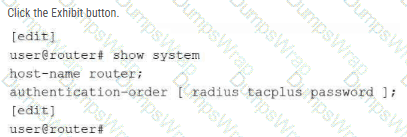
You have configured multiple authentication methods on your Junos device, including RADIUS, TACACS+, and local user accounts. A user attempts to log in, but the RADIUS server is unavailable. Referring to the exhibit, which statement is correct?
Options:
The user is prompted to select a different authentication method.
The login attempt fails immediately.
Junos will continue to attempt to authenticate with the RADIUS server until it responds.
Junos attempts the next configured authentication method.
Answer:
DExplanation:
In the Junos OS architecture, the authentication-order statement within the [edit system] hierarchy defines the sequence in which the device attempts to validate user credentials against external and internal databases. The order specified in the exhibit is [ radius tacplus password ] , meaning the device first queries the RADIUS server, followed by the TACACS+ server, and finally the local password database.
A critical distinction in Junos authentication logic is the difference between a server being " unavailable " and a server " rejecting " a user. If an authentication server responds with an explicit access-reject (meaning it received the request but the credentials were invalid), the authentication process terminates immediately to maintain security integrity. However, if the server is unreachable or fails to respond within the configured timeout period (unavailable), the Junos Control Plane automatically falls back to the next method in the defined sequence. In this specific scenario, since the RADIUS server is unavailable, the device will proceed to attempt authentication using the TACACS+ server. If that were also unavailable, it would finally check the local password database. This fallback mechanism ensures that administrators can still access the device even during external server outages, provided they have a local account configured as the final method in the list.
Which two types of traffic are processed by the Routing Engine? (Choose two.)
Options:
transit traffic
management traffic
line-card traffic
control traffic
Answer:
B, DExplanation:
The Routing Engine (RE) is the control-plane component of a Junos OS device. Its primary responsibilities include routing protocol processing, system management, maintaining routing tables, running Junos OS processes, and providing administrative access. Consequently, management traffic and control traffic are processed by the Routing Engine. Juniper specifically describes the Routing Engine as controlling routing updates and system management , while routing protocol packets from the network are directed to the Routing Engine.
Management traffic includes traffic associated with services such as SSH, Telnet, SNMP, and other traffic whose destination is the device itself. Control traffic includes routing protocol communications such as OSPF, BGP, and other protocol packets required to establish and maintain the device ' s control-plane state. Juniper categorizes these as local packets , which are handled by the Routing Engine.
By contrast, transit traffic enters one physical interface and is forwarded toward another destination. This forwarding operation is normally handled by the Packet Forwarding Engine (PFE) rather than the Routing Engine. The separation of forwarding and control functions is fundamental to Junos OS architecture.
Study Guide Reference Topics: Junos OS Fundamentals — Routing Engine and Packet Forwarding Engine; control plane versus forwarding plane; management and protocol traffic.
===============
Which two statements are examples of exception traffic? (Choose two.)
Options:
An IP packet with the Router Alert option set in the IP options field.
SSH traffic to the local Junos OS device.
An IP packet that has the IP precedence CoS bits of 111 in the ToS field.
SSH traffic to a remote server on the Internet.
Answer:
A, BExplanation:
In the Junos architecture, exception traffic consists of packets that cannot be handled by the Packet Forwarding Engine (PFE) alone and must be punted to the Routing Engine (RE) for specialized processing.
The first category of exception traffic is management/protocol traffic destined for the local device . For instance, SSH traffic to the local Junos OS device is an exception because the RE must terminate the TCP connection, authenticate the user, and present the CLI. Other examples include SNMP polls, BGP updates, and OSPF Hellos.
The second category involves packets with specific IP options or headers that require RE intervention. An IP packet with the Router Alert option (typically used by protocols like RSVP or IGMP) explicitly tells every router in the path, " Hey, stop and look at my payload. " Because the PFE is optimized for high-speed forwarding and not for interpreting complex options, it sends these packets to the RE. Conversely, traffic destined for a remote internet server (transit traffic) or packets with CoS bits (which are processed in hardware by the PFE) do not hit the RE. Exception traffic is strictly policed by the " internal link " rate limiters to ensure the RE is never overwhelmed by a flood of packets requiring software-based processing.
What are two functions of the Routing Engine? (Choose two.)
Options:
It evaluates firewall filters for transit traffic.
It runs Junos OS.
It processes all management traffic.
It processes transit traffic.
Answer:
B, CExplanation:
The Routing Engine (RE) is the " brains " of a Juniper device, representing the control plane in the Junos dual-plane architecture. One of its primary functions is that it runs the Junos OS . The RE is essentially a high-performance workstation running a specialized version of FreeBSD that hosts the various software daemons responsible for the device ' s logic, such as the Routing Protocol Process (rpd) and the Device Control Process (dcd).
The second core function is that the RE processes all management traffic . Any packet destined for the router itself—such as an SSH session, an SNMP poll, a NETCONF request, or an NTP update—is handled by the Routing Engine ' s CPU. The RE also maintains the master routing table, manages configuration commits, and provides the CLI environment for the administrator.
It is critical to distinguish these control-plane duties from the duties of the Packet Forwarding Engine (PFE) . The PFE is responsible for the " heavy lifting, " such as processing transit traffic (data passing through the router) and evaluating firewall filters at wire speed. While the RE defines the policies and routing tables, it hands off a streamlined version of this information to the PFE so the RE isn ' t bogged down by millions of individual packets. This separation ensures that a busy management session or a complex routing calculation on the RE doesn ' t impact the device ' s ability to forward traffic at maximum capacity.
Which two tasks are performed by the Routing Engine in a Junos device? (Choose two.)
Options:
The Routing Engine runs routing protocols.
The Routing Engine evaluates transit traffic against firewall filters.
The Routing Engine manages the device configuration.
The Routing Engine forwards transit traffic.
Answer:
A, CExplanation:
The Routing Engine (RE) functions as the centralized processor and administrative core of any Junos OS-based platform. Its primary responsibility involves the execution and maintenance of the control plane, which includes running all active routing protocols such as OSPF, BGP, and IS-IS. Through these protocols, the RE exchanges topology information with neighboring routers, builds the Routing Information Base (RIB), and calculates the optimal paths for traffic. Once these paths are determined, the RE distributes the resulting Forwarding Information Base (FIB) to the Packet Forwarding Engine (PFE) for hardware-level execution.
In addition to its protocol duties, the Routing Engine manages the device configuration and the overall system environment. This includes providing the user interface (CLI or J-Web), managing the candidate and active configuration databases, and handling the commit process. While the PFE is specifically designed to forward transit traffic and evaluate that traffic against firewall filters at line rate, the RE focuses on the higher-level logic and management tasks. This architectural separation ensures that management functions—such as a complex configuration commit or a protocol re-convergence event—do not degrade the performance of the data plane, allowing the device to continue forwarding user traffic without interruption. Reference: Junos OS Fundamentals, Routing Engine Functions, Management and Control Planes.
==========
Click the Exhibit button.
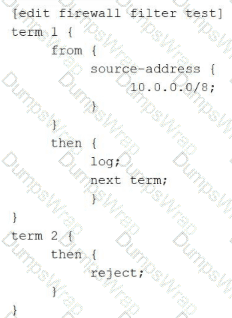
How is traffic, sourced from 10.0.0.0/8, treated by the firewall filter shown in the exhibit?
Options:
logged and discarded
logged and accepted
logged with no further action
logged and rejected
Answer:
DExplanation:
Junos OS firewall filters operate on a sequential, " first-match " logic, but their behavior is significantly influenced by the use of terminating versus non-terminating actions. In this exhibit, a packet with a source address of 10.0.0.0/8 is evaluated against the filter named test.
Evaluation begins with term 1 . The packet matches the source-address criteria, triggering the actions defined in the then statement. The first action is log, which sends the packet header information to the firewall task buffer for logging. The second action is next term . This is a critical non-terminating action ; it instructs the Packet Forwarding Engine (PFE) to continue the evaluation process using the subsequent term in the filter rather than stopping after the match.
Evaluation then moves to term 2 . Because term 2 contains no from match conditions, it acts as a " catch-all " for any traffic that reaches it. The action in this term is reject . This is a terminating action that discards the packet and sends an ICMP " destination unreachable " message back to the source. Therefore, the packet is first recorded by the logging process and is subsequently dropped by the rejection mechanism. If next term had not been present in term 1 , the packet would have been implicitly accepted (as any matched term without a terminating action like discard, reject, or accept defaults to an implicit accept in that specific term). However, the explicit instruction to move forward ensures the packet hits the reject statement.
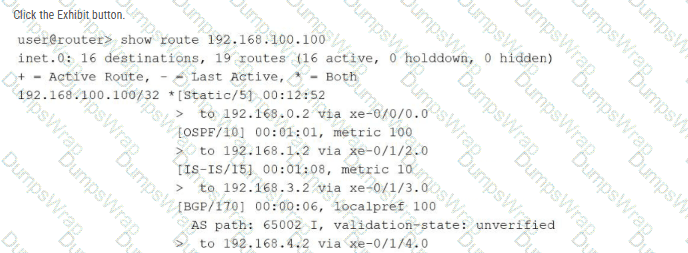
Referring to the exhibit using the show route 192.168.100.100 command output, over which interface will the traffic be forwarded?
Options:
xe-0/1/3.0
xe-0/0/0.0
xe-0/1/4.0
xe-0/1/2.0
Answer:
BExplanation:
In the Junos OS architecture, the Routing Engine (RE) manages path selection by evaluating multiple potential routes to a specific destination found within the Routing Information Base (RIB). When multiple routing sources (such as static configuration, OSPF, IS-IS, and BGP) provide information for the exact same destination prefix—in this case, 192.168.100.100/32 —the device utilizes route preference as the primary tie-breaker to determine which entry becomes the " active " route.
The provided exhibit displays the default preference values for each protocol: Static is 5 , OSPF is 10 , IS-IS is 15 , and BGP is 170 . Junos OS follows a " lower is better " logic for preference; therefore, the Static route is selected as the most trustworthy path. In the command output, the active route is explicitly identified by the asterisk (*) and plus sign (+) symbols located next to the [Static/5] entry. Looking at the specific next-hop information for this active static route, the output indicates the traffic is sent to 192.168.0.2 via xe-0/0/0.0 . Consequently, the Packet Forwarding Engine (PFE) will install this specific path into the forwarding table, causing all traffic destined for 192.168.100.100 to be egressed over the xe-0/0/0.0 interface.
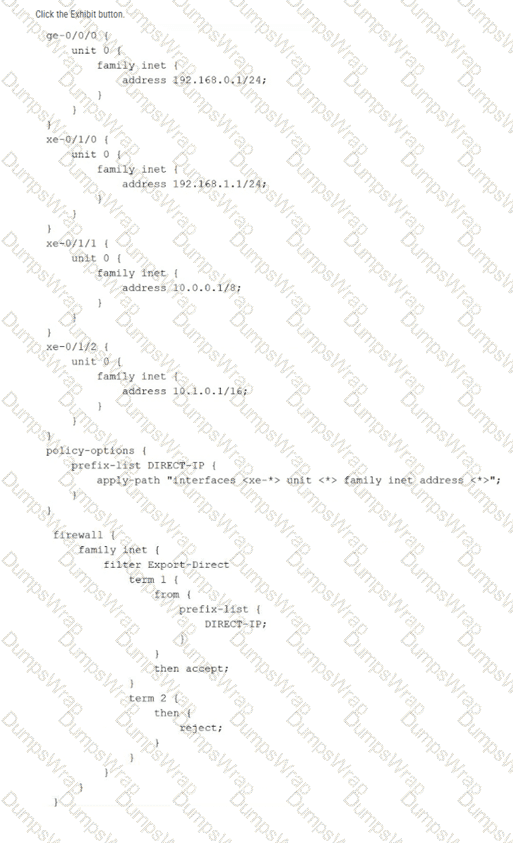
Referring to the exhibit, which command would be used to view the IP subnet addresses associated with prefix-list DIRECT-IP?
Options:
show policy-options prefix-list DIRECT-IP
show configuration policy-options prefix-list DIRECT-IP
show configuration policy-options prefix-list DIRECT-IP | display inheritance
show configuration policy-options prefix-list DIRECT-IP apply-path
Answer:
CExplanation:
The exhibit illustrates the use of the apply-path feature within a prefix list configuration. In Junos OS, apply-path is a dynamic configuration utility that allows a prefix list to be automatically populated with values derived from other parts of the configuration—in this case, all IPv4 addresses assigned to interfaces with the xe-* prefix. This is particularly useful for building automated firewall filters or routing policies that stay updated as interfaces are added or modified.
When viewing the standard configuration using show configuration, the CLI only displays the literal apply-path statement. To verify the actual list of IP addresses that the system has inherited and populated into the DIRECT-IP list, the administrator must use the | display inheritance pipe filter. This command instructs the Junos OS parser to expand all inherited values and dynamic paths, showing the effective configuration as it is seen by the Packet Forwarding Engine. Based on the exhibit, this would reveal the subnets associated with xe-0/1/0, xe-0/1/1, and xe-0/1/2, while ignoring ge-0/0/0 because it does not match the xe-* wildcard. This verification is a critical troubleshooting step before applying such a prefix list to a transit firewall filter like Export-Direct.
According to HPE Juniper Networking, what are two recommended tasks you should perform before upgrading Junos OS on a device? (Choose two.)
Options:
Delete all rollback configurations.
Verify available storage space using the show system storage command.
Disable all interfaces to prevent traffic during the upgrade.
Back up the active current configuration.
Answer:
B, DExplanation:
Upgrading the Junos OS is a high-impact operation that requires thorough preparation to minimize risk and potential downtime. According to Juniper ' s best practices, one of the most critical preliminary steps is to verify that the device has sufficient available storage space. Using the show system storage command, an administrator can inspect the /var partition, which is the primary directory where software packages are temporarily stored and expanded during the installation process. If the storage is nearly full, the upgrade may fail midway, potentially leaving the device in an inconsistent state or requiring manual intervention via the boot loader.
The second mandatory task is to back up the active configuration . While Junos automatically maintains rollback files locally, these could be lost if the storage media fails or if a " clean install " (format install) becomes necessary. Having an external backup on a remote server or a local workstation ensures that the device ' s identity, policies, and interface settings can be restored quickly regardless of the upgrade outcome. Other tasks, such as creating a rescue configuration or performing a file system cleanup, are also highly recommended to ensure the " last known good " state is preserved. Disabling interfaces is generally unnecessary as Junos manages the transition gracefully, and deleting rollbacks would counterproductively remove historical recovery points. Ensuring these two pillars—storage availability and off-box backups—provides the safest foundation for a successful software lifecycle management event.
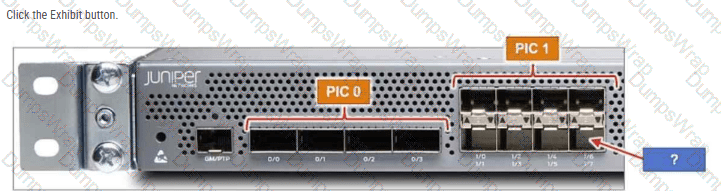
The MX204 has 12 built-in ports. Referring to the exhibit, to which interface does the arrow point?
Options:
хе-0/2/7
хе-0/0/7
хе-0/1/7
хе-0/1/6
Answer:
CExplanation:
The Juniper MX204 is a fixed-configuration router that utilizes a specific hierarchical naming convention for its physical interfaces: type-fpc/pic/port. In the MX204 architecture, there is a single built-in Flexible PIC Concentrator (FPC), which is always designated as FPC 0 . This FPC is subdivided into two logical Physical Interface Cards (PICs): PIC 0 and PIC 1 .
As shown in the exhibit, PIC 0 contains four high-speed ports (labeled 0/0 through 0/3) that typically support 40GbE or 100GbE speeds. PIC 1 contains eight ports (labeled 1/0 through 1/7) designed for 1GbE or 10GbE connectivity. These ports are arranged in a stacked, $2 \times 4$ grid. The labeling system on the chassis indicates the port numbers for each column. In the fourth column of the PIC 1 block, the top port is identified as 1/6 and the bottom port as 1/7 .
The blue arrow in the exhibit points directly to the bottom-right interface in the PIC 1 section. Correlating this physical location with the chassis labels confirms that the port number is 7. When combined with the FPC and PIC identifiers, the full interface name is xe-0/1/7 (assuming a 10GbE transceiver is installed). Understanding this physical-to-logical mapping is essential for accurate cabling and configuration within the Junos OS, ensuring that administrators apply the correct logical unit and protocol settings to the intended physical hardware.
