
Security, Specialist (JNCIS-SEC) Questions and Answers
What are two ways that Juniper Secure Connect provides flexibility in connection and authentication methods while ensuring that remote users are able to securely access company servers and cloud resources? (Choose two.)
Options:
It uses a persistent agent.
It uses Kerberos authentication.
It uses external authentication.
It uses an SSL VPN.
Answer:
C, DExplanation:
The correct answers are C and D. Juniper Secure Connect is Juniper’s remote-access VPN client for SRX Series Firewalls. Juniper describes it as a flexible SSL VPN and IPsec application that gives remote workers secure access to corporate and cloud-protected resources. That directly supports option D, because SSL VPN provides a connection method that is useful when traditional IPsec ports are restricted or blocked. Juniper’s Secure Connect guide also states that enabling SSL VPN gives the client flexibility in connecting to SRX Series Firewalls and that SSL VPN is enabled by default.
Option C is also correct because Juniper Secure Connect supports external authentication, allowing users to authenticate with enterprise identity systems rather than relying only on local firewall credentials. Juniper’s external authentication procedure notes that this method lets users use the same username and password as their domain login and is recommended for authenticating users.
Option A is not the best answer because having a client application is not the specific connection/authentication flexibility being tested. Option B is wrong because Kerberos is not the stated Secure Connect authentication method in this context. Reference topics: Juniper Secure Connect, remote-access VPN, SSL VPN, IPsec, external authentication.
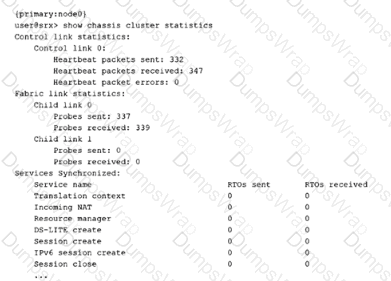
Referring to the exhibit, which two statements are correct? (Choose two.)
Options:
Fabric link 0 is working.
The control link is working.
Fabric link 1 is failing.
The control link is failing.
Answer:
A, BExplanation:
The correct answers are A and B. The exhibit shows show chassis cluster statistics. Under Control link statistics, Control link 0 has heartbeat packets sent and received, with heartbeat packet errors: 0. That is the clearest indication that the control link is operating normally. Juniper describes chassis-cluster control-plane verification as checking control-link heartbeat packets sent and received, along with heartbeat errors. If both send and receive counters are incrementing and errors are zero, the control link is functioning.
Option A is also correct because under Fabric link statistics, Child link 0 shows probes sent and probes received. Juniper uses fabric-link probe counters to verify fabric-link operation; nonzero sent and received probe counters indicate that the link is participating in fabric monitoring. Option C is not the safest conclusion from this exhibit alone. Child link 1 shows zero probes sent and received, but the output does not prove that a second fabric child link is configured and failing; it could simply be unused or not configured in this deployment. Option D is directly contradicted by the healthy heartbeat counters. Reference topics: HA Clustering, chassis cluster statistics, control-link heartbeat, fabric-link probes, cluster health verification.
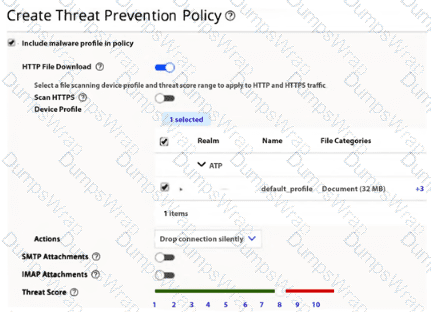
Referring to the exhibit, what should you do to ensure that Juniper ATP Cloud detects malware in HTTPS traffic?
Options:
Manually configure and apply an SSL proxy profile.
Lower the threat score.
Configure a new device profile that includes encrypted traffic.
Change the action to redirect the encrypted traffic to a decryption device.
Answer:
AExplanation:
The correct answer is A. Manually configure and apply an SSL proxy profile. HTTPS traffic is encrypted, so ATP Cloud cannot extract and submit downloaded files for malware analysis unless the SRX can decrypt the SSL/TLS session first. Juniper’s ATP Cloud documentation states that to detect malware in HTTPS traffic, you must configure the SSL inspection CA used for SSL forward proxy, and the ATP Cloud policy workflow specifically includes configuring an SSL proxy profile to inspect HTTPS traffic. Juniper’s example shows the SSL proxy profile being created with a root CA and then applied so HTTPS sessions can be inspected before advanced anti-malware processing occurs.
Option B is wrong because lowering the threat score only changes the enforcement threshold after a file verdict is returned; it does not solve the inability to inspect encrypted payloads. Option C is wrong because changing the ATP device profile alone does not decrypt HTTPS traffic. The exhibit already shows a malware profile and HTTP file-download configuration, but HTTPS malware detection still requires SSL proxy. Option D is wrong because Junos ATP Cloud integration does not require redirecting encrypted traffic to a separate decryption appliance for this task. The SRX performs SSL forward proxy locally, then advanced anti-malware can inspect extracted content. Reference topics: ATP Cloud, HTTPS malware inspection, SSL forward proxy, SSL inspection CA, advanced anti-malware policy.
Which statement is correct about Active Directory as an identity source for identity-aware security policies?
Options:
It supports a maximum of two domains.
It supports logical systems.
It supports 20 Active Directory servers per domain.
It tracks non-Windows Active Directory users.
Answer:
AExplanation:
The correct answer is A. It supports a maximum of two domains. Juniper’s Active Directory identity-source configuration guidance states that an SRX Series Firewall using the integrated user firewall/Active Directory identity source can be configured for a maximum of two domains. That is the exact limit relevant to this question. The same Juniper configuration page separately states that a maximum of 10 domain controllers can be configured, which directly eliminates option C because the supported figure is not 20 Active Directory servers per domain.
Option B is wrong because Active Directory identity source is not presented as a logical-systems feature in the JNCIS-SEC identity-aware firewall context. Option D is wrong because the primary Active Directory mechanism reads Windows domain controller event logs and uses WMI/DCOM plus LDAP to build IP-to-user and group mappings. Juniper describes the SRX as reading and monitoring the Windows event log on the domain controller, then using LDAP to obtain user/group information. Non-domain or non-Windows cases typically require alternate authentication behavior such as captive portal, not native Active Directory event-log tracking.
Reference topics: Identity-Aware Security Policies, Active Directory identity source, integrated user firewall, domain limits, domain controllers, WMIC, LDAP mapping.
When using Adaptive Threat Profiling, which two deployment modes are available on SRX Series devices? (Choose two.)
Options:
bridge
inline
tap
promiscuous
Answer:
B, CExplanation:
The correct answers are B and C. Adaptive Threat Profiling allows SRX Series Firewalls to act either as inline enforcement devices or as tap-based sensors. In an inline deployment, the SRX is directly in the traffic path and can enforce policy actions such as blocking, denying, or adding threat indicators to Security Intelligence feeds for real-time mitigation. In a tap deployment, the SRX observes copied traffic from a TAP/SPAN-style feed and contributes intelligence without being the active forwarding device. Juniper’s ATP Cloud documentation states that Adaptive Threat Profiling enables SRX devices to be deployed as sensors on Tap ports, identifying and sharing intelligence to inline devices for real-time enforcement. It also describes a “Tap-based SRX Series Firewall sensor” and contrasts it with an inline device.
Option A, bridge, is not the deployment mode being tested here. Bridge/transparent forwarding is a firewall deployment style, not the named Adaptive Threat Profiling mode. Option D, promiscuous, is also wrong; promiscuous mode is an interface behavior, not the ATP Adaptive Threat Profiling deployment model. Reference topics: ATP Cloud, Adaptive Threat Profiling, tap sensors, inline enforcement, Security Intelligence feeds.
What is a function of the Juniper Identity Management Service?
Options:
encrypting user e-mail
logging malicious code sent through ingress and egress ports
encrypting network data traffic
maintaining a centralized authentication table
Answer:
DExplanation:
The correct answer is D. maintaining a centralized authentication table. Juniper Identity Management Service, or JIMS, is used with SRX Series Firewalls to collect user-identity information from identity sources such as Microsoft Active Directory, domain controllers, and Exchange servers, then provide that identity data to SRX enforcement points. Juniper describes JIMS as storing IP address, username, and group-relationship information in its cache and generating authentication entries used for user-based or group-based access control on SRX firewalls. Juniper’s Identity-Aware Firewall documentation also states that the authentication table contains the IP address, username, and group mapping information used as the authentication source.
Option A is wrong because JIMS is not an email-encryption service. Option B is wrong because malicious-code logging belongs to security inspection features such as antivirus, IDP, or ATP workflows, not JIMS. Option C is wrong because network data encryption is handled by technologies such as IPsec VPN or SSL/TLS, not identity management. JIMS exists to centralize identity-to-IP mapping so identity-aware security policies can match users and groups instead of relying only on source IP addresses. Reference topics: Identity-Aware Security Policies, JIMS, authentication table, user-to-IP mapping, group-based policy enforcement.
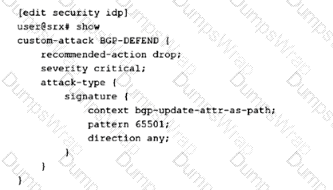
Which action will the SRX Series device take if traffic matches the custom attack object shown in the exhibit?
Options:
the action taken is defined in the IDP policy that includes this attack object.
the action taken is defined by the security policy.
The SRX Series device will reject the traffic.
The SRX series device will drop the traffic.
Answer:
AExplanation:
The correct answer is A. the action taken is defined in the IDP policy that includes this attack object. The exhibit defines a custom attack object named BGP-DEFEND under the security idp custom-attack hierarchy. The custom object includes metadata such as recommended-action drop, severity critical, and signature match conditions such as BGP update AS-path context and pattern 65501. However, an attack object by itself does not determine the final enforcement behavior. The attack object defines what to match; the IDP policy rule that references the object defines what action to take when that match occurs. Juniper describes attack objects as objects used inside IDP rules to identify malicious activity, while IDP rules include rule actions such as drop-packet, drop-connection, close-client, close-server, recommended, and others.
Option B is wrong because the firewall security policy enables IDP inspection by applying an IDP policy, but the IDP action is not selected directly by the normal security policy. Options C and D are too absolute. Even though the custom object shows recommended-action drop, that is only used if the IDP rule action invokes recommended behavior. Without seeing the IDP policy rule action, you cannot conclude reject or drop. Reference topics: IDP custom attack objects, IDP policy rule actions, recommended action, signature-based attack matching.
Which two statements are correct about cluster components? (Choose two.)
Options:
Cluster ID values range from 1 through 255.
Node ID values are either 0 or 1.
Cluster ID values are either 0 or 1.
Node ID values range from 1 through 255.
Answer:
A, BExplanation:
The correct answers are A and B. In an SRX chassis cluster, the cluster ID identifies the chassis cluster itself, while the node ID identifies the individual SRX device inside that two-node cluster. Juniper states that a cluster is identified by a cluster-id value from 1 through 255, and that setting the cluster ID to 0 is equivalent to disabling clustering. Therefore, option A is correct and option C is wrong.
Option B is also correct because Juniper states that a cluster node is identified by a node ID specified as a number from 0 through 1. A normal SRX chassis cluster has two nodes: node0 and node1. The two devices must use the same nonzero cluster ID so they belong to the same cluster, but each device must use a different node ID so Junos can apply node-specific configuration, interface numbering, redundancy-group ownership, and management settings correctly. Option D is wrong because node IDs do not range from 1 through 255; that range applies to cluster IDs, not node IDs. Reference topics: HA Clustering, cluster ID, node ID, chassis cluster formation, node0/node1 identification.
How does the SSL proxy detect if a particular session is SSL encrypted?
Options:
It uses AppID services.
It verifies the length of the packet.
It looks at the destination port number.
It uses a certificate authority (CA).
Answer:
AExplanation:
The correct answer is A. It uses AppID services. Juniper SSL proxy does not rely only on TCP/443 or a static destination-port assumption. It uses Application Identification services to dynamically determine whether the session is SSL/TLS encrypted. Juniper states directly that SSL proxy uses application identification services to detect whether a session is SSL encrypted, and SSL proxy is allowed only when the session is identified as encrypted. If the application system cache marks the session as Encrypted=Yes, SSL proxy can transition into proxy processing; if the session is marked Encrypted=No, SSL proxy ignores it.
Option B is wrong because packet length does not reliably identify SSL/TLS encryption. Option C is a common trap: many SSL/TLS sessions use port 443, but SSL/TLS can run on nonstandard ports, and non-SSL applications can also use port 443. Junos uses AppID to avoid that weak assumption. Option D is wrong because a CA is used to sign or validate certificates during SSL forward or reverse proxy operations; it is not the mechanism used to detect whether a session is encrypted. Reference topics: SSL Proxy, AppID, encrypted session detection, application system cache, SSL/TLS inspection.
Which two statements describe how Juniper ATP Cloud improves security? (Choose two.)
Options:
It tracks and logs malicious traffic.
It offers real-time threat analysis and mitigation.
It simulates real user environments to trigger malicious code execution.
It increases performance speeds.
Answer:
B, CExplanation:
The correct answers are B and C. Juniper ATP Cloud improves security by delivering cloud-based threat detection, malware analysis, and enforcement integration with SRX Series Firewalls. Juniper describes ATP Cloud as using shared cloud intelligence so customers benefit from new threat intelligence in near real time. It also provides zero-day threat protection, machine-learning-based malware detection, inline malware blocking, and policy actions that can stop malware, quarantine infected systems, prevent data exfiltration, and disrupt lateral movement.
Option C is also correct because Juniper ATP Cloud uses dynamic analysis, commonly called sandboxing. In this process, a suspicious file is executed in a secure environment while tools monitor its activity. Juniper further explains that ATP Cloud uses deception techniques to make the sandbox appear like a real user environment, including simulated mouse movement, keystrokes, common software packages, realistic network access, stored credentials, and vulnerable OS areas. This encourages evasive malware to execute and reveal malicious behavior.
Option A is weaker and not the best answer because logging alone is not the key ATP Cloud security-improvement mechanism being tested. Option D is wrong because ATP Cloud is a threat-prevention service, not a performance-acceleration technology. Reference topics: ATP Cloud, malware analysis, dynamic sandboxing, machine learning, threat intelligence, inline malware blocking.
Which two statements are correct about client-protection Secure Socket Layer (SSL) proxy configurations? (Choose two.)
Options:
Server certificate is required.
Root certificate authority (CA) configuration is required.
Root certificate authority (CA) configuration is not required.
Server certificate is not required.
Answer:
B, DExplanation:
The correct answers are B and D. In Junos SSL proxy terminology, client protection maps to SSL forward proxy. In a forward-proxy deployment, the SRX sits between internal clients and external SSL/TLS servers. The firewall intercepts the server certificate, generates a substitute certificate, signs it with the configured root CA, decrypts the SSL session for inspection, and then re-encrypts traffic toward the destination server. Juniper’s SSL proxy configuration table shows that a forward-proxy profile uses root-ca configured = Yes and server-certificate configured = No. It also states that configuring neither certificate type fails commit validation, while configuring both root-ca and server-certificate in the same profile is unsupported.
Option A is wrong because a server certificate is required for reverse proxy/server protection, not for client-protection forward proxy. Option C is wrong because without a trusted root CA, client browsers would not trust the certificates generated by the SRX during interception. Juniper separately notes that the root CA certificate is required for client browsers to trust certificates signed by the firewall. Reference topics: SSL Proxy, client protection, SSL forward proxy, root CA, server protection, SSL reverse proxy.
An administrator decides to designate a node as the primary node for the chassis cluster.
Which statement is correct in this scenario?
Options:
Configure the burnt-in-address (BIA) to the highest value to bring the node as the primary node.
The node with the highest priority will become a primary node.
The node with the lowest priority will become a primary node.
Nodes with a priority of one are ineligible to participate in the election process.
Answer:
BExplanation:
The correct answer is B. The node with the highest priority will become a primary node. In an SRX chassis cluster, redundancy groups determine which node is primary and which node is secondary. Juniper states that when priorities are assigned to nodes in a redundancy group, the node with the higher configured priority is initially designated as the primary, while the other node becomes secondary. This is the direct mechanism an administrator uses to influence primary-node selection for a redundancy group.
Option A is wrong because the burnt-in address is not the administrative method used to designate the primary node. BIA can be part of deterministic hardware identity behavior, but primary election is controlled through redundancy-group priority, preemption behavior, and failover state. Option C is the opposite of Juniper behavior; the lower-priority node does not win the election. Option D is also wrong because a priority of one is still a valid low priority. The ineligible value is 0, and Juniper specifically warns about failover behavior involving nodes with priority 0 because such nodes are not ready to accept traffic.
Reference topics: HA Clustering, redundancy groups, node priority, primary/secondary election, preemption, chassis cluster failover.
In Juniper high availability (HA) SRX Series device implementations, which interface will be used to exchange session state, configuration files, and ensure session continuity across nodes using the proprietary Trivial Network Protocol?
Options:
fab
fxp0
fxp1
swfab
Answer:
AExplanation:
The correct answer is A. fab. In SRX Series chassis clustering, the fabric interface, shown as fab0/fab1, is the data-plane HA link used between cluster nodes. Juniper states that SRX chassis clusters use the fabric interface for session synchronization and traffic forwarding, and that the fabric link synchronizes dynamic runtime state, including session-state objects created by NAT, ALG, authentication, and IPsec processing. This is what enables stateful failover and session continuity when traffic processing moves between nodes.
Option B, fxp0, is wrong because fxp0 is the out-of-band management interface, not the chassis-cluster synchronization path. Option C, fxp1, is tempting but wrong for this question: fxp1 is the control-link interface used for control-plane cluster functions such as heartbeats and cluster control communication, not the main session-state synchronization path. Option D, swfab, is not the standard SRX chassis-cluster fabric interface name used for this function. Juniper’s clustering configuration examples specifically define fab0 and fab1 as the interfaces used for the fabric connection and data-plane RTO/session synchronization.
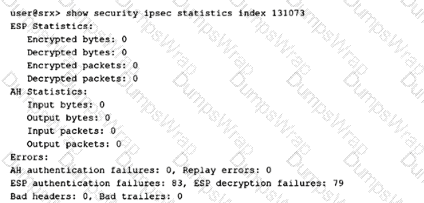
You have configured a new site-to-site VPN tunnel. The exhibit shows the security IPsec statistics output for the specific tunnel index from one of the tunnel-end devices.
Which two statements are correct in this scenario? (Choose two.)
Options:
AH is incorrectly configured.
The far-end tunnel device is rebooting.
The ESP configuration is not set up correctly.
No traffic passes through this tunnel.
Answer:
C, DExplanation:
The correct answers are C and D. The exhibit shows ESP encrypted bytes = 0, ESP decrypted bytes = 0, encrypted packets = 0, and decrypted packets = 0. That means no traffic is successfully passing through the IPsec tunnel. Juniper’s show security ipsec statistics command displays ESP encrypted/decrypted packet and byte counters, so zero values on these counters indicate that the tunnel is not successfully carrying protected ESP traffic.
Option C is also correct because the output shows ESP authentication failures and ESP decryption failures. Since ESP is the IPsec protocol responsible for encrypted payload handling, failures in ESP authentication/decryption point to an ESP/IPsec Phase 2 mismatch or incorrect configuration, such as mismatched authentication algorithm, encryption algorithm, keys, proposal parameters, or incompatible negotiated SA settings. Juniper’s IPsec overview explains that Phase 2 negotiates the IPsec SA used to authenticate traffic flowing through the tunnel, so ESP-related failures belong to the IPsec/ESP configuration path rather than AH.
Option A is wrong because the AH counters and AH authentication failures are zero; the evidence is not pointing to AH. Option B is unsupported because the output does not show peer reboot behavior. Reference topics: IPsec VPN, ESP statistics, Phase 2/IPsec SA negotiation, ESP authentication failures, ESP decryption failures.
You want to include a custom attack object named Custom-FTP-Attack and set the action to drop the packet.
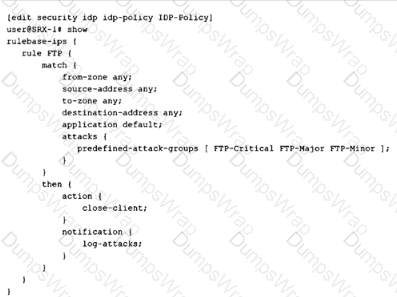
Referring to the exhibit, which modifications would you make?
Options:
Add custom-attack Custom-FTP-Attack to the attacks section and change the action to close-client.
Add custom-attack Custom-FTP-Attack to the attacks section and change the action to drop-packet.
Add custom-attack Custom-FTP-Attack to the action section and change the action to drop-packet.
Add custom-attack Custom-FTP-Attack to the notification section and change the action to drop-packet.
Answer:
BExplanation:
The correct answer is B. Add custom-attack Custom-FTP-Attack to the attacks section and change the action to drop-packet. In the exhibit, the IDP rule is built under rulebase-ips with a match block and a then block. Attack objects belong inside the match attacks hierarchy because they define what malicious pattern the IDP rule is trying to detect. Juniper’s IDP documentation states that attack objects are specified in rules to identify malicious activity and that the rule’s attack objects/groups are the attacks the device matches in monitored traffic.
The enforcement behavior belongs in the then action hierarchy. The current rule uses close-client; to meet the requirement, it must be changed to drop-packet. Juniper defines Drop Packet as an IDP action that drops a matching packet before it reaches its destination without closing the connection. Option A keeps the wrong action. Option C is structurally wrong because a custom attack object is not configured under the action section. Option D is also wrong because the notification section controls logging/alert behavior, not attack matching. Reference topics: IDP rulebase, custom attack objects, match attacks hierarchy, IDP actions, drop-packet behavior.
Which two functions does Juniper ATP Cloud perform to reduce delays in the inspection of files? (Choose two.)
Options:
Juniper ATP Cloud allows the creation of allowlists.
Juniper ATP Cloud uses a single antivirus software package to analyze files.
Juniper ATP Cloud allows end users to bypass the inspection of files.
Juniper ATP Cloud performs a cache lookup on files.
Answer:
A, DExplanation:
The correct answers are A and D. Juniper ATP Cloud reduces inspection delay in two practical ways: trusted allowlists and cache lookup. An allowlist contains known trusted IP addresses, hashes, email addresses, and URLs; Juniper states that content downloaded from locations on the allowlist does not have to be inspected for malware. That eliminates unnecessary cloud-analysis cycles for known trusted sources or objects.
Option D is also correct because ATP Cloud performs a real-time cache lookup before deeper analysis. Juniper explains that when a file is uploaded, ATP Cloud first checks whether the file has been analyzed before; if it has, the stored verdict is returned to the SRX Series Firewall and there is no need to re-analyze the file. This directly reduces inspection delay and enables faster enforcement. Option B is wrong because ATP Cloud does not rely on a single antivirus engine; it uses a pipeline that can include cache lookup, antivirus, static analysis, dynamic analysis, and machine learning. Option C is wrong because inspection bypass is not delegated to end users. Reference topics: ATP Cloud, allowlists, file inspection workflow, cache lookup, malware analysis pipeline.
Which two statements are correct about Juniper Secure Connect? (Choose two.)
Options:
Juniper Secure Connect uses a policy-based VPN.
Juniper Secure Connect can use a self-signed certificate.
Juniper Secure Connect uses a route-based VPN.
Juniper Secure Connect cannot use a self-signed certificate.
Answer:
B, CExplanation:
The correct answers are B and C. Juniper Secure Connect uses route-based VPN connectivity, not policy-based VPN connectivity. Juniper’s Secure Connect user guide contrasts Dynamic VPN and Juniper Secure Connect and identifies Juniper Secure Connect as using route-based VPN connectivity, with a tunnel interface selected or created to bind the VPN. This is why SRX configurations for Juniper Secure Connect use an st0 tunnel interface and routing/security policy logic, rather than policy-based encryption tied directly to individual firewall policies.
Option B is also correct because Juniper Secure Connect can use a self-signed certificate. Juniper’s certificate deployment guidance states that before deploying Juniper Secure Connect, the SRX should use an appropriate certificate, which can be a signed certificate, a self-signed certificate, or a Let’s Encrypt-signed certificate. The documentation also shows generating a self-signed certificate and binding it to the SRX for Secure Connect use.
Option A is wrong because policy-based VPN describes older Dynamic VPN behavior, not Juniper Secure Connect. Option D is directly contradicted by Juniper’s certificate guidance. Reference topics: Juniper Secure Connect, route-based VPN, st0 tunnel interface, certificate deployment, self-signed certificate support.
You are asked to ensure that traffic that matches an IDP policy is not impacted until administrators have a chance to evaluate it.
In this scenario, which IP action should be configured for the policy?
Options:
ip-block
ip-notify
ip-connection-rate-limit
ip-close
Answer:
BExplanation:
The correct answer is B. ip-notify. When administrators want visibility without enforcement impact, ip-notify is the correct IP action. Juniper Security Director documentation defines IP Notify as an IP action that does not take any action against future traffic but logs the event. That is exactly the requirement in the question: traffic matching the IDP condition must not be blocked, closed, or rate-limited until administrators have reviewed the events and decided whether enforcement is appropriate.
Option A, ip-block, is wrong because it blocks future packets matching the IP action rule. That would immediately impact traffic. Option C, ip-connection-rate-limit, is wrong because it limits the connection rate and therefore changes traffic behavior before administrators complete evaluation. Option D, ip-close, is also wrong because it closes matching future sessions by sending reset packets to the client and server, which is disruptive. In a safe evaluation or tuning phase, the proper approach is to log and observe first, then move to stronger actions such as block, close, or rate-limit only after the detected condition has been validated. Reference topics: IDP IP actions, ip-notify, event logging, non-disruptive evaluation mode, IDP policy tuning.
You want to use user identity information to secure your network.
Which two actions must you perform on your SRX Series Firewall to accomplish this task? (Choose two.)
Options:
Create security policies that include user identity configuration
Add user accounts to the Active Directory Domain Users group
Configure an identity provider on your SRX Series Firewall.
Add the user identity feature license to your SRX Series Firewall.
Answer:
A, CExplanation:
The correct answers are A and C. To use user identity information on an SRX Series Firewall, the firewall must first be able to obtain identity mappings from an identity source or identity provider, such as Active Directory, JIMS, Aruba ClearPass, or another supported identity-aware firewall component. Juniper’s identity-aware firewall documentation states that identity parameters are used to configure security policies so authenticated users receive the correct level of access, and that firewalls can query JIMS, obtain user identity information, and then enforce security policy decisions.
Option A is required because identity-aware enforcement only happens when security policies include user identity match criteria, such as source identity, users, roles, or groups. Juniper’s source-identity policy reference states that source identities are used as match criteria in security policies, and when configured, traffic is matched against authentication-table entries before policy lookup completes. Option C is required because the SRX must be configured with an identity source/provider so it can populate or query identity mappings. Option B is not an SRX configuration task and is not generally required because users may already exist in appropriate AD groups. Option D is wrong for this question; the required SRX tasks are configuring identity integration and identity-aware policies, not adding a separate “user identity” license. Reference topics: Identity-Aware Security Policies, identity source/provider, authentication table, source-identity policy matching.
Which two statements are correct about fabric interfaces on an SRX Series Firewall? (Choose two.)
Options:
In an active/active configuration, inter-chassis traffic uses the fab link.
In an active/passive configuration, inter-chassis traffic uses the fab link.
The node ID is reflected in the fabric interface name.
The cluster ID is reflected in the fabric interface name.
Answer:
A, BExplanation:
The correct answers are A and B. In SRX chassis clustering, the fabric link, represented by fab interfaces, is the data-plane connection between the two cluster nodes. Juniper describes the fabric as the back-to-back data connection used when traffic on one node must be processed on the other node or must exit through an interface on the other node; session-state information also passes over the fabric. This is especially visible in active/active clustering, where ingress and egress interfaces can reside on different nodes and transit traffic must cross the fabric link.
Option B is also correct because the fabric link still exists in active/passive clustering for cluster data-plane synchronization and inter-node state handling, even though active/passive designs minimize fabric transit traffic because only one node normally forwards traffic at a time. Juniper specifically states that active/passive mode minimizes traffic over the fabric link, not that the fabric link is unused.
Options C and D are not the intended answers. The cluster is identified by a configured cluster ID, and each chassis is identified by a node ID, but the fabric interface names themselves are not where the cluster ID is reflected. Reference topics: HA Clustering, fabric link, active/active clustering, active/passive clustering, session synchronization, inter-node traffic.
