
Salesforce Certified MuleSoft Developer II Questions and Answers
A developer is working on a project that requires encrypting all data before sending it to a backend application. To accomplish this, the developer will use PGP encryption in the Mule 4 Cryptography module.
What is required to encrypt the data before sending it to the backend application?
Options:
The application needs the public key from the backend service to encrypt the data
The application needs both the private and public keys to encrypt the data
The application needs the private key from the backend service to encrypt the data
The application needs to configure HTTPS TLS context information to encrypt the data
Answer:
AExplanation:
PGP uses asymmetric cryptography for establishing confidentiality between a sender and a recipient. When the Mule application sends encrypted information to the backend service, it encrypts the content using the recipient's public key. Only the corresponding private key, retained by the backend recipient, can subsequently be used to decrypt that content.
MuleSoft's Cryptography Module documentation explicitly identifies the two principal PGP scenarios: outgoing encryption uses another party's public key, while incoming decryption uses the receiver's own private key. In a Mule application, the backend's public key is normally imported into a PGP public keyring, and the Cryptography Module's PGP Encrypt operation references the appropriate key or fingerprint.
The sender does not need the backend's private key. In fact, distributing the recipient's private key would defeat the fundamental security model of public-key cryptography. Both keys would be relevant for certain combined operations such as encryption plus signing, but ordinary encryption for confidentiality requires the recipient's public key. HTTPS/TLS may additionally protect transport, but it is separate from PGP payload encryption.
Reference topics: Cryptography Module; PGP Encryption; Public and Private Keyrings; PGP Encrypt Operation.
Official documentation:
===============================================================
A scatter-gather router is configured with four routes: Route A, B, C and D.
Route C fails.
Which expression allows access to the failing route so that it can be compensated?
Options:
error.errorMessage.payload.failures[2]
payload.failures[2]
payload[2]
error.errorMessage.payload.results[2]
Answer:
AExplanation:
When any route within Scatter-Gather fails, Mule raises a MULE:COMPOSITE_ROUTING error after the routes complete. The information associated with each route is retained in the error message payload. This payload contains separate collections for failures and results, indexed according to the route positions.
Routes are zero-indexed for this structure: Route A corresponds to index 0, Route B to index 1, Route C to index 2, and Route D to index 3. Because Route C failed, its failure information is therefore available from the failures structure at index 2.
Critically, this data belongs to the Mule error's errorMessage.payload; it is not simply the current event payload. Consequently, payload.failures[2] and payload[2] address the wrong structure. Likewise, error.errorMessage.payload.results[2] refers to the successful-results collection; for a failed route, the relevant object is stored under failures.
MuleSoft's Scatter-Gather documentation demonstrates the same mechanism, accessing failed route information through expressions such as error.errorMessage.payload.failures['0'] and successful route output through the corresponding results collection.
Reference topics: Scatter-Gather Error Handling; MULE:COMPOSITE_ROUTING; Route Results and Failures; Compensation Logic.
Official documentation:
===============================================================
Which pattern should be used to invoke multiple HTTP APIs in parallel and roll back any failed requests in sequence?
Options:
Scatter-Gather as central Saga orchestrator for all API requests with compensating actions for failing routes
A Parallel For Each scope with each HTTP request wrapped in a Try scope
VM queues as a reliability pattern with error handlers to roll back any requests
A database as a transactional outbox and an Until Successful router to retry any requests
Answer:
AExplanation:
The requirement combines two architectural concerns: the downstream HTTP calls must execute concurrently, and completed remote operations must be reversible when another operation fails. Scatter-Gather is the appropriate Mule router for the concurrency requirement because it dispatches the event to multiple routes and executes those routes in parallel.
However, independent HTTP APIs cannot generally participate in a single ACID/XA transaction with Mule. Once a remote API successfully commits an operation, Mule cannot simply perform a conventional transaction rollback across that service boundary. The appropriate distributed-transaction pattern is therefore a Saga, where successful steps have defined compensating operations that semantically undo their effects when a subsequent step fails.
Scatter-Gather also provides a composite error model. If one or more routes fail, Mule collects successful route results and route failures into a MULE:COMPOSITE_ROUTING error. A centralized orchestration/error-handling flow can inspect those results and execute compensation logic in the required sequence.
Parallel For Each is designed for elements of a collection, not orchestration of several distinct API operations. VM queues and transactional-outbox patterns address different reliability concerns and do not directly implement distributed compensation.
Reference topics: Scatter-Gather Router; Composite Routing Errors; Distributed Transactions; Compensating/Saga Pattern.
Official documentation:
===============================================================
Which pattern can a web API use to notify its client of state changes as soon as they occur?
Options:
ETL data load
Schedule Event Publisher
HTTP Webhook
Shared database trigger
Answer:
CExplanation:
An HTTP webhook provides event-driven notification from an API or service to a client-controlled HTTP endpoint. Instead of requiring the client to repeatedly poll the API for changes, the client registers or supplies a callback URL. When the relevant state transition occurs, the service immediately issues an HTTP request—commonly POST—to that endpoint.
This architecture closely matches the requirement to notify the client as soon as the state change occurs. MuleSoft-supported connectors expose the same webhook model. For example, MuleSoft's connector documentation describes webhook endpoints as URLs that receive notifications about configured events, demonstrating the callback-based semantics of the pattern.
An ETL load is primarily designed for batch-oriented movement and transformation of data and would introduce unnecessary latency. A scheduled event publisher is still time based, meaning notification occurs according to a schedule rather than directly in response to the state transition. A shared database trigger tightly couples applications through the persistence tier and does not constitute an API notification mechanism.
A webhook therefore creates a clean event-driven API contract: the producing service detects the event and actively notifies the registered consumer endpoint.
Reference topics: HTTP webhooks; event-driven API integration; callback endpoints; asynchronous notifications; API consumer decoupling.
Official documentation:
===============================================================
The Center for Enablement team published a common application as a reusable module to the central Nexus repository.
How can the common application be included in all API implementations?
Options:
Add a Maven dependency in the POM file with mule-plugin as < classifier >
Add a Maven dependency in the POM file with jar as < classifier >
Copy the common application's source XML file and put it in a new flow file in the src/main/mule folder
Download the common application from Nexus and copy it to the src/main/resources folder in the API
Answer:
AExplanation:
Reusable Mule extensions and modules should be consumed through Maven dependency management rather than through manual file copying. The consuming Mule application's pom.xml declares the module's Maven coordinates—groupId, artifactId, and version—and identifies the artifact using the mule-plugin classifier.
The classifier is significant because it tells Mule's Maven and extension mechanisms that the dependency represents a Mule plugin/module rather than an ordinary Java library. MuleSoft's documentation for custom modules shows precisely this dependency pattern and states that setting the classifier to mule-plugin enables the module to be installed and recognized by the consuming Mule project.
Using a normal JAR classifier does not establish the artifact as a Mule extension. Likewise, manually copying Mule XML or downloading binaries into src/main/resources bypasses Maven dependency resolution, version management, transitive dependency handling, and reproducible builds. Those practices also make centralized maintenance significantly harder.
A Center for Enablement publishing a shared component to Nexus is specifically aligned with the Maven-based reuse model: applications reference an immutable version of the reusable artifact through their POM.
Reference topics: Maven Dependencies; Custom Mule Modules; mule-plugin Classifier; Reusable Application Components.
Official documentation:
===============================================================
Refer to the exhibit.
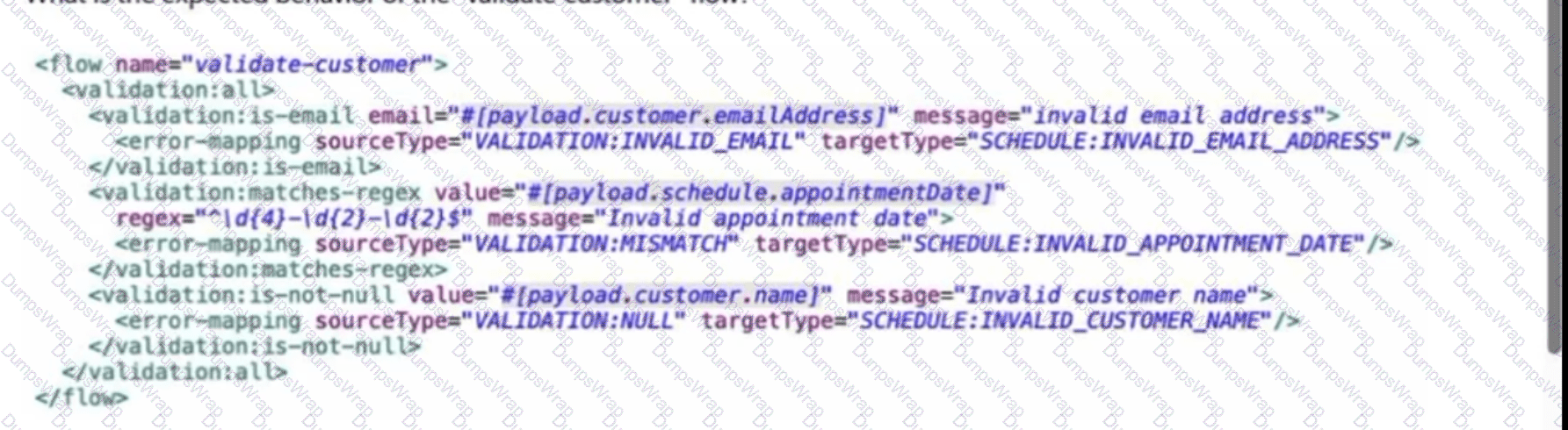
An API has been built to enable scheduling emails for a healthcare provider. The front-end system does very little data entry validation, and problems have started to appear in the emails that go out to patients. A "validate-customer" flow is added to validate the data.
What is the expected behavior of the "validate-customer" flow?
Exhibit:
Options:
If the appointment date and customer name are invalid, a SCHEDULE:INVALID_APPOINTMENT_DATE error is raised
If only the email address is invalid, a VALIDATION:INVALID_EMAIL error is raised
If the email address is invalid, processing continues to see if the appointment date and customer name are also invalid
If all of the values are invalid, the last validation error is raised: SCHEDULE:INVALID_CUSTOMER_NAME
Answer:
CExplanation:
The three validation operations are nested inside a validation:all scope. The defining behavior of this scope is that it executes every nested validation even if one or more earlier validations fail. Consequently, an invalid email does not immediately terminate validation processing. Mule continues to evaluate the appointment-date regular expression and the customer-name null check.
MuleSoft explicitly documents that all validations inside the All scope are executed even if all of them fail. If one or more nested validations fail, the All validator produces a consolidated VALIDATION:MULTIPLE error describing the failures rather than simply throwing the first or final validation error.
The flow does contain error mappings for individual validators—for example mapping VALIDATION:INVALID_EMAIL to SCHEDULE:INVALID_EMAIL_ADDRESS. However, those mappings do not change the central behavioral point being tested: the All scope evaluates the entire set rather than short-circuiting after the first failed validator.
Thus, if the email address is invalid, the remaining appointment-date and customer-name validations are still evaluated. This makes C the only option accurately describing the scope's execution behavior.
Reference topics: Validation Module; validation:all; validation aggregation; VALIDATION:MULTIPLE; error mappings.
Official documentation:
===============================================================
Refer to the exhibit.
What is the result of the Mule Maven Plugin configuration of the value of property tls.keystore.keyPassword in CloudHub 2.0?
Exhibit:

Options:
Runtime Manager masks the value
CloudHub encrypts the value
Anypoint Studio secures the value
The Mule server encrypts the value
Answer:
BExplanation:
The Mule Maven Plugin's CloudHub 2.0 deployment configuration supports a top-level < secureProperties > element. Properties supplied through this element are treated differently from ordinary deployment properties: CloudHub 2.0 encrypts their values before storing them.
MuleSoft's deployment documentation explicitly states that < secureProperties > is used to set application properties and instruct CloudHub 2.0 to encrypt the values before storing them. This is particularly appropriate for TLS credentials such as keystore passwords because these values should not be persisted as ordinary clear-text application configuration.
The important distinction is between encryption and UI masking. A masked field merely hides its visual representation; it does not by itself establish protected storage. In CloudHub 2.0, protected property values are stored securely and are not retrievable as plain values through Runtime Manager. Anypoint Studio is also not the component responsible for protecting a value supplied through the CloudHub deployment configuration, nor is this deferred to the Mule application's runtime flow.
Therefore, with the property placed under the Mule Maven Plugin's < secureProperties > configuration, CloudHub encrypts the value.
Reference topics: CloudHub 2.0 deployment; Mule Maven Plugin; secure properties; protected application configuration.
Official documentation:
Official documentation:
===============================================================
An API has been developed and deployed to CloudHub. Among the policies applied to this API is an allowlist of IP addresses. A developer wants to run a test in Anypoint Studio and does not want any policies applied because their workstation is not included in the allowlist.
What must the developer do in order to run this test locally without the policies applied?
Options:
Pass in the runtime parameter "-Danypoint.platform.gatekeeper=disabled"
Deactivate the API in API Manager so the Autodiscovery element will not find the application when it runs in Studio
Run the test as-is, with no changes, because the Studio runtime will not attempt to connect to API Manager
Create a properties file specifically for local development and set the API instance ID to a value that is not used in API Manager
Answer:
DExplanation:
API Autodiscovery is what pairs a Mule application with a particular API Manager instance. The apiId in the Autodiscovery configuration identifies the managed API from which the runtime obtains API configuration and policies. Therefore, using an environment-specific configuration for local development prevents the locally running application from binding to the production API instance and consequently prevents those production policies from governing local test traffic.
This is different from setting anypoint.platform.gatekeeper=disabled. Gatekeeper controls whether a managed API is blocked while policy information is unavailable or being synchronized; disabling Gatekeeper is not equivalent to disabling API Manager policies. Policies can still be downloaded and applied when the application remains paired through Autodiscovery.
Running the application unchanged is also incorrect because a locally executed Mule runtime can connect to API Manager when Autodiscovery and platform credentials are configured. MuleSoft explicitly documents local Autodiscovery for policy testing. Deactivating the shared API is likewise inappropriate because it modifies centrally managed configuration rather than isolating the developer's local environment.
Reference topics: API Autodiscovery; API Instance ID; Environment-specific Configuration; Mule Gateway Gatekeeper.
Official documentation:
===============================================================
A healthcare customer wants to use hospital system data, which includes code that was developed using legacy tools and methods. The customer has created reusable Java libraries in order to read the data from the system.
What is the most effective way to develop an API to retrieve the data from the hospital system?
Options:
Install the libraries in a local repository and refer to it in the pom.xml file
Refer to JAR files in the code
Include the libraries while deploying the code into the runtime
Create the Java code in your project and invoke the data from the code
Answer:
AExplanation:
Reusable Java libraries should be managed as Maven dependencies, not manually embedded or referenced through arbitrary filesystem locations. Installing the legacy library artifacts into an accessible Maven repository and declaring their Maven coordinates in the application's pom.xml gives the Mule project a deterministic and maintainable dependency model.
Mule applications use Maven as their build/dependency-management mechanism. MuleSoft's external-library guidance supports adding dependencies through Maven coordinates or local library artifacts, with those dependencies represented in the project's POM. This enables consistent resolution during development and CI/CD builds and avoids environment-specific hard-coded JAR paths.
Directly referring to JAR files from application code creates brittle coupling to local filesystem structure. Supplying libraries manually only at deployment time also weakens reproducibility because the application build no longer fully declares its dependencies. Re-creating existing Java integration logic within every Mule application defeats reuse and adds unnecessary maintenance.
Once the Java library is available as a Maven dependency, the Mule Java Module or an appropriate custom module can invoke its functionality while Maven manages versioning and packaging.
Reference topics: Maven dependency management; reusable Java libraries; external libraries; pom.xml; Java Module integration.
Official documentation:
===============================================================
Which statement is true when working with correlation IDs?
Options:
The VM Connector does not automatically propagate correlation IDs
The HTTP Listener regenerates correlation IDs regardless of the HTTP request
The HTTP Listener generates correlation IDs unless a correlation ID is received in the HTTP request
The Anypoint MQ Connector automatically propagates correlation IDs
Answer:
CExplanation:
When Mule creates a new event, it needs a correlation ID so log entries and processing activity associated with that event can be traced together. Mule first checks whether the event source already provides a correlation ID. For an HTTP Listener, headers such as X-CORRELATION-ID or MULE_CORRELATION_ID can supply that identifier.
MuleSoft explicitly states that if the source message contains a correlation ID, Mule uses it; if the source does not provide one, Mule generates a unique correlation ID. Therefore, option C accurately describes HTTP Listener behavior.
Option B is incorrect because Mule does not unconditionally replace an incoming correlation ID. Option D is also incorrect: MuleSoft specifically documents that Anypoint MQ does not automatically propagate Mule correlationId between publisher and subscriber. If an identifier must traverse Anypoint MQ, it should be included as a user property and then reapplied or used by the receiving application.
Correlation IDs are central to production observability because they let operations teams connect log records and processing stages to the same business execution.
Reference topics: Mule correlation IDs; HTTP Listener; X-CORRELATION-ID; distributed tracing; event correlation.
Official documentation:
Official documentation:
===============================================================
Refer to the exhibits.
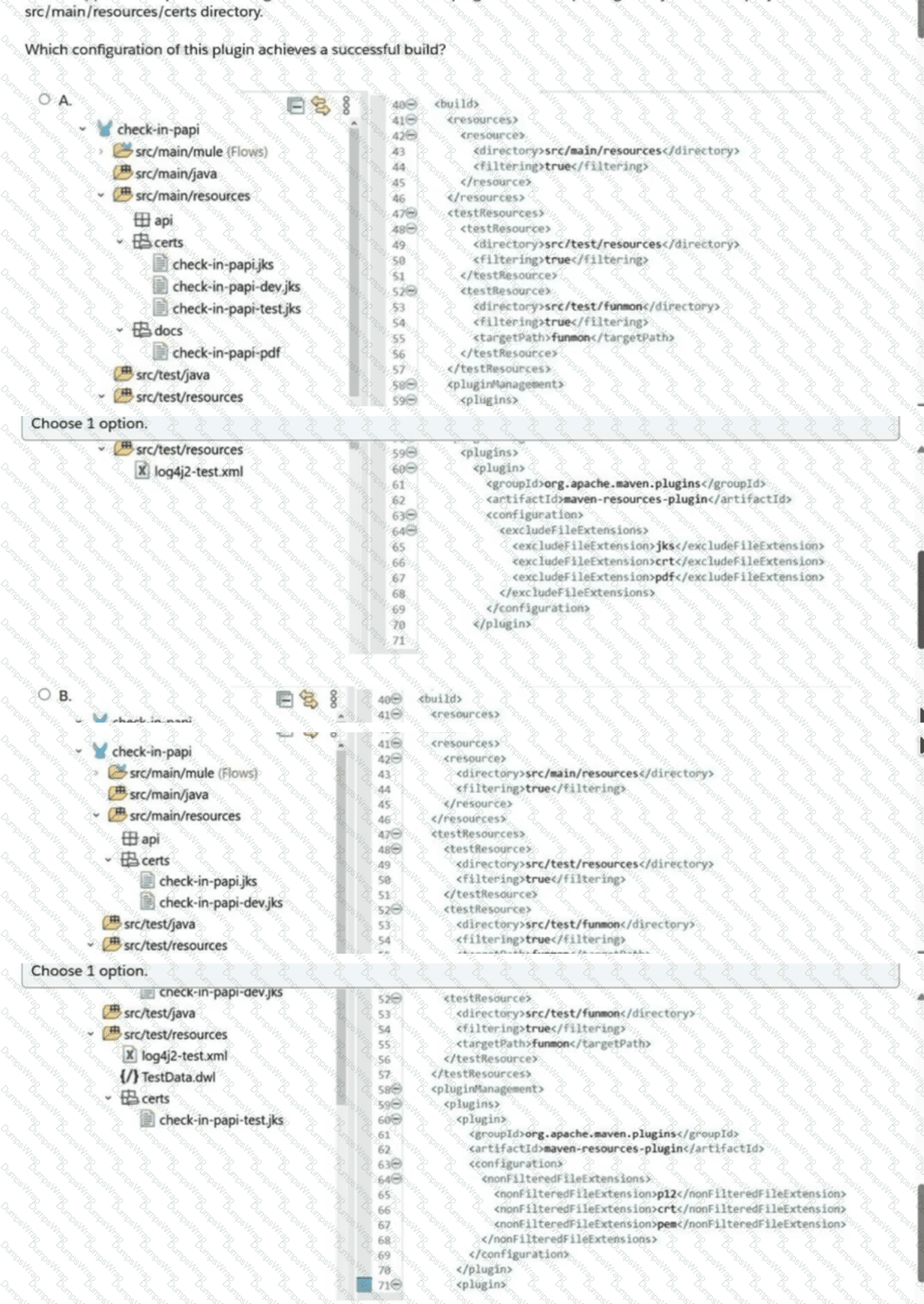
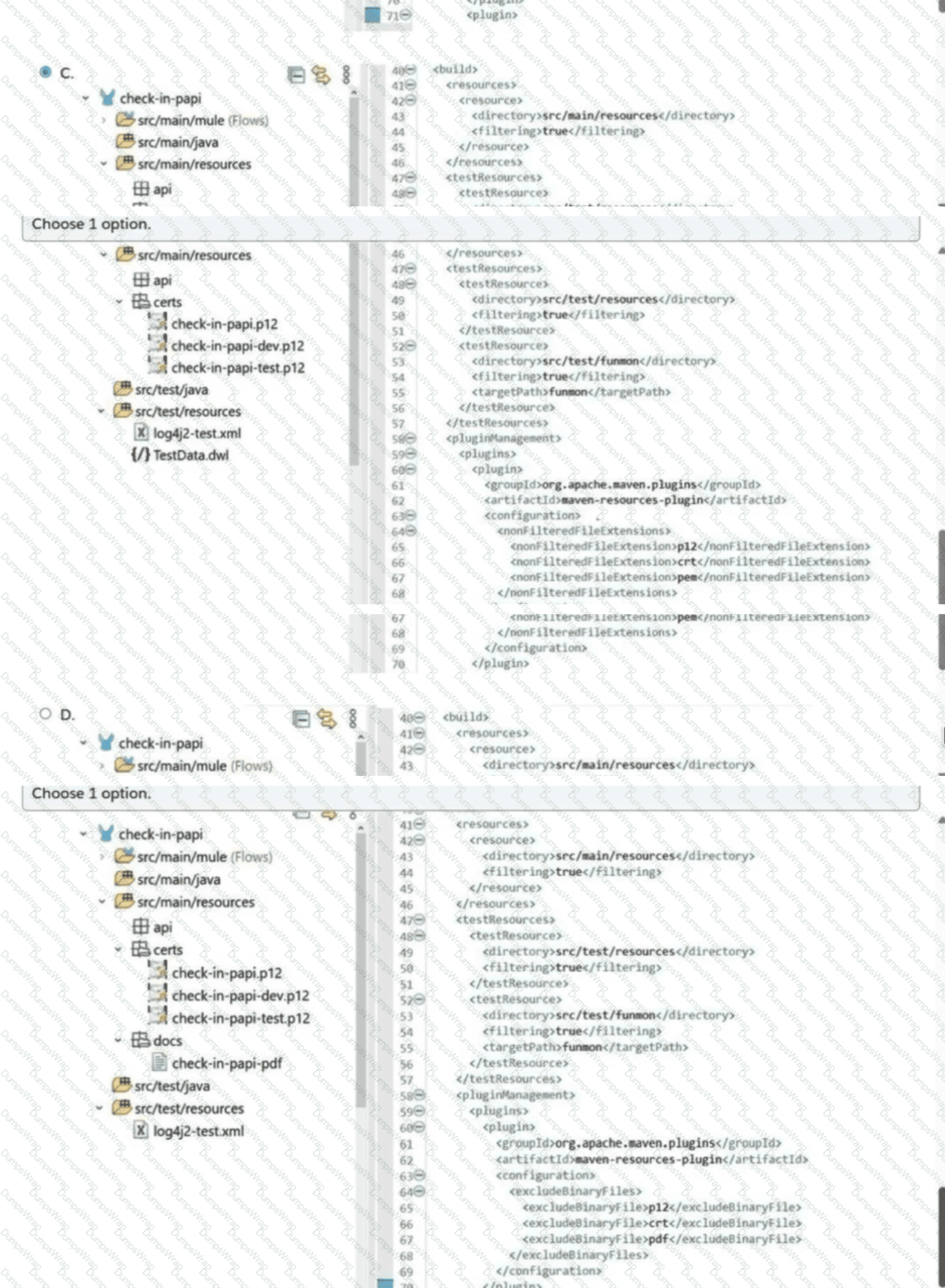
A Mule application's pom.xml configures the Maven Resources plugin to exclude parsing binary files in the project's src/main/resources/certs directory.
Which configuration of this plugin achieves a successful build?
Exhibits - Options A and B:
Exhibits - Options C and D:
Options:
Configuration shown in Exhibit A
Configuration shown in Exhibit B
Configuration shown in Exhibit C
Configuration shown in Exhibit D
Answer:
CExplanation:
Resource filtering is designed primarily for textual resources in which Maven substitutes property expressions. Binary files such as PKCS#12 keystores and certificate files must not be passed through text filtering because filtering can corrupt their binary representation.
The Maven Resources Plugin provides the dedicated configuration element nonFilteredFileExtensions. Each additional extension is declared using a nested nonFilteredFileExtension. The plugin documentation specifically defines this parameter as the list of additional file extensions to which filtering must not be applied.
Option C correctly uses the documented structure:
< nonFilteredFileExtensions >
< nonFilteredFileExtension > p12 < /nonFilteredFileExtension >
< nonFilteredFileExtension > crt < /nonFilteredFileExtension >
< nonFilteredFileExtension > pem < /nonFilteredFileExtension >
< /nonFilteredFileExtensions >
This is important because the application's normal resource configuration can still use < filtering > true < /filtering > for textual files while Maven leaves the listed certificate/keystore formats untouched.
The alternative constructs visible in the other exhibits, such as excludeFileExtensions or excludeBinaryFiles, are not the Maven Resources Plugin parameter used for this purpose.
Reference topics: Maven Resources Plugin; resource filtering; binary resources; nonFilteredFileExtensions; Mule Maven builds.
Official documentation:
===============================================================
What is the MuleSoft recommended method to encrypt sensitive property data?
Options:
The encryption key and sensitive data should be the same for all environments
The encryption key should be identical for all environments and the sensitive data should be different for each environment
The encryption key should be different for each environment and the sensitive data should be the same for all environments
The encryption key and sensitive data should be different for each environment
Answer:
DExplanation:
Secure property management should isolate development, test, staging, and production environments rather than allowing secrets from one environment to provide access to another. MuleSoft's Secure Configuration Properties model supports this by using environment-specific property files—for example dev.secure.yaml, sandbox.secure.yaml, and prod.secure.yaml—and resolving the appropriate file through an environment property.
Sensitive values such as passwords, API credentials, and private service configuration should therefore be environment-specific. Production credentials should not normally be reused in development or testing. The encryption key used to protect those values should likewise be independently managed rather than shared broadly across security boundaries. This limits the impact if a non-production key or properties file is exposed.
The Secure Properties Tool encrypts the sensitive values using a supplied key, while the Mule runtime receives the corresponding decryption key separately at deployment/runtime. MuleSoft also emphasizes protecting that key rather than embedding it directly in application configuration.
Accordingly, the Developer II security model represented by this question expects both different sensitive property values and different encryption keys across environments.
Reference topics: Secure Configuration Properties; environment-specific secure files; encryption keys; secret isolation; deployment security.
Official documentation:
===============================================================
Refer to the exhibits.
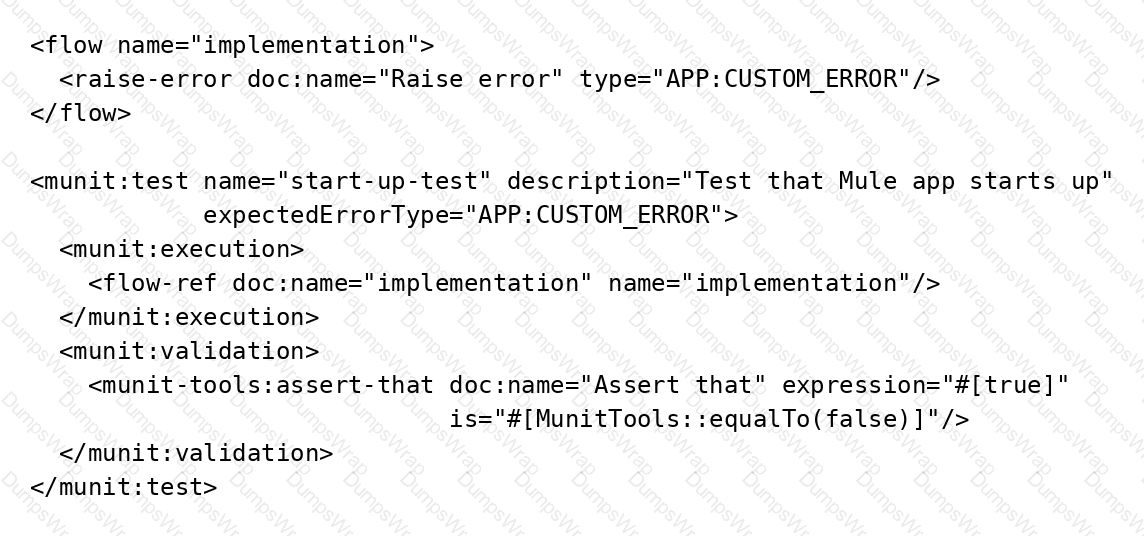
The flow name is "implementation" with code for the MUnit test case.
When the MUnit test case is executed, what is the expected result?
Exhibit:
Options:
The test case fails with an assertion error
The test case fails with an unexpected error type
The test case passes
The test case throws an error and does not start
Answer:
CExplanation:
The significant attribute in the MUnit definition is expectedErrorType="APP:CUSTOM_ERROR". The referenced implementation flow deliberately invokes raise-error with exactly the same error type: APP:CUSTOM_ERROR.
MUnit supports expected-error testing specifically for negative scenarios. When expectedErrorType is configured, the test is considered successful when execution produces that expected Mule error. The raised error is therefore not treated as an unexpected test failure; it satisfies the test's declared expectation.
The apparently failing assertion—testing true against equalTo(false)—does not change the result in this scenario because normal execution does not reach the validation chain after the referenced flow raises the expected error. The expected error terminates the execution path being tested and satisfies the MUnit expectation.
If the implementation generated a different error type, option B would apply. If it generated no error when an error was expected, the test would also fail. Here, however, the flow explicitly raises the exact application-defined error specified by the test.
Reference topics: MUnit Test Structure; expectedErrorType; Error Testing; Raise Error Component.
Official documentation:
===============================================================
A Mule implementation uses an HTTP Request within an Until Successful scope to connect to an API.
How should a permanent error response like HTTP:UNAUTHORIZED be handled inside Until Successful to reduce latency?
Options:
In Until Successful configuration, set the retry count to 1 for error type HTTP:UNAUTHORIZED.
Continue retrying until a MULE:RETRY_EXHAUSTED error is raised or the API responds back with a successful response.
Put the HTTP Request inside a try scope in Until Successful. In the error handler, use On Error Propagate to catch permanent errors like HTTP:UNAUTHORIZED.
Put the HTTP Request inside a try scope in Until Successful. In the error handler, use On Error Continue to catch permanent errors like HTTP:UNAUTHORIZED.
Answer:
DExplanation:
Until Successful is intended for failures that can reasonably succeed when retried, such as temporary connectivity issues or transient downstream unavailability. Mule executes the processors in the scope repeatedly until processing succeeds or the configured retry count is exhausted. If an error continues to propagate from the scope, Mule performs another attempt and ultimately raises MULE:RETRY_EXHAUSTED after all retries fail.
An HTTP:UNAUTHORIZED response represents a permanent application/security condition for the current request. Repeating the identical request does not normally repair invalid credentials or insufficient authorization and simply increases latency and downstream traffic.
The HTTP Request should therefore be placed inside a Try scope. An On Error Continue handler specifically catches the permanent error and handles it inside that Try scope. Because the error is consumed rather than propagated, the Until Successful scope does not interpret the attempt as a retryable failure.
Using On Error Propagate would have the opposite effect: the error would escape the Try scope and cause Until Successful to retry. Continuing until MULE:RETRY_EXHAUSTED unnecessarily delays the response.
Reference topics: Until Successful Scope; Try Scope; On Error Continue; permanent versus transient errors; MULE:RETRY_EXHAUSTED.
Official documentation:
===============================================================
A new Mule project has been created in Anypoint Studio with the default settings.
Which file inside the Mule project must be modified before using Maven to successfully deploy the application?
Options:
config.yaml
settings.xml
pom.xml
mule-artifact.json
Answer:
CExplanation:
Maven controls a Mule application's build and deployment through the project's pom.xml. A newly generated Mule project contains the normal project metadata and Mule Maven Plugin definition, but Maven-based deployment requires the appropriate deployment configuration to be added or completed in that POM.
MuleSoft's CloudHub deployment documentation explicitly states that the CloudHub deployment strategy must be configured in the project's pom.xml. The Mule Maven Plugin configuration contains deployment-specific settings such as the Mule runtime version, application name, environment, region, worker configuration, authentication information or references, and application properties.
settings.xml can store Maven-level repository or server credentials, but it is normally part of the user's Maven configuration rather than a required file inside the Mule application project. mule-artifact.json describes Mule artifact/runtime metadata and exported resources/packages; it is not where the Mule Maven deployment strategy is defined. config.yaml is likewise not the Maven build descriptor.
Therefore, before using Maven to deploy the application, the deployment configuration must be established in the project's pom.xml.
Reference topics: Mule Maven Plugin; pom.xml; Maven deployment lifecycle; CloudHub deployment configuration; CI/CD.
Official documentation:
===============================================================
A Mule application uses API autodiscovery to access and enforce policies for a RESTful implementation.
What needs to be configured for the flowRef attribute of the autodiscovery global element?
Options:
The name of the flow that has APIkit Console to receive all incoming RESTful operation requests
Nothing because flowRef is an optional attribute which can be passed during runtime
The name of the flow that has HTTP Listener to receive all incoming RESTful operation requests
Any of the APIkit generated implementation flows
Answer:
CExplanation:
API Autodiscovery pairs a Mule API implementation with an API instance managed in API Manager. The global autodiscovery element requires the API instance identifier and a flowRef that identifies the flow where API Gateway policy enforcement begins.
MuleSoft explicitly states that flowRef must reference a flow containing an HTTP Listener. The referenced flow represents the inbound API entry point receiving the requests against which API Manager policies are enforced. Connectors that merely use HTTP internally are not sufficient for this requirement.
In an APIkit-generated application, the appropriate flow is typically the main API flow that contains the HTTP Listener and APIkit Router. Individual generated resource/operation flows execute later after routing; they are not the primary inbound policy-enforcement point. Similarly, the APIkit Console flow is intended for interactive API documentation/testing and should not be used as the flowRef for production policy enforcement.
The attribute is not simply supplied dynamically at runtime. It is part of the Mule application's Autodiscovery configuration and identifies the exact listener-based flow paired to API Manager.
Therefore, flowRef must identify the flow containing the HTTP Listener that receives the REST API's incoming requests.
Reference topics: API Autodiscovery; api-gateway:autodiscovery; flowRef; HTTP Listener; API Manager policy enforcement.
Official documentation:
===============================================================
Refer to the exhibit.
What required changes can be made to give a partial successful response in case the United Airlines API returns with a timeout?
Exhibit:
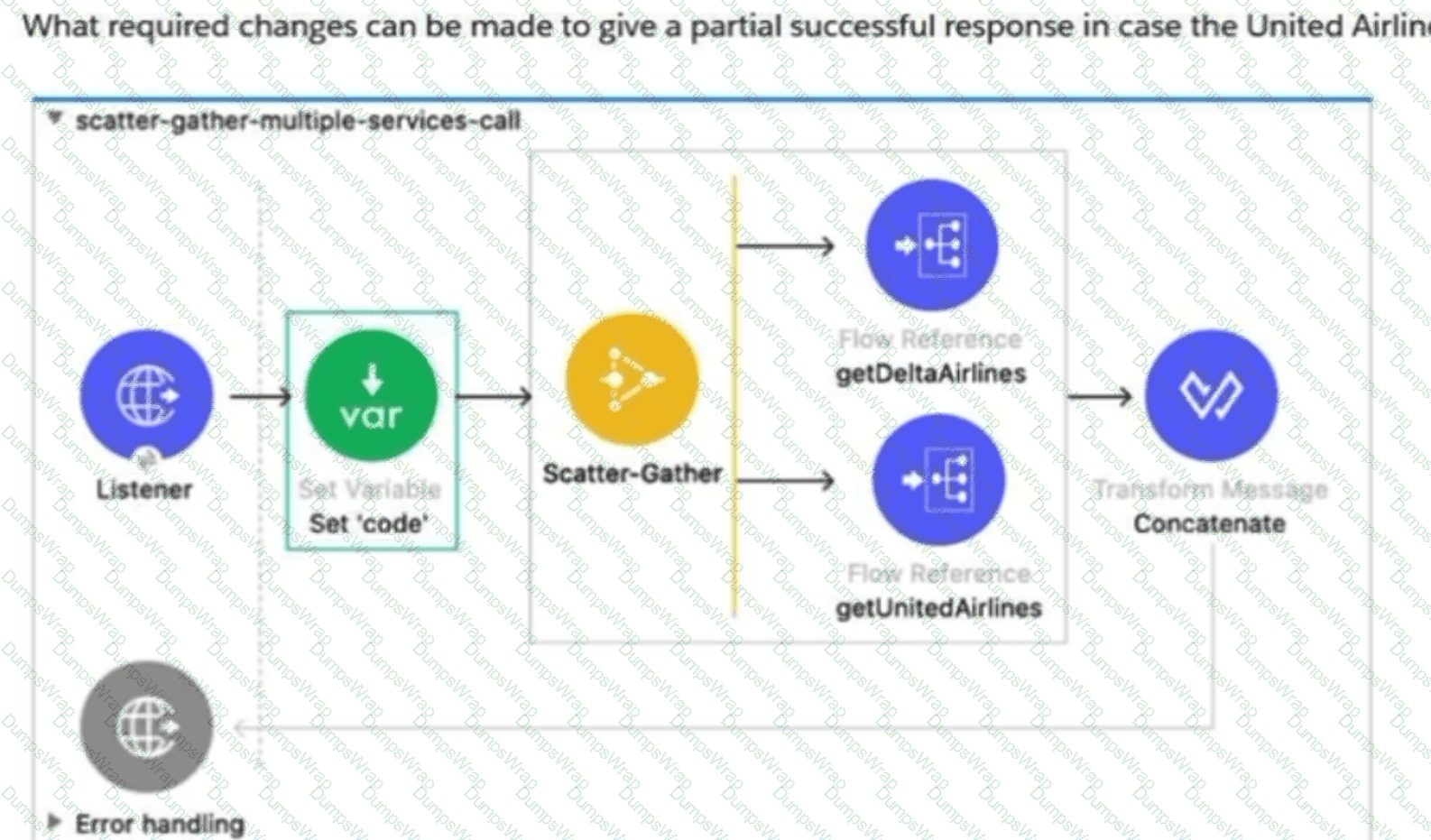
Options:
Add Flow Reference components inside a Try scope. Set the payload to a default value "" inside the error handler using the On Error Continue scope.
Add a Scatter-Gather component inside a Try Scope. Set the payload to a default value "Error" inside the error handler using the On Error Propagate scope.
Add a Scatter-Gather component inside a Try Scope. Set the payload to a default value "Error" inside the error handler using the On Error Continue scope.
Add Flow Reference components inside a Try Scope. Set the payload to a default value "" inside the error handler using the On Error Propagate scope.
Answer:
AExplanation:
Scatter-Gather normally expects all routes to complete successfully before combining their results. If the United Airlines route times out and that error escapes the route, Scatter-Gather raises a MULE:COMPOSITE_ROUTING error instead of continuing normally to the downstream Transform Message. That behavior prevents the required partial-success response.
The correct design is to handle failure inside the affected Scatter-Gather route. Each Flow Reference can be wrapped in a Try scope, with the timeout or relevant connector error handled using On Error Continue. The handler can replace the failed route's payload with a neutral/default value such as an empty string. The route is then considered successfully handled, allowing Scatter-Gather to consolidate the successful Delta response and the default United value and proceed to the concatenation step.
MuleSoft documents this exact Scatter-Gather behavior: when a route's Try scope successfully handles an error with on-error-continue, Scatter-Gather completes and passes the combined events onward. If on-error-propagate is used, the route remains failed and Scatter-Gather produces a composite-routing error.
Reference topics: Scatter-Gather Router; Try Scope; On Error Continue; partial results; MULE:COMPOSITE_ROUTING.
Official documentation:
===============================================================
A company with MuleSoft Titanium support develops a Salesforce System API using MuleSoft's out-of-the-box Salesforce Connector and deploys the API to CloudHub.
Which steps provide the average number of requests and average response time of the Salesforce Connector?
Options:
Access Anypoint Monitoring's built-in dashboard. Select a resource. Locate the information under the Connectors tab.
Access Anypoint Monitoring's built-in dashboard. Select a resource. Locate the information under Log Management > Raw Data.
Access Anypoint Monitoring's built-in dashboard. Select a resource. Create a custom dashboard to retrieve the information.
Change the API implementation to capture the information in the log. Retrieve the information from the log file.
Answer:
AExplanation:
Anypoint Monitoring provides connector-level performance metrics without requiring additional application logging or custom instrumentation. For supported connectors, these statistics are accessible from the application's monitoring interface through the Connectors tab.
MuleSoft's documentation specifies that connector monitoring includes Requests, which reports the average number of connector requests over automatically selected intervals, and Response Time, which reports the average response time for connector requests. To access these metrics, the documented procedure is to open Anypoint Monitoring, select the relevant Mule application resource, and open the Connectors view.
Because these metrics are generated by the monitoring platform, examining raw logs is unnecessary. A custom dashboard may be useful when creating specialized operational visualizations, but it is not required simply to obtain standard connector request and response-time measurements. Modifying the Salesforce System API to manually log this information would also duplicate functionality already supplied by Anypoint Monitoring and increase application complexity.
The question additionally identifies Titanium support, which aligns with availability of connector monitoring capabilities described by MuleSoft.
Therefore, the correct procedure is to use the built-in Anypoint Monitoring dashboard and inspect the Connectors tab.
Reference topics: Anypoint Monitoring; connector performance metrics; built-in dashboards; request count; response time; Salesforce Connector.
Official documentation:
===============================================================
