SnowPro Advanced: Architect Certification Exam Questions and Answers
User1 and User2 are new users that were granted different functional roles.
User1 was granted the IT_ANALYST_ROLE
User2 was granted the FIN_ANALYST_ROLE
Review the following security design (as shown in the diagram):
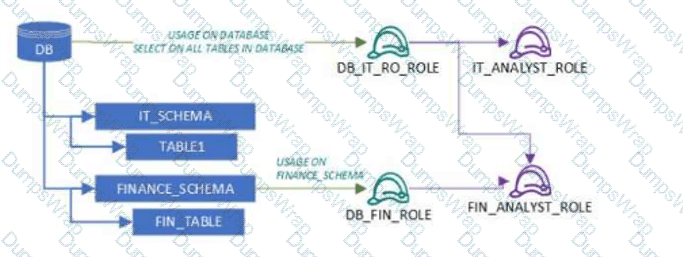
A database (DB) grants USAGE and SELECT on all tables to DB_IT_RO_ROLE
DB_IT_RO_ROLE is granted to IT_ANALYST_ROLE
IT_SCHEMA contains TABLE1
FINANCE_SCHEMA grants USAGE and SELECT to DB_FIN_ROLE
DB_FIN_ROLE is granted to FIN_ANALYST_ROLE
FINANCE_SCHEMA contains FIN_TABLE
Which tables can each user read?
Options:
User1 will be the only user able to read tables from both schemas, since the DB_IT_RO_ROLE has SELECT privileges on all database tables.
User1 will be able to read tables from both schemas, while User2 will be able to read only the FINANCE_SCHEMA tables.
User2 will be able to read tables from the FINANCE_SCHEMA, while User1 will be unable to read any table.
User2 will be able to read tables from both schemas, while User1 will be able to read tables only in IT_SCHEMA.
Answer:
BExplanation:
This question tests understanding of Snowflake Role-Based Access Control (RBAC) and privilege inheritance, which is a core SnowPro Architect exam topic. In Snowflake, privileges are not granted directly to users; instead, they are granted to roles, which are then assigned to users. Effective access depends on the combination of USAGE and SELECT privileges across databases, schemas, and tables.
In the provided design, the role DB_IT_RO_ROLE has SELECT privileges on all tables in the database, along with database usage. This role is granted to IT_ANALYST_ROLE, which is assigned to User1. As a result, User1 can read tables from both IT_SCHEMA and FINANCE_SCHEMA, assuming schema usage is satisfied, which is implied in the diagram.
User2, on the other hand, is granted the FIN_ANALYST_ROLE, which inherits privileges from DB_FIN_ROLE. That role only has USAGE and SELECT privileges on the FINANCE_SCHEMA. There are no grants that allow DB_FIN_ROLE (or FIN_ANALYST_ROLE) to access objects in IT_SCHEMA.
A new table and streams are created with the following commands:
CREATE OR REPLACE TABLE LETTERS (ID INT, LETTER STRING) ;
CREATE OR REPLACE STREAM STREAM_1 ON TABLE LETTERS;
CREATE OR REPLACE STREAM STREAM_2 ON TABLE LETTERS APPEND_ONLY = TRUE;
The following operations are processed on the newly created table:
INSERT INTO LETTERS VALUES (1, 'A');
INSERT INTO LETTERS VALUES (2, 'B');
INSERT INTO LETTERS VALUES (3, 'C');
TRUNCATE TABLE LETTERS;
INSERT INTO LETTERS VALUES (4, 'D');
INSERT INTO LETTERS VALUES (5, 'E');
INSERT INTO LETTERS VALUES (6, 'F');
DELETE FROM LETTERS WHERE ID = 6;
What would be the output of the following SQL commands, in order?
SELECT COUNT (*) FROM STREAM_1;
SELECT COUNT (*) FROM STREAM_2;
Options:
2 & 6
2 & 3
4 & 3
4 & 6
Answer:
CExplanation:
In Snowflake, a stream records data manipulation language (DML) changes to its base table since the stream was created or last consumed. STREAM_1 will show all changes including the TRUNCATE operation, while STREAM_2, being APPEND_ONLY, will not show deletions like TRUNCATE. Therefore, STREAM_1 will count the three inserts, the TRUNCATE (counted as a single operation), and the subsequent two inserts before the delete, totaling 4. STREAM_2 will only count the three initial inserts and the two after the TRUNCATE, totaling 3, as it does not count the TRUNCATE or the delete operation.
Data is being imported and stored as JSON in a VARIANT column. Query performance was fine, but most recently, poor query performance has been reported.
What could be causing this?
Options:
There were JSON nulls in the recent data imports.
The order of the keys in the JSON was changed.
The recent data imports contained fewer fields than usual.
There were variations in string lengths for the JSON values in the recent data imports.
Answer:
BExplanation:
Data is being imported and stored as JSON in a VARIANT column. Query performance was fine, but most recently, poor query performance has been reported. This could be caused by the following factors:
The order of the keys in the JSON was changed. Snowflake stores semi-structured data internally in a column-like structure for the most common elements, and the remainder in a leftovers-like column. The order of the keys in the JSON affects how Snowflake determines the common elements and how it optimizes the query performance. If the order of the keys in the JSON was changed, Snowflake might have to re-parse the data and re-organize the internal storage, which could result in slower query performance.
There were variations in string lengths for the JSON values in the recent data imports. Non-native values, such as dates and timestamps, are stored as strings when loaded into a VARIANT column. Operations on these values could be slower and also consume more space than when stored in a relational column with the corresponding data type. If there were variations in string lengths for the JSON values in the recent data imports, Snowflake might have to allocate more space and perform more conversions, which could also result in slower query performance.
The other options are not valid causes for poor query performance:
There were JSON nulls in the recent data imports. Snowflake supports two types of null values in semi-structured data: SQL NULL and JSON null. SQL NULL means the value is missing or unknown, while JSON null means the value is explicitly set to null. Snowflake can distinguish between these two types of null values and handle them accordingly. Having JSON nulls in the recent data imports should not affect the query performance significantly.
The recent data imports contained fewer fields than usual. Snowflake can handle semi-structured data with varying schemas and fields. Having fewer fields than usual in the recent data imports should not affect the query performance significantly, as Snowflake can still optimize the data ingestion and query execution based on the existing fields.
Considerations for Semi-structured Data Stored in VARIANT
Snowflake Architect Training
Snowflake query performance on unique element in variant column
Snowflake variant performance
An Architect has chosen to separate their Snowflake Production and QA environments using two separate Snowflake accounts.
The QA account is intended to run and test changes on data and database objects before pushing those changes to the Production account. It is a requirement that all database objects and data in the QA account need to be an exact copy of the database objects, including privileges and data in the Production account on at least a nightly basis.
Which is the LEAST complex approach to use to populate the QA account with the Production account’s data and database objects on a nightly basis?
Options:
1) Create a share in the Production account for each database2) Share access to the QA account as a Consumer3) The QA account creates a database directly from each share4) Create clones of those databases on a nightly basis5) Run tests directly on those cloned databases
1) Create a stage in the Production account2) Create a stage in the QA account that points to the same external object-storage location3) Create a task that runs nightly to unload each table in the Production account into the stage4) Use Snowpipe to populate the QA account
1) Enable replication for each database in the Production account2) Create replica databases in the QA account3) Create clones of the replica databases on a nightly basis4) Run tests directly on those cloned databases
1) In the Production account, create an external function that connects into the QA account and returns all the data for one specific table2) Run the external function as part of a stored procedure that loops through each table in the Production account and populates each table in the QA account
Answer:
CExplanation:
This approach is the least complex because it uses Snowflake’s built-in replication feature to copy the data and database objects from the Production account to the QA account. Replication is a fast and efficient way to synchronize data across accounts, regions, and cloud platforms. It also preserves the privileges and metadata of the replicated objects. By creating clones of the replica databases, the QA account can run tests on the cloned data without affecting the original data. Clones are also zero-copy, meaning they do not consume any additional storage space unless the data is modified. This approach does not require any external stages, tasks, Snowpipe, or external functions, which can add complexity and overhead to the data transfer process.
Introduction to Replication and Failover
Replicating Databases Across Multiple Accounts
Cloning Considerations
A company has a Snowflake account named ACCOUNTA in AWS us-east-1 region. The company stores its marketing data in a Snowflake database named MARKET_DB. One of the company’s business partners has an account named PARTNERB in Azure East US 2 region. For marketing purposes the company has agreed to share the database MARKET_DB with the partner account.
Which of the following steps MUST be performed for the account PARTNERB to consume data from the MARKET_DB database?
Options:
Create a new account (called AZABC123) in Azure East US 2 region. From account ACCOUNTA create a share of database MARKET_DB, create a new database out of this share locally in AWS us-east-1 region, and replicate this new database to AZABC123 account. Then set up data sharing to the PARTNERB account.
From account ACCOUNTA create a share of database MARKET_DB, and create a new database out of this share locally in AWS us-east-1 region. Then make this database the provider and share it with the PARTNERB account.
Create a new account (called AZABC123) in Azure East US 2 region. From account ACCOUNTA replicate the database MARKET_DB to AZABC123 and from this account set up the data sharing to the PARTNERB account.
Create a share of database MARKET_DB, and create a new database out of this share locally in AWS us-east-1 region. Then replicate this database to the partner’s account PARTNERB.
Answer:
CExplanation:
Snowflake supports data sharing across regions and cloud platforms using account replication and share replication features. Account replication enables the replication of objects from a source account to one or more target accounts in the same organization. Share replication enables the replication of shares from a source account to one or more target accounts in the same organization1.
To share data from the MARKET_DB database in the ACCOUNTA account in AWS us-east-1 region with the PARTNERB account in Azure East US 2 region, the following steps must be performed:
Create a new account (called AZABC123) in Azure East US 2 region. This account will act as a bridge between the source and the target accounts. The new account must be linked to the ACCOUNTA account using an organization2.
From the ACCOUNTA account, replicate the MARKET_DB database to the AZABC123 account using the account replication feature. This will create a secondary database in the AZABC123 account that is a replica of the primary database in the ACCOUNTA account3.
From the AZABC123 account, set up the data sharing to the PARTNERB account using the share replication feature. This will create a share of the secondary database in the AZABC123 account and grant access to the PARTNERB account. The PARTNERB account can then create a database from the share and query the data4.
Therefore, option C is the correct answer.
Replicating Shares Across Regions and Cloud Platforms : Working with Organizations and Accounts : Replicating Databases Across Multiple Accounts : Replicating Shares Across Multiple Accounts
How can the Snowpipe REST API be used to keep a log of data load history?
Options:
Call insertReport every 20 minutes, fetching the last 10,000 entries.
Call loadHistoryScan every minute for the maximum time range.
Call insertReport every 8 minutes for a 10-minute time range.
Call loadHistoryScan every 10 minutes for a 15-minute time range.
Answer:
DExplanation:
Snowpipe is a service that automates and optimizes the loading of data from external stages into Snowflake tables. Snowpipe uses a queue to ingest files as they become available in the stage. Snowpipe also provides REST endpoints to load data and retrieve load history reports1.
The loadHistoryScan endpoint returns the history of files that have been ingested by Snowpipe within a specified time range. The endpoint accepts the following parameters2:
pipe: The fully-qualified name of the pipe to query.
startTimeInclusive: The start of the time range to query, in ISO 8601 format. The value must be within the past 14 days.
endTimeExclusive: The end of the time range to query, in ISO 8601 format. The value must be later than the start time and within the past 14 days.
recentFirst: A boolean flag that indicates whether to return the most recent files first or last. The default value is false, which means the oldest files are returned first.
showSkippedFiles: A boolean flag that indicates whether to include files that were skipped by Snowpipe in the response. The default value is false, which means only files that were loaded are returned.
The loadHistoryScan endpoint can be used to keep a log of data load history by calling it periodically with a suitable time range. The best option among the choices is D, which is to call loadHistoryScan every 10 minutes for a 15-minute time range. This option ensures that the endpoint is called frequently enough to capture the latest files that have been ingested, and that the time range is wide enough to avoid missing any files that may have been delayed or retried by Snowpipe. The other options are either too infrequent, too narrow, or use the wrong endpoint3.
1: Introduction to Snowpipe | Snowflake Documentation
2: loadHistoryScan | Snowflake Documentation
3: Monitoring Snowpipe Load History | Snowflake Documentation
An Architect is designing a pipeline to stream event data into Snowflake using the Snowflake Kafka connector. The Architect’s highest priority is to configure the connector to stream data in the MOST cost-effective manner.
Which of the following is recommended for optimizing the cost associated with the Snowflake Kafka connector?
Options:
Utilize a higher Buffer.flush.time in the connector configuration.
Utilize a higher Buffer.size.bytes in the connector configuration.
Utilize a lower Buffer.size.bytes in the connector configuration.
Utilize a lower Buffer.count.records in the connector configuration.
Answer:
AExplanation:
The minimum value supported for the buffer.flush.time property is 1 (in seconds). For higher average data flow rates, we suggest that you decrease the default value for improved latency. If cost is a greater concern than latency, you could increase the buffer flush time. Be careful to flush the Kafka memory buffer before it becomes full to avoid out of memory
A user has the appropriate privilege to see unmasked data in a column.
If the user loads this column data into another column that does not have a masking policy, what will occur?
Options:
Unmasked data will be loaded in the new column.
Masked data will be loaded into the new column.
Unmasked data will be loaded into the new column but only users with the appropriate privileges will be able to see the unmasked data.
Unmasked data will be loaded into the new column and no users will be able to see the unmasked data.
Answer:
AExplanation:
According to the SnowPro Advanced: Architect documents and learning resources, column masking policies are applied at query time based on the privileges of the user who runs the query. Therefore, if a user has the privilege to see unmasked data in a column, they will see the original data when they query that column. If they load this column data into another column that does not have a masking policy, the unmasked data will be loaded in the new column, and any user who can query the new column will see the unmasked data as well. The masking policy does not affect the underlying data in the column, only the query results.
Snowflake Documentation: Column Masking
Snowflake Learning: Column Masking
Why does a conditional multi-table insert option support the Data Vault data model?
Options:
Data can be inserted in parallel to hubs and satellites using surrogate keys.
Data can be inserted in parallel to dimensions and facts using surrogate keys.
Data can be inserted in sequence to hubs and satellites using surrogate keys.
Data can be inserted in sequence to dimensions and facts using surrogate keys.
Answer:
AExplanation:
The Data Vault modeling approach separates data into hubs (business keys), links, and satellites, often requiring simultaneous insertion of related records derived from the same source dataset. Snowflake’s conditional multi-table INSERT enables a single source query to populate multiple target tables in parallel based on conditional logic. This capability aligns well with Data Vault patterns, where hubs and satellites are typically loaded together from the same staging data.
By inserting into hubs and satellites in parallel using surrogate keys (Answer A), architects ensure consistency, atomicity, and efficient processing without re-scanning source data multiple times. This approach reduces compute usage and simplifies ETL logic, which is particularly valuable in large-scale, near–real-time ingestion pipelines.
Options involving dimensions and facts relate more closely to star schema modeling, not Data Vault. Sequential insertion is also less efficient and not the defining advantage of conditional multi-table inserts. For SnowPro Architect candidates, this question emphasizes understanding how Snowflake SQL features support modern data modeling techniques such as Data Vault.
=========
QUESTION NO: 42 [Architecting Snowflake Solutions]
An Architect wants to alter a virtual warehouse for horizontal scaling but cannot find minimum and maximum cluster settings in the interface, even with the ACCOUNTADMIN role.
What is the MOST likely issue?
A. Missing CREATE WAREHOUSE privilege.
B. Incorrect SQL command used.
C. Using Standard edition where multi-cluster is not available.
D. A Snowflake Support ticket is required.
Answer: C
Multi-cluster virtual warehouses are only available in Snowflake Enterprise edition and higher. If the account is running on Standard edition, the options to configure minimum and maximum clusters for horizontal scaling will not appear in the UI or be available via SQL (Answer C).
This limitation is independent of role privileges; even ACCOUNTADMIN cannot enable multi-cluster functionality on unsupported editions. Incorrect SQL or missing privileges would result in errors rather than missing configuration options.
For SnowPro Architect candidates, this question tests awareness of edition-based feature availability, which is critical when designing scalable architectures and recommending Snowflake editions to meet workload requirements.
=========
QUESTION NO: 43 [Performance Optimization and Monitoring]
A 2 TB table with 400 columns is queried frequently to calculate average employee tenure by country and career level. The query exhibits poor partition pruning and runs on an X-Small warehouse.
What improvement meets the requirements with the LEAST operational overhead?
A. Add clustering keys on COUNTRY and EMPLOYMENT_STATUS.
B. Enable Query Acceleration Service (QAS).
C. Enable search optimization on equality predicates for COUNTRY and EMPLOYMENT_STATUS.
D. Build a materialized view for latest active employee records per country.
Answer: C
The query filters on equality predicates for COUNTRY, EMPLOYMENT_STATUS, and a specific EFFECTIVE_DATE value representing the latest record. Search Optimization Service (SOS) is specifically designed to accelerate highly selective equality predicates without requiring data reorganization (Answer C).
Clustering would introduce ongoing maintenance overhead and is less effective when cardinality is low or when multiple filter combinations exist. Query Acceleration Service helps with overall query execution time but does not directly improve partition pruning. Materialized views would require ongoing maintenance and additional storage, increasing operational complexity.
For SnowPro Architect candidates, this question highlights choosing the simplest effective optimization tool—SOS—when dealing with selective filters and large tables.
=========
QUESTION NO: 44 [Snowflake Data Engineering]
A team needs to recover data after pipeline failures or business rule violations.
Requirements:
• Database recoverable for 48 hours
• Analytics schema recoverable for 5 days
What is the correct approach?
A. Use custom stored procedure backups.
B. Use tasks with database and schema clones.
C. Use Time Travel with MIN_DATA_RETENTION_TIME_IN_DAYS = 2 and DATA_RETENTION_TIME_IN_DAYS = 5 on the ANALYTICS schema.
D. Use Time Travel with DATA_RETENTION_TIME_IN_DAYS = 2 and MIN_DATA_RETENTION_TIME_IN_DAYS = 5 on the ANALYTICS schema.
Answer: C
Snowflake Time Travel enables point-in-time recovery without manual backups. Setting MIN_DATA_RETENTION_TIME_IN_DAYS = 2 ensures that all database objects retain at least 48 hours of recoverable history. Extending DATA_RETENTION_TIME_IN_DAYS = 5 at the schema level allows longer recovery specifically for the analytics schema (Answer C).
This approach meets both recovery requirements with minimal operational overhead and aligns with Snowflake best practices. Cloning via tasks introduces unnecessary complexity and storage management. Custom backups are not required due to built-in Time Travel capabilities.
SnowPro Architect exams emphasize using native Snowflake features such as Time Travel for data recovery scenarios.
=========
QUESTION NO: 45 [Security and Access Management]
A financial services company needs to isolate sensitive production data from development data within the same region and support secure data transfer between environments.
What is the best solution?
A. Create two accounts with network policies and use data sharing.
B. Create two accounts with federated authentication and use cloning.
C. Create two databases in one account and use replication.
D. Create two databases in one account and use user-level network policies and shares.
Answer: A
Strong isolation of sensitive production data from development environments is best achieved using separate Snowflake accounts. Account-level isolation ensures independent security boundaries, network policies, and governance controls. Secure Data Sharing allows controlled, read-only access to production data without copying it, supporting safe data transfer between environments (Answer A).
Using cloning across accounts is not supported; cloning works only within the same account. Database-level separation does not provide the same security guarantees as account-level isolation, and user-level network policies are not supported in Snowflake.
This design aligns with SnowPro Architect best practices for regulated industries, emphasizing strong isolation, least privilege, and secure data access mechanisms.
When using the COPY INTO
command with the CSV file format, how does the MATCH_BY_COLUMN_NAME parameter behave?
Options:
It expects a header to be present in the CSV file, which is matched to a case-sensitive table column name.
The parameter will be ignored.
The command will return an error.
The command will return a warning stating that the file has unmatched columns.
Answer:
CExplanation:
Comprehensive and Detailed Explanation From Exact Extract:
The MATCH_BY_COLUMN_NAME parameter in the COPY INTO
command is used to load semi-structured or structured data, such as CSV, into columns of the target table by matching column names in the data file with those in the table. For CSV files, this parameter requires specific conditions to be met, particularly the presence of a header row in the file, which is used to map columns to the target table.
According to the official Snowflake documentation, when the MATCH_BY_COLUMN_NAME parameter is used with CSV files, it is only supported in specific scenarios and requires the PARSE_HEADER file format option to be set to TRUE. This option indicates that the first row of the CSV file contains column headers, which Snowflake uses to match with the target table's column names. The matching behavior can be configured as CASE_SENSITIVE or CASE_INSENSITIVE, but the default behavior is case-sensitive unless specified otherwise.
However, there is a critical limitation when using MATCH_BY_COLUMN_NAME with CSV files: as of the latest Snowflake documentation, this feature is in Open Private Preview for CSV files and is not generally available for all accounts. When the MATCH_BY_COLUMN_NAME parameter is specified for a CSV file in an environment where this feature is not enabled, or if the PARSE_HEADER option is not set to TRUE, the COPY INTO command will return an error. This is because Snowflake cannot process the column name matching without the header parsing capability, which is not fully supported for CSV files in general availability.
The exact extract from the Snowflake documentation states:
"For loading CSV files, the MATCH_BY_COLUMN_NAME copy option is available in preview. It requires the use of the above-mentioned CSV file format option PARSE_HEADER = TRUE."
Additionally, the documentation clarifies:
"Boolean that specifies whether to use the first row headers in the data files to determine column names. This file format option is applied to the following actions only: Automatically detecting column definitions by using the INFER_SCHEMA function. Loading CSV data into separate columns by using the INFER_SCHEMA function and MATCH_BY_COLUMN_NAME copy option."
Furthermore, a known issue is noted:
"For CSV only, there is a known issue when the INCLUDE_METADATA copy option is used with MATCH_BY_COLUMN_NAME. Do not use this copy option when loading CSV files until the known issue is resolved."
Given that the MATCH_BY_COLUMN_NAME parameter is not fully supported for CSV files in general availability and requires specific preview conditions, attempting to use it without meeting those conditions, such as PARSE_HEADER = TRUE or enabling the preview feature, results in an error. Therefore, option C is correct: The command will return an error.
Option A is incorrect because, while MATCH_BY_COLUMN_NAME expects a header in the CSV file for matching when the feature is enabled, the case-sensitive matching is only true when explicitly set to CASE_SENSITIVE. Additionally, the feature's limited availability means it is not guaranteed to work without causing an error. Option B is incorrect because the parameter is not simply ignored; it triggers an error if the conditions are not met. Option D is incorrect because Snowflake does not issue a warning for unmatched columns in this context; it fails with an error when the parameter is unsupported or misconfigured.
Which Snowflake objects can be used in a data share? (Select TWO).
Options:
Standard view
Secure view
Stored procedure
External table
Stream
Answer:
B, DExplanation:
An Architect entered the following commands in sequence:

USER1 cannot find the table.
Which of the following commands does the Architect need to run for USER1 to find the tables using the Principle of Least Privilege? (Choose two.)
Options:
GRANT ROLE PUBLIC TO ROLE INTERN;
GRANT USAGE ON DATABASE SANDBOX TO ROLE INTERN;
GRANT USAGE ON SCHEMA SANDBOX.PUBLIC TO ROLE INTERN;
GRANT OWNERSHIP ON DATABASE SANDBOX TO USER INTERN;
GRANT ALL PRIVILEGES ON DATABASE SANDBOX TO ROLE INTERN;
Answer:
B, CExplanation:
According to the Principle of Least Privilege, the Architect should grant the minimum privileges necessary for the USER1 to find the tables in the SANDBOX database.
The USER1 needs to have USAGE privilege on the SANDBOX database and the SANDBOX.PUBLIC schema to be able to access the tables in the PUBLIC schema. Therefore, the commands B and C are the correct ones to run.
The command A is not correct because the PUBLIC role is automatically granted to every user and role in the account, and it does not have any privileges on the SANDBOX database by default.
The command D is not correct because it would transfer the ownership of the SANDBOX database from the Architect to the USER1, which is not necessary and violates the Principle of Least Privilege.
The command E is not correct because it would grant all the possible privileges on the SANDBOX database to the USER1, which is also not necessary and violates the Principle of Least Privilege.
Snowflake - Principle of Least Privilege : Snowflake - Access Control Privileges : Snowflake - Public Role : Snowflake - Ownership and Grants
Which columns can be included in an external table schema? (Select THREE).
Options:
VALUE
METADATASROW_ID
METADATASISUPDATE
METADAT A$ FILENAME
METADATAS FILE_ROW_NUMBER
METADATASEXTERNAL TABLE PARTITION
Answer:
A, D, EExplanation:
An external table schema defines the columns and data types of the data stored in an external stage. All external tables include the following columns by default:
VALUE: A VARIANT type column that represents a single row in the external file.
METADATA$FILENAME: A pseudocolumn that identifies the name of each staged data file included in the external table, including its path in the stage.
METADATA$FILE_ROW_NUMBER: A pseudocolumn that shows the row number for each record in a staged data file.
You can also create additional virtual columns as expressions using the VALUE column and/or the pseudocolumns. However, the following columns are not valid for external tables and cannot be included in the schema:
METADATASROW_ID: This column is only available for internal tables and shows the unique identifier for each row in the table.
METADATASISUPDATE: This column is only available for internal tables and shows whether the row was inserted or updated by a merge operation.
METADATASEXTERNAL TABLE PARTITION: This column is not a valid column name and does not exist in Snowflake.
Introduction to External Tables, CREATE EXTERNAL TABLE
A retailer's enterprise data organization is exploring the use of Data Vault 2.0 to model its data lake solution. A Snowflake Architect has been asked to provide recommendations for using Data Vault 2.0 on Snowflake.
What should the Architect tell the data organization? (Select TWO).
Options:
Change data capture can be performed using the Data Vault 2.0 HASH_DIFF concept.
Change data capture can be performed using the Data Vault 2.0 HASH_DELTA concept.
Using the multi-table insert feature in Snowflake, multiple Point-in-Time (PIT) tables can be loaded in parallel from a single join query from the data vault.
Using the multi-table insert feature, multiple Point-in-Time (PIT) tables can be loaded sequentially from a single join query from the data vault.
There are performance challenges when using Snowflake to load multiple Point-in-Time (PIT) tables in parallel from a single join query from the data vault.
Answer:
A, CExplanation:
Data Vault 2.0 on Snowflake supports the HASH_DIFF concept for change data capture, which is a method to detect changes in the data by comparing the hash values of the records. Additionally, Snowflake’s multi-table insert feature allows for the loading of multiple PIT tables in parallel from a single join query, which can significantly streamline the data loading process and improve performance1.
References =
•Snowflake’s documentation on multi-table inserts1
•Blog post on optimizing Data Vault architecture on Snowflake2
How can the Snowflake context functions be used to help determine whether a user is authorized to see data that has column-level security enforced? (Select TWO).
Options:
Set masking policy conditions using current_role targeting the role in use for the current session.
Set masking policy conditions using is_role_in_session targeting the role in use for the current account.
Set masking policy conditions using invoker_role targeting the executing role in a SQL statement.
Determine if there are ownership privileges on the masking policy that would allow the use of any function.
Assign the accountadmin role to the user who is executing the object.
Answer:
A, CExplanation:
Snowflake context functions are functions that return information about the current session, user, role, warehouse, database, schema, or object. They can be used to help determine whether a user is authorized to see data that has column-level security enforced by setting masking policy conditions based on the context functions. The following context functions are relevant for column-level security:
current_role: This function returns the name of the role in use for the current session. It can be used to set masking policy conditions that target the current session and are not affected by the execution context of the SQL statement. For example, a masking policy condition using current_role can allow or deny access to a column based on the role that the user activated in the session.
invoker_role: This function returns the name of the executing role in a SQL statement. It can be used to set masking policy conditions that target the executing role and are affected by the execution context of the SQL statement. For example, a masking policy condition using invoker_role can allow or deny access to a column based on the role that the user specified in the SQL statement, such as using the AS ROLE clause or a stored procedure.
is_role_in_session: This function returns TRUE if the user’s current role in the session (i.e. the role returned by current_role) inherits the privileges of the specified role. It can be used to set masking policy conditions that involve role hierarchy and privilege inheritance. For example, a masking policy condition using is_role_in_session can allow or deny access to a column based on whether the user’s current role is a lower privilege role in the specified role hierarchy.
The other options are not valid ways to use the Snowflake context functions for column-level security:
Set masking policy conditions using is_role_in_session targeting the role in use for the current account. This option is incorrect because is_role_in_session does not target the role in use for the current account, but rather the role in use for the current session. Also, the current account is not a role, but rather a logical entity that contains users, roles, warehouses, databases, and other objects.
Determine if there are ownership privileges on the masking policy that would allow the use of any function. This option is incorrect because ownership privileges on the masking policy do not affect the use of any function, but rather the ability to create, alter, or drop the masking policy. Also, this is not a way to use the Snowflake context functions, but rather a way to check the privileges on the masking policy object.
Assign the accountadmin role to the user who is executing the object. This option is incorrect because assigning the accountadmin role to the user who is executing the object does not involve using the Snowflake context functions, but rather granting the highest-level role to the user. Also, this is not a recommended practice for column-level security, as it would give the user full access to all objects and data in the account, which could compromise data security and governance.
Context Functions
Advanced Column-level Security topics
Snowflake Data Governance: Column Level Security Overview
Data Security Snowflake Part 2 - Column Level Security
An Architect has a VPN_ACCESS_LOGS table in the SECURITY_LOGS schema containing timestamps of the connection and disconnection, username of the user, and summary statistics.
What should the Architect do to enable the Snowflake search optimization service on this table?
Options:
Assume role with OWNERSHIP on future tables and ADD SEARCH OPTIMIZATION on the SECURITY_LOGS schema.
Assume role with ALL PRIVILEGES including ADD SEARCH OPTIMIZATION in the SECURITY LOGS schema.
Assume role with OWNERSHIP on VPN_ACCESS_LOGS and ADD SEARCH OPTIMIZATION in the SECURITY_LOGS schema.
Assume role with ALL PRIVILEGES on VPN_ACCESS_LOGS and ADD SEARCH OPTIMIZATION in the SECURITY_LOGS schema.
Answer:
CExplanation:
According to the SnowPro Advanced: Architect Exam Study Guide, to enable the search optimization service on a table, the user must have the ADD SEARCH OPTIMIZATION privilege on the table and the schema. The privilege can be granted explicitly or inherited from a higher-level object, such as a database or a role. The OWNERSHIP privilege on a table implies the ADD SEARCH OPTIMIZATION privilege, so the user who owns the table can enable the search optimization service on it. Therefore, the correct answer is to assume a role with OWNERSHIP on VPN_ACCESS_LOGS and ADD SEARCH OPTIMIZATION in the SECURITY_LOGS schema. This will allow the user to enable the search optimization service on the VPN_ACCESS_LOGS table and any future tables created in the SECURITY_LOGS schema. The other options are incorrect because they either grant excessive privileges or do not grant the required privileges on the table or the schema. References:
SnowPro Advanced: Architect Exam Study Guide, page 11, section 2.3.1
Snowflake Documentation: Enabling the Search Optimization Service
An Architect is designing partitioned external tables for a Snowflake data lake. The data lake size may grow over time, and partition definitions may need to change in the future.
How can these requirements be met?
Options:
Use the PARTITION BY (
Use partition_type = USER_SPECIFIED when creating the external table.
Set METADATA$EXTERNAL_TABLE_PARTITION = MANUAL.
Alter the table using ADD_PARTITION_COLUMN before defining a new partition column.
Answer:
AExplanation:
Snowflake external tables support partitioning using the PARTITION BY clause, which allows architects to define logical partitions based on expressions derived from file paths or metadata. This approach is flexible and scalable, making it well-suited for data lakes that grow over time and may require changes to partition logic (Answer A).
Using PARTITION BY enables Snowflake to automatically manage partitions as new data arrives, without requiring manual intervention or table recreation. This aligns with Snowflake best practices for external table design and minimizes operational overhead.
The other options are invalid or unsupported in Snowflake. There is no partition_type = USER_SPECIFIED option, no METADATA$EXTERNAL_TABLE_PARTITION = MANUAL setting, and no ADD_PARTITION_COLUMN command for external tables. For the SnowPro Architect exam, understanding the correct and supported syntax for partitioned external tables is essential for designing maintainable data lake architectures.
=========
QUESTION NO: 62 [Snowflake Ecosystem and Integrations]
A group of marketing and advertising companies want to share data with one another for joint analysis while maintaining strict privacy controls.
How should an Architect design the data sharing solution?
A. Use Data Clean Rooms for privacy-preserving collaboration.
B. Use Secure Data Sharing with standard shares.
C. Use Snowflake Marketplace listings.
D. Use a Data Exchange as a shared data hub.
Answer: A
Snowflake Data Clean Rooms are specifically designed for privacy-preserving collaboration between organizations. They allow multiple parties to perform joint analytics on combined datasets without exposing raw underlying data to one another (Answer A). This makes them ideal for marketing and advertising use cases where sensitive customer data must remain private while still enabling insights such as audience overlap and campaign effectiveness.
Secure Data Sharing and Data Exchanges allow data access but do not inherently prevent participants from seeing raw data. Snowflake Marketplace is designed for broad data distribution rather than tightly controlled, privacy-centric collaboration.
For SnowPro Architect candidates, this question emphasizes selecting the right Snowflake-native collaboration mechanism based on privacy and governance requirements.
=========
QUESTION NO: 63 [Snowflake Data Engineering]
An Architect wants to build an automated ETL pipeline that reads data from an external stage using an external table, performs transformations on changed data, joins with dimension tables, and loads results into a target table.
What should the Architect use?
A. Streams and tasks
B. Dynamic tables
C. Materialized views
D. Snowpipe with auto-ingest
Answer: A
Streams and tasks provide Snowflake’s native framework for building automated, incremental ETL pipelines. A stream can track changes in the external table (or staging table), while tasks orchestrate the execution of transformation logic and loading into target tables (Answer A).
This approach supports complex transformations, joins with dimension tables, and controlled scheduling or event-driven execution. Materialized views cannot perform joins with arbitrary tables and are not suitable for complex ETL. Dynamic tables simplify transformations but are not designed to consume change data directly from external tables. Snowpipe focuses on ingestion only and does not support downstream transformations.
SnowPro Architect exams frequently test understanding of when to use streams and tasks versus newer abstractions like dynamic tables.
=========
QUESTION NO: 64 [Security and Access Management]
A data share exists between a provider and a consumer account. Five tables are already shared, and the consumer role has been granted IMPORTED PRIVILEGES.
What happens if a new table is added to the provider schema?
A. The consumer automatically sees the new table.
B. The consumer sees the table after granting IMPORTED PRIVILEGES again on the consumer side.
C. The consumer sees the table only after SELECT is granted on the new table to the share on the provider side.
D. The consumer sees the table after USAGE is granted on the database and schema and SELECT is granted on the table to the consumer database.
Answer: C
In Snowflake Secure Data Sharing, adding a new table to an existing schema does not automatically make it visible to consumers. The provider must explicitly grant SELECT on the new table to the share (Answer C). This ensures intentional and controlled data exposure.
Once the grant is applied on the provider side, consumer roles that already have IMPORTED PRIVILEGES will automatically see the new table without requiring additional grants on the consumer account. This separation of responsibilities is a core Snowflake governance principle.
This question reinforces SnowPro Architect knowledge of provider-versus-consumer responsibilities in Secure Data Sharing.
=========
QUESTION NO: 65 [Snowflake Data Engineering]
Which technique efficiently ingests and consumes semi-structured data for Snowflake data lake workloads?
A. IDEF1X
B. Schema-on-write
C. Schema-on-read
D. Information schema
Answer: C
Schema-on-read is a fundamental pattern for Snowflake data lake workloads involving semi-structured data such as JSON, Avro, or Parquet (Answer C). Data is ingested in its raw form and interpreted at query time using Snowflake’s VARIANT type and functions like FLATTEN.
This approach provides flexibility as data structures evolve, reduces ingestion complexity, and avoids the need to predefine rigid schemas. Schema-on-write is more appropriate for structured data warehouses but is less efficient for rapidly changing semi-structured data. IDEF1X is a data modeling notation, not an ingestion technique. Information schema is a metadata repository.
For SnowPro Architect candidates, understanding schema-on-read is critical when designing scalable, flexible data lake architectures in Snowflake.
An Architect wants to stream website logs near real time to Snowflake using the Snowflake Connector for Kafka.
What characteristics should the Architect consider regarding the different ingestion methods? (Select TWO).
Options:
Snowpipe Streaming is the default ingestion method.
Snowpipe Streaming supports schema detection.
Snowpipe has lower latency than Snowpipe Streaming.
Snowpipe Streaming automatically flushes data every one second.
Snowflake can handle jumps or resetting offsets by default.
Answer:
D, EExplanation:
When using the Snowflake Connector for Kafka, architects must understand the behavior differences between Snowpipe (file-based) and Snowpipe Streaming. Snowpipe Streaming is optimized for low-latency ingestion and works by continuously sending records directly into Snowflake-managed channels rather than staging files. One important characteristic is that Snowpipe Streaming automatically flushes buffered records at short, fixed intervals (approximately every second), ensuring near real-time data availability (Answer D).
Another key consideration is offset handling. The Snowflake Connector for Kafka is designed to tolerate Kafka offset jumps or resets, such as those caused by topic reprocessing or consumer group changes. Snowflake can safely ingest records without corrupting state, relying on Kafka semantics and connector metadata to maintain consistency (Answer E).
Snowpipe Streaming is not always the default ingestion method; configuration determines whether file-based Snowpipe or Streaming is used. Schema detection is not supported in Snowpipe Streaming. Traditional Snowpipe does not offer lower latency than Snowpipe Streaming. For the SnowPro Architect exam, understanding ingestion latency, buffering behavior, and fault tolerance is essential when designing streaming architectures.
=========
QUESTION NO: 57 [Snowflake Data Engineering]
An Architect wants to create an externally managed Iceberg table in Snowflake.
What parameters are required? (Select THREE).
A. External volume
B. Storage integration
C. External stage
D. Data file path
E. Catalog integration
F. Metadata file path
Answer: A, E, F
Externally managed Iceberg tables in Snowflake rely on external systems for metadata and storage management. An external volume is required to define and manage access to the underlying cloud storage where the Iceberg data files reside (Answer A). A catalog integration is required so Snowflake can interact with the external Iceberg catalog (such as AWS Glue or other supported catalogs) that manages table metadata (Answer E).
Additionally, Snowflake must know the location of the Iceberg metadata files (the Iceberg metadata JSON), which is provided via the metadata file path parameter (Answer F). This allows Snowflake to read schema and snapshot information maintained externally.
An external stage is not required for Iceberg tables, as Snowflake accesses the data directly through the external volume. A storage integration is used for stages, not for Iceberg tables. The data file path is derived from metadata and does not need to be specified explicitly. This question tests SnowPro Architect understanding of modern open table formats and Snowflake’s Iceberg integration model.
=========
QUESTION NO: 58 [Security and Access Management]
A company stores customer data in Snowflake and must protect Personally Identifiable Information (PII) to meet strict regulatory requirements.
What should an Architect do?
A. Use row-level security to mask PII data.
B. Use tag-based masking policies for columns containing PII.
C. Create secure views for PII data and grant access as needed.
D. Separate PII into different tables and grant access as needed.
Answer: B
Tag-based masking policies provide a scalable and centralized way to protect PII across many tables and schemas (Answer B). By tagging columns that contain PII and associating masking policies with those tags, Snowflake automatically enforces masking rules wherever the tagged columns appear. This approach reduces administrative overhead and ensures consistent enforcement as schemas evolve.
Row access policies control row visibility, not column masking. Secure views and table separation can protect data but introduce significant maintenance complexity and do not scale well across large environments. Snowflake best practices—and the SnowPro Architect exam—emphasize tag-based governance for sensitive data.
=========
QUESTION NO: 59 [Security and Access Management]
An Architect created a data share and wants to verify that only specific records in secure views are visible to consumers.
What is the recommended validation method?
A. Create reader accounts and log in as consumers.
B. Create a row access policy and assign it to the share.
C. Set the SIMULATED_DATA_SHARING_CONSUMER session parameter.
D. Alter the share to impersonate a consumer account.
Answer: C
Snowflake provides the SIMULATED_DATA_SHARING_CONSUMER session parameter to allow providers to test how shared data appears to specific consumer accounts without logging in as those consumers (Answer C). This feature enables secure, efficient validation of row-level and column-level filtering logic implemented through secure views.
Creating reader accounts is unnecessary and operationally heavy. Row access policies are part of access control design, not validation. Altering a share does not provide impersonation capabilities. This question tests SnowPro Architect familiarity with governance validation tools in Secure Data Sharing scenarios.
=========
QUESTION NO: 60 [Architecting Snowflake Solutions]
Which requirements indicate that a multi-account Snowflake strategy should be used? (Select TWO).
A. A requirement to use different Snowflake editions.
B. A requirement for easy object promotion using zero-copy cloning.
C. A requirement to use Snowflake in a single cloud or region.
D. A requirement to minimize complexity of changing database names across environments.
E. A requirement to use RBAC to govern DevOps processes across environments.
Answer: A, B
A multi-account Snowflake strategy is appropriate when environments have fundamentally different requirements. Using different Snowflake editions (for example, Business Critical for production and Enterprise for non-production) requires separate accounts because edition is an account-level property (Answer A).
Zero-copy cloning is frequently used for fast environment refresh and object promotion, but cloning only works within a single account. To promote data between environments cleanly, many organizations use separate accounts combined with replication or sharing strategies, making multi-account design relevant when environment isolation and promotion workflows are required (Answer B).
Single-region usage, minimizing database name changes, and RBAC governance can all be handled within a single account. This question reinforces SnowPro Architect principles around environment isolation, governance, and account-level design decisions.
Consider the following scenario where a masking policy is applied on the CREDICARDND column of the CREDITCARDINFO table. The masking policy definition Is as follows:

Sample data for the CREDITCARDINFO table is as follows:
NAME EXPIRYDATE CREDITCARDNO
JOHN DOE 2022-07-23 4321 5678 9012 1234
if the Snowflake system rotes have not been granted any additional roles, what will be the result?
Options:
The sysadmin can see the CREDICARDND column data in clear text.
The owner of the table will see the CREDICARDND column data in clear text.
Anyone with the Pl_ANALYTICS role will see the last 4 characters of the CREDICARDND column data in dear text.
Anyone with the Pl_ANALYTICS role will see the CREDICARDND column as*** 'MASKED* **'.
Answer:
DExplanation:
The masking policy defined in the image indicates that if a user has the PI_ANALYTICS role, they will be able to see the last 4 characters of the CREDITCARDNO column data in clear text. Otherwise, they will see ‘MASKED’. Since Snowflake system roles have not been granted any additional roles, they won’t have the PI_ANALYTICS role and therefore cannot view the last 4 characters of credit card numbers.
To apply a masking policy on a column in Snowflake, you need to use the ALTER TABLE … ALTER COLUMN command or the ALTER VIEW command and specify the policy name. For example, to apply the creditcardno_mask policy on the CREDITCARDNO column of the CREDITCARDINFO table, you can use the following command:
ALTER TABLE CREDITCARDINFO ALTER COLUMN CREDITCARDNO SET MASKING POLICY creditcardno_mask;
For more information on how to create and use masking policies in Snowflake, you can refer to the following resources:
CREATE MASKING POLICY: This document explains the syntax and usage of the CREATE MASKING POLICY command, which allows you to create a new masking policy or replace an existing one.
Using Dynamic Data Masking: This guide provides instructions on how to configure and use dynamic data masking in Snowflake, which is a feature that allows you to mask sensitive data based on the execution context of the user.
ALTER MASKING POLICY: This document explains the syntax and usage of the ALTER MASKING POLICY command, which allows you to modify the properties of an existing masking policy.
A company needs to share its product catalog data with one of its partners. The product catalog data is stored in two database tables: product_category, and product_details. Both tables can be joined by the product_id column. Data access should be governed, and only the partner should have access to the records.
The partner is not a Snowflake customer. The partner uses Amazon S3 for cloud storage.
Which design will be the MOST cost-effective and secure, while using the required Snowflake features?
Options:
Use Secure Data Sharing with an S3 bucket as a destination.
Publish product_category and product_details data sets on the Snowflake Marketplace.
Create a database user for the partner and give them access to the required data sets.
Create a reader account for the partner and share the data sets as secure views.
Answer:
DExplanation:
A reader account is a type of Snowflake account that allows external users to access data shared by a provider account without being a Snowflake customer. A reader account can be created and managed by the provider account, and can use the Snowflake web interface or JDBC/ODBC drivers to query the shared data. A reader account is billed to the provider account based on the credits consumed by the queries1. A secure view is a type of view that applies row-level security filters to the underlying tables, and masks the data that is not accessible to the user. A secure view can be shared with a reader account to provide granular and governed access to the data2. In this scenario, creating a reader account for the partner and sharing the data sets as secure views would be the most cost-effective and secure design, while using the required Snowflake features, because:
It would avoid the data transfer and storage costs of using an S3 bucket as a destination, and the potential security risks of exposing the data to unauthorized access or modification.
It would avoid the complexity and overhead of publishing the data sets on the Snowflake Marketplace, and the potential loss of control over the data ownership and pricing.
It would avoid the need to create a database user for the partner and grant them access to the required data sets, which would require the partner to have a Snowflake account and consume the provider’s resources.
Reader Accounts
Secure Views
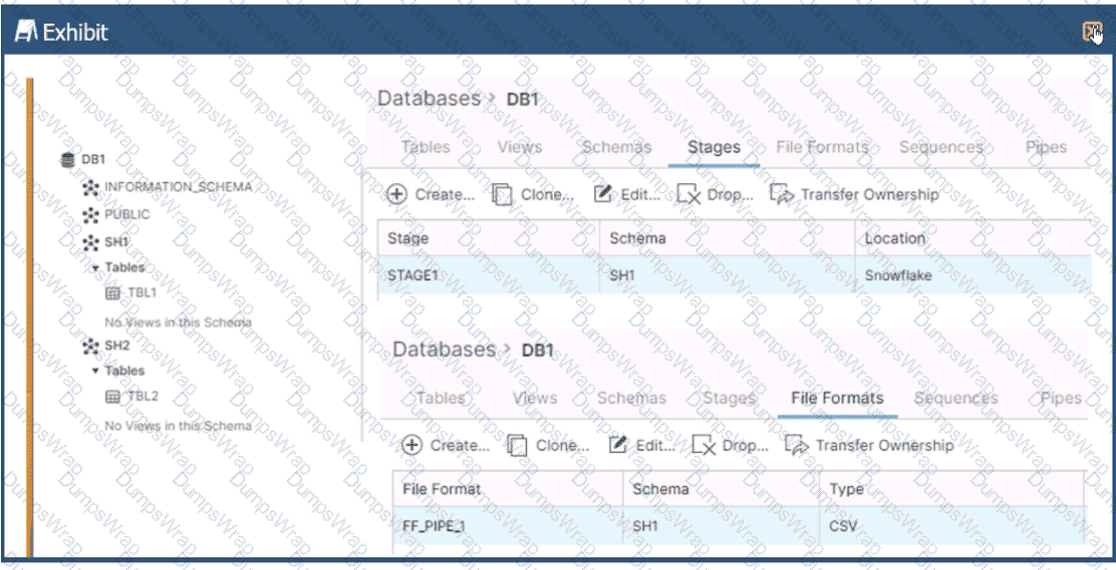
Based on the architecture in the image, how can the data from DB1 be copied into TBL2? (Select TWO).
A)
B)
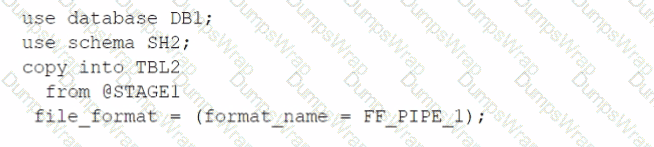
C)
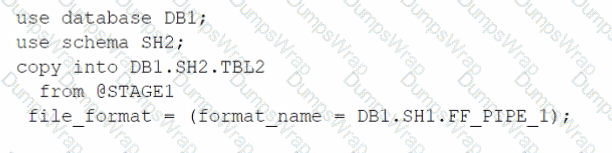
D)
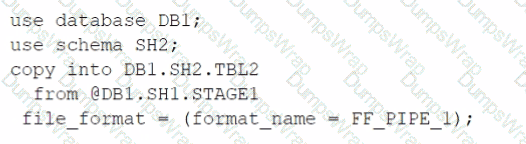
E)

Options:
Option A
Option B
Option C
Option D
Option E
Answer:
B, EExplanation:
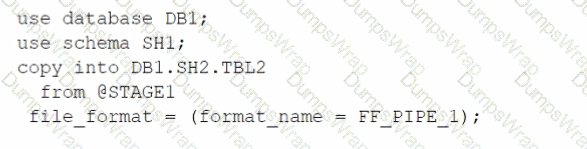
The architecture in the image shows a Snowflake data platform with two databases, DB1 and DB2, and two schemas, SH1 and SH2. DB1 contains a table TBL1 and a stage STAGE1. DB2 contains a table TBL2. The image also shows a snippet of code written in SQL language that copies data from STAGE1 to TBL2 using a file format FF PIPE 1.
To copy data from DB1 to TBL2, there are two possible options among the choices given:
Option B: Use a named external stage that references STAGE1. This option requires creating an external stage object in DB2.SH2 that points to the same location as STAGE1 in DB1.SH1. The external stage can be created using the CREATE STAGE command with the URL parameter specifying the location of STAGE11. For example:
SQLAI-generated code. Review and use carefully. More info on FAQ.
use database DB2;
use schema SH2;
createstage EXT_STAGE1
url=@DB1.SH1.STAGE1;
Then, the data can be copied from the external stage to TBL2 using the COPY INTO command with the FROM parameter specifying the external stage name and the FILE FORMAT parameter specifying the file format name2. For example:
SQLAI-generated code. Review and use carefully. More info on FAQ.
copyintoTBL2
from@EXT_STAGE1
file format=(format name=DB1.SH1.FF PIPE1);
Option E: Use a cross-database query to select data from TBL1 and insert into TBL2. This option requires using the INSERT INTO command with the SELECT clause to query data from TBL1 in DB1.SH1 and insert it into TBL2 in DB2.SH2. The query must use the fully-qualified names of the tables, including the database and schema names3. For example:
SQLAI-generated code. Review and use carefully. More info on FAQ.
use database DB2;
use schema SH2;
insertintoTBL2
select*fromDB1.SH1.TBL1;
The other options are not valid because:
Option A: It uses an invalid syntax for the COPY INTO command. The FROM parameter cannot specify a table name, only a stage name or a file location2.
Option C: It uses an invalid syntax for the COPY INTO command. The FILE FORMAT parameter cannot specify a stage name, only a file format name or options2.
Option D: It uses an invalid syntax for the CREATE STAGE command. The URL parameter cannot specify a table name, only a file location1.
1: CREATE STAGE | Snowflake Documentation
2: COPY INTO table | Snowflake Documentation
3: Cross-database Queries | Snowflake Documentation
An Architect has designed a data pipeline that Is receiving small CSV files from multiple sources. All of the files are landing in one location. Specific files are filtered for loading into Snowflake tables using the copy command. The loading performance is poor.
What changes can be made to Improve the data loading performance?
Options:
Increase the size of the virtual warehouse.
Create a multi-cluster warehouse and merge smaller files to create bigger files.
Create a specific storage landing bucket to avoid file scanning.
Change the file format from CSV to JSON.
Answer:
BExplanation:
According to the Snowflake documentation, the data loading performance can be improved by following some best practices and guidelines for preparing and staging the data files. One of the recommendations is to aim for data files that are roughly 100-250 MB (or larger) in size compressed, as this will optimize the number of parallel operations for a load. Smaller files should be aggregated and larger files should be split to achieve this size range. Another recommendation is to use a multi-cluster warehouse for loading, as this will allow for scaling up or out the compute resources depending on the load demand. A single-cluster warehouse may not be able to handle the load concurrency and throughput efficiently. Therefore, by creating a multi-cluster warehouse and merging smaller files to create bigger files, the data loading performance can be improved. References:
Data Loading Considerations
Preparing Your Data Files
Planning a Data Load
A company has a Snowflake environment running in AWS us-west-2 (Oregon). The company needs to share data privately with a customer who is running their Snowflake environment in Azure East US 2 (Virginia).
What is the recommended sequence of operations that must be followed to meet this requirement?
Options:
1. Create a share and add the database privileges to the share2. Create a new listing on the Snowflake Marketplace3. Alter the listing and add the share4. Instruct the customer to subscribe to the listing on the Snowflake Marketplace
1. Ask the customer to create a new Snowflake account in Azure EAST US 2 (Virginia)2. Create a share and add the database privileges to the share3. Alter the share and add the customer's Snowflake account to the share
1. Create a new Snowflake account in Azure East US 2 (Virginia)2. Set up replication between AWS us-west-2 (Oregon) and Azure East US 2 (Virginia) for the database objects to be shared3. Create a share and add the database privileges to the share4. Alter the share and add the customer's Snowflake account to the share
1. Create a reader account in Azure East US 2 (Virginia)2. Create a share and add the database privileges to the share3. Add the reader account to the share4. Share the reader account's URL and credentials with the customer
Answer:
CExplanation:
Option C is the correct answer because it allows the company to share data privately with the customer across different cloud platforms and regions. The company can create a new Snowflake account in Azure East US 2 (Virginia) and set up replication between AWS us-west-2 (Oregon) and Azure East US 2 (Virginia) for the database objects to be shared. This way, the company can ensure that the data is always up to date and consistent in both accounts. The company can then create a share and add the database privileges to the share, and alter the share and add the customer’s Snowflake account to the share. The customer can then access the shared data from their own Snowflake account in Azure East US 2 (Virginia).
Option A is incorrect because the Snowflake Marketplace is not a private way of sharing data. The Snowflake Marketplace is a public data exchange platform that allows anyone to browse and subscribe to data sets from various providers. The company would not be able to control who can access their data if they use the Snowflake Marketplace.
Option B is incorrect because it requires the customer to create a new Snowflake account in Azure East US 2 (Virginia), which may not be feasible or desirable for the customer. The customer may already have an existing Snowflake account in a different cloud platform or region, and may not want to incur additional costs or complexity by creating a new account.
Option D is incorrect because it involves creating a reader account in Azure East US 2 (Virginia), which is a limited and temporary way of sharing data. A reader account is a special type of Snowflake account that can only access data from a single share, and has a fixed duration of 30 days. The company would have to manage the reader account’s URL and credentials, and renew the account every 30 days. The customer would not be able to use their own Snowflake account to access the shared data, and would have to rely on the company’s reader account.
What is a valid object hierarchy when building a Snowflake environment?
Options:
Account --> Database --> Schema --> Warehouse
Organization --> Account --> Database --> Schema --> Stage
Account --> Schema > Table --> Stage
Organization --> Account --> Stage --> Table --> View
Answer:
BExplanation:
This is the valid object hierarchy when building a Snowflake environment, according to the Snowflake documentation and the web search results. Snowflake is a cloud data platform that supports various types of objects, such as databases, schemas, tables, views, stages, warehouses, and more. These objects are organized in a hierarchical structure, as follows:
Organization: An organization is the top-level entity that represents a group of Snowflake accounts that are related by business needs or ownership. An organization can have one or more accounts, and can enable features such as cross-account data sharing, billing and usage reporting, and single sign-on across accounts12.
Account: An account is the primary entity that represents a Snowflake customer. An account can have one or more databases, schemas, stages, warehouses, and other objects. An account can also have one or more users, roles, and security integrations. An account is associated with a specific cloud platform, region, and Snowflake edition34.
Database: A database is a logical grouping of schemas. A database can have one or more schemas, and can store structured, semi-structured, or unstructured data. A database can also have properties such as retention time, encryption, and ownership56.
Schema: A schema is a logical grouping of tables, views, stages, and other objects. A schema can have one or more objects, and can define the namespace and access control for the objects. A schema can also have properties such as ownership and default warehouse .
Stage: A stage is a named location that references the files in external or internal storage. A stage can be used to load data into Snowflake tables using the COPY INTO command, or to unload data from Snowflake tables using the COPY INTO LOCATION command. A stage can be created at the account, database, or schema level, and can have properties such as file format, encryption, and credentials .
The other options listed are not valid object hierarchies, because they either omit or misplace some objects in the structure. For example, option A omits the organization level and places the warehouse under the schema level, which is incorrect. Option C omits the organization, account, and stage levels, and places the table under the schema level, which is incorrect. Option D omits the database level and places the stage and table under the account level, which is incorrect.
Snowflake Documentation: Organizations
Snowflake Blog: Introducing Organizations in Snowflake
Snowflake Documentation: Accounts
Snowflake Blog: Understanding Snowflake Account Structures
Snowflake Documentation: Databases
Snowflake Blog: How to Create a Database in Snowflake
[Snowflake Documentation: Schemas]
[Snowflake Blog: How to Create a Schema in Snowflake]
[Snowflake Documentation: Stages]
[Snowflake Blog: How to Use Stages in Snowflake]
What Snowflake features should be leveraged when modeling using Data Vault?
Options:
Snowflake’s support of multi-table inserts into the data model’s Data Vault tables
Data needs to be pre-partitioned to obtain a superior data access performance
Scaling up the virtual warehouses will support parallel processing of new source loads
Snowflake’s ability to hash keys so that hash key joins can run faster than integer joins
Answer:
AExplanation:
These two features are relevant for modeling using Data Vault on Snowflake. Data Vault is a data modeling approach that organizes data into hubs, links, and satellites. Data Vault is designed to enable high scalability, flexibility, and performance for data integration and analytics. Snowflake is a cloud data platform that supports various data modeling techniques, including Data Vault. Snowflake provides some features that can enhance the Data Vault modeling, such as:
Snowflake’s support of multi-table inserts into the data model’s Data Vault tables. Multi-table inserts (MTI) are a feature that allows inserting data from a single query into multiple tables in a single DML statement. MTI can improve the performance and efficiency of loading data into Data Vault tables, especially for real-time or near-real-time data integration. MTI can also reduce the complexity and maintenance of the loading code, as well as the data duplication and latency12.
Scaling up the virtual warehouses will support parallel processing of new source loads. Virtual warehouses are a feature that allows provisioning compute resources on demand for data processing. Virtual warehouses can be scaled up or down by changing the size of the warehouse, which determines the number of servers in the warehouse. Scaling up the virtual warehouses can improve the performance and concurrency of processing new source loads into Data Vault tables, especially for large or complex data sets. Scaling up the virtual warehouses can also leverage the parallelism and distribution of Snowflake’s architecture, which can optimize the data loading and querying34.
Snowflake Documentation: Multi-table Inserts
Snowflake Blog: Tips for Optimizing the Data Vault Architecture on Snowflake
Snowflake Documentation: Virtual Warehouses
Snowflake Blog: Building a Real-Time Data Vault in Snowflake
What considerations need to be taken when using database cloning as a tool for data lifecycle management in a development environment? (Select TWO).
Options:
Any pipes in the source are not cloned.
Any pipes in the source referring to internal stages are not cloned.
Any pipes in the source referring to external stages are not cloned.
The clone inherits all granted privileges of all child objects in the source object, including the database.
The clone inherits all granted privileges of all child objects in the source object, excluding the database.
Answer:
A, CAn Architect is designing Snowflake architecture to support fast Data Analyst reporting. To optimize costs, the virtual warehouse is configured to auto-suspend after 2 minutes of idle time. Queries are run once in the morning after refresh, but later queries run slowly.
Why is this occurring?
Options:
The warehouse is not large enough.
The warehouse was not configured as a multi-cluster warehouse.
The warehouse was not created with USE_CACHE = TRUE.
When the warehouse was suspended, the cache was dropped.
Answer:
DExplanation:
Snowflake virtual warehouses maintain a local result and data cache only while the warehouse is running. When a warehouse is suspended—whether manually or via auto-suspend—the local cache is cleared. As a result, subsequent queries cannot benefit from cached data and must re-scan data from remote storage, leading to slower execution (Answer D).
Snowflake does maintain a global result cache at the cloud services layer, but it is only used when the exact same query text is re-executed and the underlying data has not changed. In many analytical workloads, queries vary slightly, preventing reuse of the result cache.
Warehouse size and multi-cluster configuration impact concurrency and throughput, not cache persistence. There is no USE_CACHE parameter in Snowflake. This question tests an architect’s understanding of Snowflake caching behavior and the tradeoff between aggressive auto-suspend for cost control and cache reuse for performance.
=========
QUESTION NO: 32 [Security and Access Management]
A company has two databases, DB1 and DB2.
Role R1 has SELECT on DB1.
Role R2 has SELECT on DB2.
Users should normally access only one database, but a small group must access both databases in the same query with minimal operational overhead.
What is the best approach?
A. Set DEFAULT_SECONDARY_ROLE to R2.
B. Grant R2 to users and use USE_SECONDARY_ROLES for SELECT.
C. Grant R2 to R1 to use privilege inheritance.
D. Grant R2 to users and require USE SECONDARY ROLES.
Answer: B
Snowflake supports secondary roles to allow users to activate additional privileges without changing their primary role. Granting R2 to the users and enabling USE_SECONDARY_ROLES for SELECT allows those users to access both DB1 and DB2 in a single query, while keeping their default role unchanged (Answer B).
This approach minimizes operational overhead because it avoids role restructuring or privilege inheritance changes. It also maintains least privilege by ensuring that users only activate additional access when needed. Setting a default secondary role applies automatically and may unintentionally broaden access. Granting R2 to R1 affects all users with R1, which violates the requirement to limit access to a small group.
This pattern is a common SnowPro Architect design for cross-database access control.
=========
QUESTION NO: 33 [Performance Optimization and Monitoring]
How can an Architect enable optimal clustering to enhance performance for different access paths on a given table?
A. Create multiple clustering keys for a table.
B. Create multiple materialized views with different cluster keys.
C. Create super projections that automatically create clustering.
D. Create a clustering key containing all access path columns.
Answer: B
Snowflake allows only one clustering key per table, which limits its effectiveness when multiple access paths exist. Creating a composite clustering key that includes many columns often leads to poor clustering depth and limited pruning.
Materialized views provide an effective alternative. Each materialized view can be clustered independently, allowing architects to tailor physical data organization to specific query patterns (Answer B). Queries targeting different access paths can then leverage the appropriate materialized view, achieving better pruning and performance.
Super projections are not a Snowflake feature. Creating multiple clustering keys on a single table is not supported. This question reinforces SnowPro Architect knowledge of advanced performance design techniques using materialized views.
=========
QUESTION NO: 34 [Cost Control and Resource Management]
An Architect configures the following timeouts and creates a task using a size X-Small warehouse. The task’s INSERT statement will take ~40 hours.
How long will the INSERT execute?
A. 1 minute
B. 5 minutes
C. 1 hour
D. 40 hours
Answer: A
Tasks in Snowflake are governed by the USER_TASK_TIMEOUT_MS parameter, which specifies the maximum execution time for a single task run. In this scenario, USER_TASK_TIMEOUT_MS = 60000, which equals 1 minute. This timeout applies regardless of account-, session-, or warehouse-level statement timeout settings.
Even though the account, session, and warehouse statement timeouts are higher, the task-specific timeout takes precedence for task execution. As a result, the INSERT statement will be terminated after 1 minute (Answer A).
This is a key SnowPro Architect concept: tasks have their own execution limits that override other timeout parameters. Architects must ensure that task timeouts are configured appropriately for long-running operations or redesign workloads to fit within task constraints.
=========
QUESTION NO: 35 [Snowflake Ecosystem and Integrations]
Several in-house applications need to connect to Snowflake without browser access or redirect capabilities.
What is the Snowflake best practice for authentication?
A. Use Snowflake OAuth.
B. Use usernames and passwords.
C. Use external OAuth.
D. Use key pair authentication with a service user.
Answer: D
For non-interactive, service-to-service authentication scenarios, Snowflake recommends key pair authentication using a service user (Answer D). This method avoids hardcoding passwords, supports automated rotation of credentials, and aligns with security best practices.
OAuth-based methods typically require browser redirects or user interaction, which are not available in this scenario. Username/password authentication introduces security risks and operational overhead.
Key pair authentication enables strong, certificate-based security and is widely used in SnowPro Architect designs for applications, ETL tools, and automated workloads.
A Snowflake Architect is designing a multiple-account design strategy.
This strategy will be MOST cost-effective with which scenarios? (Select TWO).
Options:
The company wants to clone a production database that resides on AWS to a development database that resides on Azure.
The company needs to share data between two databases, where one must support Payment Card Industry Data Security Standard (PCI DSS) compliance but the other one does not.
The company needs to support different role-based access control features for the development, test, and production environments.
The company security policy mandates the use of different Active Directory instances for the development, test, and production environments.
The company must use a specific network policy for certain users to allow and block given IP addresses.
Answer:
B, DExplanation:
B. When dealing with PCI DSS compliance, having separate accounts can be beneficial because it enables strong isolation of environments that handle sensitive data from those that do not. By segregating the compliant from non-compliant resources, an organization can limit the scope of compliance, thus making it a cost-effective strategy.
D. Different Active Directory instances can be managed more effectively and securely when separated into different accounts. This approach allows for distinct identity and access management policies, which can enforce security requirements and minimize the risk of access policy errors between environments.
A Data Engineer is designing a near real-time ingestion pipeline for a retail company to ingest event logs into Snowflake to derive insights. A Snowflake Architect is asked to define security best practices to configure access control privileges for the data load for auto-ingest to Snowpipe.
What are the MINIMUM object privileges required for the Snowpipe user to execute Snowpipe?
Options:
OWNERSHIP on the named pipe, USAGE on the named stage, target database, and schema, and INSERT and SELECT on the target table
OWNERSHIP on the named pipe, USAGE and READ on the named stage, USAGE on the target database and schema, and INSERT end SELECT on the target table
CREATE on the named pipe, USAGE and READ on the named stage, USAGE on the target database and schema, and INSERT end SELECT on the target table
USAGE on the named pipe, named stage, target database, and schema, and INSERT and SELECT on the target table
Answer:
BExplanation:
According to the SnowPro Advanced: Architect documents and learning resources, the minimum object privileges required for the Snowpipe user to execute Snowpipe are:
OWNERSHIP on the named pipe. This privilege allows the Snowpipe user to create, modify, and drop the pipe object that defines the COPY statement for loading data from the stage to the table1.
USAGE and READ on the named stage. These privileges allow the Snowpipe user to access and read the data files from the stage that are loaded by Snowpipe2.
USAGE on the target database and schema. These privileges allow the Snowpipe user to access the database and schema that contain the target table3.
INSERT and SELECT on the target table. These privileges allow the Snowpipe user to insert data into the table and select data from the table4.
The other options are incorrect because they do not specify the minimum object privileges required for the Snowpipe user to execute Snowpipe. Option A is incorrect because it does not include the READ privilege on the named stage, which is required for the Snowpipe user to read the data files from the stage. Option C is incorrect because it does not include the OWNERSHIP privilege on the named pipe, which is required for the Snowpipe user to create, modify, and drop the pipe object. Option D is incorrect because it does not include the OWNERSHIP privilege on the named pipe or the READ privilege on the named stage, which are both required for the Snowpipe user to execute Snowpipe. References: CREATE PIPE | Snowflake Documentation, CREATE STAGE | Snowflake Documentation, CREATE DATABASE | Snowflake Documentation, CREATE TABLE | Snowflake Documentation
An Architect needs to improve the performance of reports that pull data from multiple Snowflake tables, join, and then aggregate the data. Users access the reports using several dashboards. There are performance issues on Monday mornings between 9:00am-11:00am when many users check the sales reports.
The size of the group has increased from 4 to 8 users. Waiting times to refresh the dashboards has increased significantly. Currently this workload is being served by a virtual warehouse with the following parameters:
AUTO-RESUME = TRUE AUTO_SUSPEND = 60 SIZE = Medium
What is the MOST cost-effective way to increase the availability of the reports?
Options:
Use materialized views and pre-calculate the data.
Increase the warehouse to size Large and set auto_suspend = 600.
Use a multi-cluster warehouse in maximized mode with 2 size Medium clusters.
Use a multi-cluster warehouse in auto-scale mode with 1 size Medium cluster, and set min_cluster_count = 1 and max_cluster_count = 4.
Answer:
DExplanation:
The most cost-effective way to increase the availability and performance of the reports during peak usage times, while keeping costs under control, is to use a multi-cluster warehouse in auto-scale mode. Option D suggests using a multi-cluster warehouse with 1 size Medium cluster and allowing it to auto-scale between 1 and 4 clusters based on demand. This setup ensures that additional computing resources are available when needed (e.g., during Monday morning peaks) and are scaled down to minimize costs when the demand decreases. This approach optimizes resource utilization and cost by adjusting the compute capacity dynamically, rather than maintaining a larger fixed size or multiple clusters continuously.
A company is using a Snowflake account in Azure. The account has SAML SSO set up using ADFS as a SCIM identity provider. To validate Private Link connectivity, an Architect performed the following steps:
* Confirmed Private Link URLs are working by logging in with a username/password account
* Verified DNS resolution by running nslookups against Private Link URLs
* Validated connectivity using SnowCD
* Disabled public access using a network policy set to use the company’s IP address range
However, the following error message is received when using SSO to log into the company account:
IP XX.XXX.XX.XX is not allowed to access snowflake. Contact your local security administrator.
What steps should the Architect take to resolve this error and ensure that the account is accessed using only Private Link? (Choose two.)
Options:
Alter the Azure security integration to use the Private Link URLs.
Add the IP address in the error message to the allowed list in the network policy.
Generate a new SCIM access token using system$generate_scim_access_token and save it to Azure AD.
Update the configuration of the Azure AD SSO to use the Private Link URLs.
Open a case with Snowflake Support to authorize the Private Link URLs’ access to the account.
Answer:
B, DExplanation:
The error message indicates that the IP address in the error message is not allowed to access Snowflake because it is not in the allowed list of the network policy. The network policy is a feature that allows restricting access to Snowflake based on IP addresses or ranges. To resolve this error, the Architect should take the following steps:
Add the IP address in the error message to the allowed list in the network policy. This will allow the IP address to access Snowflake using the Private Link URLs. Alternatively, the Architect can disable the network policy if it is not required for security reasons.
Update the configuration of the Azure AD SSO to use the Private Link URLs. This will ensure that the SSO authentication process uses the Private Link URLs instead of the public URLs. The configuration can be updated by following the steps in the Azure documentation1.
These two steps should resolve the error and ensure that the account is accessed using only Private Link. The other options are not necessary or relevant for this scenario. Altering the Azure security integration to use the Private Link URLs is not required because the security integration is used for SCIM provisioning, not for SSO authentication. Generating a new SCIM access token using system$generate_scim_access_token and saving it to Azure AD is not required because the SCIM access token is used for SCIM provisioning, not for SSO authentication. Opening a case with Snowflake Support to authorize the Private Link URLs’ access to the account is not required because the authorization can be done by the account administrator using the SYSTEM$AUTHORIZE_PRIVATELINK function2.
What integration object should be used to place restrictions on where data may be exported?
Options:
Stage integration
Security integration
Storage integration
API integration
Answer:
CExplanation:
In Snowflake, a storage integration is used to define and configure external cloud storage that Snowflake will interact with. This includes specifying security policies for access control. One of the main features of storage integrations is the ability to set restrictions on where data may be exported. This is done by binding the storage integration to specific cloud storage locations, thereby ensuring that Snowflake can only access those locations. It helps to maintain control over the data and complies with data governance and security policies by preventing unauthorized data exports to unspecified locations.
An Architect has selected the Snowflake Connector for Python to integrate and manipulate Snowflake data using Python to handle large data sets and complex analyses.
Which features should the Architect consider in terms of query execution and data type conversion? (Select TWO).
Options:
The large queries will require conn.cursor() to execute.
The Connector supports asynchronous and synchronous queries.
The Connector converts NUMBER data types to DECIMAL by default.
The Connector converts Snowflake data types to native Python data types by default.
The Connector converts data types to STRING by default.
Answer:
B, DExplanation:
The Snowflake Connector for Python is designed to integrate Snowflake with Python-based analytics, ETL, and application workloads. One key capability is its support for both synchronous and asynchronous query execution, which allows architects to design scalable pipelines and applications that can submit long-running queries without blocking execution threads (Answer B). This is particularly important for large data sets and complex analytical workloads, where asynchronous execution improves throughput and application responsiveness.
Additionally, the connector automatically converts Snowflake data types into native Python data types wherever possible (Answer D). For example, VARCHAR values are returned as Python strings, numeric values as Python numeric types, and timestamps as Python datetime objects. This default behavior simplifies downstream processing and analysis, eliminating the need for manual casting or parsing in most use cases.
The connector does not convert all values to strings by default, nor does it specifically convert NUMBER to DECIMAL as a required behavior; instead, type conversion is handled intelligently to match Python equivalents. While cursors are used to execute queries, this is standard DB-API behavior and not a distinguishing feature for performance or architecture decisions. For SnowPro Architect candidates, understanding these connector capabilities is essential when designing Python-based data engineering or analytics solutions on Snowflake.
=========
QUESTION NO: 7 [Security and Access Management]
Which parameters can only be set at the account level? (Select TWO).
A. DATA_RETENTION_TIME_IN_DAYS
B. ENFORCE_SESSION_POLICY
C. MAX_CONCURRENCY_LEVEL
D. PERIODIC_DATA_REKEYING
E. TIMESTAMP_INPUT_FORMAT
Answer: B, D
Snowflake parameters exist at different levels of the hierarchy, including account, user, session, warehouse, database, schema, and object levels. However, some parameters are intentionally restricted to the account level because they enforce global security or compliance behavior across the entire Snowflake environment.
ENFORCE_SESSION_POLICY is an account-level parameter that determines whether session policies (such as authentication or session controls) are enforced across all users. Because this impacts authentication and session behavior globally, it cannot be overridden at lower scopes (Answer B).
PERIODIC_DATA_REKEYING is another account-level-only parameter. It controls automatic re-encryption (rekeying) of data to meet strict compliance and security requirements. Rekeying affects all encrypted data in the account and must therefore be centrally managed at the account level (Answer D).
By contrast, DATA_RETENTION_TIME_IN_DAYS can be set at multiple levels (account, database, schema, and table). MAX_CONCURRENCY_LEVEL is a warehouse-level parameter, and TIMESTAMP_INPUT_FORMAT can be set at account, user, or session levels. From a SnowPro Architect perspective, understanding which parameters are global versus scoped is critical for designing secure, compliant, and governable Snowflake architectures.
=========
QUESTION NO: 8 [Snowflake Data Engineering]
A MERGE statement is designed to return duplicated values of a column ID in a USING clause. The column ID is used in the merge condition. The MERGE statement contains these two clauses:
WHEN NOT MATCHED THEN INSERT
WHEN MATCHED THEN UPDATE
What will be the result when this query is run?
A. The MERGE statement will run successfully using the default parameter settings.
B. If the value of the ID is present in the target table, all occurrences will be updated.
C. If the value of the ID is present in the target table, only the first occurrence will be updated.
D. If the ERROR_ON_NONDETERMINISTIC_MERGE = FALSE parameter is set, the MERGE statement will run successfully.
Answer: D
In Snowflake, MERGE statements require deterministic behavior when matching rows between the source (USING clause) and the target table. If the USING clause contains duplicate values for the join condition (in this case, column ID), Snowflake cannot deterministically decide which source row should update or insert into the target. By default, this results in an error to prevent unintended data corruption.
Snowflake provides the parameter ERROR_ON_NONDETERMINISTIC_MERGE to control this behavior. When set to TRUE (the default), Snowflake raises an error if nondeterministic matches are detected. When this parameter is explicitly set to FALSE, Snowflake allows the MERGE statement to run successfully even when duplicate keys exist in the source, accepting the nondeterministic outcome (Answer D).
Snowflake does not guarantee updating all or only the first occurrence in such cases; instead, the behavior is undefined unless the parameter is adjusted. This question tests an architect’s understanding of data correctness, deterministic processing, and safe data engineering practices—key topics within the SnowPro Architect exam scope.
=========
QUESTION NO: 9 [Snowflake Data Engineering]
An Architect needs to define a table structure for an unfamiliar semi-structured data set. The Architect wants to identify a list of distinct key names present in the semi-structured objects.
What function should be used?
A. FLATTEN with the RECURSIVE argument
B. INFER_SCHEMA
C. PARSE_JSON
D. RESULT_SCAN
Answer: A
When working with unfamiliar semi-structured data such as JSON, a common first step is to explore its structure and identify all possible keys. Snowflake’s FLATTEN function is specifically designed to explode VARIANT, OBJECT, or ARRAY data into relational form. Using the RECURSIVE option allows FLATTEN to traverse nested objects and arrays, returning all nested keys regardless of depth (Answer A).
This approach enables architects to query and aggregate distinct key names, making it ideal for schema discovery and exploratory analysis. INFER_SCHEMA, by contrast, is used primarily with staged files to infer column definitions for external tables or COPY operations, not for exploring existing VARIANT data already stored in tables. PARSE_JSON simply converts a string into a VARIANT type and does not help identify keys. RESULT_SCAN is used to query the results of a previously executed query and is unrelated to schema discovery.
For SnowPro Architect candidates, this highlights an important semi-structured data design pattern: using FLATTEN (often with RECURSIVE) to explore, profile, and understand evolving data structures before committing to a relational schema or transformation pipeline.
=========
QUESTION NO: 10 [Security and Access Management]
A global retail company must ensure comprehensive data governance, security, and compliance with various international regulations while using Snowflake for data warehousing and analytics.
What should an Architect do to meet these requirements? (Select TWO).
A. Create a network policy at the column level to secure the data.
B. Use column-level security to restrict access to specific columns.
C. Store encryption keys on an external server to manage encryption manually.
D. Implement Role-Based Access Control (RBAC) to assign roles and permissions.
E. Enable Secure Data Sharing with external partners for collaborative purposes.
Answer: B, D
Snowflake provides built-in governance and security mechanisms that align with global regulatory requirements. Column-level security—implemented through features such as dynamic data masking and row access policies—allows architects to restrict access to sensitive data at a granular level based on roles or conditions (Answer B). This is essential for compliance with regulations such as GDPR, HIPAA, and similar frameworks that require limiting access to personally identifiable or sensitive data.
Role-Based Access Control (RBAC) is the foundation of Snowflake’s security model and is critical for governing who can access which data and perform which actions (Answer D). By assigning privileges to roles instead of users, organizations can centrally manage permissions, enforce separation of duties, and audit access more effectively.
Snowflake does not support column-level network policies, and encryption keys are managed by Snowflake (or via Tri-Secret Secure), not manually by customers. Secure Data Sharing is useful for collaboration but is not a core requirement for governance and compliance in this scenario. For the SnowPro Architect exam, mastering RBAC and column-level security is essential for designing compliant and secure Snowflake architectures.
How does a standard virtual warehouse policy work in Snowflake?
Options:
It conserves credits by keeping running clusters fully loaded rather than starting additional clusters.
It starts only if the system estimates that there is a query load that will keep the cluster busy for at least 6 minutes.
It starts only f the system estimates that there is a query load that will keep the cluster busy for at least 2 minutes.
It prevents or minimizes queuing by starting additional clusters instead of conserving credits.
Answer:
DExplanation:
A standard virtual warehouse policy is one of the two scaling policies available for multi-cluster warehouses in Snowflake. The other policy is economic. A standard policy aims to prevent or minimize queuing by starting additional clusters as soon as the current cluster is fully loaded, regardless of the number of queries in the queue. This policy can improve query performance and concurrency, but it may also consume more credits than an economic policy, which tries to conserve credits by keeping the running clusters fully loaded before starting additional clusters. The scaling policy can be set when creating or modifying a warehouse, and it can be changed at any time.
Snowflake Documentation: Multi-cluster Warehouses
Snowflake Documentation: Scaling Policy for Multi-cluster Warehouses
The following table exists in the production database:
A regulatory requirement states that the company must mask the username for events that are older than six months based on the current date when the data is queried.
How can the requirement be met without duplicating the event data and making sure it is applied when creating views using the table or cloning the table?
Options:
Use a masking policy on the username column using a entitlement table with valid dates.
Use a row level policy on the user_events table using a entitlement table with valid dates.
Use a masking policy on the username column with event_timestamp as a conditional column.
Use a secure view on the user_events table using a case statement on the username column.
Answer:
CExplanation:
A masking policy is a feature of Snowflake that allows masking sensitive data in query results based on the role of the user and the condition of the data. A masking policy can be applied to a column in a table or a view, and it can use another column in the same table or view as a conditional column. A conditional column is a column that determines whether the masking policy is applied or not based on its value1.
In this case, the requirement can be met by using a masking policy on the username column with event_timestamp as a conditional column. The masking policy can use a function that masks the username if the event_timestamp is older than six months based on the current date, and returns the original username otherwise. The masking policy canbe applied to the user_events table, and it will also be applied when creating views using the table or cloning the table2.
The other options are not correct because:
A. Using a masking policy on the username column using an entitlement table with valid dates would require creating another table that stores the valid dates for each username, and joining it with the user_events table in the masking policy function. This would add complexity and overhead to the masking policy, and it would not use the event_timestamp column as the condition for masking.
B. Using a row level policy on the user_events table using an entitlement table with valid dates would require creating another table that stores the valid dates for each username, and joining it with the user_events table in the row access policy function. This would filter out the rows that have event_timestamp older than six months based on the valid dates, instead of masking the username column. This would not meet the requirement of masking the username, and it would also reduce the visibility of the event data.
D. Using a secure view on the user_events table using a case statement on the username column would require creating a view that uses a case expression to mask the username column based on the event_timestamp column. This would meet the requirement of masking the username, but it would not be applied when cloning the table. A secure view is a view that prevents the underlying data from being exposed by queries on the view. However, a secure view does not prevent the underlying data from being exposed by cloning the table3.
1: Masking Policies | Snowflake Documentation
2: Using Conditional Columns in Masking Policies | Snowflake Documentation
3: Secure Views | Snowflake Documentation
A retail company has over 3000 stores all using the same Point of Sale (POS) system. The company wants to deliver near real-time sales results to category managers. The stores operate in a variety of time zones and exhibit a dynamic range of transactions each minute, with some stores having higher sales volumes than others.
Sales results are provided in a uniform fashion using data engineered fields that will be calculated in a complex data pipeline. Calculations include exceptions, aggregations, and scoring using external functions interfaced to scoring algorithms. The source data for aggregations has over 100M rows.
Every minute, the POS sends all sales transactions files to a cloud storage location with a naming convention that includes store numbers and timestamps to identify the set of transactions contained in the files. The files are typically less than 10MB in size.
How can the near real-time results be provided to the category managers? (Select TWO).
Options:
All files should be concatenated before ingestion into Snowflake to avoid micro-ingestion.
A Snowpipe should be created and configured with AUTO_INGEST = true. A stream should be created to process INSERTS into a single target table using the stream metadata to inform the store number and timestamps.
A stream should be created to accumulate the near real-time data and a task should be created that runs at a frequency that matches the real-time analytics needs.
An external scheduler should examine the contents of the cloud storage location and issue SnowSQL commands to process the data at a frequency that matches the real-time analytics needs.
The copy into command with a task scheduled to run every second should be used to achieve the near-real time requirement.
Answer:
B, CExplanation:
To provide near real-time sales results to category managers, the Architect can use the following steps:
Create an external stage that references the cloud storage location where the POS sends the sales transactions files. The external stage should use the file format and encryption settings that match the source files2
Create a Snowpipe that loads the files from the external stage into a target table in Snowflake. The Snowpipe should be configured with AUTO_INGEST = true, which means that it will automatically detect and ingest new files as they arrive in the external stage. The Snowpipe should also use a copy option to purge the files from the external stage after loading, to avoid duplicate ingestion3
Create a stream on the target table that captures the INSERTS made by the Snowpipe. The stream should include the metadata columns that provide information about the file name, path, size, and last modified time. The stream should also have a retention period that matches the real-time analytics needs4
Create a task that runs a query on the stream to process the near real-time data. The query should use the stream metadata to extract the store number and timestamps from the file name and path, and perform the calculations for exceptions, aggregations, and scoring using external functions. The query should also output the results to another table or view that can be accessed by the category managers. The task should be scheduled to run at a frequency that matches the real-time analytics needs, such as every minute or every 5 minutes.
The other options are not optimal or feasible for providing near real-time results:
All files should be concatenated before ingestion into Snowflake to avoid micro-ingestion. This option is not recommended because it would introduce additional latency and complexity in the data pipeline. Concatenating files would require an external process or service that monitors the cloud storage location and performs the file merging operation. This would delay the ingestion of new files into Snowflake and increase the risk of data loss or corruption. Moreover, concatenating files would not avoid micro-ingestion, as Snowpipe would still ingest each concatenated file as a separate load.
An external scheduler should examine the contents of the cloud storage location and issue SnowSQL commands to process the data at a frequency that matches the real-time analytics needs. This option is not necessary because Snowpipe can automatically ingest new files from the external stage without requiring an external trigger or scheduler. Using an external scheduler would add more overhead and dependency to the data pipeline, and it would not guarantee near real-time ingestion, as it would depend on the polling interval and the availability of the external scheduler.
The copy into command with a task scheduled to run every second should be used to achieve the near-real time requirement. This option is not feasible because tasks cannot be scheduled to run every second in Snowflake. The minimum interval for tasks is one minute, and even that is not guaranteed, as tasks are subject to scheduling delays and concurrency limits. Moreover, using the copy into command with a task would not leverage the benefits of Snowpipe, such as automatic file detection, load balancing, and micro-partition optimization. References:
1: SnowPro Advanced: Architect | Study Guide
2: Snowflake Documentation | Creating Stages
3: Snowflake Documentation | Loading Data Using Snowpipe
4: Snowflake Documentation | Using Streams and Tasks for ELT
Snowflake Documentation | Creating Tasks
Snowflake Documentation | Best Practices for Loading Data
Snowflake Documentation | Using the Snowpipe REST API
Snowflake Documentation | Scheduling Tasks
SnowPro Advanced: Architect | Study Guide
Creating Stages
Loading Data Using Snowpipe
Using Streams and Tasks for ELT
[Creating Tasks]
[Best Practices for Loading Data]
[Using the Snowpipe REST API]
[Scheduling Tasks]
A Snowflake Architect created a new data share and would like to verify that only specific records in secure views are visible within the data share by the consumers.
What is the recommended way to validate data accessibility by the consumers?
Options:
Create reader accounts as shown below and impersonate the consumers by logging in with their credentials.create managed account reader_acctl admin_name = userl , adroin_password ■ 'Sdfed43da!44T , type = reader;
Create a row access policy as shown below and assign it to the data share.create or replace row access policy rap_acct as (acct_id varchar) returns boolean -> case when 'acctl_role' = current_role() then true else false end;
Set the session parameter called SIMULATED_DATA_SHARING_C0NSUMER as shown below in order to impersonate the consumer accounts.alter session set simulated_data_sharing_consumer - 'Consumer Acctl*
Alter the share settings as shown below, in order to impersonate a specific consumer account.alter share sales share set accounts = 'Consumerl’ share restrictions = true
Answer:
CExplanation:
The SIMULATED_DATA_SHARING_CONSUMER session parameter allows a data provider to simulate the data access of a consumer account without creating a reader account or logging in with the consumer credentials. This parameter can be used to validate the data accessibility by the consumers in a data share, especially when using secure views or secure UDFs that filter data based on the current account or role. By setting this parameter to the name of a consumer account, the data provider can see the same data as the consumer would see when querying the shared database. This is a convenient and efficient way to test the data sharing functionality and ensure that only the intended data is visible to the consumers.
A global company needs to securely share its sales and Inventory data with a vendor using a Snowflake account.
The company has its Snowflake account In the AWS eu-west 2 Europe (London) region. The vendor's Snowflake account Is on the Azure platform in the West Europe region. How should the company's Architect configure the data share?
Options:
1. Create a share.2. Add objects to the share.3. Add a consumer account to the share for the vendor to access.
1. Create a share.2. Create a reader account for the vendor to use.3. Add the reader account to the share.
1. Create a new role called db_share.2. Grant the db_share role privileges to read data from the company database and schema.3. Create a user for the vendor.4. Grant the ds_share role to the vendor's users.
1. Promote an existing database in the company's local account to primary.2. Replicate the database to Snowflake on Azure in the West-Europe region.3. Create a share and add objects to the share.4. Add a consumer account to the share for the vendor to access.
Answer:
AExplanation:
The correct way to securely share data with a vendor using a Snowflake account on a different cloud platform and region is to create a share, add objects to the share, and add a consumer account to the share for the vendor to access. This way, the company can control what data is shared, who can access it, and how long the share is valid. The vendor can then query the shared data without copying or moving it to their own account. The other options are either incorrect or inefficient, as they involve creating unnecessary reader accounts, users, roles, or database replication.
Consider the following COPY command which is loading data with CSV format into a Snowflake table from an internal stage through a data transformation query.
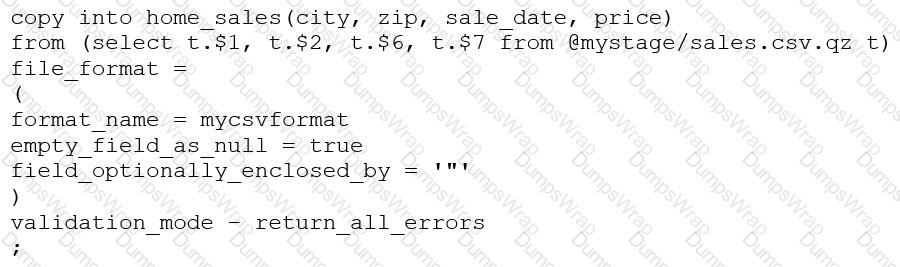
This command results in the following error:
SQL compilation error: invalid parameter 'validation_mode'
Assuming the syntax is correct, what is the cause of this error?
Options:
The VALIDATION_MODE parameter supports COPY statements that load data from external stages only.
The VALIDATION_MODE parameter does not support COPY statements with CSV file formats.
The VALIDATION_MODE parameter does not support COPY statements that transform data during a load.
The value return_all_errors of the option VALIDATION_MODE is causing a compilation error.
Answer:
CExplanation:
The VALIDATION_MODE parameter is used to specify the behavior of the COPY statement when loading data into a table. It is used to specify whether the COPY statement should return an error if any of the rows in the file are invalid or if it should continue loading the valid rows. The VALIDATION_MODE parameter is only supported for COPY statements that load data from external stages1.
The query in the question uses a data transformation query to load data from an internal stage. A data transformation query is a query that transforms the data during the load process, such as parsing JSON or XML data, applying functions, or joining with other tables2.
According to the documentation, VALIDATION_MODE does not support COPY statements that transform data during a load. If the parameter is specified, the COPY statement returns an error1. Therefore, option C is the correct answer.
COPY INTO