
Halloween Sale Special - 75% Discount Offer - Ends in 0d 00h 00m 00s - Coupon code: w75best

WatchGuard Network-Security-Essentials Dumps

Network Security Essentials for Locally-Managed Fireboxes Questions and Answers

Question 1

Your network was the target of an attack last week. You want to learn more about the source of the attack. What monitoring tools can you use to get started? (Select one.)

Options:

A.

Traffic Monitor in Firebox System Manager

B.

FireWatch in Fireware Web UI

C.

Discovery in Fireware Web UI

D.

WatchGuard Log Catalog

E.

Log Search and reports in WatchGuard Cloud or Dimension

Question 2

When does a network host make an ARP request? (Select one.)

Options:

A.

To find the IP address associated with a hostname

B.

To find the IP address of the default gateway

C.

To find the hostname associated with an IP address

D.

To find the MAC address associated with an IP address

E.

To find the IP address associated with a MAC address

Question 3

You enable a network device monitoring application on a server with IP address 10.0.1.22. After you run the application, it reports that it cannot ping the Firebox at 10.0.1.1, and you see this log message in Traffic Monitor. What is the most likely cause of this issue? (Select one.)

(Log: Deny 10.0.1.22 10.0.1.1 icmp/8 255-Unhandled Internal Packet-00)

Options:

A.

The server IP address is on the Blocked Sites list

B.

There is no route on the Firebox for the 10.0.1.0/24 subnet

C.

The dynamic NAT statement is not configured correctly for the 10.0.1.0/24 subnet

D.

The default Unhandled Internal Packet policy is at the top of the policy set

E.

There is no policy that allows Ping traffic from the server to the Firebox alias

Question 4

Some management tasks require you to use a specific management interface. Match the task below with the management interface that supports it.
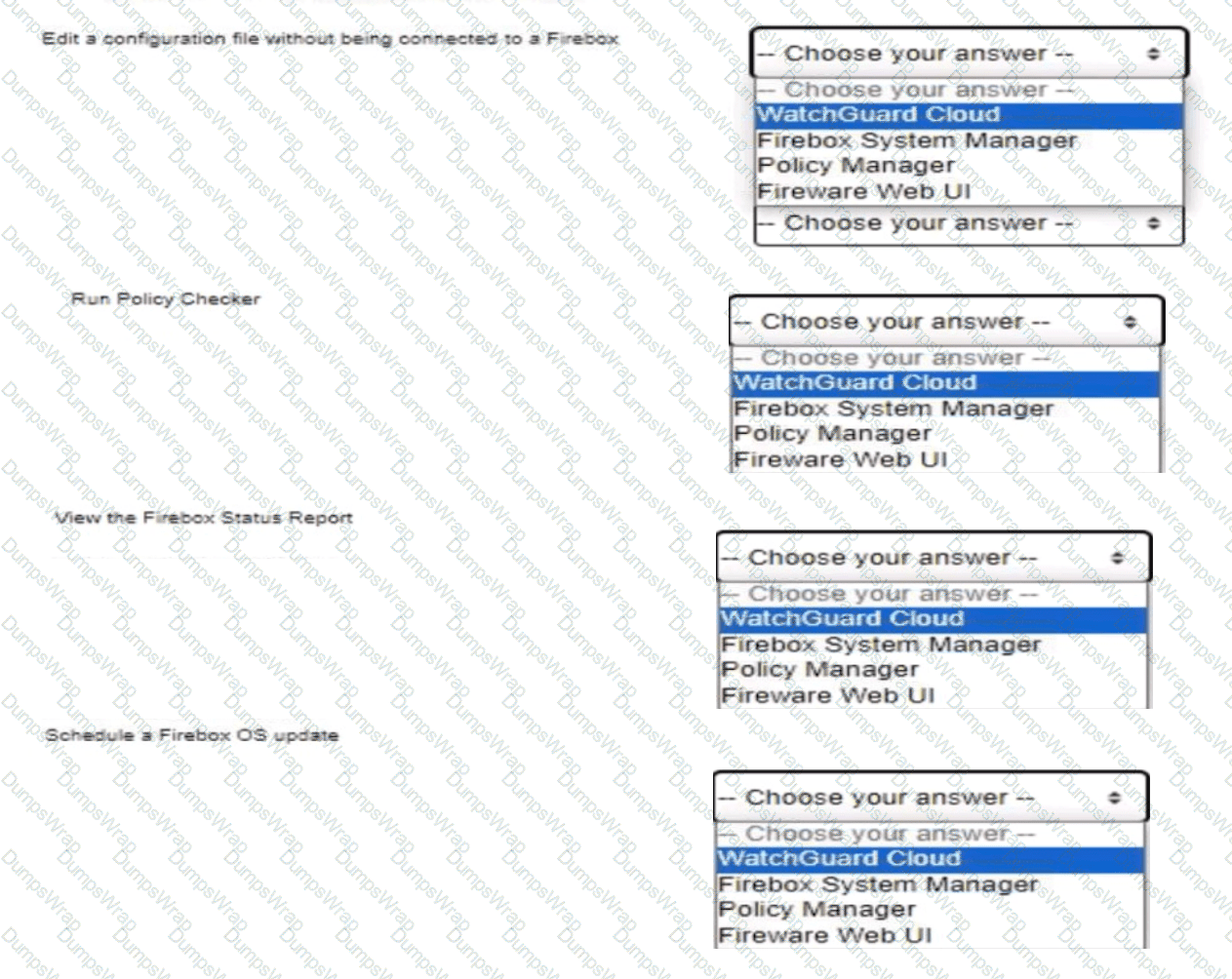
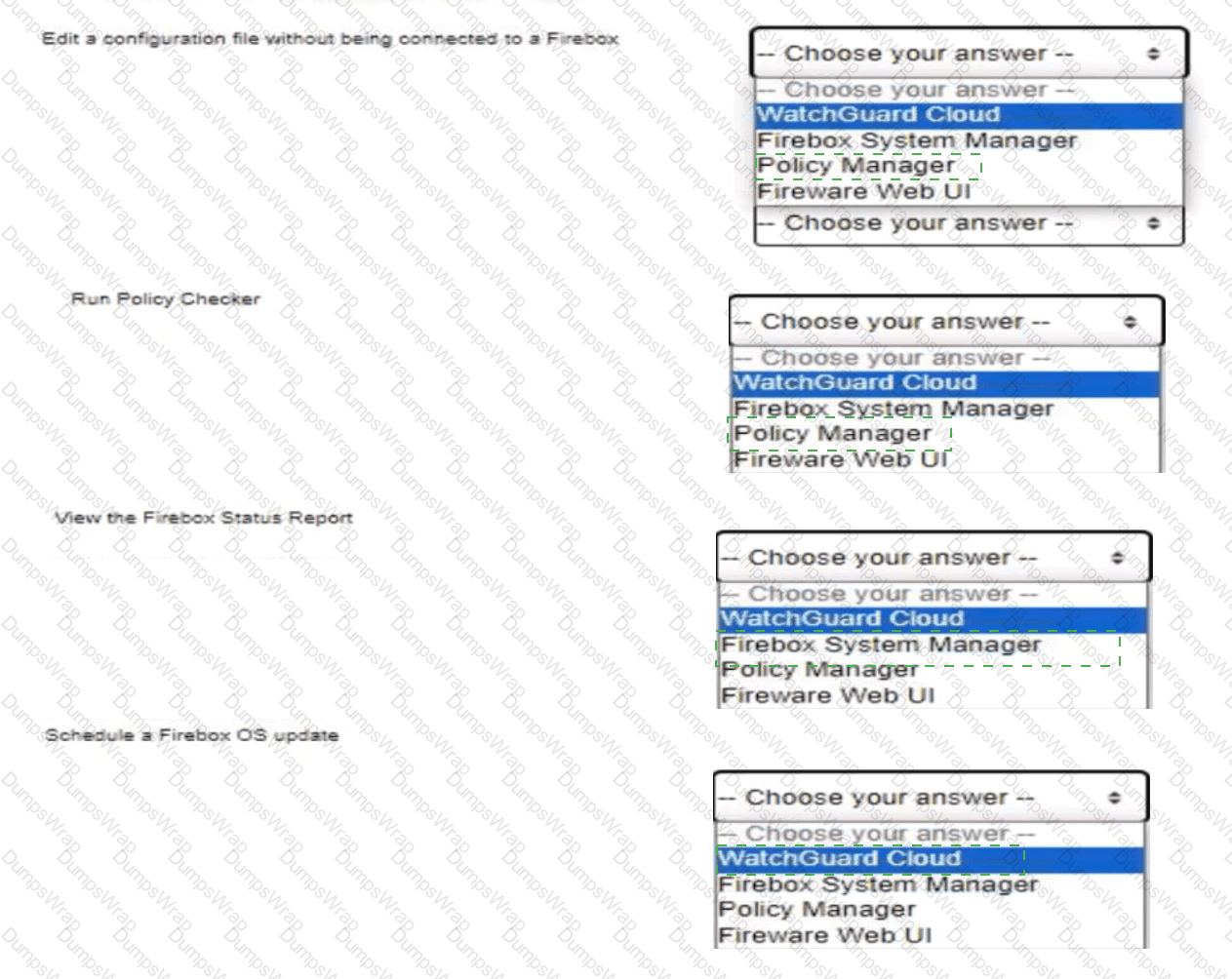
as

Options:

Question 5

What does a Firebox configured with default firewall policies do with outbound traffic that does not have a configured route? (Select one.)

Options:

A.

Sends the traffic to the loopback interface

B.

Drops the traffic

C.

Denies the traffic

D.

Sends the traffic to the default gateway

Question 6

You recently installed network monitoring software on your server and then performed a port scan for each IP address in the network. When the scan finishes, you notice that the server lost access to the Internet. What is the most likely cause of this issue? (Select one.)

Options:

A.

The server IP address was added to the Blocked Sites list because of the default packet handling port scan rule

B.

The policy that handles outbound traffic was automatically disabled because the Firebox was port scanned

C.

The port scan traffic matched a default HTTP proxy content type rule configured with a Block action

D.

The server IP address was added to the Blocked Sites list because the network was flooded with ESP traffic during the port scan

E.

The server IP address was added to the Blocked Sites list because an IPS signature was matched during the port scan

Question 7

Which WatchGuard tools can you use to review the traffic log messages generated by your Firebox? (Select three.)

Options:

A.

FireWatch

B.

Policy Manager

C.

Traffic Monitor

D.

Dimension

E.

Status Report

F.

WatchGuard Cloud

Question 8

The Audit Trail report shows information about Firebox configuration changes. How can you make sure the Audit Trail report includes the names of the specific person that made each change? (Select one.)

Options:

A.

Enable the Logging > AuditTrack feature

B.

Create unique device administrator accounts for each Firebox administrative user

C.

Configure all Firebox administrators to use the Authentication Portal to log in to the Firebox

D.

Install the SSO Client on each computer used by Firebox administrators

E.

Configure your RADIUS server to send accounting messages to the Firebox

Question 9

After you enable content inspection, your users cannot connect to the business-critical website hosted by a trusted partner. To try to resolve this issue, you added a Domain Name exception of but users still cannot connect to the website. What is the Domain Name exception format to add to the HTTP proxy to correctly resolve this issue? (Select two.)

Options:

A.

*.example.com

B.

/example.com/

C.

/account.html

E.

example.com/

Question 10

With the policies configured as shown in this image, HTTP traffic can be sent and received through Branch Office VPN tunnel 1 and tunnel 2.

Options:

A.

True

B.

False

Question 11

You configured your Firebox interfaces and routes and want to verify the status of the routes and connected hosts. You found this information in Firebox System Manager > Status Report. What is true about the IPv4 routes and ARP table in this deployment? (Select one.)
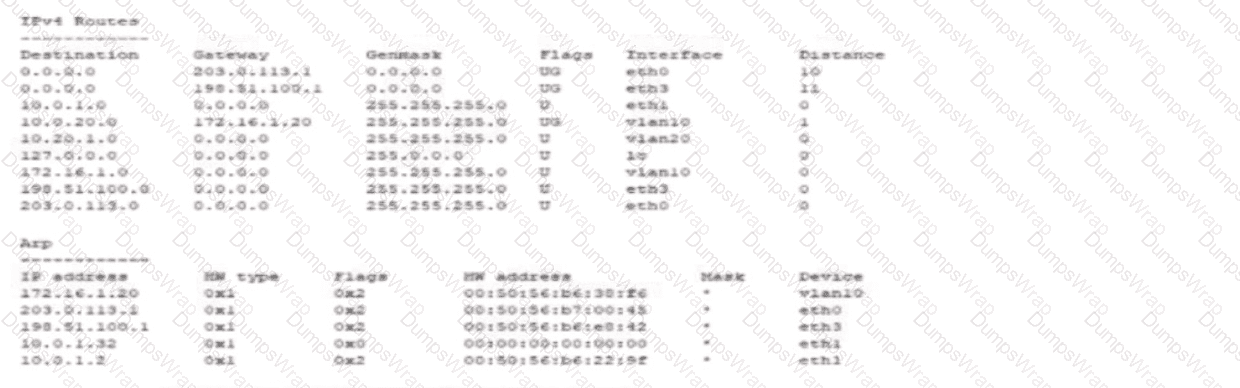
as

Options:

A.

The Firebox is publicly reachable at 198.51.100.1 through the eth0 interface

B.

10.0.20.53 can be reached through the vlan20 interface

C.

The MAC address for the default gateway that currently routes traffic is 00:50:56:b5:e5:42

D.

The MAC address for 172.16.1.20 is 00:50:56:b0:22:0f

E.

The Firebox cannot resolve a MAC address for 10.0.1.32

Question 12

When Mobile VPN is enabled, remote users receive the domain name and DNS servers from the Firebox Network Configuration by default.

Options:

A.

True

B.

False

Question 13

A Firebox has an external IP address of 203.0.113.100. A public web server with the IP address 10.0.1.80 is connected to a Firebox internal network. What is the effect of the policy shown in this image? (Select one.)
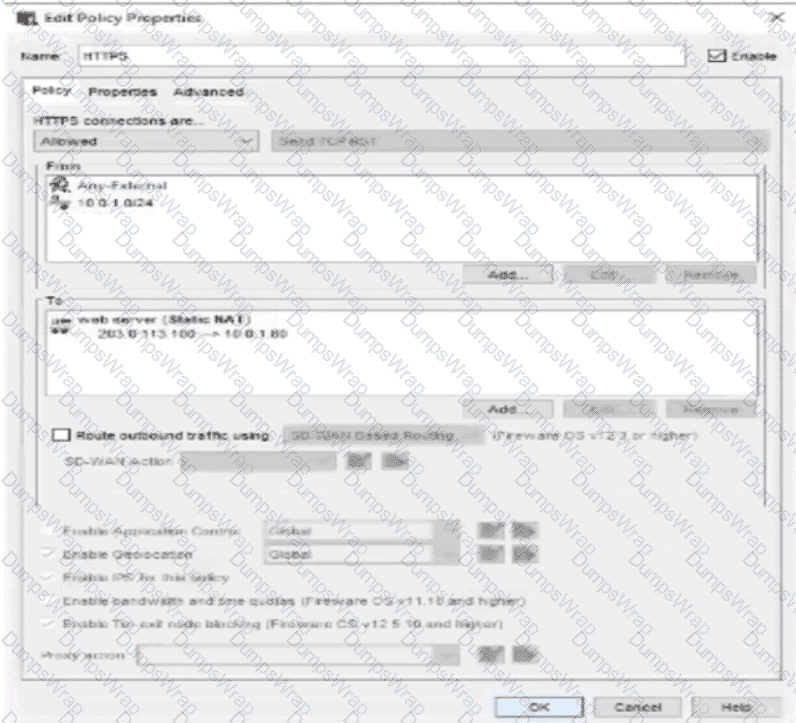
as

Options:

A.

Allows users on the Internet to connect to the 10.0.1.80 IP address of the web server

B.

Applies dynamic NAT to the 10.0.1.80 IP address of the web server to allow inbound connections

C.

Allows users on the Internet and the 10.0.1.0/24 network to use the internal IP address of the Firebox to connect to the web server

D.

Allows users on the Internet and the 10.0.1.0/24 network to use the external IP address of the Firebox to connect to the web server

Question 14

Which of these statements are true for this log message? (Select three.)

(Log context: A Traffic Monitor log entry detailing an HTTP connection through an HTTP-proxy policy that was terminated due to a signature match by Gateway AntiVirus)

Options:

A.

Application Control detected the application as a virus

B.

The URL path matched the proxy content type restrictions

C.

The connection used an HTTP Proxy

D.

Gateway AntiVirus detected a virus

E.

The connection was denied

F.

The connection used an HTTP Packet Filter

Question 15

You can add your Firebox to WatchGuard Cloud but continue to manage it locally. When you do this, what additional features does WatchGuard Cloud provide for your locally-managed Firebox? (Select two.)

Options:

A.

Automatic Firebox firmware updates

B.

Ability to schedule Firebox firmware updates

C.

Real-time network traffic data

D.

Unified event correlation and analysis

E.

Live status and access to reports

Question 16

What is true about this log message? (Select three.)

(Log context: Outbound HTTPS connection inspected through HTTPS-proxy with Application Control enabled, matching SNI inbox.google.com under TLS v1.3 and classified as Gmail)

Options:

A.

The Application Control service has identified the traffic as Gmail

B.

The traffic is allowed inbound through the Firebox

C.

The HTTPS proxy identified a TLS v1.3 connection to the inbox.google.com SNI domain

D.

The Gateway AntiVirus service denied the email traffic because it matches the 18.254 virus signature

E.

The traffic is allowed outbound through the Firebox

Question 17

You have five public IP addresses available from your ISP. When you create a Static NAT action, you want to specify one of the public IP addresses for inbound traffic but do not see it in the IP address drop-down list. How can you change the Firebox configuration to see additional public IP addresses in the Static NAT action? (Select one.)

Options:

A.

Add secondary IP addresses to the external interface

B.

Configure 1-to-1 NAT for your entire subnet

C.

Add the public IP addresses to the From field of the policy that uses the Static NAT action

D.

Enable the Set Source IP option in the policy

E.

Add the IP addresses to the Dynamic NAT configuration

Question 18

You have an existing network infrastructure built out that uses tagged and untagged VLAN networks. Based on the diagram below, which VLANs must you add to the Firebox interface? (Select one.)
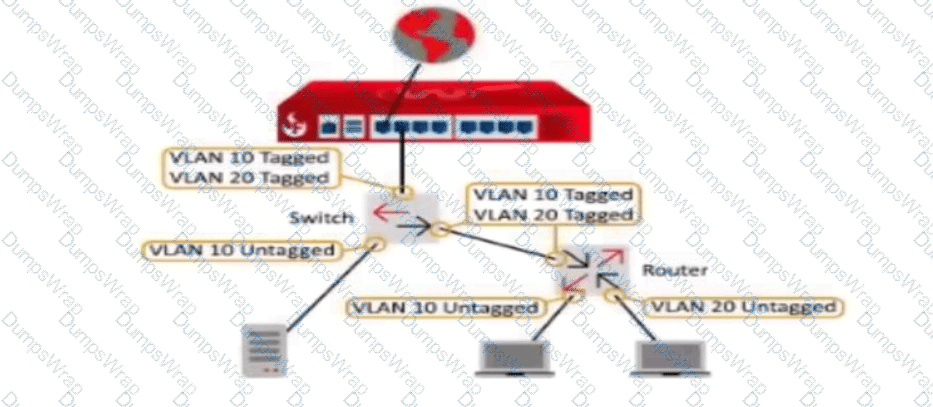

as

Options:

A.

VLAN 10 Untagged and VLAN 20 Untagged

B.

VLAN 10 Tagged and VLAN 20 Tagged

C.

VLAN 10 Untagged and VLAN 20 Tagged

D.

VLAN 10 Tagged and VLAN 20 Untagged

E.

VLAN 10 Untagged, VLAN 10 Tagged, and VLAN 20 Tagged

Page: 1 / 6
Total 60 questions