
Spring Sale Discount Flat 70% Offer - Ends in 0d 00h 00m 00s - Coupon code: 70diswrap

Workday Workday-Pro-HCM-Reporting Dumps

Workday Pro HCM Reporting Certification Exam Questions and Answers

Question 1

You want the ability to view every summarization in the composite report by Location.

What do you do?

Options:

A.

Include Location as a drillable field in one of the subreports.

B.

Include Location as a drillable field in all the subreports.

C.

Include Location as a Detail Data field in one of the subreports.

D.

Include Location as a Detail Data field in all the subreports.

Question 2

Refer to the following scenario to answer the question below.

You have prepared the following matrix report for a recruiting manager.
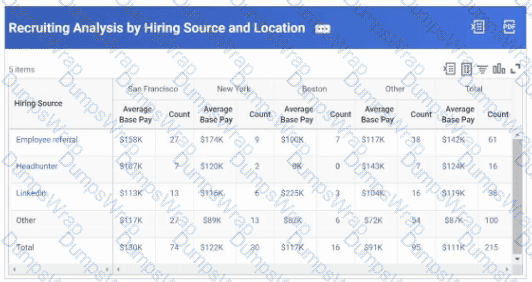
as

The recruiting manager would like to view the top ten hiring sources, rather than just three.

How can you adjust the report definition to address this requirement?

Options:

A.

Configure a Field Values group on the Group by Field.

B.

Edit the Maximum Number of Rows field.

C.

Edit the Sort Rows field on the Row Grouping column.

D.

Edit the Axis Scale on the Output tab.

Question 3

Where can you view a list of your scheduled reports?

Options:

A.

Scheduled Future Reports

B.

Scheduled Distributions Report

C.

View All Occurrences for a Schedule

D.

Scheduled Future Processes

Question 4

An HR analyst needs to schedule a collection of diversity reports to the HR director on a monthly basis. What mechanism should the HR analyst use to do this?

Options:

A.

Report bursting

B.

Report groups

C.

Embedded analytics

D.

Alerts

Question 5

The Recruiting department requested a report that shows job applications by recruiting source, displayed through count and percent summaries that they can drill into to further analyze the data.

What report type fulfills these requirements?

Options:

A.

Search

B.

Advanced

C.

Matrix

D.

nBox

Question 6

You are configuring a waterfall visualization showing employee movement. To properly display the information, you need the Termination Count field to return as a negative number.

Options:

A.

Numeric Constant

B.

Format Number

C.

Arithmetic Calculation

D.

Extract Single Instance

Question 7

A composite report sorts output based on the last column in ascending order. You want the sort to be based on the second to last column in descending order.

Where do you make this change?

Options:

A.

Second to last column

B.

Dynamic data row

C.

Combine data row

D.

Report settings

Question 8

You are creating a custom report that displays employee salary amounts. You need to ensure that compensation analysts have the appropriate security permissions to view this information for all employees.

How do you confirm the security group's access to salary amounts?

Options:

A.

Review the domain security policy on the salary amount report field.

B.

Run the Activate Security Policy Pending Changes task.

C.

Assign individuals to the compensation analyst security group.

D.

Review the domain security policy on the report’s data source.

Question 9

You are configuring a matrix report that groups average performance ratings by supervisory organization. However, the report users would like to be able to drill down and view data at each level of the hierarchy. How should you edit the report definition to achieve this functionality?

Options:

A.

Include a Lookup Related Value calculated field in the Detail Data grid.

B.

Add a Detail Data Override.

C.

Update your supervisory organization sort order to Logical sort order - Descending.

D.

Include a Lookup Hierarchy Rollup calculated field in the Drillable Fields grid.

Question 10

The benefits manager position has recently been filled by a different worker. The previous benefits manager has transferred ownership of the report schedules to the new manager. Month end is coming up and the new manager is wondering which reports are scheduled to be run automatically.

Where can the manager view this information?

Options:

A.

The Process Monitor report

B.

My Reports Library

C.

My Tasks

D.

The Scheduled Future Processes report

Question 11

A Hire event has an Effective Date of 09/02/2023.

What would be the Record Date of the Hire event on the Trended Workers object?

Options:

A.

9/1/2023

B.

9/2/2023

C.

9/30/2023

D.

10/31/2023

Question 12

You are building a report that shows employee performance ratings and their associated performance review details. The report uses the Performance Review primary business object. Using a calculated field, what formula should you use to retrieve the employee's job title from the related Worker business object?

Options:

A.

Aggregate Related Instances

B.

Lookup Related Value

C.

Lookup Range Band

D.

Evaluate Expression Band

Question 13

You need to create a report to show the trend of worker headcount over time.

What is the most appropriate data source for this report?

Options:

A.

Trended Workers

B.

Workers for HCM Reporting

C.

Worker History

D.

Headcount

Question 14

You configured a trending report for an HR analyst that shows headcount by country trends by quarter. The HR analyst has asked for the data to display for each month, rather than each quarter.

How can you fulfill these requirements?

Options:

A.

Edit the field on the Column Grouping grid in the report definition.

B.

Edit the Group by Time Period field in the report definition.

C.

Add a report prompt that uses the Trending Period field.

D.

Run the Maintain Trended Workers task and modify the Trending Period.

Question 15

You have created a composite report and are trying to add a matrix report as a subreport. However, when trying to configure a Data column, the matrix report is not available to select in the Sub Report Name field.

What can you check to identify the cause of this issue?

Options:

A.

Check that every field in the composite report's set of fields that are enabled for filtering and grouping also exists as a group-by field in the matrix report.

B.

Check that the summarization fields in the matrix report also match the selections in the Field to Aggregate field in the Data column settings.

C.

Check that the configurations on the Filter Data in Sub Report grid also exist in the Filter tab of the matrix report definition.

D.

Check that the prompt defaults in the matrix report align with the prompt defaults defined in the composite report’s Report Settings.

Question 16

You are viewing a Report Performance Log and notice the Top Level Filter Time is high.

How should you edit the report definition to improve this?

Options:

A.

Use subfilters instead of filters

B.

Use built-in data source prompts instead of filters

C.

Use a different data source

D.

Use calculated fields instead of filters

Question 17

An HR analyst has many visualizations in different discovery boards that use the Workers for HCM Reporting data source on the Worker primary business object. The analyst wants to drill into one of the visualizations by Worker. Upon drilling, the analyst notices that Worker is not a listed Drill By field option. They want to drill by Worker without editing the Drill By list of the other visualizations.

How would the analyst configure this?

Options:

A.

Add Worker as a Drill By field from the Maintain Field Lists for Discovery Boards report.

B.

Drag and drop the Worker field in one of the dimensions of this visualization in the Builder Panel.

C.

Create a control from a sheet filter and filter the data by Worker from the Control Panel.

D.

Override the Drill By field list and add Worker in the Configuration Panel for this visualization.

Page: 1 / 6
Total 59 questions