
Dell VxRail Deploy v2 Exam Questions and Answers
Which three actions cause a host “Incompatible” message to be displayed when expanding an OSA VxRail cluster? (Choose three.)
Options:
Adding a host with VxRail code 7.0.411 to a cluster with VxRail code 8.0.200
Adding a host with an AMD CPU to a cluster with Intel CPUs.
Adding a host with all NVMe SSDs to a cluster with all SAS SSDs
Adding a host with all SSDs to a cluster with HDDs
Adding a host with only 1 GbE NICs to a cluster with 10 GbE NICs
Answer:
A, B, DExplanation:
When expanding an existing VxRail Original Storage Architecture (OSA) cluster, the VxRail Manager performs stringent pre-validation checks to ensure that the incoming node conforms to the operational and architectural boundaries of the active cluster. Three distinct violations will immediately trigger a host "Incompatible" status message within the expansion wizard. First, a major software version mismatch (Choice A), such as attempting to inject a node running VxRail code 7.0.411 into a cluster operating on 8.0.200, is strictly blocked because all nodes must share the same major release line to maintain lifecycle management integrity.
Second, a CPU vendor mismatch (Choice B), where an AMD-based node is introduced into an Intel-powered cluster, is fundamentally incompatible due to disparate processor instruction sets that break VMware vMotion requirements and vSAN cluster homogeneity. Third, mixing storage tiers (Choice D), specifically attempting to join an all-flash node (all SSDs) to a hybrid node cluster (utilizing HDDs for capacity), violates core vSAN deployment design configurations. While mixing drive interfaces like NVMe and SAS SSDs within an all-flash cluster is structurally acceptable under specific constraints, mixing drive types or processor architectures introduces deviations that fail validation.
What must be enabled on ToR switch ports that are connected to VxRail nodes to support multiple VLANs?
Options:
Trunk Mode
Access Mode
Link Aggregation
Rapid Spanning Tree
Answer:
AExplanation:
Within a standard Dell VxRail cluster topology, all physical interfaces on the Top-of-Rack (ToR) switches directly attached to the physical node interfaces must be explicitly configured in Trunk Mode. This configuration is an absolute architectural requirement because a hyperconverged VxRail deployment shares a pair of high-bandwidth uplinks across a matrix of distinct virtual networks. These networks include ESXi Host Management, vSAN Storage, vMotion Live Migration, and various customer-facing production VM networks, which must remain structurally isolated from one another at Layer 2.
To maintain this network design while consolidating traffic over shared cabling, the environment relies heavily on explicit IEEE 802.1Q VLAN tagging. Setting the switch ports to Trunk Mode allows the physical infrastructure to accept, process, and pass traffic carrying multiple separate VLAN identifiers across the same interface links simultaneously. Conversely, configuring a port to Access Mode limits its transmission capability to a single untagged broadcast network domain, which completely breaks the multi-VLAN isolation required to discover and initialize a VxRail cluster.
A deployment engineer runs these commands across all nodes in a new VxRail deployment, and VLAN ID 3940 is added to the ToR switches:
esxcli network vswitch standard portgroup set -p "Private Management Network" -v 3940
esxcli network vswitch standard portgroup set -p "Private VM Network" -v 3940
None of the nodes are discovered by the VxRail Manager. What is the cause of this issue?
Options:
The VLAN ID for node discovery must be set to 3939.
The Loudmouth service was not restarted.
Changing VLAN IDs is only supported via a JSON file uploaded during the Deployment Wizard.
The Private Management Network and the Private VM Network cannot have the same VLAN ID.
Answer:
BExplanation:
In a fresh Dell VxRail deployment, node discovery is orchestrated by the proprietary Loudmouth service, which natively broadcasts over the default IPv6 multicast address using VLAN 3939. If an implementation engineer explicitly alters the default port group configurations on the standard virtual switches across the ESXi hosts to utilize an alternative VLAN ID, such as 3940, the operational state of the discovery daemon is not dynamically updated.
Although the underlying esxcli commands successfully reconfigure the "Private Management Network" and "Private VM Network" port group parameters within the hypervisor network layer, the active Loudmouth process continues to bind to the previous network state. Because the Loudmouth service was not restarted following the command executions, it fails to initialize its discovery listens and broadcasts over the newly designated VLAN 3940 interface. Consequently, the VxRail Manager cannot locate or establish communication with the nodes over the modified Top-of-Rack switch fabric. To rectify this discovery failure, the administrator must issue a service restart command directly to the Loudmouth daemon across all target nodes, ensuring that the background discovery process initializes cleanly on the updated VLAN assignment.
What are three optional components in a Dell VxRail node? (Choose three.)
Options:
Graphical Processing Units
Fibre Channel Host Bus Adapters
Smart Data Processing Units
Auxiliary Power Unit
InfiniBand Network Adapters
Answer:
A, B, CExplanation:
Dell VxRail nodes feature a highly modular hardware architecture that can be customized to align with specialized enterprise workloads, storage protocols, and advanced distributed networking topologies. While core compute elements like primary server CPUs and system memory are standard requirements, several acceleration and connectivity expansion options are classified as optional components depending on the specific node model.
First, Graphical Processing Units (GPUs) (Choice A) can be optionally integrated into performance-focused or graphics-ready profiles—such as the VxRail V-Series—to efficiently offload intensive graphic rendering, virtual desktop infrastructure (VDI), and artificial intelligence or machine learning computational workloads from the host CPU. Second, Fibre Channel Host Bus Adapters (FC HBAs) (Choice B) are available as an optional add-on card, providing dedicated hardware links to connect nodes to external SAN storage arrays, which is a mandatory configuration for VxRail dynamic node topologies. Third, modern iterations of the VxRail hardware family support Smart Data Processing Units (SmartDPUs) (Choice C) paired with the VMware vSphere Distributed Services Engine. These SmartDPUs offload foundational core networking and security microservices directly onto the smartNIC silicon, freeing up server CPU cycles for consumer application VMs.
Refer to the exhibit.
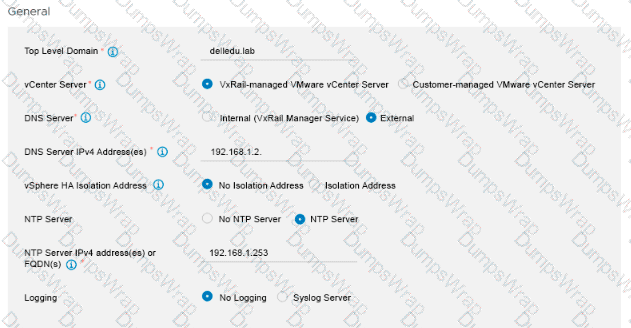
Which component is included in future VxRail Manager updates when the deployment of a VxRail Cluster is completed using the Global Settings shown?
Options:
DNS Server
NTP Server
vCenter Server
Windows Server
Answer:
CExplanation:
The exhibit illustrates the "General" settings section within the VxRail Deployment Wizard, where foundational infrastructure parameters are defined. Crucially, the radio button for "VxRail-managed VMware vCenter Server" is explicitly selected. In a VxRail deployment topology, choosing an internal, VxRail-managed vCenter server fundamentally changes how lifecycle management (LCM) operations are orchestrated for the cluster.
When a cluster is deployed with a VxRail-managed vCenter, the vCenter Server virtual appliance is tightly coupled with the VxRail Manager platform. This deep architectural integration guarantees that all future patch cycles, security definitions, and major platform upgrades for the vCenter Server are natively included within the unified VxRail composite update bundles. When an administrator applies an update package through the VxRail Manager dashboard, the orchestration engine automatically conducts pre-checks and applies the software versions to both the VxRail Manager and the vCenter Server in a fully automated, validated sequence. Conversely, infrastructure services configured as "External," such as the designated DNS or NTP servers, reside outside the VxRail ecosystem and are not targeted by VxRail lifecycle payloads. Therefore, the vCenter Server is the specific component captured in future update packages.
Which three settings must be verified when using an existing VDS during VxRail setup? (Choose three.)
Options:
Names of VDS
Details of each port group
Permissions on the VDS
System traffic shares
Details of uplinks
Answer:
A, B, EExplanation:
When deploying a VxRail cluster utilizing an existing customer-managed Virtual Distributed Switch (VDS), the deployment framework shifts networking orchestration from automated switch generation to target environment integration. To guarantee seamless mapping of cluster network components, three primary settings must be rigorously verified within the VxRail configuration workflow: the exact Names of the VDS, the precise details of each port group, and the detailed configuration of the uplinks.
The name of the VDS must be explicitly matched because the initialization wizard relies on strict string matching to locate the target switch fabric inside the vCenter inventory. Furthermore, the details of each port group—including management, vMotion, vSAN, and VM networks—must be validated to ensure correct naming syntax and corresponding VLAN tagging structures are intact. Finally, the details of the uplinks must be verified, particularly the number of assigned active physical adapters and any pre-existing Link Aggregation Group (LAG) topologies. If mismatches exist among these structural properties, the wizard cannot successfully bind the virtual network interfaces of the incoming ESXi hosts to the pre-established switch layers, precipitating initialization failure. Advanced switch policy variables like system traffic shares or specific object permissions are not structural binding metrics validated directly in the setup interface.
An implementation engineer wants to extract a VxRail cluster configuration report to validate the environment before deployment. Where can the configuration report be accessed on the VxRail Configuration Portal?
Options:
My Clusters
My Deployments
My Projects
My Final Checklists
Answer:
CExplanation:
The Dell VxRail Configuration Portal is a centralized cloud-based utility designed to streamline the planning, architecture layout, and validation stages of a VxRail cluster deployment. Within this portal, all configuration tasks, parameters, and structural variables are organized inside a hierarchical system grouped under the "My Projects" workspace.
When an implementation engineer completes a cluster design or needs to extract a comprehensive VxRail cluster configuration report to execute pre-deployment validation, they must navigate specifically to the "My Projects" tab. Inside this dashboard, users can review the end-to-end parameters of their defined deployments, perform validation checks against known configuration constraints, and download the definitive configuration reports along with the automated deployment JSON file. This documentation acts as the single source of truth for both the onsite deployment wizard and network alignment verification. Other workspace options listed, such as "My Clusters" or "My Deployments," represent distinct operational scopes or monitoring segments that do not host the primary pre-initialization project configuration export tools.
What are the two methods of node discovery in a VxRail environment?
Options:
Automatic Discovery - IP Discovery
Automatic IPv4 Mapping - Static IPv6 Mapping
Automatic Loudmouth - IP Loudmouth
Answer:
AExplanation:
VxRail architecture natively supports two primary mechanisms to discover unconfigured nodes on a local network during cluster initialization: Automatic Discovery and IP Discovery. Automatic Discovery relies entirely on the proprietary Loudmouth service running concurrently on the ESXi hosts and the VxRail Manager virtual appliance. This service transmits and listens for discovery frames utilizing IPv6 Multicast (specifically through the Neighbor Discovery Protocol) over the default internal management VLAN 3939. However, if the upstream physical Top-of-Rack (ToR) switch fabric has IPv6 multicast filtering active, or if the incoming nodes are situated across separate routed Layer 3 network boundaries, this automated multicast broadcast will fail to establish a link.
To bypass these network infrastructure constraints, deployment teams must utilize the second method: IP Discovery. IP Discovery—frequently classified as manual discovery—eliminates the dependency on multicast routing by allowing the VxRail Deployment Wizard to directly scan a specific, predefined list or sequential range of static IPv4 addresses assigned to the host management interfaces. This ensures that node verification, hardware inventory checking, and node allocation can finish smoothly even within restricted or legacy enterprise networking topologies. Alternate combinations like "IP Loudmouth" do not exist within the product terminology.
An administrator wants to use the /rest/vxm/v5/system API to retrieve current cluster configuration information. Which HTTP method must be used for this API call?
Options:
GET
POST
PUT
DELETE
PATCH
Answer:
AExplanation:
The VxRail REST API platform adheres strictly to Representational State Transfer (REST) design principles, leveraging standardized HTTP methods to dictate operations against infrastructure resources. When an administrator intends to interact with the /rest/vxm/v5/system endpoint specifically to retrieve the current cluster configuration parameters, operational state, and component inventory details, they must invoke the GET HTTP method.
In RESTful web services, the GET verb is universally defined as a safe, idempotent read operation used exclusively to fetch a representation of a specified resource without altering its underlying state. Alternative HTTP methods are mapped to destructive or state-changing actions within the VxRail Manager API gateway. For instance, POST is reserved for executing initialization workflows or generating new system objects, PUT and PATCH are used to modify existing resource configurations or update target properties, and DELETE handles object removals. Because retrieving configuration data is purely an information readout task, GET is the correct operational method.
When following Dell best practices during an implementation, where do you assign the VxRail Manager permanent IP address?
Options:
All nodes
Any node
Primary node
Answer:
CExplanation:
When preparing for a Dell VxRail cluster implementation, establishing network connectivity and identity for the management plane is a key foundational step. During the automated initialization process orchestrated by the VxRail Deployment Wizard or via a pre-configured configuration JSON template, the permanent management IP address designated for the VxRail Manager virtual appliance is assigned to the primary node.
The primary node—traditionally the first physical host in the rack sequence (Node 1)—acts as the bootstrap anchor point for the entire deployment workflow. The VxRail Manager virtual machine is initially stood up, configured, and run locally on this primary node's storage and compute resources before the cluster is fully formed and resources are aggregated into a shared vSAN datastore. Once the initial node setup completes and the hyperconverged cluster environment is established, the VxRail Manager VM participates in standard vSphere High Availability (HA) rules and can migrate across other nodes as needed, but its definitive configuration and initial IP binding are bound directly to the primary node profile during Day 1 tasks. Assigning the permanent IP addresses randomly or globally across all nodes is incorrect, as only the specific management host entity receives the dedicated identifier.
Which two iDRAC settings must be set before running the VxRail Deployment Wizard? (Choose two.)
Options:
Channel Privilege Level Limit to Operator
NIC selection to Dedicated
Auto Negotiation to Off
Enable IPMI over LAN to Enabled
Answer:
B, DExplanation:
During the hardware preparation and initial configuration phase of Dell VxRail nodes, specific Integrated Dell Remote Access Controller (iDRAC) settings must be manually validated or modified to ensure proper communication and discovery by the VxRail Manager during cluster creation.
First, the iDRAC NIC Selection must be explicitly set to Dedicated. This configuration ensures that out-of-band management traffic is routed exclusively through the server's dedicated iDRAC port rather than sharing a LOM or OCP adapter network path, ensuring clean channel segregation and management path integrity. Second, the Enable IPMI over LAN attribute must be set to Enabled. The automated VxRail Deployment Wizard relies directly on Intelligent Platform Management Interface (IPMI) commands over the network to securely query, identity-check, and configure node states during initialization. If IPMI over LAN is left disabled, the VxRail Manager cannot communicate with the chassis management layer, causing automated host validation to fail. Other options, such as modifying the Channel Privilege Level Limit to Operator or altering default Auto Negotiation parameters, are not required and can disrupt expected configuration fabrics.
Refer to the exhibit.

Which selection in the VxRail deployment wizard leads to the displayed locked option?
Options:
Customer-managed vCenter Server
vSAN 2-Node Cluster
Stretched Cluster
VxRail-managed vCenter Server
Answer:
AExplanation:
During the configuration phase of the VxRail Deployment Wizard, choices made within the foundational global settings dynamically govern subsequent system requirements and user interface behaviors. When an implementation engineer selects the option to deploy the cluster using a Customer-managed VMware vCenter Server, the system architecture shifts name resolution responsibilities entirely to the customer's pre-existing enterprise environment.
Because an external, customer-managed vCenter Server already relies on established enterprise datacenter infrastructure to resolve hostnames, lookup records, and management components, the internal VxRail Manager DNS service cannot be used to anchor the deployment. Consequently, choosing a Customer-managed vCenter Server forces the wizard to automatically lock and restrict the DNS Server configuration field to "External," graying out the "Internal (VxRail Manager Service)" alternative option entirely. This built-in validation guardrail ensures that the incoming VxRail nodes and management components are integrated within the exact same authoritative external DNS servers handling the external management plane, preventing name resolution mismatches or deployment initialization failures. Other deployment options, such as using a standard VxRail-managed internal vCenter, leave this choice unlocked, permitting either internal or external placement.
