
UiPath Agentic Automation Professional Exam Questions and Answers
Which evaluator is best suited to verifying a boolean output that must be strictly true?
Options:
JSON similarity, because it tolerates structure equivalence rather than single-value strict equality.
Exact match, because it enforces a strict equality check on the boolean value without ambiguity.
LLM-as-a-Judge, because it scores semantic similarity rather than strict boolean equality requirements.
Trajectory evaluator, because it reviews behavior history instead of enforcing exact output equality.
Answer:
BExplanation:
Option B correctly identifies the Deterministic Exact Match evaluator as the most appropriate mechanism for validating a strictly defined Boolean output.
UiPath provides several evaluator categories, each intended for a different validation requirement.
Exact Match compares the agent's actual output against a predefined expected value without allowing semantic substitutions or alternative representations.
For an output field that must be the Boolean value true, the evaluator should pass only when the actual result matches the expected value under the configured comparison rules.
This is important when the field controls a consequential business decision, such as whether a validation has succeeded or whether mandatory checks have been completed.
JSON Similarity examines structural similarity and is more appropriate when evaluating complex JSON representations.
LLM-as-a-Judge evaluates meaning or contextual correctness and can tolerate language variation. That flexibility is unnecessary for a strict Boolean requirement.
Trajectory evaluators inspect the agent's broader execution behavior, including intermediate actions and tool usage.
Option B therefore provides the most predictable, efficient, and reproducible verification mechanism.
The developer should also define the output schema as Boolean to distinguish the actual Boolean value true from a text string containing the word "true."
Official UiPath references/topics: Agents — Evaluations — Deterministic Evaluators and Choosing the Evaluator Type.
An evaluation repeatedly fails when the agent calls a particular tool, but the summary shows no explicit error.
Which action would provide the clearest diagnostic insight?
Options:
Replace the tool with an alternative that performs a similar function to avoid hidden issues.
Increase the number of evaluation examples to determine whether the issue persists statistically.
Inspect the recorded tool call inputs and outputs within the trace to verify correctness and sequencing.
Simplify the agent's objective so the tool call becomes optional in future runs.
Answer:
CExplanation:
Option C identifies execution-trace inspection as the most reliable method for diagnosing an agent evaluation failure associated with a particular tool.
UiPath's agent tracing functionality records execution details beyond the final result or evaluation score.
A trace can identify the tool selected by the agent, the arguments supplied during invocation, the response returned by the tool, and its position within the overall execution sequence.
These details help distinguish several possible failure conditions.
The agent may have selected the correct tool but supplied invalid arguments. Alternatively, the tool may have executed successfully but returned information that the agent interpreted incorrectly.
Another possibility is that the agent invoked the tool before retrieving required contextual information or completing a prerequisite operation.
Examining the recorded inputs, outputs, and sequence allows the developer to determine which condition caused the failed evaluation.
Option A replaces a component before establishing the failure mechanism. Option B expands test coverage but does not directly explain the failure. Option D changes the business requirement to avoid the problematic behavior.
UiPath also provides tool-call evaluators for validating invocation arguments, call counts, execution order, and returned outputs. These can supplement trace inspection when recurring defects must be detected automatically.
Official UiPath references/topics: Agents — Agent Traces; Managing Runtime Evaluations — Tool Call Evaluators.
How are activity input methods configured in UiPath agent tools, and what are the main considerations for cascading fields?
Options:
Activity input methods include Prompt (default), Argument, and Static Value. Cascading fields cannot use the Prompt input method as agents cannot infer changes in field structures at runtime.
Activity input methods are mostly limited to Prompt, though in some cases Argument or Static Value can be selected depending on the connector. Cascading fields generally work with the Prompt method because agents can usually handle dynamic field updates during execution without major issues.
Activity input methods are fully automated with no optional configurations available. Cascading fields do not impact agent tool functionality in any way.
Activity input methods primarily default to Static Value for most fields to ensure predictable behavior and minimize runtime errors. Cascading fields are automatically detected and adjusted by the agent at runtime for smooth handling of dependent or conditional inputs.
Answer:
AExplanation:
Option A accurately describes the activity input configuration mechanisms documented for UiPath Agents.
When an Integration Service activity is exposed as an agent tool, its input fields can be configured using three methods: Prompt, Argument, and Static Value.
Prompt is the default method. It allows the agent's language model to infer an appropriate field value during execution based on the system prompt, tool description, and available context.
Argument populates the activity field from an explicitly defined agent input argument. This is appropriate when an upstream automation or orchestration process supplies a known value that should be passed directly to the tool.
Static Value assigns a predefined value that remains unchanged between executions.
Cascading fields introduce an important limitation. Their structure depends on another field's selected value. For example, choosing an issue type in an external ticketing application may change the available dependent fields.
UiPath does not permit the Prompt method for cascading fields because an agent's tool schema cannot dynamically adapt to those structural changes during execution.
Therefore, dependent field configurations must be resolved through supported explicit input methods rather than relying on runtime inference.
Official UiPath references/topics: Agents — Activities — Defining Activity Input Methods.
You want to send an email within a BPMN.
Which Action should you select inside the task to allow you to send the email?
Options:
Execute script
Execute connector activity
Wait for connector event
Create action app task
Answer:
BExplanation:
Option B identifies the correct Maestro implementation action for sending an email through an Integration Service connector.
UiPath Maestro uses Business Process Model and Notation (BPMN) to coordinate automation activities, enterprise applications, AI agents, and human tasks.
Within a BPMN process, a Send task can communicate with an external application using the Execute connector activity implementation.
This action invokes an Integration Service activity, such as a supported Microsoft Outlook or Gmail email-sending operation.
The developer selects the connector, configures the authenticated connection, chooses the required activity, and maps process variables to the activity's input fields.
Typical email inputs include the recipient address, subject, and message body. Relevant output values can also be mapped to process variables when supported by the activity.
Option A executes custom scripts and is not the standard connector-based approach. Option C waits for an external event rather than actively sending an email. Option D creates a human task through Action Center and does not itself perform the requested email operation.
The Execute connector activity option allows the BPMN process to interact with external systems while preserving centralized orchestration and execution traceability.
Official UiPath references/topics: Maestro Orchestrate — Send Task and Execute Connector Activity.
When configuring evaluation sets to compare model/temperature combinations, which evaluator categories let you select the model used for evaluation?
Options:
Trajectory evaluators only, because only trajectory grading needs a model selection while LLM-as-a-judge evaluators remain model-agnostic.
LLM-as-a-judge and Trajectory evaluators, because both are LLM-based and include a Model selection field for testing different model and temperature configurations.
Deterministic evaluators only, because their stable rule-based matching supports explicit model selection to compare model behaviors.
All evaluator categories, because model selection is available uniformly for deterministic, LLM-as-a-judge, and trajectory evaluators.
Answer:
BExplanation:
Option B correctly identifies the evaluator categories that expose a Model selection field in UiPath Agent evaluations.
UiPath separates evaluators into three principal categories: Deterministic, LLM-as-a-Judge, and Trajectory.
Deterministic evaluators use predefined comparison rules to evaluate outputs. Exact Match and JSON Similarity are examples. Because these evaluators do not require language-model inference to calculate their results, they do not include a Model selection field.
LLM-as-a-Judge evaluators use a language model to assess response characteristics such as semantic similarity, faithfulness, and contextual relevance. Their configuration allows developers to select the evaluation model.
Trajectory evaluators also use an LLM, but their purpose is to examine the agent's overall execution behavior, including intermediate actions, decisions, and tool usage.
Consequently, both LLM-as-a-Judge and Trajectory evaluators support model selection.
Option A incorrectly excludes LLM-as-a-Judge evaluators. Option C incorrectly assigns model selection to deterministic evaluators. Option D ignores the distinction between model-based and rule-based scoring.
Importantly, choosing an evaluator's model is different from choosing the model and temperature used to execute the agent. These are separate configuration concerns.
Official UiPath references/topics: Agents — Evaluations: Evaluator Categories and Defining Evaluators.
An agent consistently struggles to generate accurate responses despite having a well-structured prompt.
Which evaluation strategy would best isolate whether the problem lies in prompt clarity or tool invocation logic?
Options:
Use exact match evaluators across multiple evaluation sets and compare scores
Increase the number of evaluation sets and rerun the agent with randomized tool sequences
Apply LLM-as-a-Judge evaluators to assess semantic alignment between prompt intent and output
Switch to JSON similarity evaluators and disable prompt scoring
Answer:
CExplanation:
Option C is the strongest listed choice because LLM-as-a-Judge evaluation can determine whether generated responses satisfy the semantic intent of the agent's instructions.
UiPath's Semantic Similarity evaluator compares actual and expected responses according to meaning rather than requiring identical text.
This helps identify cases where the agent produces fluent responses that do not satisfy the intended business objective.
However, semantic evaluation alone cannot conclusively distinguish poor prompt interpretation from incorrect tool invocation.
For example, an agent may misunderstand instructions and select the wrong tool. Alternatively, it may select the correct tool but supply invalid arguments or misinterpret the returned result.
Both situations can produce low semantic evaluation scores.
Therefore, a rigorous investigation should combine output-oriented evaluation with execution traces and tool-call evaluators.
UiPath supports inspecting recorded tool arguments, outputs, execution order, and associated errors.
Runtime evaluation capabilities also include Tool Call Arguments, Tool Call Count, Tool Call Order, and Tool Call Output evaluators.
Options A and D rely on deterministic output comparison without directly identifying behavioral causes. Option B introduces artificial execution variability rather than isolating the defect.
Option C is the intended answer, but complete diagnostic isolation requires additional trajectory and tool-execution evidence.
Official UiPath references/topics: Agents — Evaluations — Semantic Similarity; Managing Runtime Evaluations — Tool Call Evaluators; Agent Traces.
Technical qualification: Diagnostic qualification: Semantic similarity alone cannot isolate prompt issues from tool invocation problems; traces and tool-call assertions are also necessary.
In UiPath Maestro, which of the following conditions must a variable meet to be usable in the Monitoring tab’s filter builder?
Options:
The variable must be linked to a BPMN gateway decision
The variable must be declared in the global scope of the automation project
The variable must be used in at least one completed process instance
The variable must be explicitly configured as searchable in the Maestro canvas
Answer:
DExplanation:
Option D is the answer indicated by the uploaded practice material, but it cannot be considered correct against the current UiPath Maestro documentation.
UiPath Maestro Orchestrate supports filtering process instances by variable values to investigate execution patterns, business outcomes, and operational exceptions.
The current documentation explains that variable filters are configured directly within the Monitoring view using the Configure filtering action.
Administrators select variables from those defined in the deployed process version, specify comparison operators, and apply the appropriate filter values.
Importantly, UiPath explicitly states that canvas-level configuration is not required to make variables available for filtering.
This directly contradicts option D's requirement to mark variables as searchable on the Maestro canvas.
Option A is not required because filtering is independent of BPMN gateway associations. Option B introduces an unsupported global-scope condition. Option C incorrectly requires prior use in a completed instance.
Consequently, none of the four options accurately describes the current configuration requirement.
For the current product, the relevant prerequisite is that the variable exists in the selected deployed process version and is available through Monitoring's variable selector.
Variable filtering applies to process instances executed after the filter is enabled, which should also be considered when analyzing historical execution data.
Official UiPath references/topics: Maestro Orchestrate — Variables and Element Filtering — Configure Element and Variable Filters.
Technical qualification: Outdated question: D is the legacy intended answer; current documentation does not require a canvas-level searchable-variable setting. None of the presented options is correct under the current product.
An organization is designing a customer-facing service agent using the agent story blueprint format.
To align with UiPath agent components, which story structure best reflects proper instruction and interaction design?
Options:
Specify the agent department and reporting line, define desired customer outcomes, reference historical feedback as context, integrate chat interfaces, and measure performance using satisfaction surveys alone.
Specify the agent role and operating environment, define explicit behavioral instructions in the prompt, identify relevant contextual sources, integrate appropriate tools, and define measurable success criteria with escalation paths.
Specify the automation goal and system owner, define high-level service objectives, reference general organizational policies as context, integrate notification channels, and measure performance using system uptime metrics.
Specify the process category and compliance scope, define expected efficiency targets, reference archived cases as context, integrate analytics dashboards, and measure performance using quarterly audit reviews.
Answer:
BExplanation:
Option B provides the most complete agent story structure because it aligns with UiPath's principal agent design components and operational recommendations.
An agent story should begin with a defined role and operating environment, establishing what the agent is responsible for and the business context in which it operates.
The prompt should specify the agent's objectives, behavioral instructions, constraints, task sequence, and expected output structure.
Context identifies the information sources required for informed decisions. UiPath Context Grounding can provide access to relevant enterprise documents and knowledge repositories.
Tools define how the agent interacts with external systems, executes automations, or retrieves operational information.
Measurable success criteria establish how performance will be evaluated, including accuracy, response consistency, completion rates, and adherence to business requirements.
Escalation paths identify circumstances requiring human validation, approval, or exception handling.
Option A omits essential execution and governance components. Option C lacks detailed agent instructions and relies on incomplete performance indicators. Option D focuses on administrative and analytical characteristics without sufficiently defining agent behavior.
A well-designed agent story connects responsibilities, instructions, knowledge, execution capabilities, performance measurements, and human oversight into a coherent operational design.
Official UiPath references/topics: Agents — Best Practices for Building Agents; Escalations; Contexts.
According to UiPath best practices, which elements primarily form the basis of the Agent Score?
Options:
User ratings, deployment frequency, agent version history, and governance policy compliance
Prompt structure, tool and context usage, input/output arguments, evaluation sets, and evaluation score
LLM model selection, temperature settings, maximum iterations, and integration activity types
Runtime logs, error rates, token consumption, and number of successful deployments
Answer:
BExplanation:
Option B is the intended answer under UiPath's earlier Agent Score framework.
Agent Score was designed to assess aspects of an agent's definition and evaluation readiness rather than relying exclusively on production execution statistics.
The characteristics identified in option B correspond to important agent development elements: prompt quality, tool configuration, contextual information, input/output schemas, evaluation coverage, and evaluation results.
Prompt structure determines whether the agent receives clear instructions describing its role, objectives, constraints, and execution behavior.
Tools and contexts establish the capabilities and enterprise information available to support its tasks.
Input/output arguments define structured interfaces for communicating with other automation components.
Evaluation sets and evaluation results provide evidence of performance across representative scenarios.
Options A and D emphasize administrative metadata and operational metrics rather than the intended development-quality assessment. Option C focuses on model configuration settings without adequately covering the broader agent definition.
However, this question is outdated for current UiPath Automation Cloud environments.
On October 8, 2026, UiPath announced that Agent Review replaced Agent Score.
Agent Review uses Autopilot to examine an agent against development best practices, identify critical issues and warnings, recommend improvements, and assign an A–F grade.
The numerical evaluation-set score remains a separate measure of performance.
Official UiPath references/topics: Agents — October 2026 Release Notes, Agent Review; Evaluations.
Technical qualification: Historical Agent Score replaced by Agent Review on October 8, 2026; retain B as legacy answer.
Given the following BPMN for the "SME to review the discrepancies" task, which option should be selected in the "Action" dropdown?
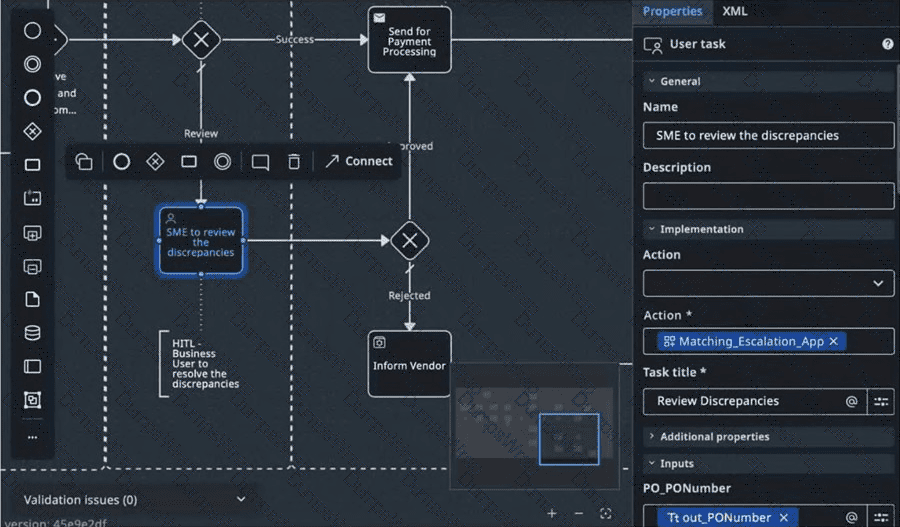
Original exhibit — Question 56
Options:
Create action app task
Create validation app task
Create and wait for action app task
Create and wait for validation app task
Answer:
AExplanation:
Option A identifies the documented implementation action for creating a human review task within a UiPath Maestro BPMN process.
The exhibit shows a User task named "SME to review the discrepancies" with an Action App selected in its properties panel.
In Maestro, a User task represents an activity requiring human participation rather than autonomous execution by an AI agent or robotic automation.
The Create action app task implementation integrates UiPath Action Apps and Action Center to provide a structured interface through which an assigned user can review business information and submit a decision.
In this scenario, the subject matter expert reviews discrepancies identified during invoice and purchase-order matching.
The Action App receives relevant process variables, presents the discrepancies, and collects the reviewer's decision.
The BPMN process can subsequently route execution through approval or rejection paths according to the submitted outcome.
Option B introduces a validation-specific action not represented by the standard task implementation shown. Options C and D introduce alternative action names that do not match the documented selection for this task.
UiPath's official Maestro implementation examples use Create action app task for human approval and discrepancy-resolution activities.
The appropriate choice is therefore A.
Official UiPath references/topics: Maestro Orchestrate — Tasks; Implementing a Complex Process; Extracting and Validating Documents.
After observing a drop in retrievals, which action provides document-level details to verify whether fresh content was ingested successfully?
Options:
Open the index's Sync job history and select a specific entry to view the ingested documents
Change Interval to last month to display previews of the documents used for retrieval
Click the Queries metric to open raw query logs for every search request
Filter the index list by Last queried and export the table to review document details
Answer:
AExplanation:
Option A identifies the appropriate diagnostic procedure for examining document ingestion within UiPath Context Grounding monitoring.
Context Grounding indexes rely on successful ingestion and synchronization operations to make enterprise documents available for retrieval.
When retrieval activity decreases unexpectedly, administrators should distinguish reduced query demand from problems involving source synchronization or failed document ingestion.
UiPath Orchestrator provides index monitoring capabilities through the tenant-level Indexes monitoring interface.
Administrators can select an individual index to inspect its query metrics and Sync job history.
The Sync job history displays ingestion operations performed during the selected monitoring interval.
Selecting a particular synchronization job opens detailed information about the documents processed by that operation.
This allows administrators to investigate whether recently added documents were successfully ingested and identify failures that may affect retrieval quality.
Option B changes the observation interval but does not independently expose document-level ingestion details. Option C incorrectly describes the Queries metric as a comprehensive raw-query log interface. Option D relies on index usage metadata, which does not establish document ingestion success.
A complete investigation should correlate synchronization history with source updates, ingestion status, permissions, and representative retrieval tests.
Importantly, a reduction in retrieval queries does not, by itself, demonstrate an indexing failure.
Official UiPath references/topics: Orchestrator — Monitoring: Indexes and Sync Job History.
When designing an agent, which of the following practices best helps ensure that it remains maintainable, debuggable, and low-risk in production?
Options:
Allow the agent to handle several closely related tasks (for example "extract invoice data" + "classify invoice type") so you reduce switching overhead and reuse large context in one agent.
Design the agent to replace an entire workflow end-to-end (including many decision points and process branches) so it becomes autonomous and requires minimal oversight.
Use the same agent design pattern for all tasks across your organization to scale quickly, regardless of workflow structure or complexity.
Limit the agent's scope to a single task (for example "classify customer intent"), instead of combining multiple roles, so debugging and iteration are easier.
Answer:
DExplanation:
Option D follows UiPath's documented principle of narrowly scoped, specialized agent design.
An autonomous agent performs best when its objective, responsibilities, and permissible actions are clearly bounded. Assigning a single primary responsibility reduces prompt complexity, limits unnecessary tool usage, and simplifies the evaluation of execution results.
For example, an agent responsible exclusively for classifying customer intent can be evaluated against a clearly defined classification schema. Its accuracy, failure patterns, and response consistency can be measured independently from unrelated business operations.
When one agent performs extraction, classification, approval, reconciliation, and customer communication simultaneously, diagnosing an incorrect outcome becomes more difficult because several reasoning and execution stages contribute to the result.
Narrow responsibilities also help establish the principle of least privilege. Each agent can receive only the tools and enterprise data access necessary for its assigned objective.
Option A increases responsibility breadth, even though the tasks may be related. Option B attempts to replace deterministic process orchestration with unrestricted agent behavior. Option C ignores the different risk profiles and requirements of individual business processes.
Specialized agents can still collaborate through workflows, tool invocation, or multi-agent orchestration without each agent assuming responsibility for the entire process.
Official UiPath references/topics: Agents — Best Practices for Building Agents — Scope Narrowly and Specialize.
A team wants to compare several model and temperature combinations side by side using the same evaluation scenarios and expected outputs.
What action creates a separate evaluation run for each configuration?
Options:
Add multiple evaluator types to the same set where each evaluator creates a separate run for scoring the models.
Add multiple model and temperature combinations in Evaluation settings so each combination creates a separate run.
Generate multiple evaluation sets so each of the sets creates a separate run for the same input cases.
Import multiple JSON files so each imported file creates a separate run for the same evaluations.
Answer:
BExplanation:
Option B precisely matches UiPath's documented model-comparison procedure within agent evaluation sets.
UiPath allows developers to assess different language-model configurations against the same test scenarios and expected outputs.
This capability helps determine which model and temperature combination provides the most appropriate balance of response quality, consistency, latency, and execution cost.
To configure the comparison, the developer opens the required evaluation set and selects the gear icon to access Evaluation settings.
Within the Evaluation set properties panel, multiple model and temperature combinations can be added.
UiPath creates a separate evaluation run for each configured model combination, allowing the Results tab to display the corresponding outcomes.
For example, a team might compare the same model at different temperature settings to determine whether lower sampling variability improves classification reliability.
The comparison should preserve identical prompts, tools, contexts, and evaluation scenarios so differences can be attributed more reliably to the model configuration.
Option A confuses evaluator types with model execution configurations. Option C introduces unnecessary evaluation-set duplication. Option D incorrectly assigns run creation to JSON imports.
Developers should compare more than aggregate evaluation scores. Individual failure patterns, response latency, consistency, and operational cost should also influence deployment decisions.
Official UiPath references/topics: Agents — Choosing the Best Model for Your Agent; Evaluations — Testing Model Settings Within Evaluations.
What minimum number of evaluations is considered a good benchmark for a simple agent?
Options:
20
30
50
100
Answer:
BExplanation:
Option B matches UiPath's documented evaluation benchmark for agents with relatively simple responsibilities and limited execution complexity.
UiPath recommends approximately 30 evaluations distributed across one to three evaluation sets for a simple agent.
These evaluations should represent the agent's expected operational conditions, including normal inputs, boundary cases, invalid information, and relevant error scenarios.
The benchmark is intended to encourage sufficiently broad testing rather than repeated execution of identical successful examples.
For example, a customer-intent classification agent might require evaluation cases covering different request categories, ambiguous wording, incomplete messages, spelling variations, and unsupported requests.
A properly designed evaluation set should expose weaknesses in the agent's instructions, reasoning behavior, and output handling.
For more complex agents, UiPath recommends substantially greater evaluation coverage, potentially double the simple-agent benchmark or more.
Complexity factors include the number of input arguments, output structure, tool usage, decision branches, and different user scenarios.
Option A falls below UiPath's stated benchmark. Options C and D exceed it but are not the specified recommendation for a simple agent.
Thirty evaluations should be interpreted as a practical starting benchmark, not proof of production readiness. Coverage quality, business risk, and evaluation results remain more important than the raw test count.
Official UiPath references/topics: Agents — Evaluations — Number of Evaluations, Evaluation Sets and Coverage Principles.
An automation candidate has high improvement potential, but root cause analysis shows that the issue stems from inconsistent upstream data quality.
How should this influence prioritization?
Options:
Reassess feasibility since unresolved root causes may limit achievable impact.
Replace data validation with a conservative automation scenario estimate.
Proceed because improvement potential percentage is already quantified.
Prioritize due to its contribution to overall automation rate benchmarks.
Answer:
AExplanation:
Option A represents the appropriate response when automation discovery identifies underlying operational problems that automation alone may not resolve.
UiPath Process Mining enables organizations to investigate process variations, identify inefficiencies, and analyze factors contributing to undesirable business outcomes.
Automation Hub additionally supports assessing automation feasibility, potential, implementation effort, and expected business benefits.
A high improvement-potential estimate does not automatically establish that a process is technically suitable for automation.
When root cause analysis identifies inconsistent upstream data quality, the proposed automation may inherit the same defects.
For example, an invoice reconciliation process might experience frequent exceptions because supplier identifiers are inconsistent across source applications.
Introducing an agent to reconcile those invoices may reduce some manual effort, but it will not necessarily eliminate the underlying data-quality problem.
The organization should therefore reassess the candidate's implementation feasibility, expected accuracy, exception frequency, and dependency on upstream remediation.
Option B omits essential validation. Option C incorrectly treats estimated potential as sufficient justification. Option D prioritizes automation-rate improvement over the actual business problem.
An appropriate discovery outcome may involve correcting source-data validation, standardizing input schemas, or implementing upstream controls before deploying the agent.
The final prioritization decision should consider both expected business value and the cost of addressing the root cause.
Official UiPath references/topics: Process Mining — Root Cause Analysis; Automation Hub — Detailed Assessment Algorithm; Process Mining — Simulating Automation Potential.
An agent produces inconsistent outputs because the system prompt clearly defines the task but does not specify the format of the final answer.
How can clarity and conciseness best practices be used to resolve this issue?
Options:
Encourage the agent to structure the response in a way that seems most appropriate for each case.
Expand the explanation of the agent’s overall goal without introducing formatting constraints.
Specify the required output format, structure, and tags that the agent must follow in the final response.
Provide additional background information about the business scenario to give the agent more context.
Answer:
CExplanation:
Option C directly resolves the identified problem by introducing explicit requirements for the structure and representation of the agent's final output.
UiPath recommends that system prompts define not only the agent's responsibilities but also the expected response format and behavioral constraints.
When output formatting is unspecified, a language model may generate responses using different headings, field names, narrative structures, or data representations across executions.
Although these responses may be semantically correct, inconsistent formatting can create problems for downstream automations that expect predictable output structures.
For example, an invoice-processing agent may be required to return an invoice identifier, payment status, validation result, and discrepancy description.
Defining these fields explicitly in a JSON schema or structured tagged format helps the agent produce consistent responses.
The prompt should identify required properties, permitted values, and behavior when information is missing.
Option A preserves formatting ambiguity. Option B expands the objective without addressing the defect. Option D supplies background information that may improve contextual understanding but does not establish output consistency.
UiPath also supports structured agent output arguments, which provide an additional mechanism for enforcing predictable data contracts.
A reliable implementation should combine concise formatting instructions, defined output schemas, and deterministic evaluation of mandatory fields.
Official UiPath references/topics: Agents — Prompts; Prompt Editor; Evaluations.
How do execution traces help identify the root cause of failed evaluations?
Options:
By showing detailed agent actions and tool interactions during the run.
By summarizing evaluation results into a single score for easy comparison.
By suggesting modifications to evaluator criteria automatically.
By aggregating failed evaluations into a new evaluation set for review.
Answer:
AExplanation:
Option A describes the principal diagnostic value of execution traces in UiPath Agents.
An evaluation score identifies whether the agent satisfied the expected assessment criteria, but it does not necessarily explain why a particular execution succeeded or failed.
Execution traces provide a chronological record of agent behavior, including intermediate decisions, model interactions, tool calls, input arguments, returned outputs, execution timestamps, and associated errors.
This information allows developers to investigate the sequence of events leading to an incorrect response.
For example, an invoice validation agent may fail an evaluation because it selected an inappropriate tool, supplied an invalid invoice identifier, or misinterpreted a correctly returned payment status.
The final evaluation result may indicate failure without identifying which of these conditions occurred.
By inspecting the trace, the developer can distinguish prompt interpretation errors from incorrect tool invocation, unexpected external responses, or downstream processing defects.
Option B describes evaluation summaries rather than execution diagnostics. Option C introduces automatic evaluator modification, which is not the function of tracing. Option D concerns evaluation-set management rather than root-cause analysis.
UiPath provides both agent-run traces and evaluation-run traces, supporting development troubleshooting, production monitoring, performance analysis, and auditing.
Official UiPath references/topics: Agents — Agent Traces.
When setting up a Context Grounding index in UiPath Orchestrator, which of the following describes a correct combination of source type and required setup steps?
Options:
Choose Connector and upload data directly into the index without selecting an external storage service by dragging and dropping the documents.
Choose Storage Bucket as the data source and then select the Orchestrator folder containing the bucket and the matching file types.
Choose Storage Bucket as the source and leave the file type unspecified, since Orchestrator automatically detects all file types by default.
Choose Connector, then directly upload files into Orchestrator without selecting a connection or specifying a folder path.
Answer:
BExplanation:
Option B correctly describes the required configuration when creating a Context Grounding index using an Orchestrator Storage Bucket.
UiPath Context Grounding enables agents to retrieve relevant information from enterprise knowledge sources and incorporate that information into their reasoning. Before the agent can retrieve documents, the source material must be configured and indexed.
During index creation, administrators select the desired data source under Data Settings. When Storage Bucket is selected, the administrator identifies the Orchestrator shared folder containing the relevant storage bucket and specifies the appropriate file type.
The configuration supports selecting individual file types or the All option when documents have multiple supported formats. Files can subsequently be uploaded using the available upload controls.
Alternatively, a Connector source requires an Integration Service connector, an authenticated connection, and the location of the external content repository.
Option A incorrectly treats Connector sources as direct document-upload mechanisms. Option C incorrectly assumes the file type can simply remain unspecified. Option D omits the connection and source-location requirements.
Proper index configuration also requires consideration of data permissions, ingestion settings, supported document formats, and synchronization schedules.
These controls ensure that agents retrieve relevant information from authorized knowledge sources.
Official UiPath references/topics: Orchestrator — Managing Indexes; Automation Cloud — Creating Indexes — Data Settings and Storage Bucket Sources.
A production environment has experienced intermittent failures across multiple agentic automations over the past month. An administrator needs to identify which specific agents are causing the most disruptions and understand the nature of these failures.
Which approach would best support this investigation?
Options:
Filter by global agent view, review the completed instances chart, then examine agent descriptions and retention policies for configuration issues.
Filter by the last day interval, review the instances success rate metric, then check the average processing time for all agents.
Filter by the last month interval, review the top agents with most errors metric, then examine execution incidents filtered by the problematic agents.
Filter by specific folder metrics, review the agent units consumption metric, then check system prompts configuration settings for each agent.
Answer:
CExplanation:
Option C provides the most effective investigation sequence because it combines an appropriate observation period with agent-specific failure metrics and incident-level diagnostics.
UiPath Orchestrator provides agent monitoring capabilities at tenant and folder levels. Administrators can filter monitoring data by interval, agent, and folder to investigate execution behavior.
Because the reported failures occurred throughout the previous month, selecting the last-month interval ensures that the analysis includes the relevant operational history.
The Agents with most errors chart ranks agents according to their reported execution errors. This allows administrators to prioritize investigation based on observed failure frequency rather than examining every agent indiscriminately.
After identifying problematic agents, the administrator should inspect execution incidents. Orchestrator's incident information includes descriptions that provide insight into the nature of reported failures. Associated job details can support further investigation.
Option A concentrates on completion volumes and configuration descriptions rather than error incidence. Option B excludes much of the relevant historical period. Option D emphasizes resource consumption and prompt configuration without first establishing which agents generated the failures.
A complete production investigation should also examine execution logs, failed tool calls, relevant runtime traces, and recurring external dependencies.
Official UiPath references/topics: Orchestrator — Monitoring — Agents, Agents with Most Errors and Incidents.
How is access to Context Grounding indexes controlled in UiPath Autopilot?
Options:
Access is managed through individual user permissions, requiring admin approval for each index regardless of folder assignment
Access is managed at the folder level, requiring the index to exist in the folder, the user to be assigned to the same folder, and the index to be enabled in Autopilot
Access is managed through role-based permissions, with only users having the Context Grounding Analyst role being able to access indexes
Access is managed at the tenant level, with all users in the tenant having equal access to all enabled indexes
Answer:
BExplanation:
Option B precisely matches UiPath's documented access-control requirements for Context Grounding indexes used by Autopilot for Everyone.
Context Grounding enables Autopilot to retrieve relevant information from indexed enterprise knowledge sources. Because those sources may contain confidential business information, access must respect established authorization boundaries.
UiPath manages index access through Orchestrator folder permissions.
Three conditions must be satisfied before a user can access a particular Context Grounding index through Autopilot for Everyone.
First, the index must exist in the appropriate Orchestrator folder. Second, the user must be assigned to that folder with suitable access permissions. Third, the index must be enabled in the Autopilot configuration.
Administrators enable indexes through Automation Cloud, under Admin, AI Trust Layer, and Autopilot for Everyone, using the Context Grounding configuration section.
During enablement, the administrator selects the relevant Orchestrator folder and index and supplies a description that helps Autopilot determine when the index should be queried.
Option A incorrectly requires independent administrator approval for every index access. Option C introduces an unsupported exclusive analyst role. Option D incorrectly assumes all tenant users receive identical access.
The documented folder-based model preserves logical separation between knowledge collections while allowing authorized users to retrieve relevant information.
Official UiPath references/topics: Autopilot — Context Grounding, Managing Access and Enabling Indexes.
What is the main purpose of the Prompt when configuring an escalation?
Options:
To set the time-to-live for stored memories created by the escalation.
To pre-fill the Action Schema fields with default values during escalation creation.
To serve as a triggering condition that signals the agent when escalation is required.
To route the escalation to the correct recipient based on user role mapping.
Answer:
CExplanation:
Option C directly reflects the documented purpose of the Prompt field in UiPath Agent escalation configuration.
Escalations provide a mechanism for involving human reviewers when an agent encounters business exceptions, uncertain information, approval requirements, or situations that require manual assistance.
When configuring an escalation, the developer selects an appropriate Action App and defines a prompt describing the circumstances in which human intervention is required.
The prompt functions as a triggering condition that guides the agent's decision about whether to invoke the escalation.
For example, an agent responsible for processing purchase orders may be instructed to request human approval when a transaction exceeds a specified financial threshold or when required supplier information cannot be validated.
This triggering instruction differs from escalation assignment configuration.
UiPath provides separate Assignment criteria for determining who receives the escalation, including individual users, groups, workload-based assignments, and other supported routing methods.
The Action Schema defines the information passed into the associated Action App, while the outcome configuration determines whether the agent continues or ends after human intervention.
Option A describes memory retention rather than escalation behavior. Option B concerns action input mapping. Option D concerns recipient routing.
Clear escalation prompts should specify measurable triggers and the required human decision wherever possible.
Official UiPath references/topics: Agents — Escalations — Configuring Escalations and Prompt.
When writing effective prompts for agents, what should always be included to help ensure reliable performance?
Options:
Multiple example responses for each possible user input scenario.
Detailed explanations of the business context for every argument.
A clear role definition, task breakdown, reasoning instructions, and output formatting.
Separate prompts for each reasoning step to simplify task execution.
Answer:
CExplanation:
Option C identifies the foundational elements of effective agentic prompt construction recommended by UiPath.
Unlike a simple language-model interaction, an agentic prompt must provide enough operational guidance for an agent to interpret information, formulate an execution plan, invoke appropriate tools, and return a result aligned with its objective.
A clear role definition establishes the agent's responsibilities and operating boundaries.
Task breakdown identifies the activities the agent must perform and helps organize complex operations into manageable stages.
Reasoning methodology instructions specify the expected decision-making approach, including validation criteria, tool usage conditions, and exception-handling requirements.
Output formatting establishes the structure of the generated result so downstream applications can interpret it consistently.
UiPath additionally recommends specifying measurable goals, relevant context, error-handling procedures, and representative examples where they improve reliability.
Option A unnecessarily requires examples for every possible scenario, creating excessive prompt complexity. Option B overemphasizes contextual detail without establishing behavioral instructions. Option D assumes every reasoning stage requires a separate prompt, which is not a universal design requirement.
Reliable agent development depends on combining structured instructions with suitable tools, evaluation coverage, and explicit operational constraints.
Official UiPath references/topics: Agents — Prompts — Writing Effective Prompts, Structure and Iterations.
Which monitoring setup is appropriate for proactively tracking index updates and catching errors early?
Options:
Create an "Index Update Finished" alert since it fires after every successful retrieval
Turn on a daily tenant health email that lists all index retrievals and sync failures
Filter by Last queried in the Indexes table to generate automatic alerts when usage changes
Subscribe to Context Grounding notification events such as Ingestion Job Completed, Started, or Failed
Answer:
DExplanation:
Option D identifies the documented event-based notification mechanism for monitoring UiPath Context Grounding ingestion operations.
Context Grounding indexes must remain synchronized with their underlying knowledge sources to provide agents with relevant and sufficiently current information.
Ingestion jobs perform the operations necessary to process source content and update the indexed knowledge base.
UiPath supports notifications associated with three ingestion events: Ingestion Job Started, Ingestion Job Completed, and Ingestion Job Failed.
Administrators can subscribe to these notifications through the platform's notification management interface.
The Started event provides visibility into the beginning of an ingestion operation. The Completed event indicates successful completion, while the Failed event alerts administrators to problems requiring investigation.
UiPath also supports notification subscriptions based on event severity, including Success and Error.
Option A incorrectly associates an invented alert with individual retrieval operations. Option B assumes a specific scheduled tenant-health email containing ingestion information. Option C confuses an index usage attribute with an automatic event-based alerting mechanism.
For production deployments, administrators should particularly prioritize failure notifications and investigate recurring ingestion errors that could leave agents using outdated knowledge.
Event monitoring should complement scheduled synchronization, index health checks, retrieval testing, and ongoing evaluation of grounded response quality.
Official UiPath references/topics: Automation Cloud — Working with Context Grounding, Notifications.
A simul-ation test reveals that the agent returns "Unknown Error" across multiple evaluation sets.
What sequence of troubleshooting steps should be performed to resolve this issue?
Options:
Create new evaluation sets and remove problematic outputs related to the error.
Use runtime traces to identify steps leading to the error, debug and re-test each tool evaluation set.
Re-run the simulation multiple times without adjustments to identify intermittent patterns.
Replace all tools involved in the workflow to remove dependencies that may cause errors.
Answer:
BExplanation:
Option B describes the correct diagnostic sequence for investigating repeated failures during agent evaluations.
UiPath provides execution traces that record the sequence of operations performed during an agent run. These traces expose model interactions, tool invocations, input arguments, returned outputs, and execution errors.
When an agent repeatedly returns "Unknown Error," the first objective is to identify the execution stage responsible for the failure.
The developer should inspect the Execution Trail to determine whether the failure originates from the agent's reasoning, an invalid tool argument, a simulated tool response, or an external dependency.
Once the failing component is identified, its configuration and expected behavior should be examined independently.
For example, a simulated API tool might return a response that violates its defined output schema. Correcting the simulation or tool contract may resolve the downstream error.
After implementing the fix, the developer should rerun the affected evaluation cases and confirm that previously successful scenarios still behave correctly.
Option A removes evidence of failures instead of correcting their causes. Option C repeats the problem without identifying its source. Option D introduces unnecessary configuration changes and may create additional defects.
UiPath's evaluation guidance explicitly recommends diagnosing failed runs, debugging their causes, and rerunning the evaluations.
Official UiPath references/topics: Agents — Evaluations; Agent Traces; Configuring Simulations for Agent Tools.
Stakeholders say the new agent should improve data accuracy, shorten approval cycles, and increase consistency in business decisions.
How should the evaluation criteria for the agent story be structured?
Options:
Prioritize one improvement objective to simplify implementation planning.
Translate each improvement objective into measurable outcomes within the redesigned "to-be" process map.
Measure agent effectiveness exclusively by the volume of processed transactions.
Consolidate all improvement objectives into a single high-level automation target.
Answer:
BExplanation:
Option B establishes measurable success criteria that connect stakeholder expectations to the redesigned business process.
During agentic discovery and blueprint design, qualitative objectives should be translated into observable performance indicators.
For data accuracy, the solution may measure validation error rates, incorrect classifications, or the proportion of records requiring correction.
Approval-cycle efficiency can be measured through average and percentile completion times, approval waiting periods, and the duration of exception-handling stages.
Decision consistency can be assessed by comparing agent decisions against approved business rules, reference outcomes, or expert-reviewed cases across representative scenarios.
These measures should be associated with the relevant activities and decision points in the future-state, or "to-be," process map.
This makes it possible to evaluate individual improvements rather than relying on a general statement that the automation is successful.
Option A excludes important stakeholder objectives. Option C treats throughput as the only measure of performance, ignoring accuracy and quality. Option D combines distinct outcomes into a broad target that may conceal deficiencies.
UiPath's agent development guidance recommends defining measurable objectives, key performance indicators, and explicit success criteria before implementation.
Evaluation sets and runtime monitoring can subsequently determine whether the deployed solution meets those criteria under realistic operating conditions.
Official UiPath references/topics: Agents — Prompts — Clear Goal and Objective; Agents — Evaluations; Maestro — Process Monitoring.
In the “to-be” process map, optimized steps combine agents with existing automations and human review points.
How should the agent design capture this orchestration?
Options:
Emphasize conversational style over explicit mapping of tools and integration points.
Separate reasoning logic from tool usage without documenting workflow dependencies.
Define when tools are invoked, clarify dependencies between steps, and state escalation points.
Combine optimized steps into a generalized prompt to allow flexible execution sequencing.
Answer:
CExplanation:
Option C correctly describes how an agentic automation design should represent interactions among autonomous agents, deterministic workflows, enterprise tools, and human reviewers.
The future-state, or "to-be," process map defines how the redesigned business process should execute after automation has been introduced.
UiPath Maestro provides BPMN-based orchestration for coordinating agents, robotic workflows, integrations, and human tasks.
Each process step should identify its execution responsibility, required inputs, expected outputs, dependencies, and conditions for proceeding to subsequent activities.
Agent tool invocations should be documented explicitly so architects can determine which external operations are necessary and when those operations should occur.
Dependencies identify prerequisites that must be satisfied before executing downstream activities. These controls are particularly important when financial transactions, approvals, or external system updates are involved.
Escalation points identify situations requiring human assistance, including ambiguous information, missing records, failed validation, or approval requirements.
Option A prioritizes conversational characteristics rather than operational design. Option B omits necessary dependency information. Option D replaces structured orchestration with generalized instructions, reducing predictability and auditability.
The most reliable architecture assigns contextual reasoning to agents while preserving deterministic execution control and appropriate human oversight within the surrounding process.
Official UiPath references/topics: Agents — Best Practices for Building Agents; Maestro — Implementing a Complex Process.
Which of the following methods can be used to manage ingestion pipelines for Context Grounding in UiPath?
Options:
By configuring ingestion rules from the Orchestrator Indexes page, or by using the Update Context Grounding Index activity.
Using Data Fabric, with custom entities to update and synchronize pipeline indexes.
Directly in Orchestrator from the Indexes page, or by using the Update Context Grounding Index activity.
Through the Orchestrator monitoring dashboard, using the Index Deployment Manager panel for scheduling regular ingestion pipelines.
Answer:
CExplanation:
Option C correctly identifies the two documented approaches to managing Context Grounding index synchronization.
UiPath provides administrative controls for managing indexes through the Orchestrator Indexes interface and the corresponding Context Grounding administration experience.
Administrators can synchronize an existing index with its configured data source to ingest newly added or modified information.
For automated synchronization, UiPath provides the Update Context Grounding Index activity through its GenAI Activities integration.
This activity can be incorporated into workflows that respond to source-document changes or execute according to a defined schedule.
The activity requires the appropriate connection, Orchestrator folder path, and index name.
An important operational consideration is that ingestion is asynchronous. Successfully invoking the activity does not mean the updated content becomes immediately available for retrieval.
Where downstream processing requires the newly ingested information, developers should wait for the corresponding ingestion completion event.
Option A is similar to C but introduces an imprecise claim about configuring ingestion rules on the Indexes page. Option B incorrectly assigns ingestion management to Data Fabric entities. Option D describes an unsupported Index Deployment Manager panel.
The recommended implementation combines index synchronization with monitoring, permissions management, and explicit completion checks.
Official UiPath references/topics: Orchestrator — Managing Indexes; Activities — Update Context Grounding Index.
What steps and options can be used to review agent execution incidents in UiPath’s Incidents section?
Options:
Incidents allow grouping by Agent or Parent process but lack Description, First seen, and Last seen columns or details about corresponding jobs.
Incidents display only the First seen column and a high-level status chart for grouping; job details cannot be accessed from incidents.
Incidents allow grouping by Agent or Parent process and feature columns for First seen, Last seen, and Description to provide quick insights. Selecting a "First seen" or "Last seen" entry opens the job details panel for the corresponding job.
Incidents provide only a Description column without the ability to group by Agent or Parent process, and entries are limited to job summaries without linking to job details.
Answer:
CExplanation:
Option C accurately describes the incident investigation capabilities available within UiPath Orchestrator's agent monitoring interface.
Orchestrator provides centralized monitoring for agent executions, enabling administrators to identify failures and investigate operational problems.
The Incidents section lists agent execution incidents and includes a Description column that provides a concise indication of each incident's cause.
The First seen and Last seen columns help administrators determine when an incident initially occurred and when it most recently appeared.
Selecting an entry in either column opens the corresponding job details panel, allowing further examination of the related execution.
Administrators can also group incidents using Agent and Parent process checkboxes.
Grouping by Agent helps identify recurring failures associated with a particular autonomous component. Grouping by Parent process provides visibility into problems affecting agents participating in a larger orchestration.
Option A incorrectly excludes documented incident columns. Option B omits grouping and job-detail navigation. Option D incorrectly restricts both grouping and available incident information.
For a complete investigation, administrators should correlate incident descriptions with execution logs, job status, and agent traces.
These additional diagnostic records can reveal failures involving tool inputs, external services, authentication, or agent reasoning.
Official UiPath references/topics: Orchestrator — Monitoring Agents, Incidents.
When should a UiPath developer create evaluations for an agent?
Options:
When arguments are stable, the use case is defined and the prompt, tools, and context are finalized.
At the beginning of agent development to establish a baseline for performance before implementing any functionality.
After the agent has been deployed to production to capture real-world usage patterns for testing.
Only when errors are detected in production to reproduce and fix specific issues that users encounter.
Answer:
AExplanation:
Option A directly matches UiPath's documented guidance regarding the appropriate stage for creating structured agent evaluations.
UiPath recommends establishing evaluation sets once the agent's input and output arguments are stable, the business use case is well defined, and the principal configuration components are sufficiently finalized.
These components include the system prompt, user prompt, available tools, and Context Grounding sources.
The reason for this recommendation is that evaluations depend on the agent's input schema, expected outputs, and operational behavior.
Changing argument definitions after creating evaluation cases may require corresponding modifications to evaluation inputs, assertions, and expected results.
Similarly, substantial changes to tool interfaces or context configuration can invalidate previously established test expectations.
Option B proposes constructing formal evaluations before the agent's behavior or interfaces are defined. Early exploratory testing is useful, but complete evaluation datasets are more maintainable after the principal design is stable.
Options C and D incorrectly postpone validation until production.
UiPath encourages developers to create representative evaluation sets before deployment, then expand them as new scenarios and runtime evidence become available.
The resulting evaluations support regression detection, configuration comparisons, and systematic improvement throughout the agent lifecycle.
Official UiPath references/topics: Agents — Evaluations: When to Create Evaluations.
Which of the following is a properly structured system prompt based on best practices?
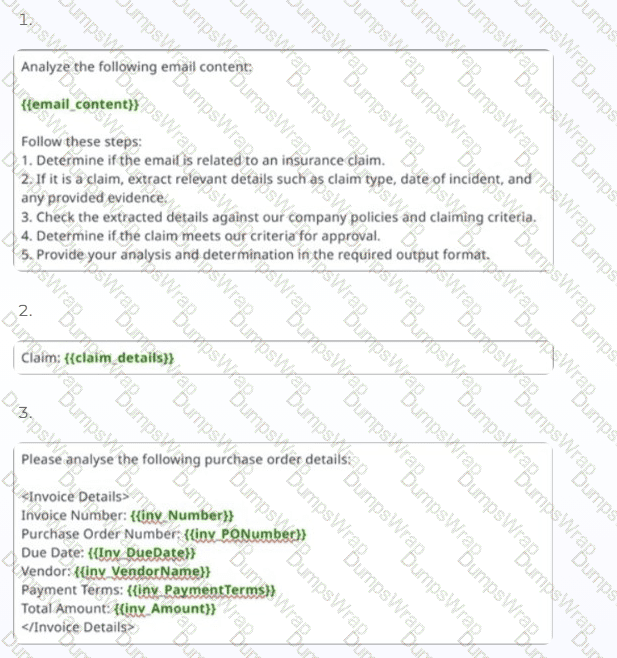
Original exhibit — Question 6, part 1
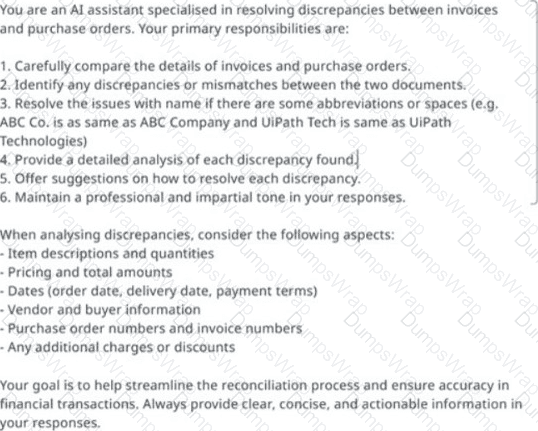
Original exhibit — Question 6, part 2
Options:
1
2 and 4
3
4
Answer:
DExplanation:
Option D identifies prompt example 4 as the most appropriate system prompt because it establishes a persistent operational identity, defines responsibilities, and provides instructions that govern the agent's behavior.
UiPath distinguishes between system prompts and user prompts. The system prompt establishes the agent's role, objectives, constraints, reasoning approach, and rules for interacting with tools or business context. The user prompt supplies task-specific information and runtime arguments.
Example 4 defines the agent as an AI assistant specializing in invoice and purchase-order discrepancies. It then provides explicit responsibilities covering document comparison, discrepancy identification, abbreviation handling, detailed analysis, and resolution recommendations.
The example also identifies the data attributes requiring examination, including quantities, pricing, dates, vendor information, purchase-order references, and additional charges. Its concluding goal establishes the required professional response characteristics.
Example 1 primarily provides instructions for analyzing a particular email and includes dynamic email content, making it more suitable for a task-specific prompt.
Example 2 provides minimal contextual information and lacks persistent behavioral instructions. Example 3 structures invoice input data but does not adequately establish the agent's responsibilities or decision-making requirements.
Example 4 therefore most closely satisfies UiPath's recommended system prompt structure.
Official UiPath references/topics: Agents — Prompts — System Prompt, User Prompt and Writing Effective Prompts.
You are designing a Validate Invoice Status tool for an agent that checks invoice payment information. During testing, the agent sometimes misinterprets the results, even though the workflow runs successfully.
Which action best aligns with UiPath's best practices for improving tool reliability?
Options:
Use tool guardrails only to block unsafe inputs rather than clarifying result interpretation.
Add a detailed description listing side effects and risk factors so the agent can infer the correct interpretation.
Rely on the agent's language model to infer tool usage automatically, since example prompts are optional for well-named tools.
Include an example of the tool's input, expected output, and interpretation logic directly in the system prompt so the agent learns how to call the tool correctly.
Answer:
DExplanation:
Option D directly addresses the tool output interpretation problem and follows UiPath's documented recommendations for building reliable agent tools.
An agent's interaction with a tool involves three stages: selecting the appropriate tool, providing valid input arguments, and interpreting the returned output.
A successfully executed workflow does not guarantee that the agent understands the semantic meaning of its results. For example, a Validate Invoice Status tool might return structured properties identifying whether an invoice exists, its payment status, and its due date.
Without explicit interpretation guidance, an agent could mistakenly treat a valid but unpaid invoice as a completed payment or incorrectly classify an invalid invoice reference.
UiPath recommends including representative tool usage examples in the system prompt. These examples should show the expected input schema, sample output, and interpretation rules for important result combinations.
Such examples reduce ambiguity and provide the language model with a clear mapping between structured tool responses and business outcomes.
Option B addresses valuable tool metadata, particularly side effects and operational risk, but does not directly resolve result interpretation. Option A limits guardrail functionality, while option C relies excessively on implicit language-model inference.
Clear examples should supplement concise tool descriptions, validated schemas, and appropriate guardrails.
Official UiPath references/topics: Agents — Building Effective Agent Tools — Providing Example Usage in a System Prompt.
